25 AI Prompts for Airbnb Hosts to Improve Your Listing in 2026
By Jonathan Miksis · Updated October 27, 2026 · 31 min read
Some links in this post are affiliate links. If you buy through one, I may earn a commission at no extra cost to you.
Updated October 27, 2026: copy buttons, a reusable fact sheet, clearer title and description prompts, and listing-audit next steps. The Airbnb layout observations below were measured October 23.
The short answer: the AI prompts that work for Airbnb hosts give the model three things: your listing's real facts, Airbnb's current rules and the exact format you want back. Use them in ChatGPT, Claude or Gemini to check your photos and draft your title, description, guest messages, house manual and review replies. Then check every claim before you publish or send.
I'm Jon Miksis. Since 2020 I've completed 100+ listing audits and partnerships with hosts, and driven 3M+ page views to vacation rental content on Global Viewpoint, my travel site. These 25 prompts cover your listing, guest messages, your house manual and reviews, whether you own the place, co-host it or answer guests for an owner. My AI for Airbnb hosts guide covers the bigger picture.
Jump to: 5 facts · how to use them · listing prompts · guest messages · house manual · reviews · which AI to use · FAQ
Five Airbnb facts to check before you prompt (October 2026)
- Titles: fewer than 50 characters. Airbnb's title guidelines (February 2, 2026) say longer titles get shortened in search on smaller screens.
- US search cards usually show an AI-written line, not your title. Airbnb builds it from details hosts provide (since September 30, 2026); 23 of 26 US sessions we checked on October 23 showed it. In our logged-out checks on October 22, the UK, Canadian, Australian and Irish sites still showed host titles, cut to one line.
- Phones show your cover close to square on the listing page. In search it usually leads a 4:3 card of up to six swipeable photos. A standard 3:2 photo loses about 30% of its width at the top of a phone listing page, 15% from each side, and about 11% in a 4:3 search card (measured on airbnb.com, October 2026; how we measured).
- New house rules from November 20, 2026. For reservations booked from that date, hosts generally can't ask guests to do a cleaner's tasks, fine them, or add rules or requests after booking.
- Ranking. Airbnb's search help names quality, popularity (including wishlist saves), price against similar listings, and location. It doesn't mention keywords.
These prompts judge the photos you give a chatbot, not your live card in search. The free audit below shows you fact 3 on your own listing:
How to use these prompts
- Fill in the fact sheet below once. Paste it wherever a prompt says [FACT SHEET], or save it in a ChatGPT or Claude project or Gemini Gem if your plan has them.
- Replace every [BRACKET] with real details, use placeholders for guest names, door codes and Wi-Fi passwords, and remove names and contact details from guest messages or reviews you paste.
- Add "Reply in [language]" to get answers in your guests' language.
- Match the model to the input. For photo prompts, choose a model that accepts images and attach numbered photos. For review prompts, paste anonymized text. If an upload fails or a file is too large, use smaller batches and tell the model what it has not seen.
- Check before you publish. AI miscounts characters and invents details that sound right, such as restaurants, distances and Wi-Fi speeds.
Your listing fact sheet (copy it, fill it in, keep it updated):
- Property: [type, e.g. 2-bedroom apartment] in [neighborhood, city]
- Sleeps: [number of guests]. Beds: [e.g. 1 king, 2 singles]. Bathrooms: [number]
- Top 3 reasons to book: [e.g. private hot tub, mountain view, 5-minute walk to the old town]
- Amenities guests ask about: [e.g. Wi-Fi at 200 Mbps, desk and chair, free parking, washer, crib]
- Distances: [e.g. beach 10 minutes on foot, airport 25 minutes by car]
- Best for: [e.g. couples, remote workers, families with small children]
- Honest limits: [e.g. third floor with no elevator, weekend street noise]
- Check-in: [time and method]. Checkout: [time]
- House rules, exactly as written on Airbnb: [paste]
- My tone: [e.g. warm and brief], plus one message I've sent a guest: [paste]
AI prompts for your Airbnb listing: photos, title and description (1 to 11)
Guests meet your listing in two steps. In search they see a card: your cover photo first, a line of text, your rating and the price. Once they tap in, they see your title as the headline, the opening of your description and your first photos: five at once on desktop, one at a time on a phone. These prompts follow that order.
1. Check your cover photo at phone size
I'm attaching my Airbnb cover photo and [3 or 4] photos that could replace it. The main reason guests book my place is [hero feature, e.g. the private hot tub with a mountain view].

Guests first see the cover small and cropped from the center: about 4:3 in search, close to square at the top of a phone listing page. For each photo:

1. Describe what stays inside a centered square and what the crop cuts from the left and right edges.
2. At phone search size, is [hero feature] still obvious? What pulls the eye away?
3. Rate the light: bright and even, or dark corners and blown-out windows?
4. Rank all the photos as a cover, with one line on why.
5. If none works, describe the photo I should take instead: subject, angle, time of day, shot horizontally with the subject in the middle.

Only describe what you can actually see. Don't suggest edits that add, remove or hide anything real.
Why it works: the model judges each photo small and cropped, the way guests meet it. If your chatbot runs code, add: "Crop each photo from the center to 1.05:1 and 4:3 and show me." My Airbnb cover photo guide shows all four crops.
What it can't see: your live listing and the homes around it, unless you add screenshots. The free listing audit renders your live cover in Airbnb's crops, among nearby listings from a real search. Hosts also report Airbnb leading with a different photo when guests filter for an amenity such as a hot tub, so make every amenity photo strong.
2. Choose your first five photos
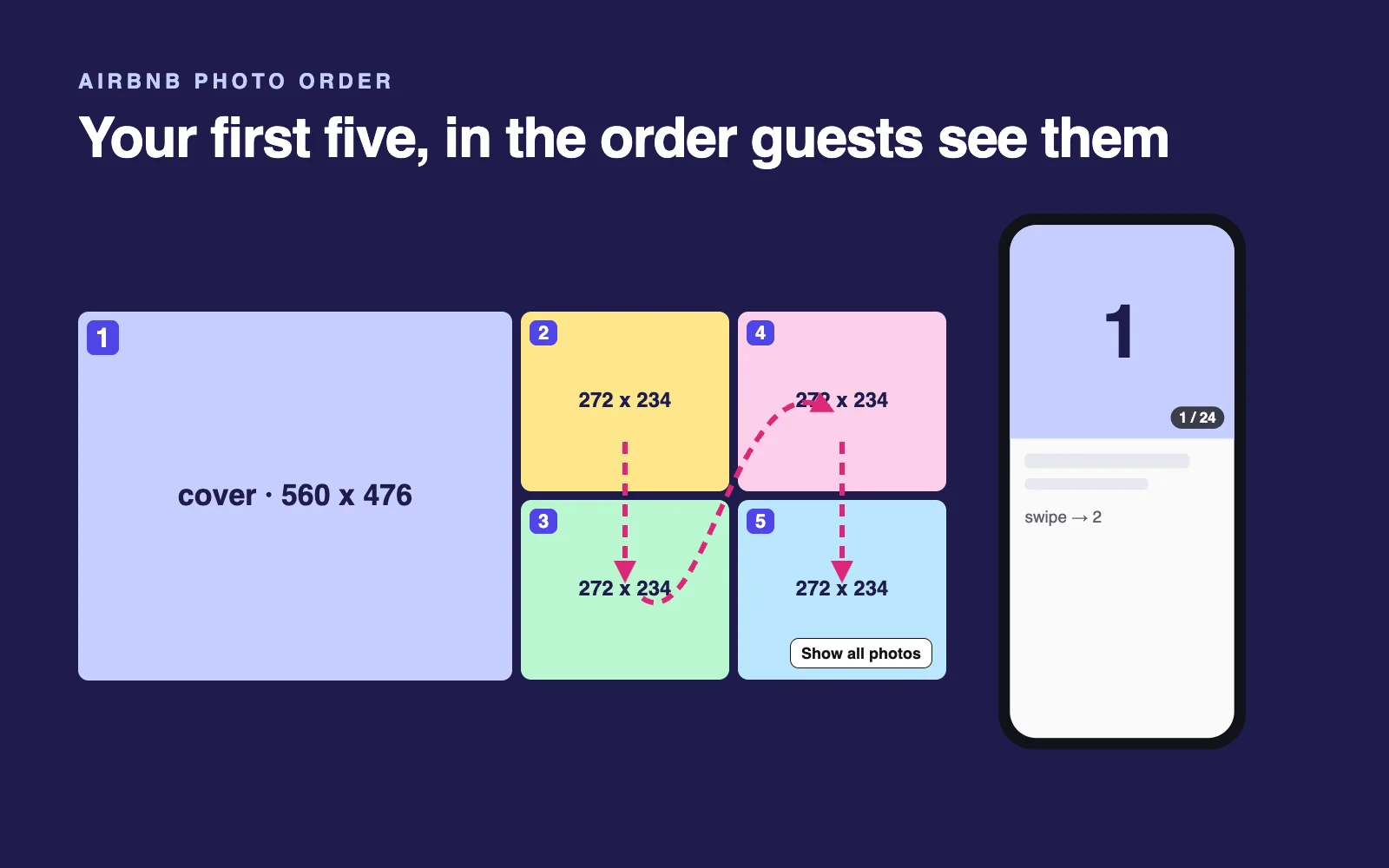
I'm attaching all my listing photos, numbered in their current order. On desktop, Airbnb's listing page shows photo 1 large on the left and photos 2 to 5 in a two-by-two block filled column by column (2 top left, 3 below it, 4 top right, 5 below that); on a phone the listing opens on photo 1. Choose the best first five, in order, so together they show the main reason to book ([hero feature]), where guests sleep, where they spend the evening, and the setting.

Rules: no two photos of the same room (unless it's a studio), nothing dark or blurry, and photo 1 must work as the cover. Give one line on why each photo earns its slot. Then list the photos I should cut (near-duplicates, clutter, low light) and any shot that's missing.
Why it works: Airbnb says the first five photos matter most, and judging them as a set catches repeats. To apply it: Listing editor, Photo tour, All photos, then drag; Make cover photo sets photo 1, and changes can take up to 30 minutes. More in my Airbnb photo order guide.
3. Write a title under 50 characters
Using my [FACT SHEET], write 10 Airbnb listing titles. Rules:

- At most 50 characters, including spaces. Prefer fewer than 50 where possible.
- Use feature + proof + fit: name the main feature, add a specific supporting detail, and identify the guest fit only if it fits naturally. Do not cram in all three.
- Put the strongest reason to book in the first 30 characters. Treat 30 as a writing target, not a guaranteed cutoff for every search card.
- Capitalize only the first word and proper nouns. No emojis, no repeated symbols, no ALL CAPS.
- Don't repeat what Airbnb already shows: the city or town, the number of beds, or that the listing is new.
- Only use features from my fact sheet. No filler such as cozy, charming, hidden gem or oasis.
- Mix angles: feature first, view or setting first, who it suits, distance to a landmark.

Show the character count after each title. Then pick the 3 best for a phone screen, with one line on why.
Why it works: the rules follow Airbnb's title guidelines (February 2, 2026). Two titles that fit: "Hot tub cabin with Smoky Mountain views" (39 characters) and "Sea-view apartment, 2 minutes to the beach" (42).
Check before you use it: chatbots miscount, so paste your pick into Airbnb's title field, and ignore any AI quoting Airbnb's older 32-character advice. Remember fact 2: US search cards show an AI-written line instead (see prompt 6), while UK, Canadian, Australian and Irish cards cut your title to one line. For 60 examples, see my Airbnb title ideas.
4. Rewrite the opening of your description
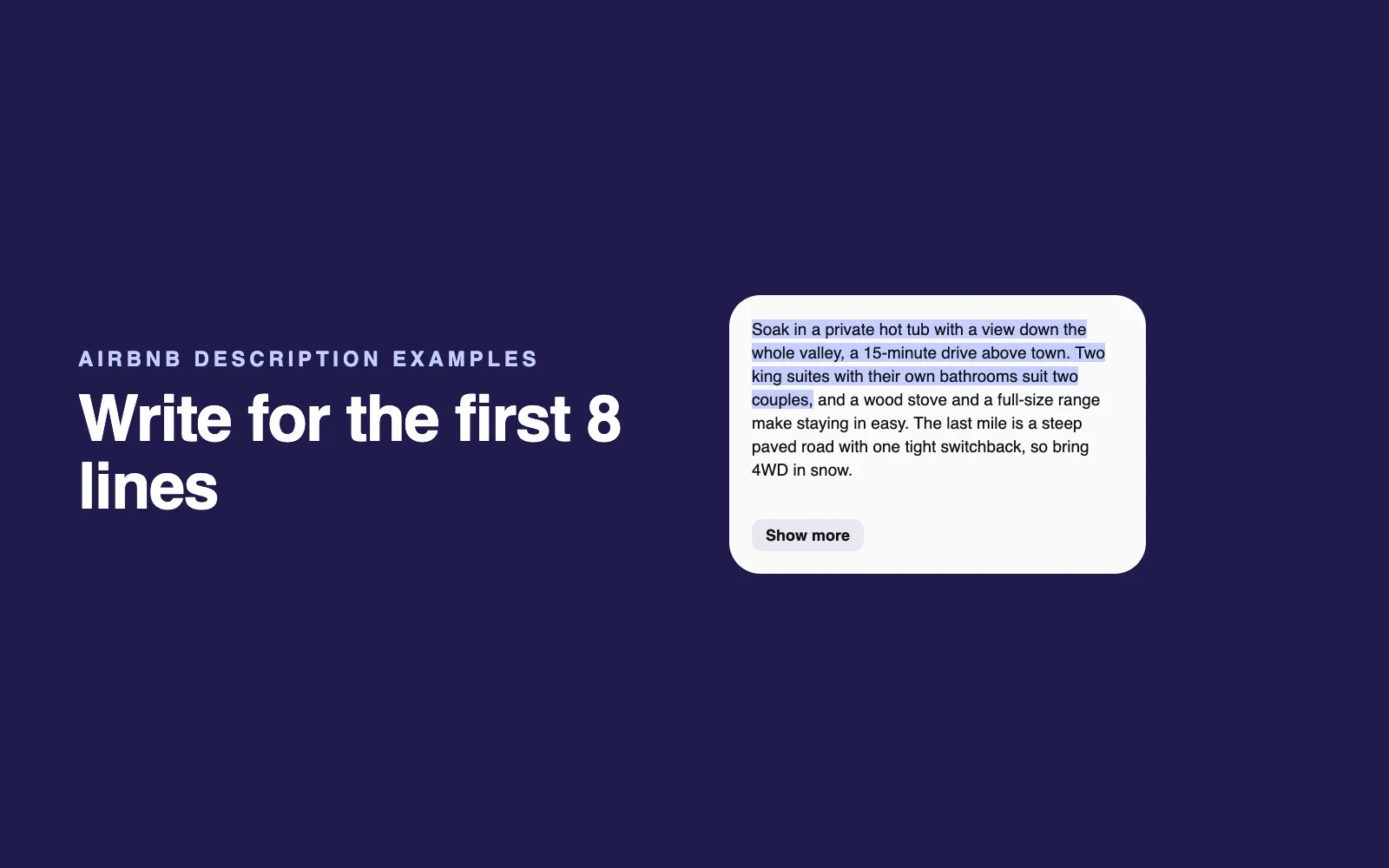
Here is the start of my Airbnb description: [paste the first paragraph]. Guests see only the first few lines before they tap "Show more". Using my [FACT SHEET], rewrite the opening so it:

- says who the place is for, the single best reason to book and the main honest limitation guests need to know;
- includes at least one concrete detail, such as a distance, a view, a named amenity or a number;
- sounds like a person, not an ad (no "dream stay", no "hidden gem", no exclamation marks);
- claims nothing that isn't in my fact sheet.

Give me 3 versions with different angles, each one unbroken paragraph of 280 to 300 characters, including spaces. No line breaks or bullets. Show the count. If the key facts will not fit, keep the limitation clear and tell me what supporting details to put after the opening.
Why it works: our October 23 measurements found an eight-line preview on a 390-pixel-wide phone browser, with 317 to 345 characters of unbroken sentences. Line breaks can reduce what fits. A 280-to-300-character target leaves some room; it does not guarantee a fit on every screen or in the app. This is the listing-page opening, not text shown verbatim on search cards. Airbnb recommends leading with the important details. See the description examples, or diagnose views but no bookings before rewriting.
5. Rewrite the full description, honestly
Rewrite my full Airbnb description using my [FACT SHEET] and my current text: [paste]. Use Airbnb's sections: Listing description, Your property, Guest access, Interaction with guests, Other details to note.

- Turn features into what the guest gets, using only numbers and distances from my fact sheet: "kayaks included" becomes "two kayaks, and the lake is a 2-minute walk".
- State every honest limit plainly and, where my fact sheet gives one, pair it with something useful: stairs with a note about luggage, street noise with the bedroom that faces the garden.
- Don't repeat my amenities list, and leave house rules out, because Airbnb wants them only in the House rules section.
- Short paragraphs, plain words, no hype.
- Keep the main Listing description section to 500 characters or fewer, counting spaces, and show its character count.
Why it works: Airbnb's writing guide warns that overselling leads to disappointment and negative reviews. Stating limits up front protects your accuracy rating, one of the ratings behind Guest Favorite. The 500-character line matches the cap the channel manager SuperControl lists for that main section.
6. Make your best features easy to find (for filters and Airbnb's AI)
Here are my listing's title, description, amenities list and photo captions: [paste]. My top features are [list 3 to 5].

1. For each top feature, check that it appears in three places: the amenities list if Airbnb has a matching amenity (guests filter by it), the description in plain words, and at least one photo caption. List the gaps.
2. Airbnb's US search cards show a short AI description built from host details. Write 5 lines of 6 to 10 words that an AI could fairly write from my details alone.
3. Name any top feature that none of the lines could mention because my details are vague or missing, and give me the exact sentence to add.

Don't invent features or describe anything I didn't mention.
Why it works: Airbnb says sought-after amenities can improve visibility in searches for them, and its AI lines draw on host details: in our AI search card study, 91% of the details we traced were in the host's description, 54% in the amenities list and 30% in photo captions. These lines test your details; they don't preview Airbnb's. More on Airbnb's 2026 AI changes.
7. Catch mismatches between photos, amenities and description
I'm attaching my listing photos and pasting my title, description, amenities list, photo captions and house rules: [paste]. Find every mismatch a guest could notice:

- amenities I list that no photo shows, and things the photos show that I don't list;
- captions that don't match their photo;
- claims in the description that the photos or amenities don't support, such as sizes, views and distances;
- places where the description and house rules disagree, such as pets, parking, parties and guest count.

Put the results in a table: the mismatch, where it appears, the fix. List first anything that could make a guest feel misled at check-in.
Why it works: mismatches can leave guests feeling misled. Fix the listing, not the photo. My free listing audit starts from your public listing and checks its first impression; the full report lists the mismatches it finds and includes one free re-audit after your changes. It is my own tool. Nearby-card comparisons depend on a local search being available.
8. Write photo captions and visual descriptions
For each photo I attach, write two things:

1. A caption of up to 12 words that says what is special about this space, warm but factual, for example "Main bedroom: king bed, blackout curtains, garden view".
2. A visual description for guests who use screen readers: objective, fewer than 250 characters, covering the main objects, size, style and light.

Use only what is visible in the photo and in my [FACT SHEET]. If you can't tell what something is, say so instead of guessing.
Why it works: Airbnb treats these separately: captions can carry mood, while visual descriptions must be objective and fewer than 250 characters. Airbnb says they also help search engines understand your images.
9. Turn your reviews into listing copy and a fix list
Here are my last [20] guest reviews, with names removed: [paste].

1. List what guests praise most, in their own words, with how many reviews mention each point.
2. List every complaint or friction point, with counts, including small ones.
3. Rewrite my description opening around the top 2 things guests praise that are still true in my [FACT SHEET], in my tone, without quoting anyone by name.
4. Turn the complaints into a fix list ordered by frequency, marking which the listing could fix (a photo, the description, a message) and which need a change in the home.
Why it works: past guests tell you what future guests care about, in words they understand.
10. Write a version for one type of guest
Rewrite my listing description for [one guest type: remote workers, families with small children, monthly stays, or guests with a dog], using my [FACT SHEET]. Lead with what that guest checks first: for remote workers, measured Wi-Fi speed, a real desk and chair, and quiet; for families, the sleeping setup, safety and nearby essentials. Mention only what I actually have, and list anything this guest would expect that I don't offer, so I can add it or say so plainly.Why it works: guests search for what they need, and in the US, Airbnb's search now takes requests in guests' own words.
11. Compare your listing with five you compete with
Here are details of my listing and of 5 that show up near mine in Airbnb search for my usual dates and guests. For each: the title, the first two sentences of the description, the total price for [dates] with fees, the rating and review count, and the 5 most important amenities. [paste]

Compare them in a table. Then tell me where I'm weaker on price, reviews or features; what they all say that I don't; one thing I have that none of them mention; and the 5 changes to make first, quickest first. Use only what I pasted.
Why it works: Airbnb's ranking compares your price with similar listings nearby, and guests compare cards side by side. From pasted text, a chatbot can't see how your cover looks next to theirs; the free listing audit pulls a real search around your listing and scores how your card stands out.
AI prompts for Airbnb guest messages (12 to 16)
Write each message once, check the details, then schedule it. On Airbnb alone, start with its quick replies (how to automate Airbnb messages). Across booking sites, Hospitable has a free Essentials plan with a shared inbox, limited scheduled messages and 10 AI uses a week shared between drafts and rewrites. Host starts at $29/month for one property and adds unlimited AI drafts; Inbox AI that can send replies on its own requires Mogul, from $99/month for three properties. Drafting, scheduled templates and AI auto-sending are different features (Essentials limits, plan prices, AI Auto Reply, checked October 27, 2026). For ready-made wording, see the 24 Airbnb message templates; for other tools, the Airbnb software comparison.
One rule applies to every message: for reservations booked on or after November 20, 2026, Airbnb doesn't allow new rules or requests after booking, by message, sign or in person. Keep rules in your listing's House rules and requests section.
12. Pre-arrival message with check-in details
Write a message to send [3] days before check-in, using my [FACT SHEET]. Include a one-line welcome using [GUEST FIRST NAME]; the check-in time and how to get in ([self check-in method]); directions from [airport, station or main road] in 3 short steps; parking; the Wi-Fi name and password as placeholders; and one question ("Anything you need before you arrive?"). Under 120 words, friendly and easy to read on a phone. Don't add rules or requests that aren't already in my listing.Why it works: arrival-day answers sit in one message the guest can find again, and the last line keeps it within Airbnb's house-rules policy.
13. Saved replies for the questions every guest asks
Write saved replies of under 60 words each for: the Wi-Fi name and password; check-in time and arriving early; dropping off luggage; parking; heating and air conditioning; extra towels or bedding; where the trash and recycling go; and, before booking, "Can you do a better price?" and "Is the place good for [guest type]?". Use my [FACT SHEET], with placeholders such as [WI-FI PASSWORD] for anything private. Friendly, specific, no filler. For the price question, keep everything on Airbnb: no discounts for booking elsewhere.Why it works: saved answers go out in seconds, whoever sends them, and without Instant Book your response speed counts in ranking. Airbnb also bars discounts for booking off its platform.
14. Answer early check-in and late checkout requests
A guest asked: "[paste the request, e.g. Can we check out at 4 pm?]". My cleaner needs [hours] between stays, and [another guest arrives that day / the next night is free]. Write a friendly reply that thanks them, gives a clear yes, no or "I'll confirm on [day]", explains the reason in one line if the answer is no, and offers what I can do instead ([e.g. luggage storage until 2 pm]). Only mention a paid option if it's described in my listing's House rules and requests section. Under 80 words.Why it works: a clear answer with an alternative reads as helpful even when it's a no. Airbnb lets hosts describe optional add-on fees in their listing's requests but bars new requests after booking.
15. Something broke: apologize and fix it
A guest wrote: "[paste the message, e.g. The bedroom lamp doesn't work]". Here's what I'm doing about it: [the fix and when]. Write a reply that apologizes once, sincerely and without excuses, and says exactly what happens next and when. If I'm offering something to make up for it ([e.g. a partial refund through Airbnb or a later checkout]), include it with no conditions attached. Don't mention reviews or ratings. Under 90 words, calm and human.Why it works: the guest learns it's handled, and when. Because Airbnb bars trading anything of value for a review, keep any make-good completely separate from reviews.
16. Checkout message under Airbnb's new rules
Write a checkout message to send the evening before departure. Include the checkout time ([time]); what to do with the keys or lock ([method]); at most 2 or 3 light requests that are already in my listing's House rules and requests section, such as closing the windows; a thank-you; and one line inviting honest feedback. Don't ask guests to strip beds, start laundry, wash dishes or take garbage off-site. Under 80 words.Why it works: it follows Airbnb's policy for reservations booked from November 20, 2026, which rules out a cleaner's tasks; persistent violations can reduce your visibility in search.
Make them send themselves. Once you've checked the messages from prompts 12, 13 and 16, paste them into Hospitable as scheduled messages and saved replies, swapping placeholders such as [GUEST FIRST NAME] for its shortcodes. Its free plan includes scheduled messages (marked "Limited") and 10 AI uses a week, shared between suggested replies and rewrites; paid plans from $29 a month lift both limits. Auto-sending with Inbox AI requires Mogul, from $99/month. It's usually the first tool I recommend to hosts who are drowning in messages.
AI prompts for your Airbnb house manual (17 to 21)
A good house manual answers questions before guests ask. Under Airbnb's new policy, rules belong only in your listing's House rules and requests section, so the manual should explain how things work. To share it as a link or QR code, Touch Stay turns it into a digital guidebook that guests open with no app to download.
17. A house manual that answers questions first
Using my [FACT SHEET] and these notes [paste: appliances, Wi-Fi, heating, trash and recycling, emergency contacts, nearest pharmacy and hospital], write a house manual with short sections and clear headings: Arriving, Wi-Fi and TV, Kitchen, Heating and cooling, Trash and recycling, Emergencies, Leaving. Write like a helpful local: plain steps and one tip per section. Explain how things work and don't add rules, because mine live in my listing's House rules section. Don't guess: wherever a detail is missing, write [CHECK] so I can fill it in.Why it works: short headings scan well on a phone, and the [CHECK] markers show the gaps instead of filling them with fiction. Models still slip, so check every step and emergency number before you share it.
18. Step-by-step instructions for any device
Write step-by-step instructions for the [thermostat / TV / coffee machine / hot tub / smart lock] at my listing. Model: [brand and model, if known]. How I use it: [describe the steps in your own words, however rough]. Turn this into numbered steps a first-time guest can follow, using the exact button names I gave. Add a short "If it's not working" section with up to 3 checks a guest can safely try, taken only from my notes or the maker's manual, and when to message me. Then tell me which 2 or 3 photos of the controls to take.Why it works: the model can't see your device, so it works from your words and asks for photos instead of inventing button names.
19. A local guide built from places you actually recommend
Turn this list of places I recommend into a "Local favorites" section: [paste names, each with a note, e.g. "Café Rosa: best pastries, 5-minute walk"]. Group them into coffee, food, walks and rainy-day ideas, sort each group by distance, and keep my notes in my voice. Don't add any place I didn't list, and don't guess opening hours or prices.Why it works: AI can invent places, hours and prices that sound real; starting from your own list keeps the guide accurate and personal.
20. Arrival directions and parking
Write arrival directions to my place from [airport / station / main road], plus parking instructions, from these details: [where to park, permits or payment, which entrance, landmarks, what to avoid]. Use numbered steps with landmarks a first-time visitor can spot ("turn left after the blue pharmacy"), keep the address as a placeholder, and add a one-line fallback ("If the spot is taken, park at [alternative]"). Then list 3 photos I should add.Why it works: landmark-based steps work for guests who don't know the area, and photos fill the gaps.
21. House rules that follow Airbnb's November 2026 policy
Here are my current house rules: [paste]. Rewrite them for my listing's House rules and requests section: clear, friendly and short, with a one-line reason where it helps ("Quiet after 10 pm, because our neighbors are close"). Then check each rule against Airbnb's house-rules policy for reservations booked from November 20, 2026, and list any that must change or go: tasks a cleaner would usually do (dishes, stripping beds, laundry, taking garbage off-site), fines or penalties, separate contracts, keeping copies of guests' IDs or asking for personal information, limits on amenities my listing advertises, and fees for advertised features that aren't in the price. Airbnb allows a few exceptions, such as a legal or HOA requirement or a contract for a monthly stay, so mark any rule that might qualify for me to check.Why it works: the checklist mirrors Airbnb's house rules policy and its limits on contracts and other requirements. Airbnb highlights non-compliant requests in the listing editor, guests may see an alert such as "includes cleaning requests" if an issue stays unresolved, and persistent violations can reduce your visibility in search. Read the source before you publish.
AI prompts for Airbnb reviews and repeat guests (22 to 25)
Airbnb bars reviews given or withheld in exchange for anything of value and any pressure to influence a review, and its Host Privacy Standards bar encouraging guests to review you on another site. These prompts stay within those rules.
22. Review a great guest
Write a short review of a guest who [what they did well, e.g. left the place tidy, communicated clearly, respected the neighbors]. Mention one specific thing they did, thank them, and say they'd be welcome back. Two or three sentences, warm and natural. First name only: [FIRST NAME].Why it works: one specific detail makes a review read as genuine and tells the next host something useful.
23. Ask for a review without pressure
Write a message to send the day after checkout. Thank the guest, mention one detail from their stay ([detail]), and invite them to leave an honest review on Airbnb if they have a minute. Don't ask for a particular rating, don't offer anything in return, don't mention any other review site, and don't make it sound like a favor they owe. You may end with: "Would you like a heads-up when [season] dates open?" Under 60 words.Why it works: a friendly reminder helps guests who meant to review and forgot, and the "don'ts" keep it within Airbnb's rules. The optional last line asks permission before you send anything promotional (prompt 25).
24. Reply to a negative review
Write a public reply to this review: [paste]. What happened from my side: [the facts, and what I fixed]. Write for future guests more than for this one: thank them for staying, acknowledge the issue without arguing, say what I fixed or changed, and keep it under 80 words. No personal details about the guest, no blame, no sarcasm. Give me 2 versions: one short, one with a sentence of context.Why it works: future guests read your replies to judge how you handle problems. If a review breaks Airbnb's review policy, you can ask Airbnb to remove it. Check every fact in the draft before you post it.
25. Invite a past guest back
Write a short message to a past guest who stayed in [month or season] and asked to hear when new dates open. Mention one real detail from their stay ([detail]), give one reason to come back in [season] ([e.g. the hot tub is covered for winter now]), and invite them to book again on Airbnb. No discount codes for booking elsewhere and no links that lead away from Airbnb. Under 70 words, friendly, no pressure.Why it works: a returning guest already knows your place. Send it only to guests who said yes: Airbnb's Terms bar using its messaging tools or members' personal information to send commercial messages without express consent (Terms, section 11.1), and its rules bar off-platform links and discounts.
Which AI to use for these prompts: ChatGPT, Claude or Gemini
Choose a model in ChatGPT, Claude or Gemini that accepts the material the prompt needs. The key context is your fact sheet, not a model name:
- Photo prompts 1, 2, 7 and 8: upload the relevant numbered images. A text-only session cannot inspect a photo, and a model cannot judge a file it did not receive.
- Copy and messages: paste the same fact sheet first, then the prompt. Keep names, access codes, Wi-Fi passwords and private guest details as placeholders.
- Reviews and competitor checks: use anonymized excerpts, label what you supplied and ask the model to flag missing information. A shared URL is not proof that the model loaded the page.
I would start with the tool you already use. Compare one draft against your actual photos and facts before paying for a different plan. For broader comparisons, see ChatGPT vs Claude vs Gemini.
Where prompts stop: three next steps
- See your listing the way guests do. The free listing audit shows your live cover in Airbnb's phone and search crops, next to nearby listings from a real search, with a keep, swap or reshoot call and your first fix. No Airbnb login; Airbnb listings only.
- Get the full plan. The full audit ($39 one-time, $29 for the first 50 hosts, or $99 for three listings) adds your best first five photos, three titles within the 50-character limit, a rewritten description opening, photo and amenity mismatches, and a step-by-step plan with one free re-audit.
- Have me write the listing plan. My personal Airbnb listing optimization is $197 for a title and description rewrite, first-five photo order and captions, missing shots and amenity gaps. The $497 option adds a 30-minute strategy call and pricing/calendar and interior/photo feedback. Your written plan arrives within 48 hours of kickoff; you make the changes in Airbnb, with no login shared.
For the full 30-point checklist, see my Airbnb listing optimization guide. To automate the messages after checking them, use the host tools comparison.
Frequently asked questions
Can ChatGPT write my Airbnb listing?
Yes, as a first draft. ChatGPT, Claude and Gemini can write a strong title, description opening and captions if you give them your real features, distances and ideal guest. Unless you give them screenshots, they can't see how Airbnb crops your cover or how you compare with nearby homes, so check every claim against your photos and amenities.
Which AI is best for Airbnb hosts: ChatGPT, Claude or Gemini?
Start with the tool you already use: ChatGPT, Claude or Gemini. Choose an image-capable model for photo prompts and provide a fact sheet for copy and messages. Check the result against your listing before paying for a different plan. Model names and upload allowances change; these prompts depend on the facts and files you supply.
What is the character limit for an Airbnb title?
Airbnb's title guidelines (February 2, 2026) say to use fewer than 50 characters, because longer titles are shortened in search results on smaller screens. Lead with the most important feature, capitalize only the first word and proper nouns, skip emojis and repeated symbols, and leave out your city, your bed count and that the listing is new.
Does Airbnb show my listing title in search results?
It depends on the Airbnb site the guest uses. As of October 2026, US search cards on airbnb.com usually show the home type, the town and a line Airbnb writes from details hosts provide, not your title (3 of 26 sessions we checked still showed titles). The UK, Canadian, Australian and Irish sites we checked still show your title, cut to one line. Your listing page always shows it.
Do AI prompts help an Airbnb listing rank higher?
Indirectly. Airbnb says ranking weighs quality, popularity (including wishlist saves, bookings and messages), price compared with similar listings nearby, and location. It doesn't mention keywords in titles. Prompts help with what you control: clearer photos and descriptions, complete amenities, quick replies and better-handled reviews.
Can AI check my Airbnb photos?
Yes. Upload your cover and gallery photos to ChatGPT, Claude or Gemini and ask it to judge them at thumbnail size, as prompts 1 and 2 do. But it sees the full files, while guests see your cover cropped from the center: about 4:3 in most search cards and close to square on a phone listing page (measured October 2026).
Will AI-written guest messages feel impersonal?
Not if you add the specifics: the guest's first name, your real check-in details and a local tip or two. AI handles structure and tone; you supply the human details. Read each message on your phone and change anything that doesn't sound like you before saving it as a template.
Can I ask Airbnb guests to strip the beds or do the dishes at checkout?
Not for reservations booked on or after November 20, 2026. Airbnb's house-rules policy says hosts generally can't ask guests to do a cleaner's tasks, such as washing dishes, removing sheets, starting laundry or taking garbage off-site, or add new rules or requests after booking. Keep every rule and request in your listing's House rules and requests section.
How should I respond to a negative Airbnb review?
Stay calm, thank the guest, acknowledge the issue without arguing, say what you fixed and keep it short: future guests read replies to see how you handle problems. Leave out personal details, and never offer anything to get a review changed, because Airbnb's review policy bars incentives and pressure. Check every fact before you post.
Sources
The original rule checks were October 22 and 23, 2026. Title and description guidance, house-rules policy and Hospitable tier boundaries were rechecked against the linked official sources on October 27. Layout figures retain their October 23 measurement date.
- Airbnb: Guidelines for writing your listing title (February 2, 2026) and Writing an effective listing description
- Airbnb: 2026 Fall Update (September 30, 2026) and How search results work
- Airbnb: House rules policy, Limiting host-imposed contracts and other requirements and Important changes to house rules (October 20, 2026)
- Airbnb: Authentic and trustworthy reviews, Host Privacy Standards, Pricing and payment transparency and the Terms of Service
- Airbnb: Photo tour help, visual descriptions for photos and ground rules for hosts
- Crop frames and the Show more cutoff: measured on airbnb.com in October 2026 (how we measure)
Related reading
- Free Airbnb listing audit: see your listing the way guests do
- AI for Airbnb hosts: what it can and can't do in 2026
- The best Airbnb tools for hosts in 2026: free and paid apps, compared
- ChatGPT vs Claude vs Gemini: the best AI model for your business in 2026
- 15 AI prompts every real estate agent needs to close more deals

Written by Jon Miksis
Founder of AI Hustle Guy, Make the Leap, and Europe Flight Club, and the travel blogger behind Global Viewpoint (9+ years, 73 countries). He brings 9+ years of coaching and mentorship experience and has attended 23 transformation retreats and facilitated 6 across four continents. Every AI tool and prompt on this site gets tested on his own businesses first.
Choose your next step for this listing
These are my own products and services. Start with the free audit, then choose the help you need.
Free listing audit
$0
Your cover in measured Airbnb website crops, a keep, swap or reshoot verdict, and a nearby-card comparison when a local search is available. About three minutes; no Airbnb login.
Run the free auditFull automated report
$39 one time
$29 launch price for the first 50 hosts
Recommended first five photos, three titles within 50 characters, a rewritten description opening, mismatches and a fix list. Includes one free re-audit after your changes. $99 covers three full audits.
Start free, then unlock your reportPersonal listing optimization
$197, or $497 with a strategy call
I write your title, description and first-five photo plan, with captions and amenity gaps. Written plan within 48 hours of kickoff; you make the changes. The $497 option adds a 30-minute call and pricing/calendar and interior/photo feedback.
See the personal review options