The Best Airbnb Tools for Hosts in 2026: Apps, Automation Software and AI
By Jonathan Miksis · Updated September 3, 2026 · 23 min read
Some links in this post are affiliate links. If you buy through one, I may earn a commission at no extra cost to you.
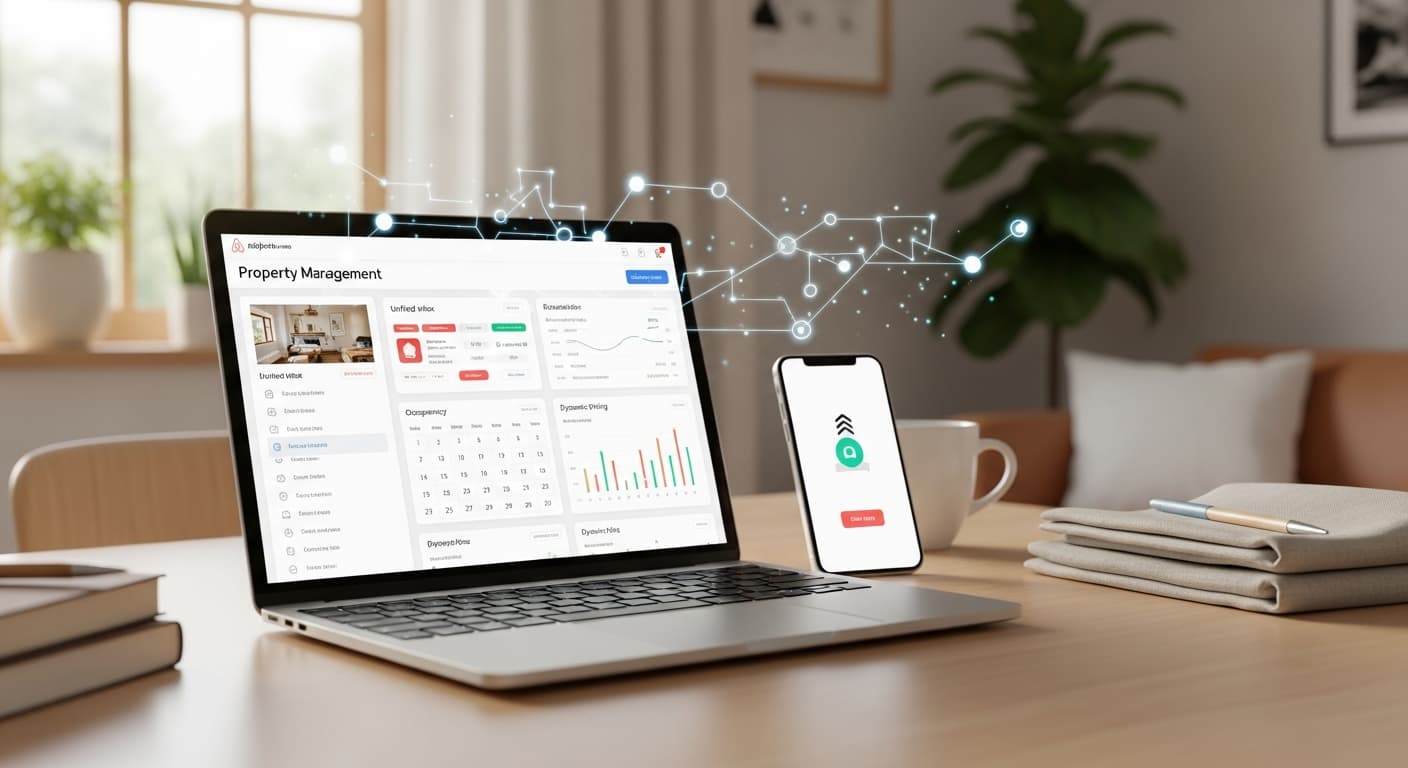
If you're still managing your Airbnb manually in 2026… you're not just wasting time. You're losing bookings, burning out, and watching guests slip through the cracks. Over the years, I’ve had many friends and clients complain about spending hours and hours on guest messages and reacting to problems at 11PM. Meanwhile, the best hosts figured out how to automate their entire operation while they slept.
As a travel blogger who was one of the “OG” Airbnb affiliates, I’ve worked with over 100 hosts since 2020. Newbies, superhosts, full-time operators. They all want the same thing: less chaos, more bookings, and a business that runs even when they’re offline.
The short answer, if you only read one paragraph: the best Airbnb tools for hosts in 2026, by job, are Hospitable for guest messaging and cleaner coordination (its Essentials plan is free as of September 2026), PriceLabs for dynamic pricing ($14.49 per listing per month), Touch Stay for a guidebook that stops repeat questions, and Rankbreeze when your listing is not showing up in search. Once you pass about five listings, Hostaway replaces Hospitable as the operating system. The table below maps all ten tools to the job they do, and the sections after it explain how to pick.
Here’s the part most hosts don’t realize:
You don’t need a VA draining $1,000 a month.
You don’t need to micromanage cleaners, pricing, or guest communication.
You just need the right AI tools quietly running your listing in the background…adjusting rates, sending personalized messages, syncing calendars, handling issues before they blow up, and giving you back your time.
And the crazy part? The best Airbnb automation software is genuinely affordable. Some of these tools cost less than one night’s booking, and one of my top picks now has a free plan.
👉 Want me to audit your Airbnb setup and give you free automation tips?
Or skip the DIY: my done-for-you Airbnb Listing Optimization shows you exactly where to plug in AI and win back 5+ hours/week.
The Best Airbnb Tools for Hosts at a Glance (2026)
Short on time? Here's every tool compared, then I break down exactly who each one is for below. These are the 10 best Airbnb automation tools I actually recommend to hosts after working with 100+ of them since 2020.
| Tool | Best for | Category | Starting price |
|---|---|---|---|
| Hospitable | Small portfolios drowning in messages | Messaging + light PMS | Free plan, paid from $29/mo |
| Hostaway | Scaling to a real, multi-channel business | Full PMS + AI inbox | ~$10-50/listing (quote-based) |
| PriceLabs | Data-driven hosts who want control | Dynamic pricing | $14.49/listing/mo, 30-day free trial (as of September 2026) |
| Beyond | Set-it-and-forget-it pricing | Dynamic pricing | ~1% of booking revenue |
| Rankbreeze | Diagnosing your search visibility | Airbnb SEO / rank tracking | From $29/mo |
| StayFi | Owning guest data + repeat bookings | WiFi marketing | From ~$15/mo |
| Duve | A premium, branded guest journey | Guest experience + upsells | From $120/mo |
| Touch Stay | Cutting repeat guest questions | Digital guidebook | Subscription (free trial) |
| Host Tools | A lean all-in-one after listing #2 | Ops automation | Budget per-listing |
| Make + an AI model | Power users building custom flows | Custom automation | Free to start |
Prices checked July 2026; most tools offer a free trial. Details and my honest take on each are below.
Which Airbnb Tools Do You Actually Need?
The honest answer depends on how many listings you run, not on how many tools exist.
One listing. Two tools. A messaging platform (Hospitable, free) so you stop answering the same six questions at 11pm, and a digital guidebook (Touch Stay) so guests stop asking them at all. Add a pricing tool after your first full month of bookings, when there is data for it to learn from.
Two to five listings. Add dynamic pricing (PriceLabs) as the third tool; at this size the revenue it recovers is bigger than its fee every month. Turn on Hospitable's cleaner reminders and review requests, which most hosts leave switched off. If you are not showing up in search, run a Rankbreeze diagnosis before you spend on anything else.
Six or more listings, or more than one channel. This is where a full property management system pays for itself. Hostaway gives you a multi-channel calendar, an AI inbox, owner reports and a place for your team to work, and you keep PriceLabs plugged into it. Everything else in this guide is optional at that point.
You do not need all ten tools. Most hosts I have worked with run three.
I'm New to Hosting on Airbnb. Is There Software to Simplify Management?
Yes, and you only need one piece of it to start. Sign up for Hospitable's free Essentials plan, connect your listing, and set message templates for the questions every guest asks: check-in time and directions, Wi-Fi, parking, house rules, checkout. From that moment those replies go out on their own, and you only step in for the unusual ones. Add a cleaner reminder after each checkout and a review request a day after each stay, both built into the same tool.
That single setup takes about an hour and covers most of what makes new hosts feel like they are on call. Pricing tools, guidebooks and search diagnostics can wait until you have a month of bookings and a feel for your market.
What Makes a Smart Airbnb Automation Stack?
Most “AI tools” look impressive on their website. But when you plug them into a real Airbnb operation, half of them break, lag, or create more work than they save. A smart automation stack does the opposite. It removes friction, kills repetitive tasks, and gives you back hours every week.
I’ve seen this firsthand. After working with 100+ hosts, here’s what actually matters in 2026:
Real-world impact
A good tool should earn its keep. I’ve watched hosts cut guest messages in half, boost occupancy, and finally stop answering “What’s the WiFi?” at 2AM. If a tool doesn’t move the needle in the first 30 days, it’s not worth keeping.
Stupid-simple setup
Hosts don’t need dashboards with ten submenus. You want something you can set up in under an hour and trust for the rest of the year. No coding. No API rabbit holes. No “I’ll finish this later” projects.
Plays well with others
Your tech stack should talk to everything: Airbnb, Vrbo, Booking.com, your cleaner app, smart locks, pricing tools…all of it. When I see hosts juggling multiple calendars or texting cleaners manually, I know their tech isn’t working for them.
Truly automated, not “semi-automated”
A lot of tools still require daily check-ins. That’s not automation. A real AI stack runs on its own. It adjusts prices automatically, messages guests instantly, flags problems before they escalate, and sends your cleaners what they need without you jumping in.
Predictive, not reactive
The tools I recommend don’t just follow rules. They anticipate issues, like late check-ins, high-demand weekends, or guests who are about to send a “Hey, how do I get inside?” message, and solve them before they land in your inbox.
A smart Airbnb automation stack should feel like this: you wake up, check your phone, and everything is already handled. No fires. No surprises. Just smooth operations and better bookings. Now, without further ado, I’ll share all the tools that actually deliver on that!
Airbnb Guest Messaging Tools
1. Hospitable (formerly Smartbnb)
Hospitable is usually the first software I recommend when someone is drowning in messages. It’s an automation platform that connects to your Airbnb account and handles guest messages, scheduling, and reviews for you, so your place runs like a mini hotel without you glued to your phone.
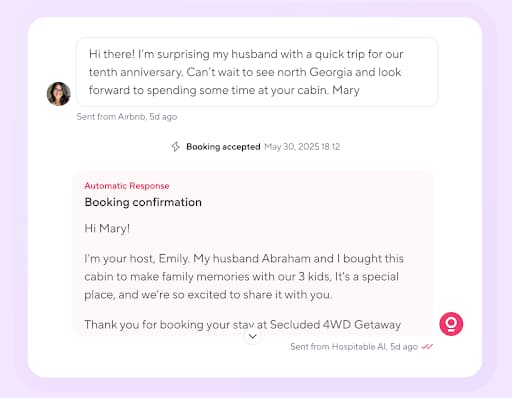
If you’re a new host, think of it as your auto-pilot. Guests get instant answers about check-in, Wi-Fi, parking, house rules, and more, based on templates you set once. I love Hospitable’s new Inbox AI feature, that writes exactly as you do.
👉 Start Hospitable free and connect your first listing here. The free plan is a real free plan, and signing up through my link also gets you 25% off for your first 3 months if you upgrade.
If you’re already hosting and struggling to sell out your calendar, faster, consistent replies help your listing rank better on Airbnb. This can translate into more views and bookings.
Hospitable can also send automatic reminders to your cleaners after each booking and follow up with guests for reviews.
That combination (messaging + cleanings + reviews) is what I love about Hospitable. A lot of Airbnb tools do one of those, but Hospitable bundles them so your whole guest experience feels tight without you babysitting the process.
Pricing
Essentials plan: Free as of September 2026: unified inbox and automated messaging across Airbnb, Vrbo, Booking.com and Agoda, a guest portal with upsells, and cleaning and teammate workflow automation, with no booking commission. It is the best free Airbnb automation software to start with.
Paid plans: Host (one property included, extra properties billed per month), Professional (two included) and Mogul (three included). Host was listed at $29 per month when I last checked; confirm the current figure on Hospitable's pricing page. Every plan comes with a 14-day trial of all features, no card required.
2. Hostaway
Hostaway is what I recommend once hosting starts feeling like a real business, not a side hobby. It pulls messages from Airbnb, Vrbo, Booking.com, and your direct site into one inbox and uses AI to draft replies that sound like you, so you’re not bouncing between apps all day.
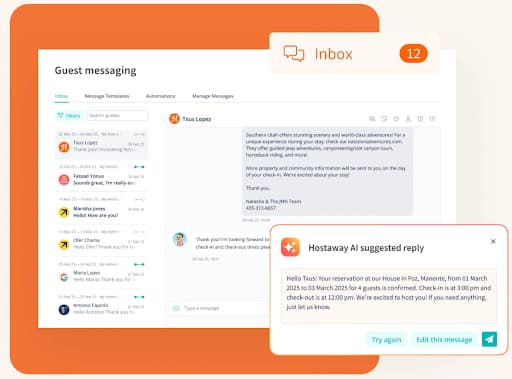
If you’ve only got one listing, it works, but it’s usually overkill. In that case, Hospitable is simpler and cheaper. Hostaway really makes sense when you have multiple listings or channels and want everything in one place: unified inbox, multi-calendar, owner reports, and more PMS-style features on top of the AI. Of course, it also has some other key features - like dynamic pricing and cross channels distribution.
This is a simple way to think about it:
Hospitable = smart messaging for small portfolios.
Hostaway = full PMS with an AI inbox for hosts who are scaling.
Pricing (typical ranges)
Hostaway is quote-based
About $10-$50 per listing per month
Larger portfolios get lower per-unit rates
A setup fee is common for bigger accounts
Airbnb Pricing Tools
3. PriceLabs
When a client tells me they’re just guessing their nightly rate, PriceLabs is the first tool I plug in. It connects to Airbnb and updates your nightly rates every day using live market data.
The way it works is simple. PriceLabs looks at:
Local supply and demand
How fast properties are booking
Seasonality
Lead time (how far in advance guests are booking)
Comparable listings
Special event demand (yes, even things like big concerts, conferences, and college graduations)
Most new hosts don’t realize this, but these tools pick up patterns long before a host ever would. If you’re in a city like Boston, PriceLabs sees booking spikes for graduation weekend and raises prices automatically, even if the event isn’t listed anywhere. You still control your base price, minimums, and maximums, but PriceLabs does the daily adjustments.
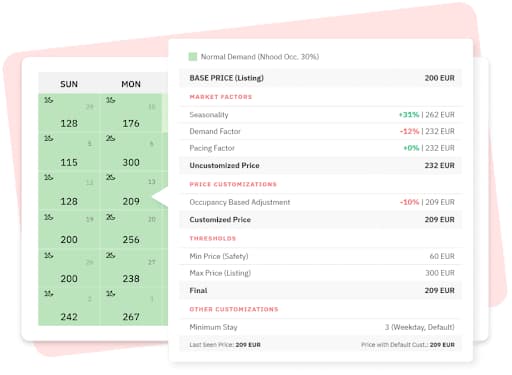
How does it stack up to other dynamic pricing tools?
Compared to other pricing tools, PriceLabs is more data-heavy and customizable. You can set rules for orphan nights, minimum stays, last-minute discounts, or weekend premiums. PriceLabs is really for hosts who want visibility into the numbers and more control.
If you’re struggling to fill your calendar, dynamic pricing almost always tightens your occupancy. And for new hosts, it removes the stress of trying to guess your own rates each day.
Pricing
$19.99/month for 1 listing
Volume discounts for multiple listings
Optional “Market Dashboard” add-on starts at $9.99/month
4. Beyond Pricing
I see the same pattern over and over. A host finally turns on dynamic pricing and messages me saying, “I should’ve done this a year ago.” Beyond is for the host who wants that result without living inside a dashboard.
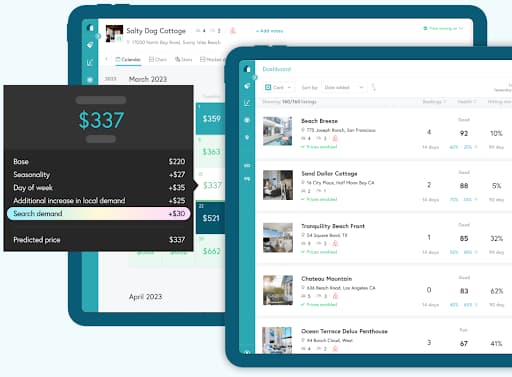
Like PriceLabs, Beyond connects to your Airbnb account and updates your prices daily using live market data. It looks at things like local demand, seasonality, lead time, competitor rates, and special events in your area, then adjusts your nightly price to match. It can pick up demand spikes for things like college graduations, big sports games, or festivals in your city, even if you’re not tracking them yourself.
Here’s the key difference. PriceLabs is for tinkering. Beyond is for turning it on and letting it run.
It gives you solid default settings so you don’t have to build a pricing strategy from scratch. I’ve found that new hosts usually find Beyond less overwhelming, while more advanced hosts sometimes prefer PriceLabs for the extra control.
If you’re struggling to sell out your calendar, Beyond reacts to slow periods by easing prices down to stay competitive and pushing them up when demand is high. You still set your minimums and guardrails, but you’re not guessing nightly rates anymore.
Beyond’s pricing is typically:
Around 1% of booking revenue, or
Flat-fee options that vary by market and portfolio size
So instead of a fixed subscription like PriceLabs, you’re mostly paying as you earn.
Airbnb SEO and Visibility Tools
5. Rankbreeze
Rankbreeze is my cheat code for seeing what Airbnb’s search algorithm really thinks of your listing. It’s an Airbnb search optimization platform that shows how visible your listing really is and what you can tweak to get in front of more guests.
The user experience is simple. You hook up your live Airbnb listing, and Rankbreeze starts tracking where you show up in search for different dates and guest counts.

In the dashboard you’ll see things like calendar rankings, city-level rankings, and competitor pricing snapshots. Plus, there’s tools in their “Optimization Hub” to compare your listing against others and spot gaps in photos, amenities, or setup.
Rankbreeze uses real search and market data in the background, then shows you how your changes affect visibility over time.
For new hosts, that means you’re not blindly hoping your title and photos work. For hosts struggling to sell nights, it helps answer the big question: “Is my problem visibility, pricing, or both?”
I’d recommend pairing Rankbreeze with a pricing tool like PriceLabs or Beyond. Rankbreeze helps you get seen, the pricing engine helps you convert views into bookings.
Pricing (current public plans)
Starter: $29/month for up to 3 Airbnb properties
Standard: $67/month for up to 10 properties (adds market & investment reports)
Scaling: $129/month for up to 30 properties
6. StayFi
One of the quickest ways I help Airbnb hosts is by fixing one simple problem: they don’t own their guest data. StayFi solves that by turning your WiFi into a guest data machine and feeding you emails and phone numbers from everyone who stays, not just the person who booked.
Here’s what the experience looks like. A guest connects to your WiFi and, instead of just typing a password, they see a branded login page with your logo and messaging.
To get online, they enter their name, email (and optionally phone). Once they’re in, StayFi syncs that data to its own dashboard or into tools like your PMS or email platform, so you’re quietly building a real guest database in the background.
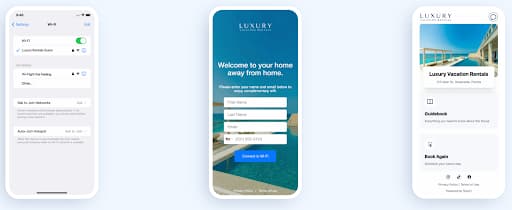
If you’re a new host, this is how you avoid being “just another Airbnb” and start building a brand from day one. If you’re already hosting and struggling to sell out your calendar, StayFi gives you a way to bring guests back directly with email campaigns, SMS, and special offers - instead of paying Airbnb fees again for the same people.
None of the other tools in this list give you this. Messaging tools help you communicate. Pricing tools help you optimize rates. Rank tools help you get seen. StayFi helps you keep the relationship so you can drive repeat stays, upsells, and direct bookings long after checkout.
Pricing
WiFi marketing / guest data capture typically starts around $15/month
Total cost depends on how many access points or StayFi Express devices you use and how many email contacts you store
Hardware: either compatible existing routers, or a one-time StayFi Express device to layer on top of your current WiFi
Airbnb Guest Experience Tools
7. Duve
One of the fastest “level ups” I’ve given hosts is plugging Duve into their Airbnb account. It turns the whole guest journey into a system: online check-in, guest messaging, a web-based guest app, and upsells, all running in the background.
From the host side, the setup is front-loaded. You create your Duve account, connect Airbnb via their direct integration, pull in your listings, then add your house rules, check-in steps, WiFi, FAQ, and any upsells you want to offer. Expect to spend a focused block of time getting your first listing dialed in, then it’s mostly copy-paste for the rest.
After that, Duve is largely on autopilot. It automatically sends pre-arrival messages, online check-in links, arrival instructions, in-stay info, and check-out reminders on a schedule you set.
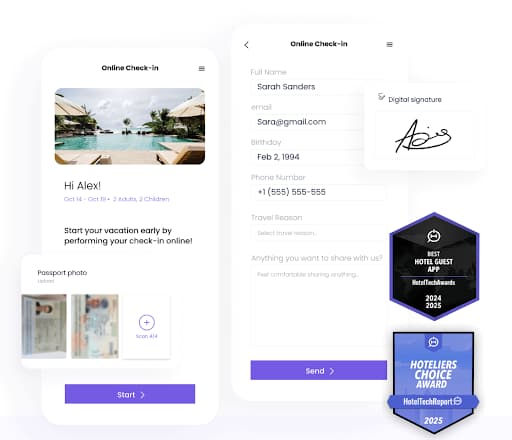
All Airbnb messages (including pre-booking inquiries) feed into one communication hub, so you can manage everything from a single inbox instead of bouncing between apps.
For your guests, the UX is a simple web link. They open a branded “guest app” in their browser with directions, WiFi, house rules, upsell offers and, if you’ve connected a compatible lock, digital keys for contactless check-in. No app downloads, no messy message threads.
If you’re a new host, Duve stops you forgetting key details and makes you look like a pro from day one. If you’re already hosting and chasing better reviews and more bookings, a tighter guest journey like this usually translates into higher ratings and smoother ops. Trust me, this helps you stand out in crowded markets.
Pricing (current plans)
Basic - from $120/month
Pro - from $150/month
Premium - from $200/month
Enterprise - custom
8. Touch Stay
Touch Stay is the easiest way I’ve found to cut down on repeat guest questions. It replaces the clunky paper welcome book with a clean digital guidebook you share as a simple link or QR code. No app. No login. Guests just tap and they’re in.
From your side, setup is straightforward. You create your guidebook, drop in your check-in steps, house rules, WiFi, appliance instructions, and local recommendations.
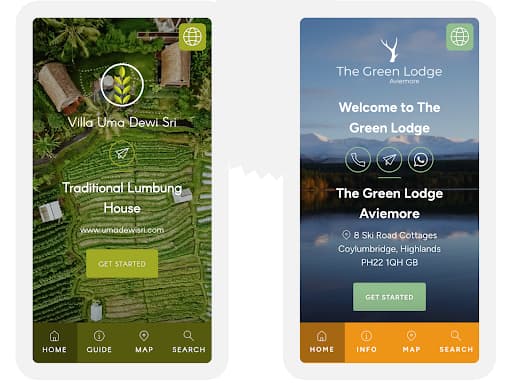
Touch Stay gives you templates, so you’re not building everything from scratch. Update something once and it instantly refreshes for every future guest.
For guests, the experience is smooth. As soon as they book or a few days before arrival, they get the link. They open a branded “guest hub” on their phone with everything in one place: directions, parking, how to use the heater, where to eat, what to do nearby. That alone cuts down a huge chunk of back-and-forth messaging.
If you’re new, Touch Stay helps you look put-together from day one. If you’re already hosting and tired of repeating the same answers, it saves you hours and helps guests feel more confident during their stay.
Where Duve runs the whole guest journey, Touch Stay is lighter and focused: a clean, simple guest guidebook with great UX.
Pricing
Touch Stay is subscription-based and scales with how many properties you have.
They also offer a free trial so you can build a guidebook and see if it actually reduces guest questions before committing.
For exact pricing, you plug your property count into their calculator on the Touch Stay site.
Airbnb Host Dashboard and Operations Tools
9. Host Tools
A lot of the hosts I work with start losing time the moment they add a second listing. Host Tools is the lightweight system I bring in when they need one place to manage messaging, calendars, cleaners, and basic pricing rules without jumping into a full PMS.
From the host’s side, the setup is simple. You connect Airbnb (and any other platforms you use), load your message templates, and set rules for when they send - booking confirmed, pre-arrival, post-checkout.
You add your cleaners, choose when they get notified, and Host Tools handles it from there. Most of the day-to-day work becomes automated: confirmations, reminders, schedule updates, and availability sync.
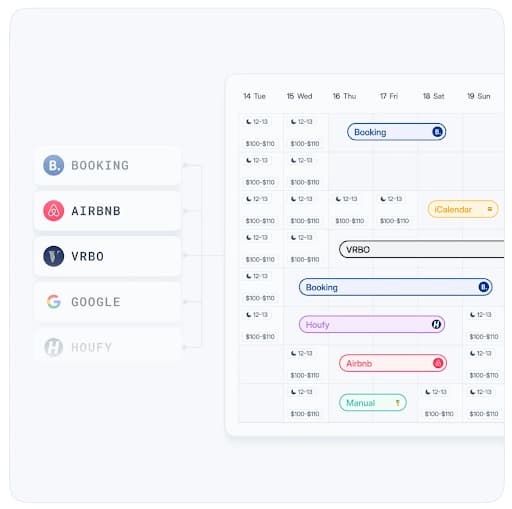
For newer hosts, this stops the last-minute scrambling and missed messages. For more experienced hosts who are stretched thin, it frees up a surprising amount of time because Host Tools quietly handles the repetitive tasks you shouldn’t be doing manually. You just step in when something needs a personal touch.
Compared with the rest of this list, I see Host Tools as a lean all-in-one ops tool. Hospitable is heavier on smart messaging and reviews. Hostaway is a full PMS for bigger portfolios. Host Tools sits in the middle: channel sync, automated messaging, cleaner scheduling, and built-in pricing/availability rules for hosts who want automation without enterprise software.
Pricing
Budget-friendly, per-listing pricing that scales with your portfolio
Pro plan adds channel sync, a direct booking site, smart-lock integrations, AI replies, and multi-user access
14-day free trial and no contracts (check their site for current per-listing rates)
10. Make.com + AI Model Workflows
Best for: Power users ready to go next level
This is where you unlock true custom automation. Use Make.com to trigger prompts on the current GPT or Claude model for:
Auto-responding to FAQs
Summarizing guest reviews into insights
Drafting rebooking emails 6 months post-stay
I’ve been using Make.com for a lot of my own automations over the past year, and it is the tool I reach for when nothing off the shelf does exactly what I want.
💥 One workflow I set up: When a guest checks out, GPT drafts a thank-you + review request email. Sent automatically 24 hours later. It reliably lifts review rates.
Why Airbnb Hosts Need AI Tools in 2026
Let’s be real. In 2026, the host who’s still doing everything by hand is not “old school.” They’re just getting outplayed. Not because they’re worse at hospitality, but because they’re burning time on things software can do better and faster.
I’ve seen this with my own clients. Two hosts. Same city. Similar properties. One leans into tools like the ones in this guide. The other “means to get to it soon.” Six months later, one has cleaner ops, stronger reviews, better pricing, and a fuller calendar. The other is dropping rates and blaming the market.
These tools are no longer optional. They’re how you:
Show up above similar listings in search instead of page three
Price like a pro without stalking your competitors every night
Give guests a smoother experience without living in your inbox
Turn one stay into a repeat guest without begging for bookings
You don’t need all ten. But you do need a simple, intentional stack that covers:
Messaging & guest comms
Dynamic pricing
Search visibility
Guest experience (guidebooks / journeys)
Direct bookings & repeat guests
If those five are dialed in, you’re ahead of 90% of casual hosts in your market.
I’ve helped Airbnb hosts since 2020, and the same pattern keeps repeating: the ones who adapt early look “lucky” later. The ones who wait, chase.
Want help building your stack?
Want expert eyes on your listing? My Airbnb Listing Optimization service analyzes your local market, rewrites your title and description, and reorders your photos to boost clicks, delivered within 48 hours.
Frequently asked questions
What are the best tools for Airbnb hosts? For most hosts, four tools cover the work: Hospitable for messaging and cleaner coordination, PriceLabs for pricing, Touch Stay for the guidebook, and Rankbreeze to diagnose search visibility. Past five listings, Hostaway becomes the operating system. The table at the top maps all ten to the job they do.
What tools do superhosts use? The superhosts I have worked with rarely run more than three: a messaging automation tool, a dynamic pricing tool, and a guidebook. What separates them is that the tools are actually switched on, with cleaner reminders and review requests running, rather than which brand they picked.
Can you really automate an Airbnb? Most of the repetitive work, yes. Guest messaging, dynamic pricing, review requests, and rebooking nudges can all run on autopilot. What you can't (and shouldn't) automate is the judgment: pricing strategy, standout hospitality touches, and handling the rare problem guest.
What's the best Airbnb automation tool? It depends on your biggest bottleneck. If it's time, start with a guest-messaging tool; if it's revenue, start with a dynamic pricing tool. The stack above covers the best pick for each job so you can layer them as you grow.
Are Airbnb dynamic pricing tools worth it? For most hosts, they pay for themselves. They adjust your rates to demand, local events, and seasonality far faster than you can manually, which usually means more booked nights at better rates.
How do I automate guest messages without sounding robotic? Use AI to draft the templates, then personalize with merge fields (guest name, local tips, check-in quirks). Pair these tools with my 25 AI prompts for Airbnb hosts to get the wording right.
Do I need this if I only have one listing? Even with one listing, messaging and pricing automation save hours a week and lift revenue. Start with one tool, get comfortable, then add the rest as it makes sense.
What is the best Airbnb automation software in 2026? There's no single winner because they solve different problems. For most hosts I recommend Hospitable for messaging (it now has a free plan), PriceLabs for dynamic pricing, and Touch Stay or Duve for the guest experience. The comparison table above maps the best pick to each job.
How much does Airbnb automation software cost? Less than most hosts expect. Messaging tools start free (Hospitable's Essentials plan) or around $29/month, dynamic pricing runs about $14.49 per listing per month with PriceLabs as of September 2026, or roughly 1% of revenue with Beyond, and guidebook tools are a low monthly fee. A solid starter stack runs roughly $50-80/month and typically pays for itself in a single extra booking.
Is there free Airbnb automation software? Yes. Hospitable launched a free Essentials plan in April 2026 with calendar sync, a unified inbox, and workflow automation for unlimited properties. You can also build free custom automations with Make.com's free tier plus ChatGPT. Most paid tools add a 14-day free trial on top.
Hospitable vs Hostaway: which is better? Hospitable is simpler and cheaper, ideal for 1-5 listings that mainly need smart messaging, reviews, and cleaner coordination. Hostaway is a full property management system with an AI inbox, built for hosts scaling across multiple channels who need owner reports and PMS-grade features. Small portfolio: Hospitable. Growing business: Hostaway.
Related reading
- AI for Airbnb Hosts: the prompts, the software, and done-for-you help
- 25 AI Prompts for Airbnb Hosts to Improve Your Listing in 2026
- Airbnb Listing Optimization: done-for-you title, description and photo order
- AI Prompts to Save Money When Booking Travel

Written by Jon Miksis
Founder of AI Hustle Guy, Make the Leap, and Europe Flight Club, and the travel blogger behind Global Viewpoint (9+ years, 73 countries). He brings 9+ years of coaching and mentorship experience and has facilitated 23 transformation retreats across four continents. Every AI tool and prompt on this site gets tested on his own businesses first.
Get my free AI prompt pack
Join 300+ founders, creators, and professionals. I’ll send you my go-to AI tools and copy-paste prompts that save hours every week. No spam.