Descript vs CapCut vs Opus Clip: My Timed Test (2026)
By Jonathan Miksis · Updated October 27, 2026 · 23 min read
Some links in this post are affiliate links. If you buy through one, I may earn a commission at no extra cost to you.
Descript vs CapCut vs Opus Clip: I would choose Descript to edit a spoken-word video, CapCut to style social shorts, and Opus Clip to find candidate clips in a long recording. My original workflow took 28 minutes in Descript for a long-form edit plus five shorts, 18 minutes in CapCut for five styled shorts, and about four minutes in Opus Clip to generate 17 candidates. Those are different deliverables, not a straight speed ranking. Below I separate the work each timing includes, what needed review, and the current subscription costs.
You ever look at your content pipeline and think, “How the hell am I supposed to edit all this?”
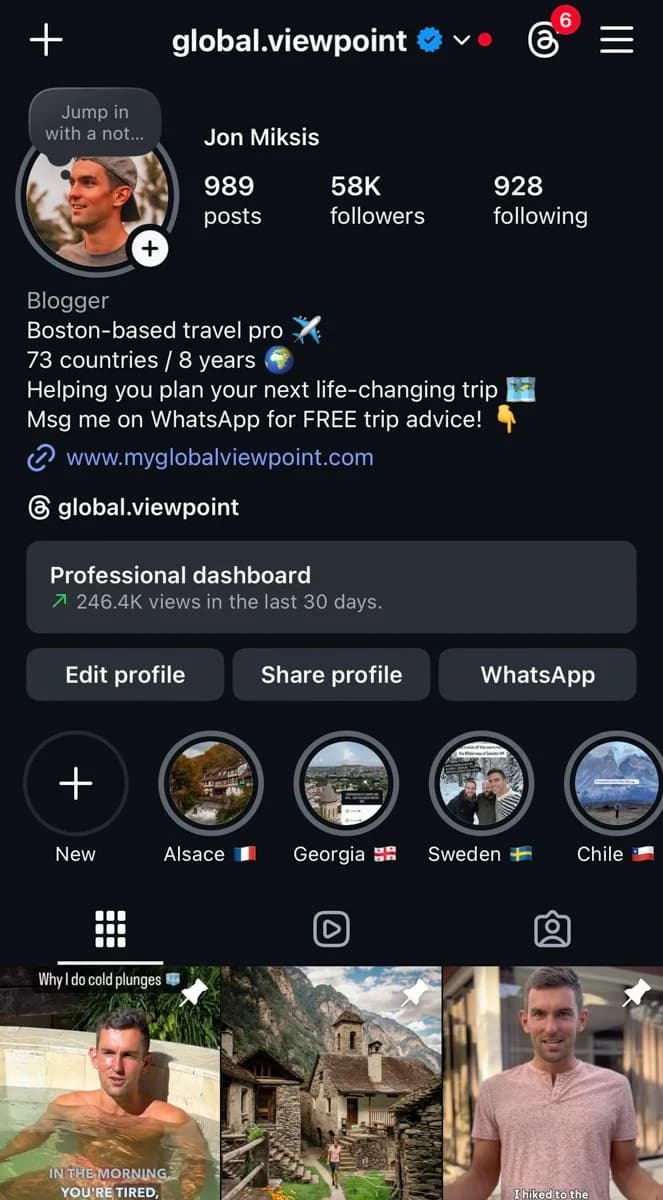
I’ve been there. I’ve created content for multiple brands, my travel site Global Viewpoint, my AI Hustle Guy platform. I’ve also coached mastermind groups on how to scale content without burning out. But even with all that experience, editing was always the bottleneck.
Shorts. Reels. TikToks. YouTube long-form. It felt like a never-ending conveyor belt that I couldn't keep up with.
So, I ran a ruthless test. I didn't just look at feature lists. I took the exact same raw video file and ran it through Descript, CapCut, and Opus Clip side-by-side. My goal? To find out which tool doesn't just "edit video," but actually builds a viral content engine.
The results were not what I expected.
One tool is the king of speed. One is the king of creative polish. But the "winner" isn't who you think it is…because the best workflow might actually involve using them together.
If you’re a creator, freelancer, or solo operator trying to produce 10x more content in half the time, this breakdown is going to save you hours every single week. Let’s get into it.
Quick verdict (TL;DR)
Short on time? Here's who won after I ran the same footage through all three:
- Best overall and for long-form: Descript. The fastest all-in-one editor. You edit video by editing text, with automatic silence removal and captions.
- Best for TikTok, Reels, and Shorts: CapCut. Fastest for flashy short-form edits, trending effects, and auto-captions.
- Best for repurposing long videos: Opus Clip. Drop in one long video and it finds the viral moments for you automatically.
- What I actually use: all three together. Descript to edit, Opus Clip to pull clips, CapCut to polish, which turns one video into 10–20+ posts.
The test observations below are from my original workflow, not a new October benchmark. Pricing and current feature notes were checked October 27, 2026. The four-minute Opus Clip result excludes about five minutes of review and later polishing.
Full timing tests, screenshots, and the exact workflow are below. Deciding between two of them? Jump to the direct head-to-heads: Opus Clip vs CapCut, Descript vs Opus Clip, or Descript vs CapCut.
| Descript | CapCut | Opus Clip | |
|---|---|---|---|
| Best for | All-in-one + long-form | Shorts, Reels, TikTok | Auto-clipping long videos |
| Original timed result | Long-form + 5 shorts in 28 min | 5 styled shorts in 18 min | 17 candidates in ~4 min, plus ~5 min review |
| Long-form editing | Excellent (text-based) | Weak | No |
| Short-form polish | Good | Best | Basic |
| Auto clip discovery | AI-assisted Create Clips now available | Feature availability depends on version | My pick for batch clip discovery |
| Free plan | 60 media min/mo; 720p with watermark | Basic edits; export depends on assets and settings | 60 credits/mo; watermark; exports expire after 3 days |
| Paid plan / billing | Hobbyist $16/mo annual or $24 monthly | Pro $19.99/mo reference price | Starter $15 monthly; Pro $14.50/mo annual or $29 monthly |
👉 Read next: My Guide to Using Gemini for Content Creation
Why Content Speed Wins in 2026
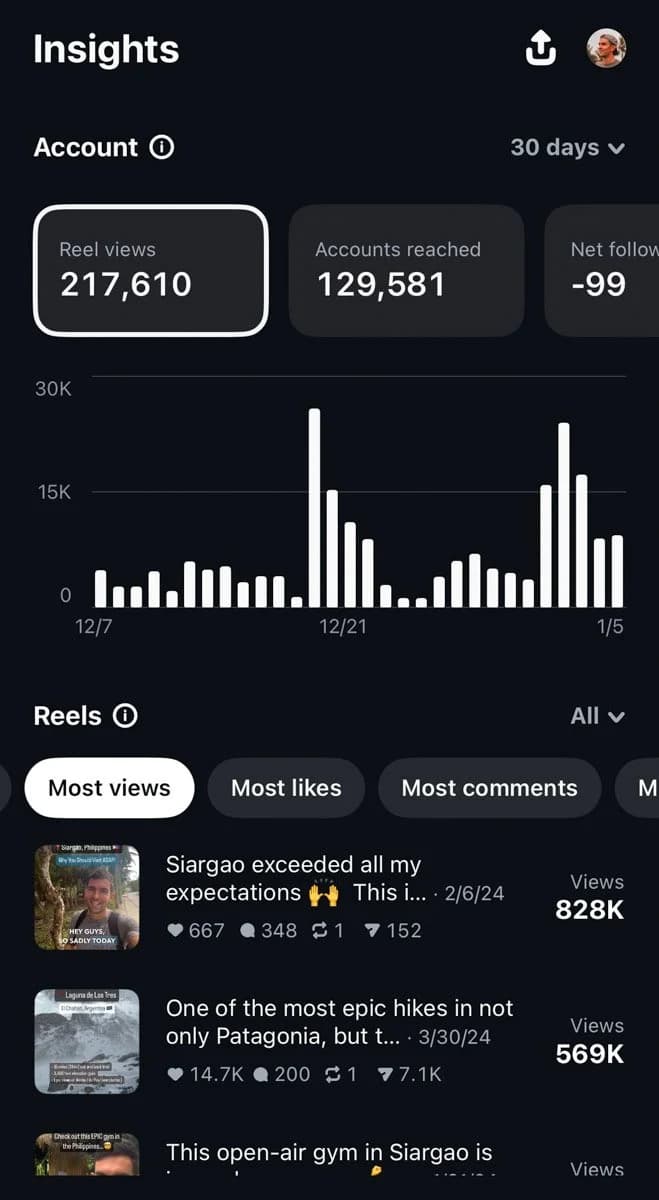
For my own brands and client work, the bottleneck is getting from a recording to something worth publishing. I care about how much editing, review and switching between apps a workflow needs. Producing more files is only useful when the clips have enough context and quality to publish.
That is why I compare the deliverable as well as the stopwatch. A clip generator can produce candidates quickly; someone still has to review them. An editor may take longer while also finishing the long video, cleaning audio and styling the shorts.
How I Tested Descript, CapCut and Opus Clip
Before I make any claims about speed, I want you to see exactly how I tested these tools. No theory. No feature list copy/paste. Just a real workflow I’ve used for my own brands and for client projects in the travel and lifestyle space.
Here’s the setup…
Same Raw Footage
I took one long-form video: a talking-head piece I recorded for my AI Hustle Guy content. Around 12 minutes long. Clean audio. Natural lighting. Nothing fancy. This is the type of footage most creators work with.
Current capabilities have moved on since that workflow: Descript Create Clips can use AI to find highlights, and Opus Clip’s paid plans include an editor. My manual selections below describe what I did in the test, not limits on those products today.
Same Goal
Turn that single video into:
- 5 high-quality short clips
- 1 polished long-form edit
- With captions, jump cuts, clean audio, and platform-ready formatting
This aligns with how I create content for Global Viewpoint, for clients, and when I teach content systems inside masterminds.
One video → multiple assets. That’s the entire game.
What I Measured
I broke the test into four categories:
1. Time to first usable edit
How long did it take to get something “postable”?
2. Workflow simplicity
How many steps? How many exports, imports, edits?
3. AI accuracy
Did the tool pick the right clips? Remove filler words cleanly? Correctly transcribe?
4. Quality of the final export
Did it look clean? Did the captions align? Was the audio good enough?
Why This Test Works
This is the workflow I run at scale. This is what most creators struggle with. And this test shows how much a tool either speeds you up or slows you down.
I don’t care about “cool features.” I care about what gets me from raw footage to finished content with minimal friction.
Now let’s get into the results.
Descript vs CapCut vs Opus Clip: Comparison Chart
Before we jump into the breakdowns, here’s the snapshot most creators care about. I kept this simple and brutally honest based on my real testing.
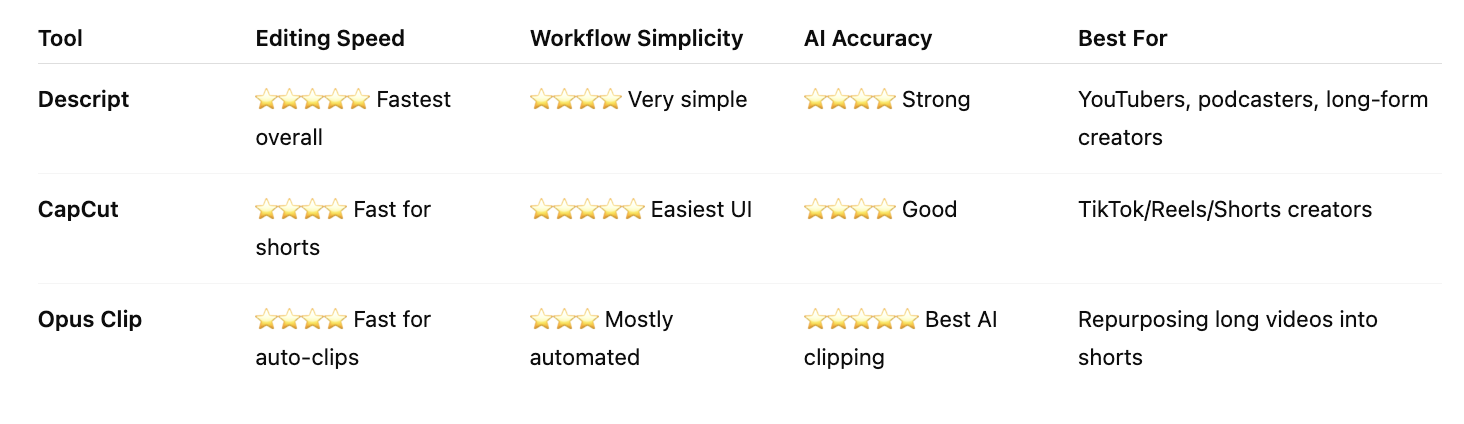
My comparison chart showing my three favorite AI video editors
What Surprised Me Most
Descript was the fastest overall because I didn’t have to switch tools.
CapCut crushed it for short-form edits.
Opus Clip was insanely good at finding viral moments.
Each tool has a clear lane. Now let’s dive deeper into how each one performs in real-world editing.
Descript Review: The Fastest All-In-One Editor
I’ll be straight with you…I didn’t expect Descript to win this test.
I’ve used it for podcast editing, but I always thought of it as a “nice-to-have,” not a full video editing powerhouse.
But when I ran Descript through the same workflow I’ve used for my own brands, my travel site Global Viewpoint, AI Hustle Guy, and the content I create for clients, the speed difference was obvious.
Descript doesn’t just make editing faster. It removes steps… entire chunks of the workflow disappear.
Here’s where Descript won big.
Where Descript Saves the Most Time
• Text-based editing
Editing video like a Google Doc is unreal.
Delete a sentence? It deletes the clip.
Move a paragraph? It moves the timeline.
If you create long-form content or talk on camera, this is a cheat code.
• Automatic filler-word removal
“Um,” “uh,” “like,” “you know”…gone in seconds.
I do this for every client and every brand I touch.
Saves me 10–15 minutes per video, minimum.
• Audio cleanup that actually works
Descript’s Studio Sound is incredibly good.
It fixes room echo, background noise, and mic inconsistencies instantly.
No more running audio through three different apps.
• Multitrack editing without the headache
If you record interviews or podcasts, Descript keeps everything synced.
Moving from Premiere or Final Cut to Descript feels like stepping into the future.
What Makes Descript Faster Than CapCut and Opus Clip
CapCut and Opus Clip are solid tools, but Descript lets me:
- Record, edit, clip, caption, and export in one app
- Fix audio and video without extra software
- Use AI speech and transcript editing for voice corrections
- Create long-form + short-form in the same timeline
The workflow efficiency is on another level.
Less context-switching = way more speed.
When you’re creating content at scale (for clients, partners, or your own brand) that matters.
Where Descript Falls Short
No tool is perfect. So here’s the real talk:
- Not ideal for flashy TikTok-style edits
- Timeline feels stiff for highly stylized transitions
- Some captions still need manual alignment
- AI can mislabel speakers occasionally
It’s not a CapCut replacement for viral-style edits. But it’s the backbone of a serious editing workflow.
Best For
- YouTubers
- Podcasters
- Course creators
- Coaches
- Anyone turning long-form into multi-platform content
- Creators who want one tool instead of three
Descript is the tool I use when I want speed and quality…especially across multiple brands and industries.
👉 Try Descript free. This is the exact tool that cut my editing time in half.
CapCut Review: Fastest for Short-Form
CapCut is the tool I reach for when I need to crank out short-form content fast.
If you’re posting Reels, Shorts, or TikToks, this app is unreal. I’ve used CapCut for client campaigns, lifestyle partnerships, and even travel content where I needed quick, punchy edits on the go.
Is it an all-in-one editor like Descript? Not even close. But for short-form? CapCut is the fastest hands-down. Let me break it down.
Where CapCut Wins Big
• Templates that actually look good
CapCut has some of the best short-form presets I’ve seen.
Dynamic cuts. Subtitles. Motion transitions.
Plug in your footage and it looks polished with barely any effort.
• Stupid-fast workflow
Pull your clip in.
Trim. Add text.
Add auto captions.
Export.
You can crank out 5–10 shorts in the time it takes to make one in a traditional editor.
• Auto captions are shockingly accurate
For travel content, interviews, and brand campaigns, captions matter.
CapCut’s auto-caption tool is fast and fixes a ton of manual work.
• Best for “native feel” content
Everything CapCut makes looks like it belongs on TikTok, Reels, or YouTube Shorts.
The aesthetic is built in.
No overthinking. No overproducing.
Why CapCut Couldn’t Replace Descript
As fast as CapCut is, it hit some walls:
- Long-form editing is a nightmare
- Audio tools are basic compared to Descript
- Complex edits get messy fast
- Multitrack editing is limited
Those were the friction points in my original long-form edit, not a claim that CapCut cannot edit long videos or that its current AI tools lack transcript features. This is why Descript became my “main” tool… and CapCut stays in the short-form toolbox.
Best For
- TikTok creators
- Short-form coaches
- Travel and lifestyle content
- Reels creators
- Anyone pumping out high-volume vertical content
- Creators who want quick, clean edits without learning Premiere
If your focus is short-form content, CapCut is an easy win.
👉 Try CapCut Pro to unlock templates and advanced editing tools for next-level shorts.
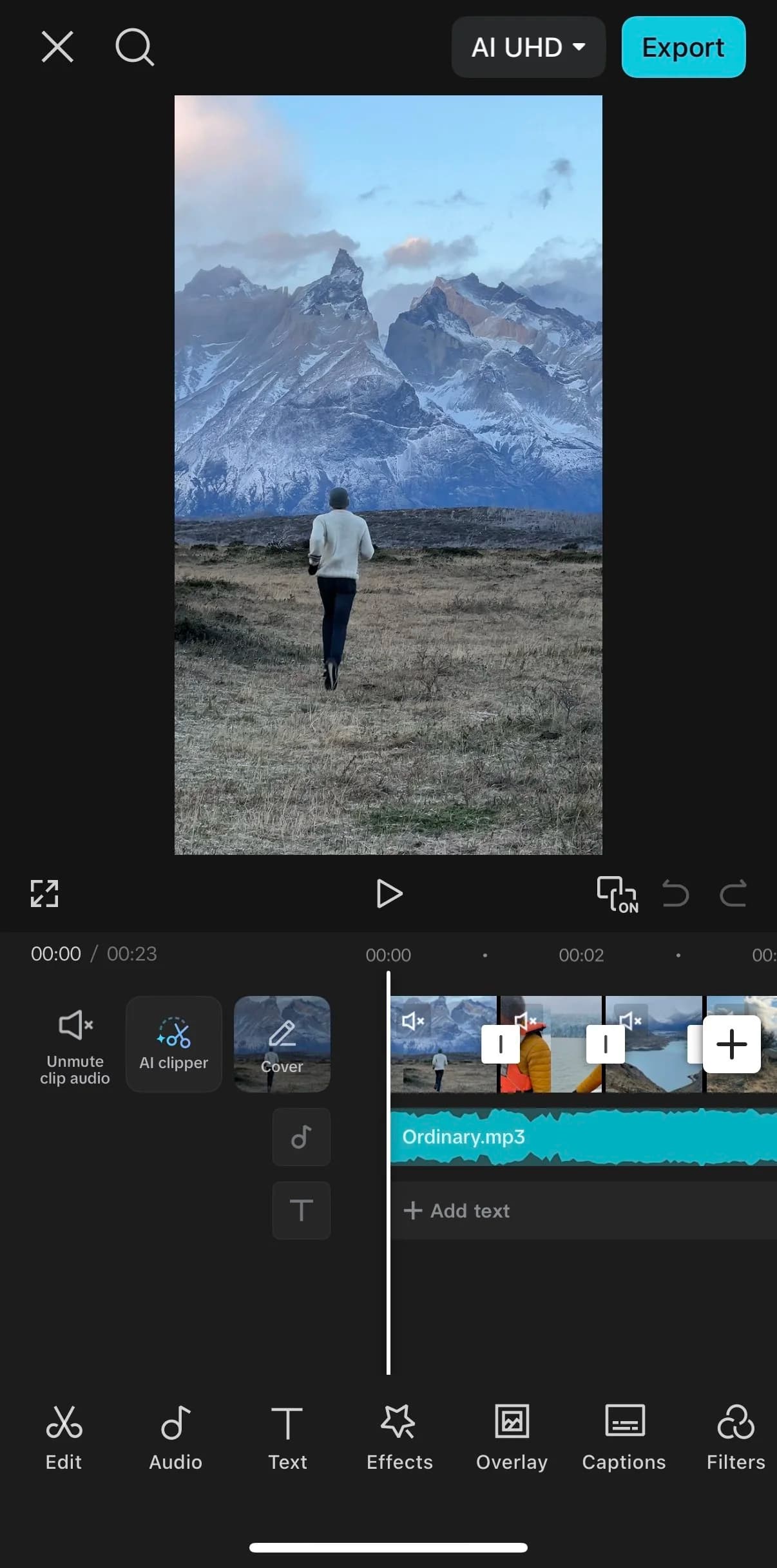
I love CapCut’s simple user interface
Opus Clip Review: Fastest for Automatic Clips
Opus Clip is built around repurposing long videos. Its paid plans also include editing tools.
If you create long-form content (podcasts, YouTube videos, educational content, interviews), Opus Clip can save you a ridiculous amount of time.
I’ve used it for my own content, for client work, and inside masterminds where creators wanted to turn one long recording into a week’s worth of shorts. Opus Clip makes that possible in minutes.
Here’s how it performed in my test.
Where Opus Clip Wins
• Best AI clip detection by far
Opus Clip finds the “viral” moments in your long-form content faster and more accurately than any tool I’ve used.
It analyzes speech patterns, hooks, pacing, and emotional beats to choose the moments that will actually keep people watching.
For podcast repurposing, this is a game changer.
• Viral score = helpful for creators who overthink
Every clip gets a “Viral Score” based on structure, delivery, and audience retention signals.
Is it perfect? No.
But it’s great for prioritizing which clips are worth posting first.
• Automatic punch-ins, jump cuts, and reframing
These used to take forever manually.
Opus Clip does them instantly, and looks natural on TikTok, Reels, and Shorts.
• 10–20 clips in minutes
This is the part that shocked me.
Opus Clip generated 17 candidate clips from the same roughly 12-minute source video in about 4 minutes.
Not all of them were winners, but 6–7 were solid enough to post immediately.
Where It Falls Short
Opus Clip is incredible at clipping. It’s not incredible at editing.
Here’s the real talk:
- Some AI-generated captions still need cleanup
- It doesn’t always pick clips with strong context
- Custom styling is limited compared to CapCut
- You’ll still want Descript or CapCut for final polishing
- Not ideal for storytelling-style edits
Opus Clip includes an editor on paid plans. I use it primarily as an idea generator and clip extractor, then polish the strongest clips in my preferred editor.
Best For
- Creators who record long videos
- Podcasters
- Coaches + educators
- YouTubers
- Founders who want to repurpose content fast
- Anyone who wants 10+ clips in minutes without doing the grunt work
If you’re sitting on long-form content, you’re leaving easy views on the table without Opus.
👉 Get Opus Clip, my go-to tool for pulling viral moments out of long-form videos instantly.
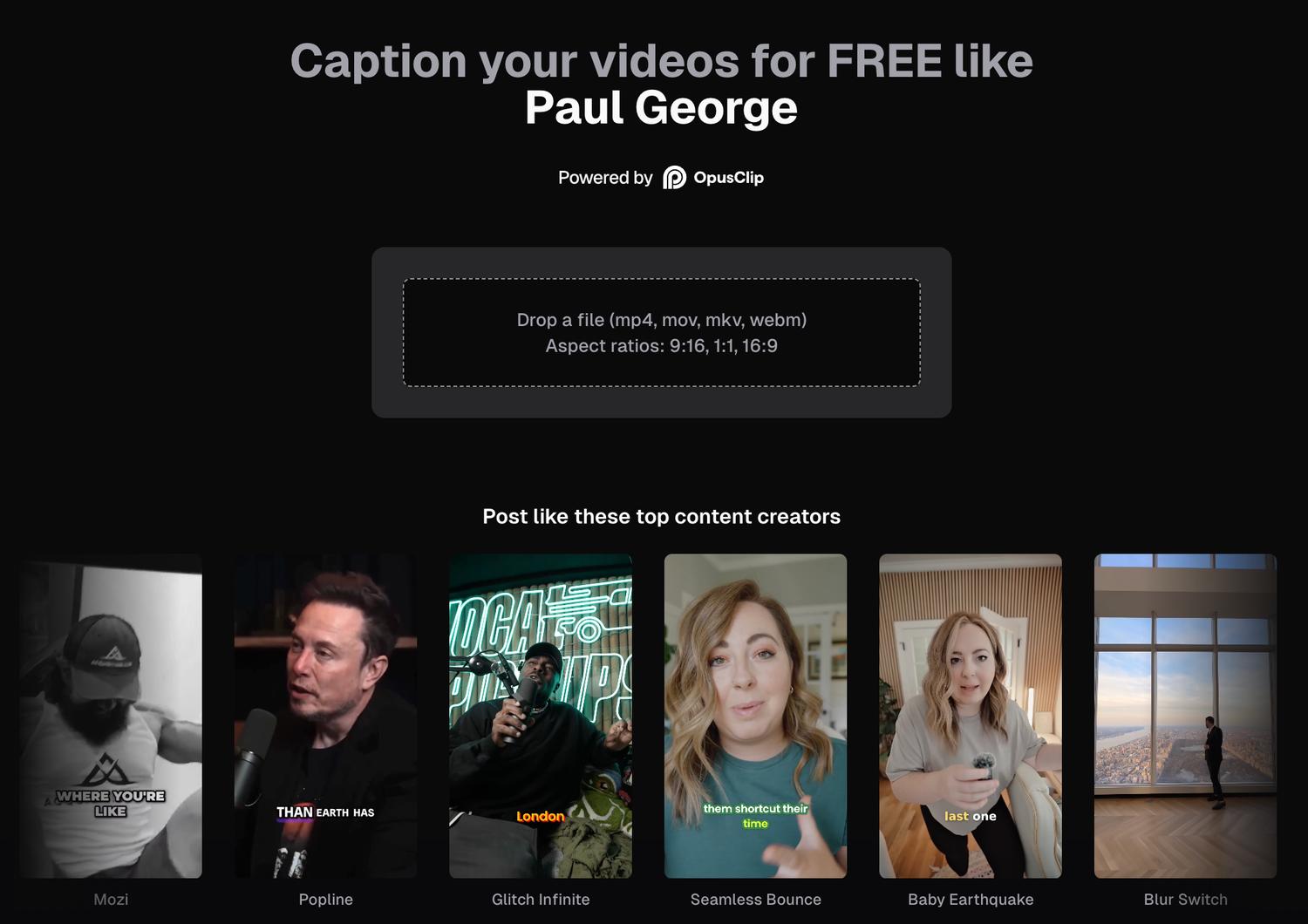
Caption styling in my original Opus Clip workflow; current free export limits are explained below.
The Speed Test Results (Winner Revealed)
I didn’t want this to be a vague “this one felt faster” review. I tracked the actual time it took me to go from raw video → final edits using all three tools.
Raw video used:
12-minute talking-head recording
(what I normally use for Global Viewpoint, AI Hustle Guy videos, and client content)
Goal:
- 5 polished shorts
- 1 clean long-form edit
- Captions on everything
- Audio cleaned
- Platform-ready exports
Here are the real numbers.
⏱️ Descript: Fastest Overall Workflow
Total Time: 28 minutes
Breakdown:
- Import + transcript: ~2 minutes
- Filler word removal: 10 seconds
- Long-form edit (text-based): ~10 minutes
- Creating 5 shorts from timeline: ~10 minutes
- Captions + light cleanup: ~5 minutes
- Export: ~1 minute
Why It Was Fastest
Descript eliminated entire parts of the workflow: no bouncing between apps, no manual audio cleaning, no reformatting, no hunting for clips.
Learning Curve
Medium. If you’ve never used a text-based editor, give yourself an hour to adapt. After that, it feels stupidly easy.
⏱️ CapCut: Fastest for Short-Form Only
Total Time for 5 Shorts: 18 minutes
Breakdown (short-form only):
- Import: ~20 seconds
- Clip trimming: 3–4 minutes
- Auto captions: 1 minute
- Styling + templates: 6–7 minutes
- Export: ~30 seconds
Long-form edit attempt:
34 minutes - and still felt sloppy.
I found that particular long-form edit less comfortable in CapCut than in Descript.
Why It’s Fast (But Limited)
CapCut is built for fast vertical edits.
Templates make everything move quick.
The UI is beginner-proof.
Learning Curve
Low. You’ll be dangerous in 10 minutes.
⏱️ Opus Clip: Fastest for Automatic Clip Generation
Time to Auto-Generate 17 Candidate Clips: about 4 minutes, before review
Breakdown:
- Upload file: ~1 minute
- AI generating clips: 2–3 minutes
- Additional review, outside that four-minute generation time: ~5 minutes
(You’ll still want to polish 2–3 of the best clips in CapCut or Descript.)
Why It’s Fast
Opus Clip does the hardest part for you: finding the moments worth posting.
Learning Curve
Low to zero. If you can upload a file, you can use Opus.
Final Results, With Real Timing
Here were the results of my AI video testing across these three different tools…
| Test | Descript | CapCut | Opus Clip |
|---|---|---|---|
| Full workflow (long-form + 5 shorts) | 28 min | 34 min for long-form alone (and it felt sloppy) | Not built for it |
| 5 short-form edits | ~10 min from the timeline | 18 min, most polished | Auto-generated |
| Clip selection in my original test | Selected from the timeline | Selected and styled by hand | 17 candidates in ~4 min, plus ~5 min review |
| Learning curve | Medium (about an hour) | Low (10 minutes) | Zero (upload and go) |
Descript vs CapCut Pricing in 2026
Prices checked October 27, 2026, in USD. Annual figures are monthly equivalents paid for a year; monthly subscriptions are shown separately.
| Tool and plan | Billed monthly | Monthly equivalent, billed annually | Main allowance |
|---|---|---|---|
| Descript Hobbyist | $24/person | $16/person ($192/year) | 10 media hours and 400 AI credits/month; 1080p export |
| Descript Creator | $35/person | $24/person ($288/year) | 30 media hours and 800 AI credits/month; 4K export |
| CapCut Pro | $19.99 reference price | Check your signed-in checkout | 1,200 monthly AI credits on the displayed web plan |
| Opus Clip Starter | $15 | Not shown on the checked pricing page | 150 credits/month; watermark removal |
| Opus Clip Pro | $29 | $14.50 ($174/year) | 300 credits/month; editing and scheduling tools |
Sources: Descript pricing, CapCut pricing and Opus Clip pricing. CapCut labels its public prices as references; account, platform, region, taxes and offers can change the checkout. Confirm the plan offered on the platform you actually edit on before budgeting.
Free does not mean the same thing across these tools. Descript Free includes 60 media minutes/month and watermarked 720p output. Opus Clip Free includes 60 credits/month and a watermark, with clips no longer exportable after three days. CapCut supports basic free editing, but a clean export depends on your project: remove any default ending clip and avoid premium assets or settings. Its watermark guide and Pro export explanation explain why even a 1080p project can hit a restriction.
My recommendation: try exporting one representative project before paying. Choose Descript Creator if you need its 4K output, CapCut when styling the short is the job, or Opus Clip when finding clips in a backlog is the bottleneck. Paying for all three only makes sense if you use all three jobs regularly.
My Honest Verdict
If you’re a creator, freelancer, or brand producing content at scale: Descript will save you the most time…period.
CapCut is still a must-have for short-form polish.
Opus Clip is unbeatable for repurposing long videos.
But when I look at the entire workflow (from raw footage to finished content), Descript was the clear winner. It wasn’t even close.
How I Use All Three Tools Together
Here’s the part most “comparison” posts skip…how these tools actually fit into a real creator workflow. Because the truth is, after years of creating content for my own brands (Global Viewpoint and AI Hustle Guy), plus client work across travel, lifestyle, and multiple mastermind groups…I’ve learned that no single tool does everything perfectly.
But used together? They create a stupid-fast workflow that lets you pump out more content in less time. Here’s the exact system I use today.
1. I record and edit the main video in Descript
Descript is where everything starts.
- Record directly in Descript
- Auto-transcribe
- Remove filler words
- Clean the audio
- Edit the long-form cut
- Mark potential short-form moments in the transcript
By the time I export, the long-form video is done…and the timeline is clean.
This alone cuts hours off my workflow.
2. I feed the full video into Opus Clip to find extra viral moments
Once the long-form edit is done, I upload that same file into Opus Clip.
It scans the content and gives me:
- 10–20 short clips
- “Viral Scores”
- Predictions on which clips will perform best
- Auto punch-ins and subtitle formatting
For me, this is where the magic happens. Sometimes Opus finds moments I didn’t even think to clip. This is a massive win for repurposing.
3. I take the best clips into CapCut to polish for TikTok/Reels
CapCut is where I add the extra shine:
- Punchier transitions
- Better caption styling
- Trendy animations
- Motion text
- TikTok/Reels-native formats
This gives me “platform-native” content, the kind that blends into feeds and performs better.
I don’t overdo this. Usually 30–60 seconds per clip.
4. I schedule everything using my platform of choice
Depending on the campaign or client:
- Reels: Instagram + Facebook
- Shorts: YouTube
- TikTok: native app
- LinkedIn clips: manually posted
- Long-form videos: YouTube
- Short-form bundles: Newsletter via Beehiiv and Kit.com
And because my edit is already clean from Descript, everything is ready for export in multiple aspect ratios without re-editing.
The Result: 1 video turns into 10–20+ pieces of content
This workflow works because it’s simple:
- Descript = creation + long-form editing
- Opus Clip = clip discovery
- CapCut = polish for short-form
- Beehiiv = distribute clips + behind-the-scenes content
I’ve used this exact system to help creators, founders, and brands produce more content than they thought they were capable of…without hiring an editor or spending hours in Premiere.
This is the system I teach inside mastermind groups.
This is the exact stack I use for client deliverables. And this is the workflow I use for my own brands every week. (You can see everything else I run alongside it on my AI tools page.)
Final Verdict: Which AI Video Editor Should You Choose?
After running Descript, CapCut, and Opus Clip through the same workflow I use for my own brands and clients, the answer is pretty simple:
No single tool “wins everything.”
But each tool dominates its lane.
Here’s the clear breakdown:
If you create long-form videos… choose Descript.
This is the all-in-one editor that handled:
- scripting
- recording
- editing
- captions
- audio cleanup
- short-form extraction
- platform exports
I’ve never used a tool that speeds up the entire workflow this much. If you run a YouTube channel, podcast, online course, or educational content…Descript saves HOURS.
If you live in TikTok/Reels/Shorts world… choose CapCut.
CapCut is built for fast, native vertical video.
If your content is:
- punchy
- trend-focused
- fast-paced
- aesthetic-driven
CapCut is the fastest way to crank out 5–10 short-form clips without thinking too hard.
If you have long videos to repurpose… choose Opus Clip.
Opus Clip turns one long video into dozens of short clips instantly. It finds moments you didn’t even catch.
If you’re a podcaster, course creator, or coach, this tool pays for itself immediately.
Read next: My Favorite Prompts to Create Content with Claude AI
Descript vs CapCut: Which Should You Choose?
Here’s how I’d choose if I were starting fresh:
- Want the fastest overall workflow? → Descript
- Want the fastest shorts? → CapCut
- Want the fastest clip discovery? → Opus Clip
- Want a full-stack creator workflow? → Use all 3 like I do
This combo lets you create content at scale…the same system I use for AI Hustle Guy, Global Viewpoint, and client campaigns in the travel + lifestyle space.
And when you stack these tools, you become unstoppable. More output. Less editing time. Way more leverage.
Ready to Edit Faster and Pump Out More Content?
If there’s one thing I’ve learned after creating content for my own brands, clients, and mastermind groups, it’s this:
Your editing workflow controls your output.
Your output controls your growth.
When I switched to AI-powered tools, everything changed.
More content. Less stress. Way more leverage.
And if you want to move faster (without hiring an editor), here’s exactly where I’d start:
👉 Try Descript (Free). This is the tool that cut my editing time in half.
If you create YouTube videos, podcasts, lessons, or even talking-head content… Descript will instantly speed up your workflow. This is the editor I use every week.
👉 Try CapCut Pro. If you want clean, punchy, viral-ready short-form content, CapCut is unbeatable. Perfect for TikTok, Reels, Shorts, and anything vertical. I use it to polish every clip I publish.
👉 Try Opus Clip. If you have long videos sitting on your hard drive, Opus Clip will turn them into 10–20 short clips instantly. It’s the fastest way to squeeze more value out of everything you record.
Looking to dive more into my full AI content stack? Subscribe to my email list for my FREE AI tool guide in 2026!
Frequently asked questions
Which AI video editor is best overall in 2026?
For my spoken-word workflow, Descript was the most useful all-in-one editor. CapCut produced my preferred styled shorts, while Opus Clip generated candidate clips quickly. The 28-minute, 18-minute and four-minute results cover different deliverables and should not be read as an equal-task speed ranking.
Is Descript free?
Yes. As checked October 27, 2026, Free includes 60 media minutes per month and watermarked 720p export. Hobbyist costs $24 per month or $16 per month with annual billing; Creator costs $35 monthly or $24 per month annually and includes 4K export.
Is CapCut really free? What does Pro add?
Basic editing is free, but premium assets and export settings can require Pro. Removing the default ending clip does not remove restrictions caused by Pro content. The public web pricing page showed Pro at a $19.99 monthly reference price on October 27, 2026; confirm the final price in your account.
Does Opus Clip watermark videos?
Free outputs carry a watermark and become unavailable for export after three days. Starter is $15 per month and removes the watermark. Pro is $29 monthly or $174 paid annually, equivalent to $14.50 per month, as checked October 27, 2026.
Can CapCut replace Descript for long-form videos?
It depends on your editing style. My original long-form attempt took 34 minutes in CapCut, while my Descript edit plus five shorts took 28 minutes. That is my workflow observation, not a claim that CapCut cannot edit long videos.
Do I actually need all three?
No. Start with the tool that solves your main bottleneck. Descript, CapCut and Opus Clip have overlapping capabilities, so add another subscription only when you have a specific recurring job for it.
Related reading
- Opus Clip vs CapCut: Which Short-Form Tool Wins?
- Descript vs Opus Clip: Editor or Repurposer?
- The 3 Best AI Notetakers for Zoom, In-Person, or Teams
- How GPT-5 Will Change Content Creation Forever
- Top 10 AI Tools Every Coach Should Use (With Copy-Paste Prompts)
- 12 AI Prompts to Build a Personal Brand (Even If You Hate Writing)

Written by Jon Miksis
Founder of AI Hustle Guy, Make the Leap, and Europe Flight Club, and the travel blogger behind Global Viewpoint (9+ years, 73 countries). He brings 9+ years of coaching and mentorship experience and has attended 23 transformation retreats and facilitated 6 across four continents. Every AI tool and prompt on this site gets tested on his own businesses first.
Get my free AI prompt pack
Join 300+ founders, creators, and professionals. I’ll send you my go-to AI tools and copy-paste prompts that save hours every week. No spam.