The Best AI Resume Builders in 2026 (Tested on Real Client Resumes)
By Jonathan Miksis · Updated August 29, 2026 · 13 min read
Some links in this post are affiliate links. If you buy through one, I may earn a commission at no extra cost to you.

I’ve been helping friends and clients fix their resumes for years, but 2026 has been the most chaotic yet. Everyone is “using AI”… and still getting ghosted.
The short answer, if you're skimming: Rezi to beat ATS filters, Teal to run your whole search as a pipeline, Kickresume for sharp modern design. All seven picks below were tested on real client resumes that needed to earn real interviews, and I tell you where each one falls short.
This year alone I’ve seen people paste raw ChatGPT outputs into their resumes. Same corporate jargon. Same fluffy bullets. Sometimes even fake-sounding metrics that do more harm than good.
The painful part? They’re actually qualified. Their tools just make them sound like everyone else.
One client came to me after three months of silence. We rebuilt her resume using the tools in this guide and tailored it properly. Within two weeks, she had three interviews booked with companies that used to ignore her.
That’s why I started testing AI resume builders seriously this year. Not just “does it generate text?” but: Does it make you look like someone a hiring manager wants to talk to?
Some tools flopped. A few were solid. And a handful instantly made my clients look sharper, clearer, and way more hireable.
This guide breaks down the best AI resume builders in 2026 - the ones I actually trust when I’m working on real client resumes, not just theory.
(If the real question is which career the resume should be aiming at, start with my guide to the best AI career tools for career changers first.)
👉 Grab your $100 resume rewrite spot
I take on a small number of $100 resume-and-cover-letter rewrites each month, using the exact workflows in this guide (my usual rate for this work is $500). If you want it done for you, grab a spot before the month's batch fills.
Looking to level up your LinkedIn and resume in 2026? Check out my personal development tool Make the Leap, which has a free personalized career assessment that matches your skills and interests with 3 career paths!
The Best AI Resume Builders in 2026 (At a Glance)
Most AI resume tools in 2026 look impressive on the surface, but only a handful actually help you get more interviews. Here’s the quick breakdown if you’re skimming:
Rezi: Beat the ATS (Applicant Tracking System) filters and match the job description.
Teal: Turn job search chaos into a simple pipeline
Kickresume: Make your resume look sharp and modern
Wonsulting AI: Reframe your experience into impact-driven bullets (great for pivots).
Canva AI: Clean up ugly formatting and brick-of-text resumes
FlowCV: One resume free forever, unlimited downloads, clean layouts.
Novorésumé: Polished all-rounder for almost any industry
I’ve tested every major builder this year while helping friends and clients fix their job-search bottlenecks. These are the ones that consistently produce sharper resumes, clearer stories, and better responses from hiring managers.
1. Rezi - Best for ATS Optimization
Rezi is usually the first tool I reach for when someone tells me they’ve applied to 40 jobs and heard nothing.
Not because they’re unqualified, but because their resume never makes it past the company’s software filter.
Most mid-sized and large companies use an ATS (Applicant Tracking System). ATS is software that scans your resume for keywords, skills, and formatting before a human ever sees it. If you don’t match what it’s looking for, you’re out before a recruiter even opens your file. Rezi solves that fast.
It reads the job description, pulls out the signals that actually matter, and helps your resume speak the same language as the posting. I’ve had clients run their draft through Rezi and immediately see the gaps they’d been missing for weeks.
What it does well:
Identifies the must-have keywords your resume is missing
Rewrites bullets so they align with the role’s requirements
Keeps everything clean, structured, and recruiter-friendly
Where it falls short:
Templates are pretty plain
Some bullets can feel stiff unless you soften them in your own voice
If you keep getting ghosted and you’re not sure why, Rezi is the fastest way to make sure your resume actually reaches a human - not a trash folder.
🚨 Want me to just do this part for you? I use Rezi in all my rewrites to make sure it improves your odds and helps you align keywords and formatting.
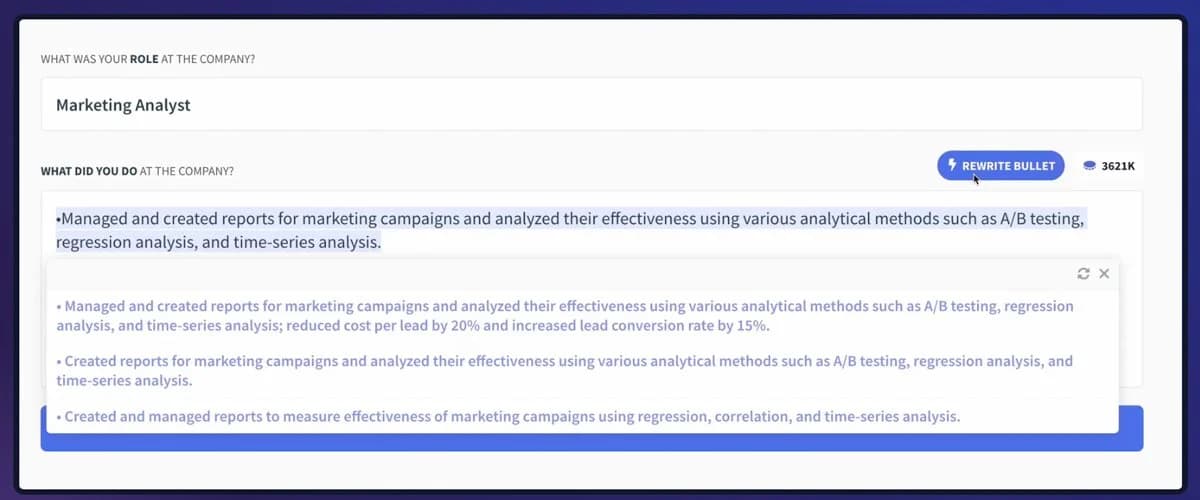
Sample showing Rezi in action
2. Teal - Best for Managing a Chaotic Job Search
Teal is the tool I recommend when someone tells me their job search feels like organized chaos.
Too many tabs open. Too many job descriptions saved. Too many resume versions floating around with no idea which one went where.
Teal fixes that by giving you a single dashboard where you can save roles, attach the right resume version to each job, add notes, track your stages, and keep everything organized without relying on your inbox or your memory.
Instead of juggling 20 tabs, everything lives in one clean, visible pipeline.
Where it helps:
You import roles manually or with their Chrome extension, and Teal sorts them into a trackable board
Every job gets its own space for notes, resume versions, deadlines, and follow-ups
Tailoring becomes easier because the job description sits right next to your resume
Where it struggles:
AI suggestions can feel a bit generic if you don’t refine them
Not as design-focused as the “pretty” resume builders
If your job search currently lives in 10 Google Docs and a pile of unread emails, Teal will feel like hitting reset.
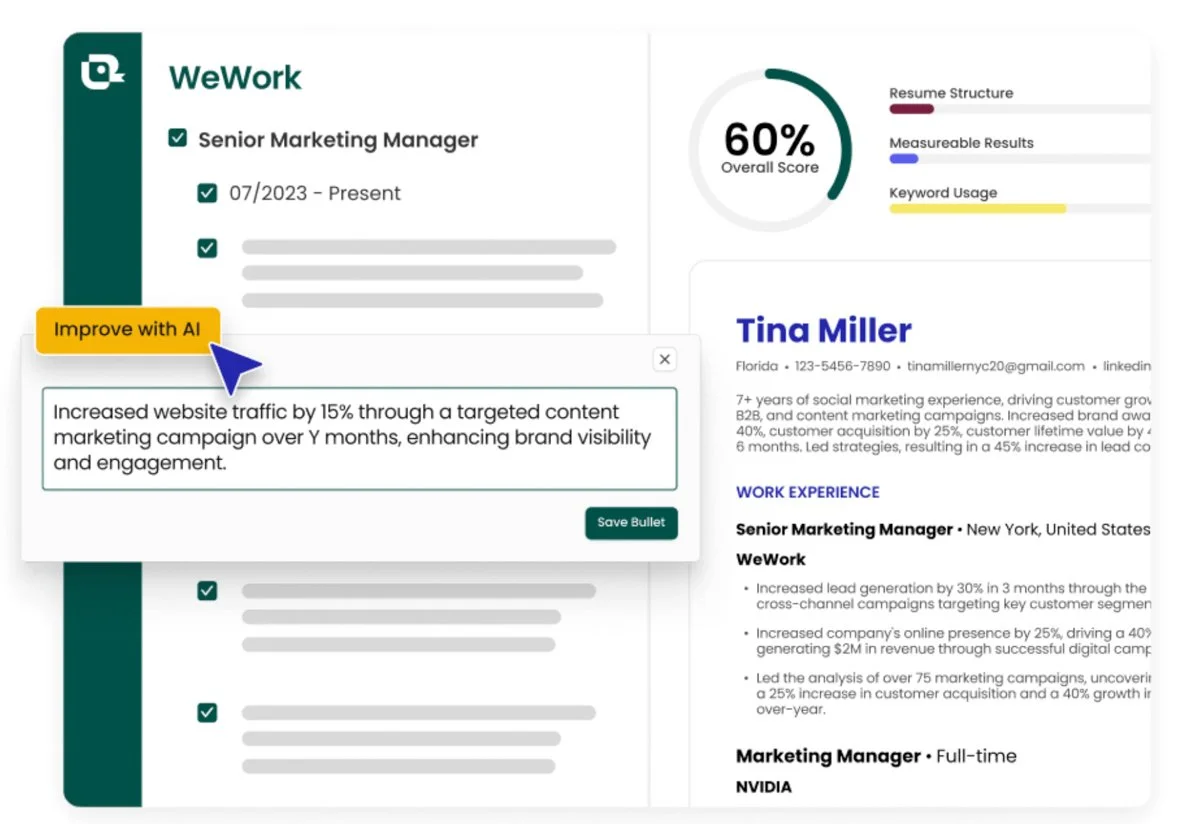
Example showing Teal in action improving a resume with AI / Credit: Tealhq.com
3. Kickresume - Best for Polished, Beautiful Designs
Kickresume is what I reach for when someone says, “My resume is fine, but it looks boring.”
Because like it or not, presentation matters. If your resume looks like it was built in Word 2009, you’re starting on the back foot.
Kickresume gives you modern, clean templates that make your resume look like a designer touched it. It’s especially strong for marketing, design, content, comms, media, and startup roles where visual taste is part of the job and your resume is judged on more than words.
I’ve used it with clients in marketing, design, content, and media who needed something visually sharp to match the work they do.
Where it stands out:
Sleek, professional templates that don’t look like everyone else’s
Built-in AI to help draft sections and cover letters
Easy to tweak layout, fonts, and structure without breaking everything
Where it stumbles:
It can lean into buzzwords if you let the AI run wild
Not the best choice if you’re aiming for ultra-conservative industries
Kickresume is the move when your resume needs to signal “I get good design” before anyone even reads line one.
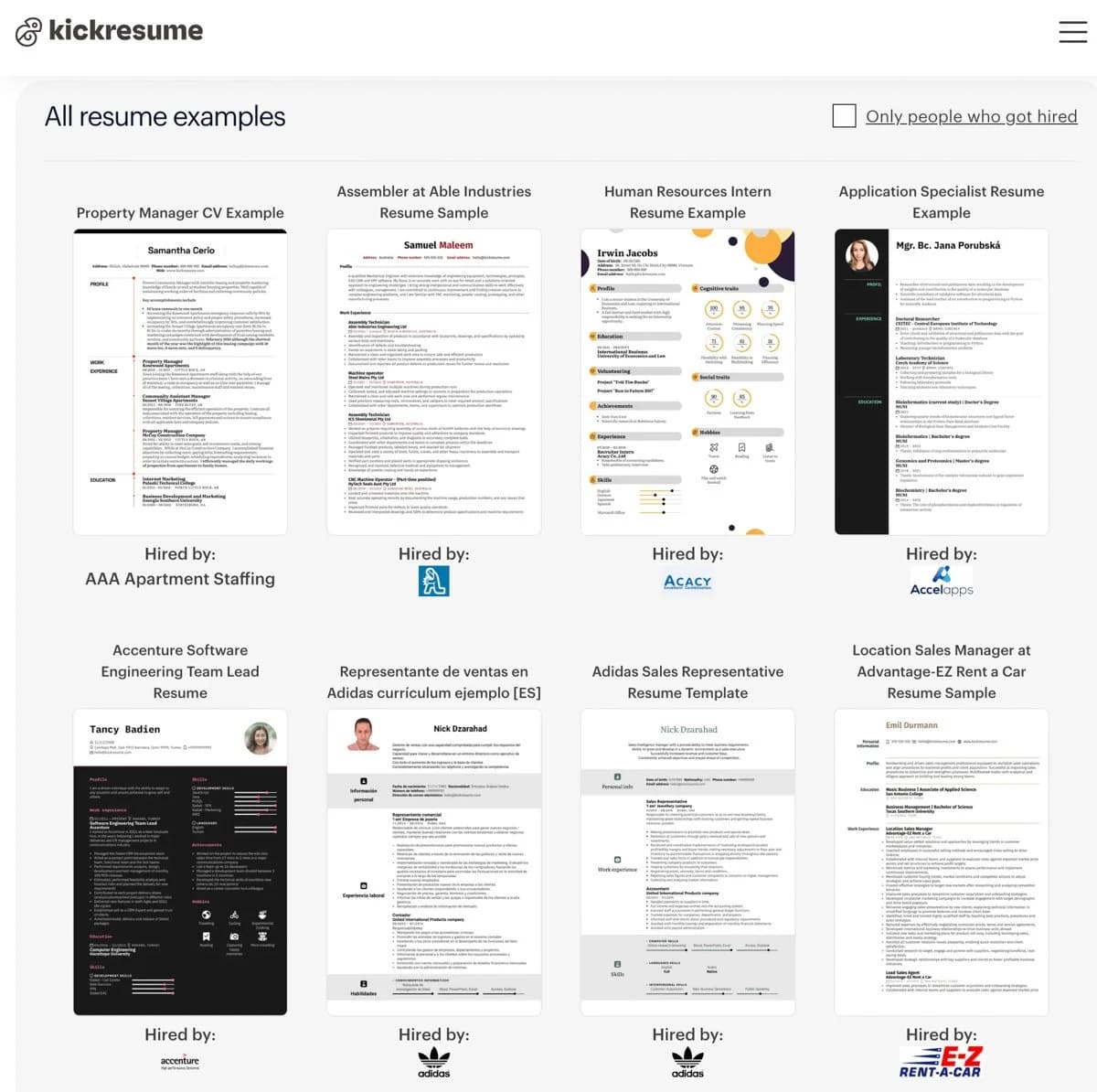
Examples showing successful resumes using Kickresume
4. Wonsulting AI - Best for Career Changers
A lot of people come to me thinking their background makes no sense. Teacher going into UX. Retail moving into tech sales. Ops trying to break into product.
On a resume, that kind of path can look scattered even when the person is actually strong.
Wonsulting AI is built for that exact challenge.
You paste in your resume or past roles, add the kind of job you’re aiming for, and it rewrites your bullets and summary to highlight the skills that carry over. It’s usually a 5-10 minute process, not a full weekend rewrite.
What it does well:
Translates your old roles into language that fits your new industry, based on the target job you feed it
Pulls out transferable skills (communication, leadership, ops, analysis) and moves them to the front of the story
Great for writing or fixing your resume summary, profile, and LinkedIn “About” section so they all tell the same story
Where it struggles:
The tone can drift into cheesy or overly inspirational if you don’t tone it down
You still need to check that nothing is exaggerated or misrepresents what you did
Use it when your experience needs structure, clarity, and a point of view - not another generic template. It’s great for turning bullets, scoring, and reframing duties into accomplishments.
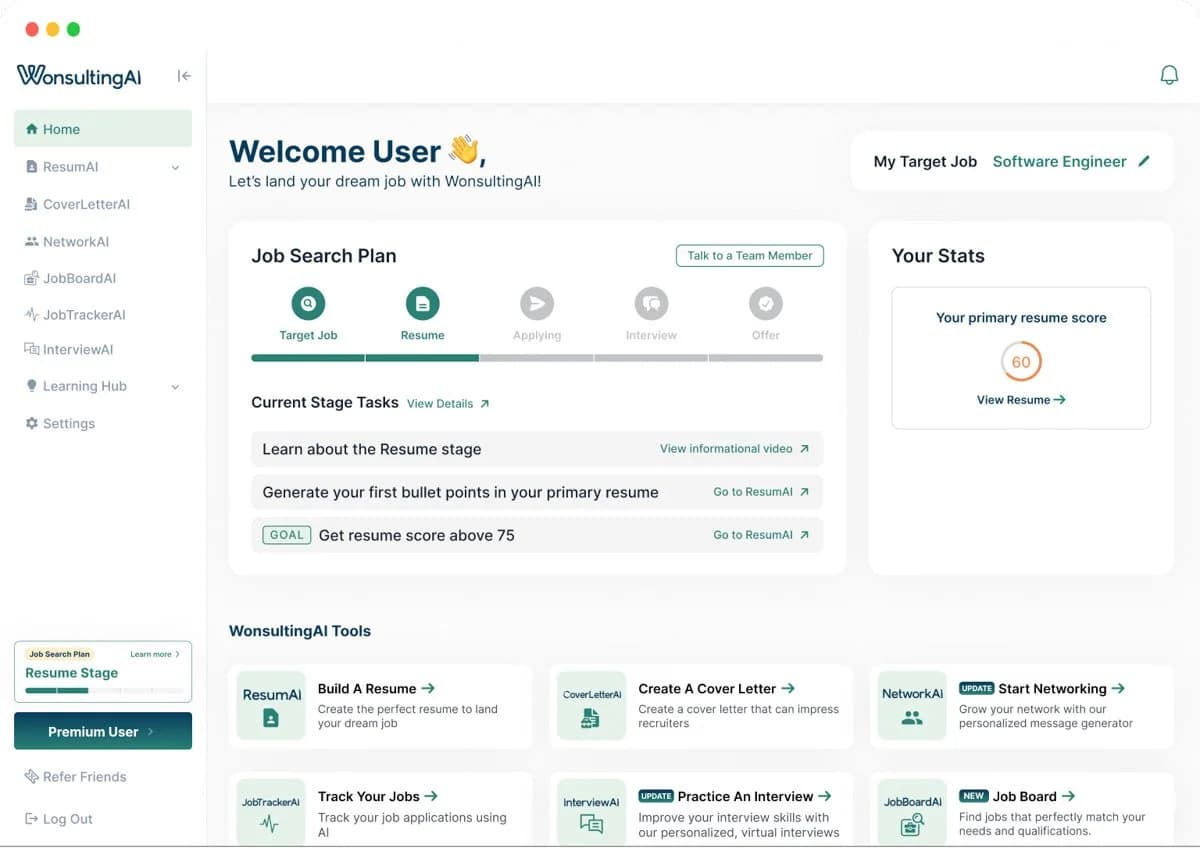
WonsultingAI dashboard showing the interface and resume tools
5. Canva AI - Best for Clean, Simple Drafts
Canva AI is the tool I pull out when someone’s resume has good content but looks like a wall of text.
Great experience, terrible presentation. No spacing, no hierarchy, nothing that makes a recruiter want to keep reading. Canva fixes that fast!
It’s not the smartest writer in this list, but it’s hands-down one of the easiest ways to take a messy resume and give it structure, breathing room, and a clean modern layout in under an hour.
Where it helps the most:
Dead-simple drag-and-drop layout
Tons of modern templates that don’t scream “Microsoft Word”
Great for fixing spacing, fonts, and structure without fighting the formatting
Where it struggles:
AI copy suggestions are pretty surface-level
Not ideal if you need deep help with strategy or positioning
I highly recommend Canva AI for people who already have decent content, but need their resume to stop looking like a school assignment.
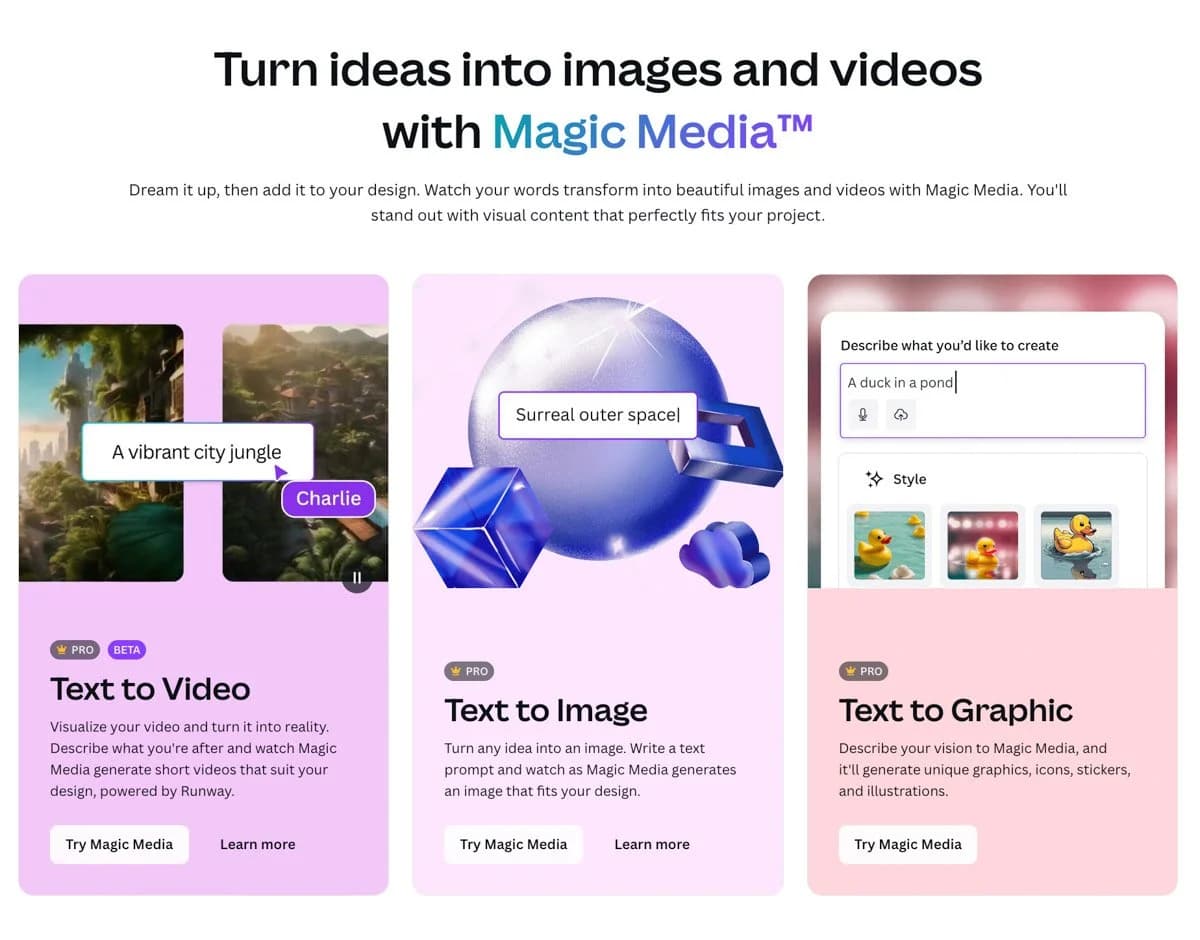
One of Canva AI’s newest features, Magic Media, covers text to image, video, and graphic
6. FlowCV - Best Free, No-Frills Resume Builder
FlowCV is my go-to recommendation when someone needs a sharp, modern resume without spending a cent. If you want multiple versions or advanced AI features, you’ll need to pay, but the free version is great for a single version.
No dark patterns. No “surprise” paywalls. No downloading limitations. Just clean templates you can edit forever.
It’s not trying to be the smartest AI tool in the room - and that’s the charm.
FlowCV is like the Google Docs of resume builders: simple, reliable, and never fighting you. You add your content, adjust the layout, and end up with something that looks professional instead of homemade.
Where it delivers:
Completely free with unlimited edits and downloads
Clean, minimal templates that feel modern
Easy to tweak sections, spacing, and structure without breaking the design
Where it struggles:
Very limited AI support:
It won’t rewrite your bullets.
It won’t match your resume to a job description.
It won’t pull keywords or help you beat ATS filters.
It won’t suggest metrics or highlight transferable skills.
Basically: it formats well, but it doesn’t help you think through your story
It’s the perfect starting point if you’re on a tight budget but still want a resume that looks like you really care about your career.
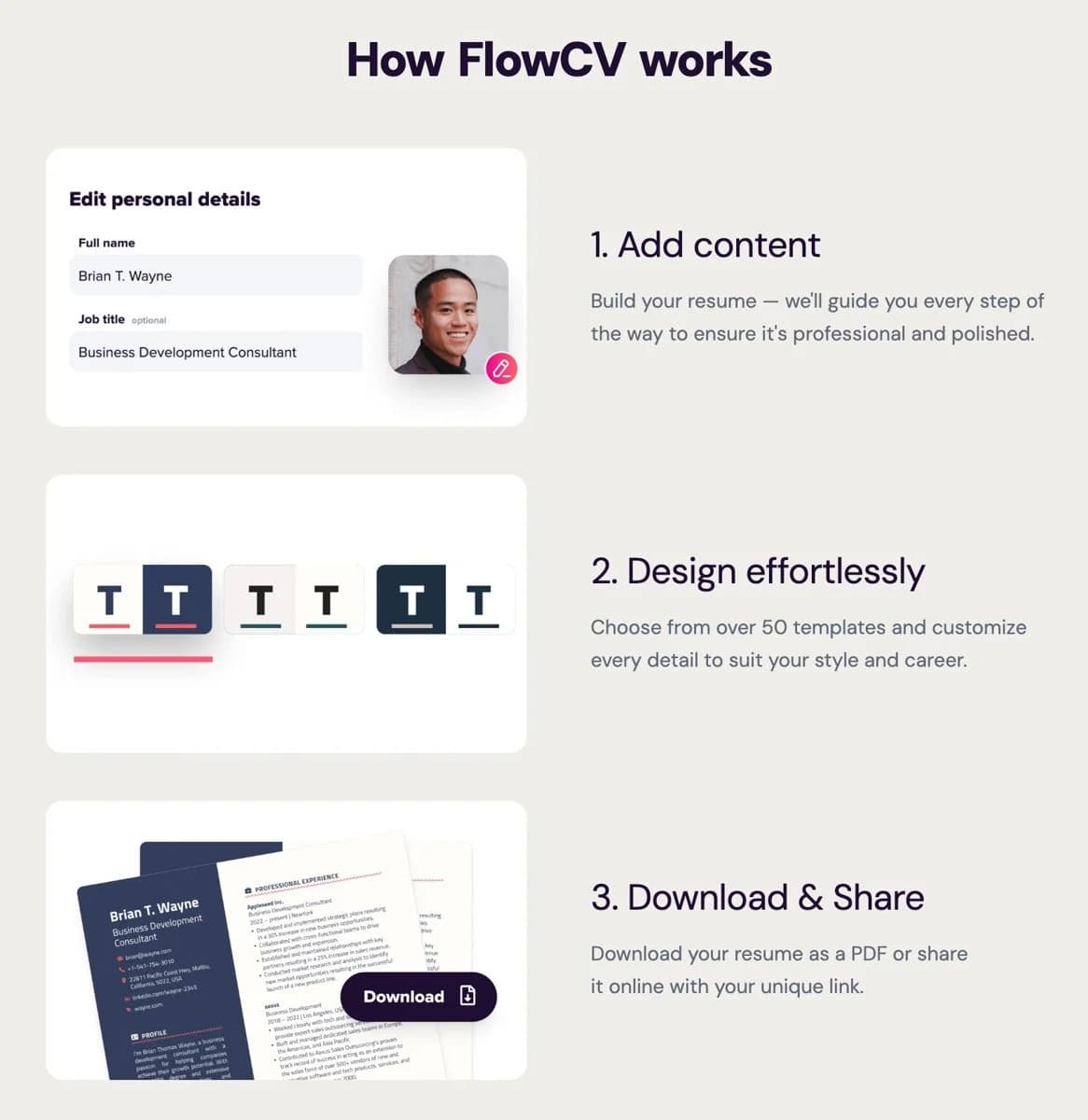
FlowCV’s process is super simple and easy to use
7. Novorésumé - Best All-Around Professional Builder
Novorésumé is the builder I recommend when someone wants the “I just want something polished that won’t embarrass me” solution.
It sits in that sweet spot between design, structure, and usability. You don’t have to be a designer. You don’t have to be a writer. You just plug in your details and it guides you into a clean, professional final product.
Quick heads up: the free plan is built around a single, one-page resume version. If you want multiple versions, extra pages, or matching cover letters, that’s typically in the paid tier.
What I like most is the balance. It’s polished without being flashy. Structured without feeling rigid. And solid enough for almost any industry - from entry-level roles to senior corporate positions.
What it does well:
Beautiful, modern templates with strong visual hierarchy
Smart prompts that help you flesh out sections without overdoing it
Works across industries - from corporate roles to creative ones
Where it struggles:
Best templates and features sit behind the paid version. The free version is great for a single version - max one page resume.
AI writing help is fine, but not as strong as Rezi or Wonsulting
Novorésumé consistently delivers resumes that look intentional, confident, and well-crafted - even if your draft started as a messy Google Doc.
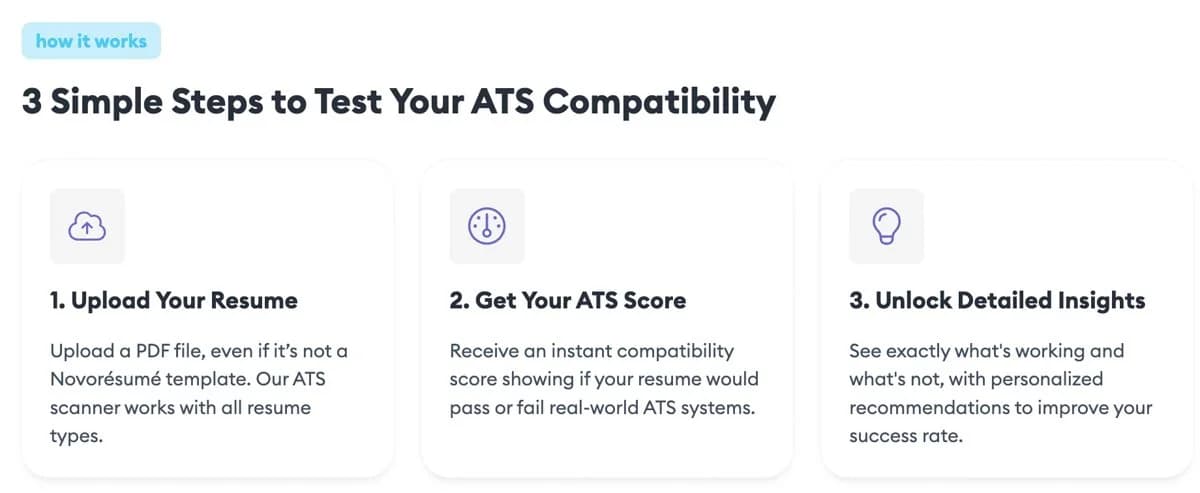
I love this ATS compatibility feature in Novoresume
The Right Tool Makes a Strong Story Unstoppable
I’ve helped a lot of people rewrite their resumes this year, and here’s the truth nobody likes hearing: Most of the time, the resume builder isn’t the problem. The story is.
You can use the best tools on the planet - Rezi, Teal, Kickresume, whatever - but if your bullets are vague, your achievements are buried, or your experience reads like a job description instead of impact… you’ll still get ghosted.
The good news? You’re not far off. With the right builder and a little guidance, your resume can go from “decent” to “damn, we need to talk to this person” fast.
These seven tools are the ones I trust in 2026. They’re the same tools I use when I’m fixing resumes for friends, clients, and people stuck in the job search spiral. They cut out the busywork so you can focus on telling a sharper, more confident version of your story.
And if you want someone to just take the wheel…
👉 Grab your $100 resume rewrite spot
Each month's batch is small, and my usual rate for this work is $500. If you’re tired of getting ghosted, this is your shortcut to a resume that actually gets read - and remembered.
Read next: My Favorite AI Prompts to Upgrade Your Resume and CV

Enjoyed reading my blog post on the top resume builders? Pin it!
Frequently asked questions
Are AI resume builders worth it? Yes, if you use them to sharpen a strong story rather than generate a generic one. The best ones save hours, optimize for ATS keywords, and format cleanly. Just edit the output so it sounds like you, because recruiters can spot copy-paste AI from a mile away.
Do AI-built resumes pass ATS (applicant tracking systems)? The good ones are built specifically for ATS: clean formatting, standard headings, and the right keywords pulled from the job description. That's exactly what I tested for here. Avoid heavy graphics, columns, and tables, which is where a lot of "pretty" resumes quietly get rejected.
Is it OK to use AI to write your resume? Completely. Recruiters care about clarity and fit, not whether AI helped. Treat it as a first draft: feed it your real experience and the job description, then edit for voice and accuracy. The only thing that backfires is using AI to invent experience you don't have.
Is there a free AI resume builder? Several offer free tiers that are genuinely usable for a first draft, with paid plans for more templates and ATS scoring. If budget is tight, start free and only upgrade once you're applying at volume.
What's the fastest way to improve a resume with AI? Pair a builder with the right prompts. Grab my free prompt pack, or see my AI prompts to upgrade your resume, cover letter, and interviews.
Related reading

Written by Jon Miksis
Founder of AI Hustle Guy, Make the Leap, and Europe Flight Club, and the travel blogger behind Global Viewpoint (9+ years, 73 countries). He brings 9+ years of coaching and mentorship experience and has facilitated 23 transformation retreats across four continents. Every AI tool and prompt on this site gets tested on his own businesses first.
Get my free AI prompt pack
Join 300+ founders, creators, and professionals. I’ll send you my go-to AI tools and copy-paste prompts that save hours every week. No spam.