Fathom vs Otter (2026): Which AI Notetaker Should You Use?
By Jonathan Miksis · Updated September 3, 2026 · 15 min read
Some links in this post are affiliate links. If you buy through one, I may earn a commission at no extra cost to you.
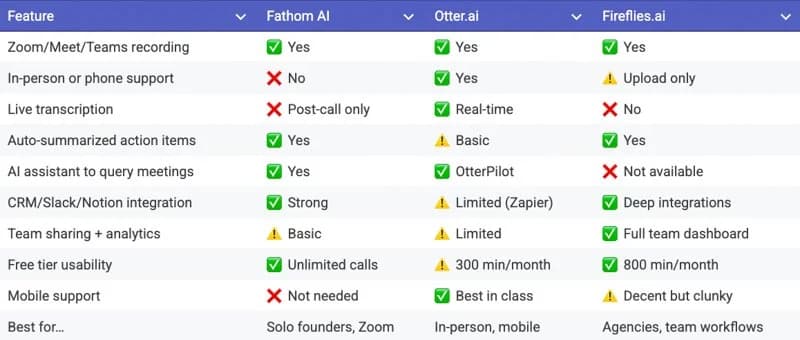
Fathom vs Otter has a short answer. If your meetings happen on Zoom, Google Meet, or Microsoft Teams, pick Fathom: it records and transcribes without limit on the free plan, and its post-call summaries are the cleanest I have used. If your important conversations happen in the room, on the phone, or on a stage, pick Otter: its mobile app transcribes live, in person, which Fathom's shipping product still cannot do as of September 2026.
I've run both across client calls, team meetings, and in-person sessions. Every price and feature below is checked against Fathom's and Otter's own pricing pages and help centers as of September 2026, and my own observations are kept separate from the documented facts.
One line: Fathom is the video-call specialist. Otter is the in-the-room specialist.
Fathom vs Otter at a glance
| Criterion | Fathom | Otter |
|---|---|---|
| Price (annual billing) | Free; Premium $16/user/mo; Team $15/user/mo; Business $25/user/mo | Free; Pro $8.33/user/mo; Business $19.99/user/mo |
| Free tier | Unlimited recordings, storage, and transcription; advanced AI summaries on 5 calls/mo | 300 min/mo, 30 min per conversation, 3 lifetime file imports |
| Best for | Zoom, Google Meet, and Teams calls; solo users who want free, fast notes | In-person, phone, events, and live transcription; anyone who needs a mobile recorder |
| In-person capture | Not in the shipping product; iOS app listed as coming soon with a waitlist | Yes, iOS and Android apps plus desktop, with live transcription and speaker recognition |
| Integrations | HubSpot, Salesforce, Slack, Notion, Asana, Zapier, ChatGPT and Claude via MCP, public API | Salesforce, HubSpot, Slack, Notion, Zapier (Pro and up), Dropbox, Google and Outlook calendars |
| Privacy posture | SOC 2 Type II, GDPR, HIPAA with signed BAA on Enterprise; data stored in the US | SOC 2 Type 2, GDPR, CCPA; HIPAA with BAA on Enterprise only, listed as an add-on |
| Languages | 38 transcription languages | English, Spanish, French, German (beta), Japanese, Chinese (Simplified) |
Both companies change their plans often, so check before you buy.
Fathom vs Otter: Pricing
Otter is cheaper at the entry paid tier. Fathom is cheaper if you never leave the free plan, because Fathom's free plan has no minute cap and Otter's does.
Fathom, per its pricing page, as of September 2026:
| Plan | Monthly | Annual | What you get |
|---|---|---|---|
| Free | $0 | $0 | Unlimited recordings, storage, transcription; advanced summaries on 5 calls/mo |
| Premium | $20/user/mo | $16/user/mo | Unlimited advanced summaries, action items, follow-up emails, Ask Fathom |
| Team | $19/user/mo | $15/user/mo | 2-seat minimum; team search, playlists, comments, keyword alerts |
| Business | $34/user/mo | $25/user/mo | 2-seat minimum; CRM field sync, Deal View, coaching metrics, custom summaries |
| Enterprise | Custom | Custom | Signed HIPAA BAA, organization-wide retention policies |
Fathom lists a 90-day guarantee on paid plans.
Otter, per its pricing page, as of September 2026:
| Plan | Monthly | Annual | What you get |
|---|---|---|---|
| Basic (Free) | $0 | $0 | 300 min/mo, 30 min per conversation, 3 lifetime file imports, 20 AI Chat queries |
| Pro | $16.99/user/mo | $8.33/user/mo | 1,200 min/mo, 90 min per conversation, 10 imports/mo, 50 AI Chat queries, Zapier |
| Business | $30/user/mo | $19.99/user/mo | Unlimited transcription, 4 hours per conversation, unlimited imports, 200 AI Chat queries, admin controls |
| Enterprise | Custom | Custom | SSO (100-user minimum), HIPAA as an add-on |
Two things stand out. The annual discount on Otter Pro is steep (Otter labels it a 51 percent saving), so if you go Otter, go annual. And the two companies meter different things: Otter meters minutes, Fathom meters advanced summaries and gives away the recording and transcript.
Both are cheap next to the hours they save.
Fathom vs Otter: Free plans
Fathom's free plan is the more generous one for pure call volume. Otter's is the more useful one if you need in-person capture and can live inside 300 minutes a month.
On Fathom Free, the help center lists unlimited recordings, storage, and transcription in 38 languages, forever. The cap is on advanced AI summaries: premium templates on your first five calls each month, then the General/Enhanced template. Action items, follow-up emails, and Ask Fathom are Premium. A personal Zapier connection and basic CRM connections are listed on both Free and Premium.
On Otter Basic, the 30-minute cap per conversation matters more than the 300-minute monthly total: a 45-minute client call stops at 30 unless you are on Pro (90 minutes) or Business (4 hours).
My read: a solo founder or coach who mostly needs notes from video calls can stay on Fathom Free for a long time. An Otter free user hits the wall the first time a meeting runs long.
Fathom vs Otter for video calls (Zoom, Google Meet, Teams)
Fathom is the better tool for video calls. Both support the big three platforms, but Fathom's post-call output needs less work.
Fathom's device page says it records Zoom, Google Meet, and Microsoft Teams on Mac and Windows, and does not support Chromebooks, Linux, mobile devices, phone calls without a meeting link, webinars, or breakout rooms. Otter's integrations page lists Zoom, Google Meet, and Teams with real-time transcription, plus desktop apps and a Chrome extension.
Fathom's 2026 release notes and what's new page add a bot-free capture mode (no bot joining the call), live summaries that build during the meeting, and Slack Huddles support. As of September 2026 bot-free mode is Mac only, with Windows listed as coming soon.
Here is the part that is my experience rather than a spec sheet. If your calendar is wall-to-wall Zoom and Meet, Fathom is hard to beat. The moment a call ends, you get a clean summary with action items and clickable, timestamped highlights you can push to Slack, Notion, or your CRM. No cleanup, no copy-pasting into ChatGPT.
Otter handles video calls fine too. But Otter's AI summaries are a step behind Fathom's and sometimes need a cleanup pass. If the summary is the deliverable, that gap is the whole comparison.
Fathom vs Otter for in-person meetings
Otter wins in-person meetings, and as of September 2026 it is not close, because Fathom's in-person product has not shipped.
Otter's iOS and Android apps record from the phone's microphone and transcribe live, with speaker recognition. Otter's own in-person guide notes that live transcription requires an internet connection and there is no offline mode, and its help center recommends keeping the mic within about three feet of the speaker and using an omnidirectional external mic for multi-person rooms.
This is the thing Otter does that Fathom simply does not. Otter earns its keep the moment you step away from Zoom. You can watch the words appear as people speak, then search and edit the transcript afterward. That makes it the tool for real estate walkthroughs, event talks, phone consults, and in-person interviews.
Fathom's own help article says the shipping product is designed for online meetings with a standard meeting link, describes an iOS app that will record in-person meetings from your phone, and offers a waitlist. Fathom's iOS app page still reads coming soon as of this update, with no mention of Android. Its laptop-in-the-room workaround comes with Fathom's own warning that it cannot distinguish between multiple speakers in the same physical room.
I have not tested the Fathom iOS app, because there is nothing to test yet. When it ships I will update this section. Until then, if a meaningful share of your important conversations happen face to face or on the phone, Otter is the obvious pick.
Which is more accurate?
Neither company publishes an independent accuracy benchmark, so I will not hand you a percentage I cannot source. Otter's own blog claims 95 percent or better live transcription accuracy; Fathom does not publish a comparable figure. Treat both as vendor claims.
What I can tell you from use is about the output you actually read. Fathom's summaries arrive near-instantly and rarely need editing. Otter's are good, but sometimes need a cleanup pass before I would send them to a client. On the raw transcript, both hold up with one clear speaker and a decent mic, and both degrade the way every notetaker does: crosstalk, unusual accents, bad audio. That is why Otter's in-person guidance is mostly about microphone placement.
One structural point: Otter transcribes one language at a time from a list of six. Fathom transcribes in 38 and detects the language of the call. If your calls switch languages, that matters more than any model difference.
AI features: summaries, action items, and ask-the-meeting
Both now offer a chat-with-your-meetings assistant. Fathom's is Ask Fathom, a Premium feature; Otter's is Otter AI Chat, metered by plan.
Fathom. The overview page lists instant summaries with action items, live summaries that update as you talk, reusable custom prompts, and Ask Fathom, which searches across your entire account. Fathom also exposes your meeting library to ChatGPT and Claude through MCP and publishes a public API.
Otter. The homepage describes Otter AI Chat as searching across your meetings and connected apps, plus automated summaries with decisions and action items assigned from every meeting. The pricing page meters AI Chat at 20 queries on Basic, 50 on Pro, and 200 on Business and Enterprise, and lists the Takeaways panel that assigns action items on Pro and up.
In practice, Fathom's action items are the ones I actually use, because they arrive with the summary and link to a timestamp. Otter's are there, but I end up reading the transcript to confirm them.
Integrations: CRM, Slack, Notion, Zapier
Both cover the standard stack. Fathom's CRM integration goes deeper on its Business plan; Otter gates Zapier and CRM sync behind Pro.
Fathom, per its integrations page, lists HubSpot, Salesforce, Slack, Notion, Asana, Zapier, Make, Zoom, Google Meet, Microsoft Teams, and MCP connections to ChatGPT and Claude. The HubSpot card, which shows your last five meetings with recording links and summaries inside HubSpot, requires the Business plan, as does automatic CRM field sync.
Otter, per its integrations page, lists Salesforce, HubSpot, Slack, Notion, Zapier, Microsoft Teams, Zoom, Google Meet, Dropbox, Google Calendar, and Outlook. Per the pricing page, Zapier is Pro and up, and Salesforce and HubSpot sync is limited on Pro and full on Business and Enterprise.
If you live in Notion or Slack, either works. If you need CRM fields updated without a human touching them, you are looking at a Business plan either way.
Languages
Fathom supports far more languages. Otter supports six, one at a time.
Fathom's help center lists 38 transcription languages, including Spanish, French, German, Portuguese, Japanese, Korean, Hindi, and Arabic. For calls in Spanish, Portuguese, German, French, Italian, or Dutch, Fathom translates the summary into that language automatically.
Otter's help center lists English, Spanish, French, German (in beta), Japanese, and Chinese (Simplified). You pick one language in settings, with one exception: a French default can switch to English mid-meeting.
If you or your clients speak anything outside Otter's six, this section alone decides it.
Privacy, security, and data retention
Both publish SOC 2 Type II and GDPR claims. Both offer HIPAA only on Enterprise with a signed BAA. Fathom stores data in the US; Otter stores it on AWS with AES-256 encryption.
Fathom, per its security FAQ, states it is HIPAA, SOC 2 Type II, and GDPR compliant and stores all data in the United States. Its AI subprocessors (Anthropic, OpenAI, and Google) are contractually barred from training on user data; Fathom itself uses de-identified data to improve its own models, with an opt-out in settings. The pricing page lists the signed HIPAA BAA under Enterprise. Recordings are stored until you delete them, and organization-wide retention policies are Enterprise only, set by emailing support.
Otter, per its privacy and security page, states SOC 2 Type 2, GDPR, CCPA, AES-256 encryption on AWS S3, and that no customer data trains its AI service providers' models, while Otter itself uses de-identified data for training. Otter announced HIPAA compliance in July 2025; its HIPAA help article and pricing page say it is Enterprise only, requires a signed BAA, and is listed as an add-on. Deleted conversations purge from trash after 30 days, and custom retention periods (minimum 24 hours) are set through an account manager.
Practical translation: on any plan below Enterprise, neither product is HIPAA-covered for you, whatever the homepage badge says. If you handle PHI, you need Enterprise and a signed BAA on either one.
Who should choose Fathom
Choose Fathom if your meetings are on Zoom, Google Meet, or Teams and you want the fastest, cleanest notes with the least babysitting.
- Coaches, consultants, and founders whose client calls are video calls
- Anyone who wants unlimited recording and transcription for free
- Teams that need meeting data written into HubSpot or Salesforce fields (Business plan)
- Multilingual users, given the 38-language list
Skip Fathom, for now, if you need in-person or phone capture. That is the one job it cannot do until the iOS app ships.
Who should choose Otter
Choose Otter if a lot of your important conversations happen off Zoom: in person, on the phone, at events, or anywhere you need live transcription on your phone.
- Real estate agents doing walkthroughs and in-person consults
- Journalists, researchers, and students recording interviews and lectures
- Event hosts and speakers who want a live transcript of a talk
- Anyone on a tight budget who wants the $8.33 per month paid plan
Skip Otter if your calls run long on the free plan, if you need a language outside its six, or if the summary is the deliverable and you do not want to edit it.
Fathom vs Otter vs Fireflies
If you are choosing for a whole team rather than your own calls, Fireflies belongs in the comparison. It is built around team channels, CRM sync, and searching every conversation your company has had, so it competes with Fathom Team and Otter Business more than with the individual plans here.
I cover Fathom vs Fireflies head to head, and the full three-way comparison breaks it down by the same question this post asks: video calls, in person, or teams.
Where both fall short
Neither is perfect, and the gaps are the ones every AI notetaker has.
- Speaker attribution in a room. Otter's speaker recognition works once you tag voices, and its help center recommends an external omnidirectional mic for groups. Fathom's own help article says its workaround cannot tell speakers apart in a physical room.
- Consent is on you. Fathom's free plan shows in-meeting banners and Otter's notetaker joins the call as a participant, but neither handles recording law for you, and in-person recording puts that burden entirely on you.
- Summaries still need a human. Fathom's are closer to done, but I still read them before sending. Otter's more often need a pass.
- Free-plan ceilings. Fathom's five advanced summaries a month and Otter's 30-minute conversation cap are both designed to move you to a paid plan.
- Platform gaps. Fathom has no Chromebook, Linux, mobile, webinar, or breakout-room support, and bot-free mode is Mac only for now. Otter needs an internet connection to transcribe live.
- Retention and training. Automatic retention policies are Enterprise only on both, and both use de-identified customer data to improve their own models. Fathom documents an opt-out.
Can you use both?
Yes, and for some people that is the right answer.
Both have free plans, so the honest move is to try the one that matches your meeting style first. The combination that makes sense: Fathom on your laptop for every Zoom, Meet, and Teams call, and Otter on your phone for everything else. Just do not run both on the same video call, or you get two consent banners and two sets of notes to reconcile.
It really does come down to one question: where do your most important conversations happen?
Frequently asked questions
Is Fathom or Otter better? Neither across the board. Fathom is better for Zoom, Google Meet, and Teams calls. Otter is better for in-person meetings, phone calls, and live transcription on your phone.
Is Fathom really free? Yes. As of September 2026, the free plan includes unlimited recordings, storage, and transcription, with advanced AI summaries on your first five calls each month. Action items and Ask Fathom require Premium.
Is Otter or Fathom better for in-person meetings? Otter. Its iOS and Android apps record from your phone and transcribe live. Fathom's iOS app is still listed as coming soon.
Is Fathom HIPAA compliant? Fathom's security FAQ says it is HIPAA, SOC 2 Type II, and GDPR compliant, and its pricing page lists a signed BAA under Enterprise only. Otter's HIPAA coverage is also Enterprise only.
Which is cheaper, Fathom or Otter? Otter's entry paid plan is cheaper ($8.33 per user per month annual versus $16 for Fathom Premium). Fathom is cheaper if you stay on the free plan, because it does not cap minutes.
Can I use both Fathom and Otter? Yes. Fathom on your laptop for video calls, Otter on your phone for everything else. Just do not run both on the same call.
Keep comparing

Written by Jon Miksis
Founder of AI Hustle Guy, Make the Leap, and Europe Flight Club, and the travel blogger behind Global Viewpoint (9+ years, 73 countries). He brings 9+ years of coaching and mentorship experience and has facilitated 23 transformation retreats across four continents. Every AI tool and prompt on this site gets tested on his own businesses first.
Get my free AI prompt pack
Join 300+ founders, creators, and professionals. I’ll send you my go-to AI tools and copy-paste prompts that save hours every week. No spam.