25 Gemini Prompts for Content Creation in 2026
By Jonathan Miksis · Updated September 3, 2026 · 39 min read
Some links in this post are affiliate links. If you buy through one, I may earn a commission at no extra cost to you.

Let’s be honest: keeping up with the 'content algorithm' is exhausting.
You know the feeling. You need a LinkedIn post for the morning, a thread for X at lunch, a script for your YouTube channel, and a newsletter for Sunday. I used to stare at my screen for 45 minutes just trying to write one of those. It felt like a second full-time job.
I tried using AI to speed it up, but the results usually sounded… off. Robotic. Boring. Like everyone else's.
But after spending the last few months deep-diving into Google’s Gemini 3.1 Pro (the Pro model inside the Gemini app as of September 2026; Gemini 3.5 Pro has been announced but not yet released), I realized the problem wasn't the AI. It was how I was talking to it.
Once I cracked the code on the right prompts, everything changed. Now, I don't use Gemini to 'write' for me…I use it to think with me. I use it to map out Instagram Reels in seconds, turn voice notes into LinkedIn authority posts, and draft newsletters that actually sound like I wrote them.
This is my personal 'stack'…the exact 25 commands I use every single week to run this business in half the time. Ready to get off the hamster wheel? Here are my absolute favorite Gemini prompts for content creators in 2026.
👉 Grab all 25 of these prompts as a free, copy-paste pack, plus my go-to AI tools and bonus prompts, sent straight to your inbox.
Gemini Prompts for Content Creation: What Makes These 25 Work
Gemini prompts for content creation work when they give the model a specific job instead of a topic. Every prompt below follows the same five-part structure: a role (act as a LinkedIn ghostwriter), context you paste in (your notes, transcript, or past posts), a format (table, thread, two-column script), constraints (length, tone, no hashtags), and a goal (comments, clicks, replies). Swap the bracketed fields for your own details and the output stops sounding like everyone else's.
A few facts about the tool itself, current as of September 2026 and checked against Google's own model and plan pages:
- The Gemini app's Pro model is Gemini 3.1 Pro, with a 1M-token context window, which is why the transcript-based prompts below work on a full hour of audio. Google has announced Gemini 3.5 Pro and lists it as coming soon, but it had not shipped at the time of this update.
- The free tier runs the current Flash model (Gemini 3.6 Flash on Google's plan page) with limited access to 3.1 Pro, and it includes Canvas (a side-by-side editor for iterating on drafts) and Gems (saved custom instructions). Every prompt in this guide runs on the free tier.
- Video generation inside the app now uses Gemini Omni on the paid Google AI plans; the video prompts section near the end covers it.
If you want the method behind the prompts rather than just the prompts, read my prompt engineering guide for Gemini alongside this one. For a model-by-model comparison, see ChatGPT vs Claude vs Gemini.
Here's what's inside, so you can jump to what you need:
| Prompts | Category | What they do |
|---|---|---|
| 1-5 | Social posts | Threads, LinkedIn authority posts, carousels, and scroll-stopping hooks |
| 6-8 | Blogging & SEO | SEO outlines that rank, messy notes into clean posts, optimizing without losing your voice |
| 9-10 | Planning & CTAs | Monthly content calendars and high-converting calls to action |
| 11-15 | Video scripts | Reels, YouTube scripts, video hooks, and green-screen/webinar repurposing |
| 16-20 | Welcome emails, subject lines, nurture sequences, and sales emails that don't feel salesy | |
| 21-25 | Strategy | Content maps, your "viral DNA," lead magnets, content pillars, and audits |
| Bonus | Video generation | Prompts that make Gemini generate video with Gemini Omni, not just script it, plus product, ad, and action templates |
1. Write a Viral Twitter Thread in My Niche
I’ve used this exact prompt to turn half-baked ideas into threads that pulled thousands of impressions overnight. Perfect when you're staring at X with no idea how to start a banger.
Prompt:
"Act as a viral ghostwriter for [Niche]. Write a Twitter thread about [Topic].
Hook: The first tweet must be under 140 chars and state a contrarian opinion.
Structure: Alternate between short punchy sentences and bullet points.
Tone: Casual, authoritative, no hashtags, no emojis.
Goal: Drive clicks to my newsletter link in the bio."
2. Turn a Voice Memo Into a LinkedIn Authority Post
The best content comes from random sparks of inspiration, usually when you aren't near a keyboard. I use this workflow to turn 2 minutes of rambling into a polished piece of thought leadership.
Open the Gemini Mobile App, tap the microphone, ramble about your topic for 60 seconds, and then paste this prompt below the transcript.
Prompt:
"Act as a top-tier LinkedIn ghostwriter. I am pasting a rough voice transcript below. Rewrite this into a high-performing LinkedIn text post using the following rules:
The Hook: Start with a short, punchy, contrarian statement (under 10 words).
Formatting: Use short sentences and line breaks. No paragraphs longer than 2 sentences.
Tone: Authoritative but conversational. Remove all filler words (e.g., 'um,' 'like,' 'basically').
Ending: End with a specific question to drive comments.
Transcript: [Paste text here]"
💡 My Pro Tip: If the output feels too "stiff," add this follow-up command: "Make the tone 20% more casual and remove any corporate jargon."
3. Turn One Blog Post Into a Week of Instagram Carousels
Don't let your blog post die after one share. I use this prompt to extract a full week’s worth of visual content from a single article. The key here is asking Gemini for different angles so your feed doesn't look repetitive.
Paste your full blog post text (or the URL if public) and use this structure to get ready-to-design slides.
Prompt:
"Act as an expert Instagram Strategist. Analyze the blog post text below and generate 3 distinct carousel concepts (e.g., 'The Step-by-Step,' 'The Common Mistake,' 'The Checklist').
For each concept, provide a slide-by-slide breakdown:
Slide 1 (Hook): A scroll-stopping headline (under 10 words).
Slides 2-7 (Value): The core content. Rule: Maximum 20 words per slide. Use bullet points.
Final Slide (CTA): A clear call to action.
Visual Suggestion: Briefly describe an icon or image idea for each slide (e.g., 'Use a warning sign icon').
Blog Content: [Paste text here]"
💡 My Pro Tip: I highly recommend copying the "Slide Text" outputs directly into Canva's "Bulk Create" feature to generate the actual graphics in seconds.
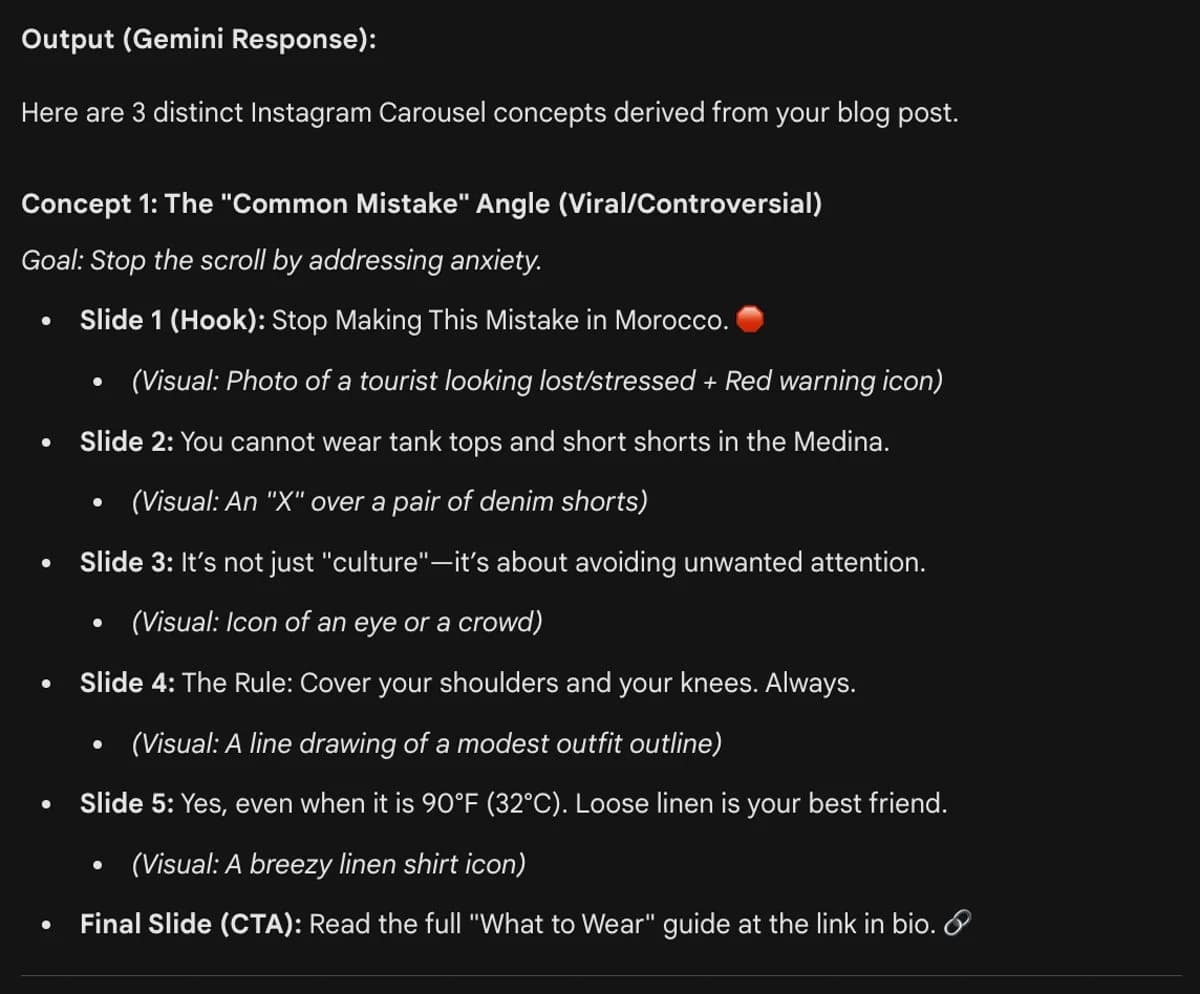
My Gemini output for one of my Instagram Carousels
4. Write a Hook That Stops the Scroll (Using Psychological Triggers)
If your first sentence is boring, the rest of your post doesn't exist. Most people write the hook last…or worse, they settle for "Here are 5 tips." I use this prompt to force Gemini to use proven psychological frameworks that drive curiosity.
Instead of asking for "good hooks," ask for specific styles of hooks. This gives you options ranging from controversial to educational.
Prompt:
"Act as a viral copywriter. I need 10 scroll-stopping hooks for a [Platform] post about [Topic].
Don't just give me generic questions. Generate 2 options for EACH of the following frameworks:
The Negative Bias: (e.g., 'Stop doing X if you want Y...')
The 'Insider' Secret: (e.g., 'The one tool pros use that beginners ignore...')
The Transformation: (e.g., 'How I went from X to Y in Z days...')
The Contrarian: (e.g., 'Why everyone is wrong about X...')
The Specific Numbers: (e.g., '3 steps to save $1,200...')
Constraint: Keep all hooks under 15 words. Make them punchy."
If you are writing for LinkedIn or Twitter, pick the "Negative Bias" hook. Human psychology is wired to avoid pain more than gain pleasure. "Stop losing money" almost always clicks better than "Start making money."
5. Summarize My Podcast Episode Into a LinkedIn Post
Most podcast promotion posts are boring: "New episode out now. We talk about X, Y, and Z." Nobody clicks those. I use this prompt to turn the content of the episode into a standalone value post that makes people actually want to listen.
Here’s what I recommend: Upload your full podcast transcript (PDF or text file) to Gemini. (Gemini 3.1 Pro has a 1M-token context window as of September 2026, so it can read an entire hour-long transcript easily).
Prompt:
"Act as a content marketer. I am attaching the transcript of my latest podcast episode.
Do NOT write a summary saying 'In this episode we discussed...'
Instead, extract the single most valuable 'aha' moment or tactical lesson from this conversation and write a standalone LinkedIn post teaching it.
Hook: Start with a controversial or surprising quote from the transcript.
Body: Provide 3 actionable takeaways (bullet points) that the reader can use immediately.
Tone: Professional but conversational.
CTA: End with 'Listen to the full deep dive in the comments below.'"
Need video clips to go with that text? I use Opus Clip to automatically slice my long episodes into viral shorts. It finds the highlights, adds captions, and centers the speaker automatically. It’s a non-negotiable part of my workflow. 👉 Try Opus for free here
6. Generate an SEO-Optimized Blog Outline (That Actually Ranks)
Structure is the difference between a 2-hour writing session and a 2-day struggle. But don't just ask for an "outline"…ask for a roadmap. I use this prompt to ensure every post I write targets the right keywords and satisfies user intent before I write a single sentence.
Treat Gemini as your SEO strategist. Give it your topic and audience, and ask for a detailed hierarchy that covers "depth" (essential for ranking).
Prompt:
"Act as a senior SEO content strategist. Create a comprehensive blog post outline for the topic: [Topic] targeting [Target Audience].
Requirements:
Title: Provide 5 click-worthy title options including the keyword.
Introduction: Outline a 'Problem-Agitation-Solution' (PAS) opening.
Body Structure (H2s & H3s): Create a deep logical flow. For each section, list 3 specific bullet points of what to cover and suggest 1 unique data point, example, or case study to include.
FAQ Section: Include 3 'People Also Ask' questions relevant to this topic to capture long-tail traffic.
Conclusion: Summarize key takeaways and end with a specific CTA."
My Recommendation: Once you have the outline, don't write the whole post at once. Paste one section of the outline back into Gemini and say: "Draft this specific section using a clear, punchy tone." Working section-by-section yields much higher quality text than doing it all at once.
7. Turn Messy Phone Notes Into a Quality Blog Post
I often write my best ideas in the Apple Notes app while waiting for coffee. They are messy, full of typos, and fragmented. I use this prompt to turn that "brain dump" into a publishable article without losing my personal voice.
The key is telling Gemini to expand the structure but stick to your ideas. If you don't set boundaries, it will add fluff to fill the word count.
Prompt:
"Act as a skilled ghostwriter. I am pasting some rough, unstructured notes below. Expand these into a cohesive [Word Count] word blog post.
Rules for Writing:
Tone: Conversational, direct, and 'human' (like a Medium article, not a textbook).
Formatting: Use short paragraphs (max 3 sentences). Use bold text to emphasize key points.
Constraint: Do NOT invent new concepts. Only expand upon the specific points I provided in the notes.
My Notes: [Paste your messy notes here]"
👉 Read also: My Guide to Using Gemini to Write Landing Pages
8. Optimize for SEO (Without Killing Your Voice)
The biggest mistake creators make is letting AI rewrite their entire article for SEO. The result? It sounds like a robot ate a dictionary. I use this prompt to surgically insert keywords only where they matter, keeping 90% of my original writing intact.
Don't ask for a rewrite. Ask for an audit and tweak. You want Gemini to act like an editor who just tightens the screws on your headlines and metadata.
Prompt:
"Act as a strict SEO Editor. I have written a blog post and my primary keyword is '[Insert Keyword]'.
Do NOT rewrite the whole post. instead, provide the following specific optimizations:
The Title (H1): Give me 5 viral-style titles that include the keyword near the front.
The Intro: Rewrite only my first paragraph to naturally include the keyword in the first 100 words.
The Headers: Suggest 3 tweaks to my existing H2/H3 sub-headers to include the keyword or related terms.
Semantic Keywords: List 5 related LSI keywords I should mention in the body text to help relevance.
Meta Description: Write a click-worthy meta description (under 160 chars) containing the keyword.
Blog Post: [Paste text here]"
After Gemini gives you the list, manually weave the changes in yourself. This ensures the "flow" stays yours, but the "signals" satisfy Google.
9. Create a Monthly Content Calendar
Most people ask AI for "30 ideas," and they get 30 variations of the same boring topic. I use this prompt to generate a balanced strategy (mixing viral broad topics with high-conversion niche topics) formatted instantly into a table I can paste into Notion.
My tip: Don't just ask for ideas…ask for a Content Mix. I follow the "3-Type Rule": Educational (How-to), Inspirational (Stories), and Transactional (Product/Service focus).
Prompt:
"Act as a Content Marketing Manager. Create a 4-week blog content calendar for the [Month] targeting [Target Audience] in the [Niche] industry.
Format: Present this as a Markdown Table with the following columns:
Week: (Week 1, Week 2, etc.)
Topic/Title: A catchy working title.
Content Goal: (e.g., Viral Awareness, Trust Building, or Sales/Conversion).
Format: (e.g., Listicle, Case Study, Ultimate Guide, Opinion Piece).
Strategy Requirements:
Ensure a mix of 60% educational content and 40% sales/conversion content.
Since it is [Month], include 1-2 seasonal or trending angles relevant to this time of year."
Once you have the table, I recommend copying and pasting it directly into Google Sheets or Notion. The Markdown formatting will automatically organize it into perfect rows and columns for you.
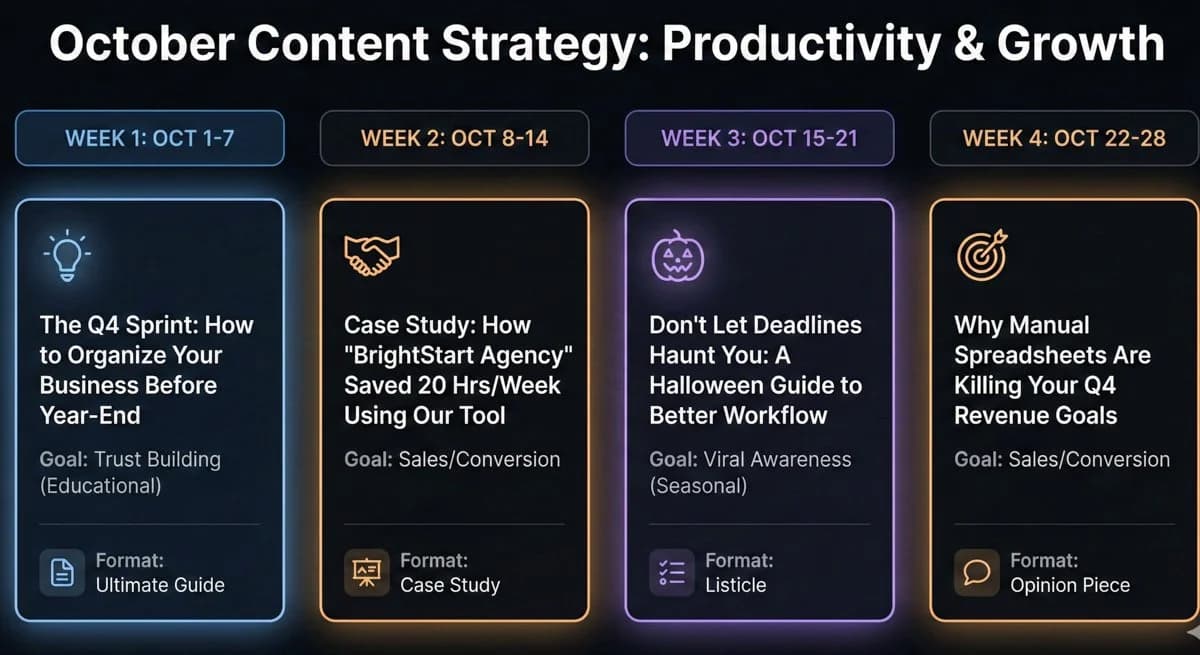
10. Generate High-Converting CTAs (Not Just "Sign Up")
We’ve all seen the "Join my newsletter" box at the bottom of a post. We’ve also all ignored it. To actually build an email list, your Call to Action (CTA) needs to sell the value, not the subscription. I use this prompt to generate "un-ignorable" CTAs tailored to the specific article the reader just finished.
Don't use the same generic CTA for every post. Use Gemini to write a specific bridge that links the problem discussed in the blog post to the solution in your lead magnet.
Prompt:
"Act as a Conversion Copywriter. I have written a blog post about [Topic] and I want readers to download my [Lead Magnet Name].
Write 5 distinct CTA options to place at the bottom of this article. For each option, provide:
The Lead-In Text: (1-2 sentences creating urgency or desire).
The Button Text: (Max 5 words, action-oriented).
Create one option for each of these angles:
The 'Logical Next Step': (e.g., 'Mastered the basics? Get the advanced guide.')
The 'Time Saver': (e.g., 'Don't want to do this manually? Download my template.')
The 'FOMO' (Fear Of Missing Out): (e.g., 'Join 5,000 others using this...')
The 'Value Stack': (Focus heavily on what is inside the download.)"
💡 My Pro Tip: Don't just put your CTA at the bottom. The highest conversion rates often come from "Inline CTAs"…text links placed right in the middle of the article when the reader is most engaged.
11. Write a Viral 60-Second Reel Script (With Visual Cues)
Most people just talk at the camera for 60 seconds and wonder why views drop off. The secret to viral Reels isn't just what you say…it's changing what the viewer sees every few seconds. I use this prompt to generate scripts that include specific camera movements and visual changes to keep retention high.
My suggestion: Don't just ask for text. Ask for a Director's Script. This forces Gemini to plan the visual flow of the video, not just the dialogue.
Prompt:
"Act as a Short-Form Video Expert (TikTok/Reels). Write a 60-second video script about [Topic].
Format: Create a Table with 3 columns: Time, Visual Action, and Audio/Dialogue.
Script Requirements:
0-3 Seconds (The Hook): Describe a visual disruption (e.g., 'Knock on camera lens' or 'Hold up a sign') combined with a controversial statement.
Body: Change the visual angle or add text overlays every 5-7 seconds.
Ending: A quick CTA pointing to the caption.
Tone: Fast-paced, high energy, no fluff."
Once you have the script, paste the "Audio" column directly into CapCut’s Teleprompter feature. It scrolls the text next to the camera lens so you can read your lines while maintaining eye contact. 👉 Grab CapCut here
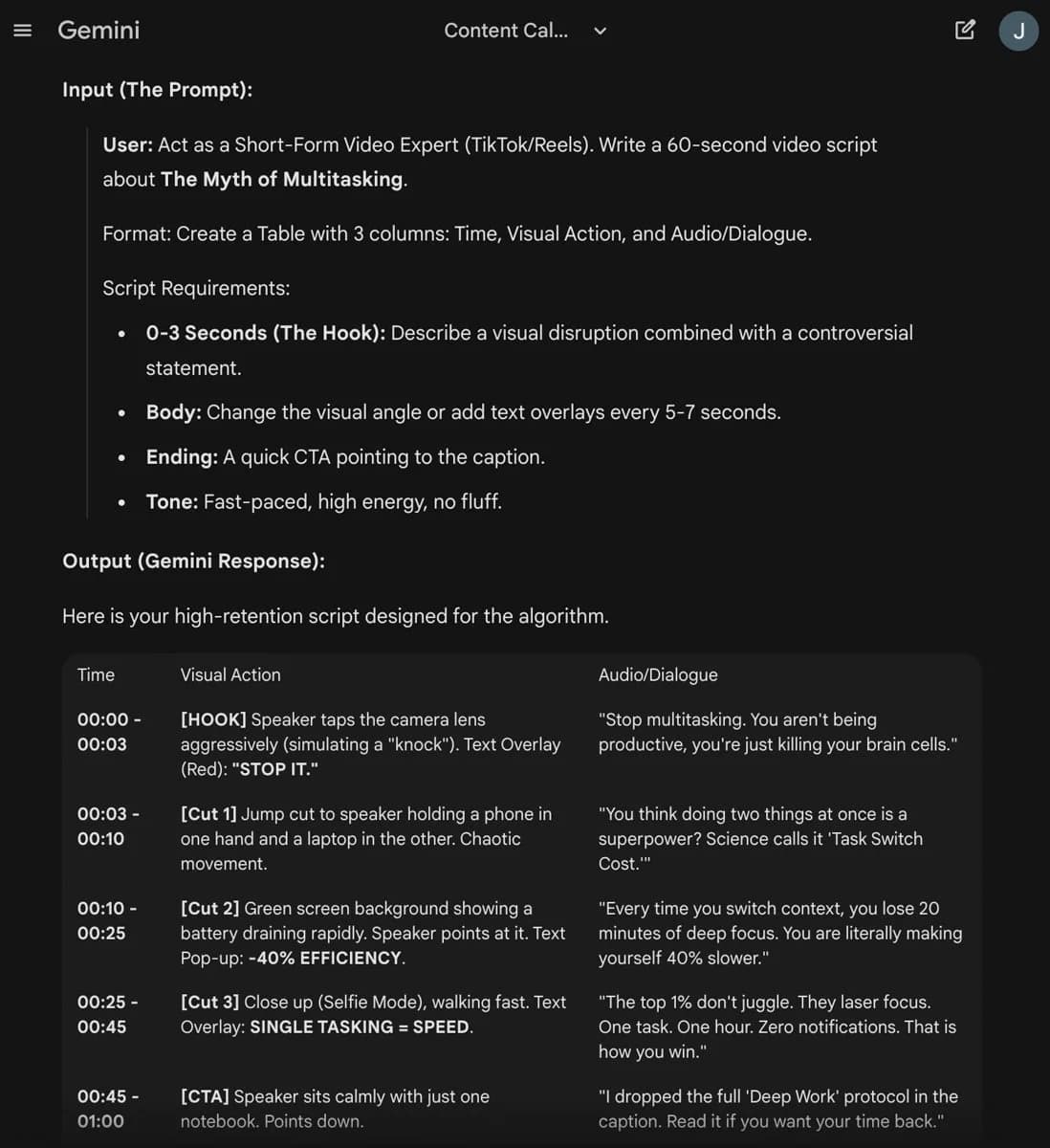
My example of a prompt output for my short form video script
12. Turn a Blog Post into a High-Retention YouTube Script
If you just read your blog post into a camera, your viewers will click off in 10 seconds. Video requires different pacing, visual changes, and conversational language. I use this prompt to convert my written articles into production-ready scripts that include visual direction.
Don't just ask for a "summary." Ask for a Two-Column AV Script. This separates what you say (Audio) from what the viewer sees (Video), ensuring you don't just have a boring "talking head" for 10 minutes.
Prompt:
"Act as a YouTube Scriptwriter. Convert the blog post below into an engaging video script.
Format: Create a Table with two columns: Visual (Video/B-Roll) and Audio (Dialogue).
Script Guidelines:
The Hook (0:00-0:30): Start with a visual disruption or a strong promise. Do not start with 'Hello everyone.'
Pacing: Break long paragraphs into short, punchy spoken sentences.
Visuals: For every main point, suggest a specific B-Roll idea (e.g., 'Screen recording of X', 'Stock footage of Y', 'Text overlay on screen').
Tone: Casual, high-energy, and direct.
Blog Post: [Paste text here]"
The most important part of your video is the first 30 seconds. Once Gemini generates the script, look at the "Hook" section and ask it to generate 5 alternative hooks so you can pick the absolute strongest one before you start filming.
💡 Pro Tip for Non-Video Editors: If you film your script and the audio sounds bad (or you kept looking down at your notes), don't reshoot. I use Descript’s AI features to fix it.
Studio Sound: Removes echo and background noise instantly.
Eye Contact AI: Digitally moves your eyes to look at the camera, even if you were reading a script. 👉 Fix your video audio/visuals with Descript here
13. Give Me 5 Video Hook Ideas (Using Proven Frameworks)
The first 5 seconds of your video are the only thing that matters. If you lose them there, the rest of your editing doesn't count. I use this prompt to generate hooks based on psychological triggers that force the viewer to ask "What happens next?"
Whatever you do, don't just ask for "hooks." Ask for specific types of openings. This gives you a menu of options ranging from high-energy visual openers to deep psychological warnings.
Prompt:
"Act as a YouTube Retention Expert. I need 5 distinct opening hooks for a video about [Topic].
Do NOT write generic intros like 'Hey guys, welcome back.' Instead, generate one option for each of these 5 frameworks:
The 'Result First' Hook: Start by describing or showing the insane final result immediately.
The 'Warning' Hook: Tell the audience why ignoring this topic is dangerous or costly.
The 'Prop' Hook: Describe a physical object I should hold up or show on screen to grab attention.
The 'Contrarian' Hook: State a controversial opinion that challenges common advice in my niche.
The 'Story' Hook: Start in the middle of a high-stakes moment (In Medias Res).
Constraint: Keep every hook under 40 words."
💡 My Pro Tip: I usually film three different hooks for every video. Then, I show them to a friend (or my editor) and ask: "Which one makes you want to click the most?" The winner goes in the final cut.
14. Turn a Viral Tweet Into a "Green Screen" Video Script
If a text post goes viral on X (Twitter) or LinkedIn, it’s virtually guaranteed to work as a video. The easiest way to film this is using the "Green Screen" effect where the tweet is behind you. I use this prompt to turn a static image into a dynamic commentary script.
The Strategy: Reading the tweet out loud is boring. Instead, use the tweet as the "Hook," and then use Gemini to script the context and story behind the tweet to keep people watching.
Prompt:
"Act as a Social Media Strategist. I want to turn the tweet below into a 30-45 second short-form video using the 'Green Screen' effect (where the tweet is visible in the background).
Script Requirements:
The Hook: Start by pointing up at the tweet and creating curiosity (e.g., 'This is the most controversial take I've posted...').
The Expansion: Don't just read the tweet. Explain the backstory, give a concrete example, or explain why this tweet matters.
Visual Cues: Tell me when to look at the camera vs. point at specific lines in the tweet.
Tone: Casual commentary.
The Tweet: [Paste text here]"
You don't need fancy software for this. Open TikTok or Instagram Reels, select the "Green Screen" effect, upload a screenshot of your tweet, and hit record. It’s the lowest-effort, highest-reward video format right now.
15. Turn a Webinar into a 3-Part Viral Video Series
Webinars are great for depth, but terrible for reach. Instead of letting that 60-minute recording gather dust, I use this prompt to slice it into a cohesive 3-part miniseries for TikTok or Reels. This strategy turns one piece of content into three days of engagement.
My suggestion: Don't try to cram the whole webinar into one minute. Split it up. Use Gemini to identify the three distinct "chapters" of your presentation that can stand alone as short videos.
Prompt:
"Act as a Video Editor. I am attaching the transcript of my recent webinar. I want to repurpose this into a 3-part short-form video series.
Create a script for each of the following 3 videos:
Video 1 (The Hook): Focus entirely on the Problem discussed in the webinar. Agitate the pain point. (Ending CTA: 'Check out Part 2 for the solution').
Video 2 (The Value): Focus on the Core Solution or Framework presented. Give the specific 'How-To'. (Ending CTA: 'See the results in Part 3').
Video 3 (The Proof): Focus on a specific Case Study or Example mentioned in the transcript. Show the result. (Ending CTA: 'Link in bio to watch the full training').
Constraint: Keep each script under 150 words (approx 60 seconds spoken)."
If you have the video file, use Gemini to find the timestamps. Add this line to the prompt: "Identify the timestamp in the transcript where I discuss the [Specific Topic] so I can find the clip easily."
💡 My "Cheat Code" for Editing: I don't use complex video software to chop up my webinars. I use Descript. It transcribes the video, and I just delete the text I don't want, which automatically deletes the video frames. It cuts my editing time by 90%. 👉 Try Descript for free here (it's magic)
16. Write a "Super Welcome" Email (That Actually Gets Replies)
Your welcome email has the highest open rate of any email you will ever send (usually 50%+). Don't waste it on a generic "Thanks for subscribing" message. I use this prompt to write an email that establishes authority, sets expectations, and, most importantly, gets the reader to reply (which keeps me out of the spam folder).
I recommend treating this email like a "Manifesto." It needs to tell them who you are, what they will get, and exactly what to do next.
Prompt:
"Act as an Email Marketing Expert. Write a high-converting Welcome Email for my [Niche] newsletter.
Structure the email with these 4 specific sections:
The 'Not-Boring' Hook: Don't say 'Welcome.' Start with a 1-sentence story or a surprising fact about the industry.
The Origin Story: Briefly explain who I am and why I started this newsletter (keep it under 3 sentences).
The Expectation: Tell them exactly what they will get (e.g., 'Every Tuesday, I’ll send you...').
The Micro-Commitment (Crucial): Ask a specific, easy-to-answer question and tell them to 'Hit reply and let me know.' (e.g., 'What is your #1 struggle with X right now?').
Tone: Write this like a text message to a friend: casual, spacing, no corporate jargon."
💡 My Pro Tip: Getting a subscriber to reply to your very first email is the #1 "hack" for email deliverability. It signals to Gmail and Outlook that you are a "friend," ensuring your future sales emails land in the Primary tab, not the Spam folder. I highly recommend using either Kit.com or Beehiiv, which have the best tools and functionalities for email marketing in 2026.
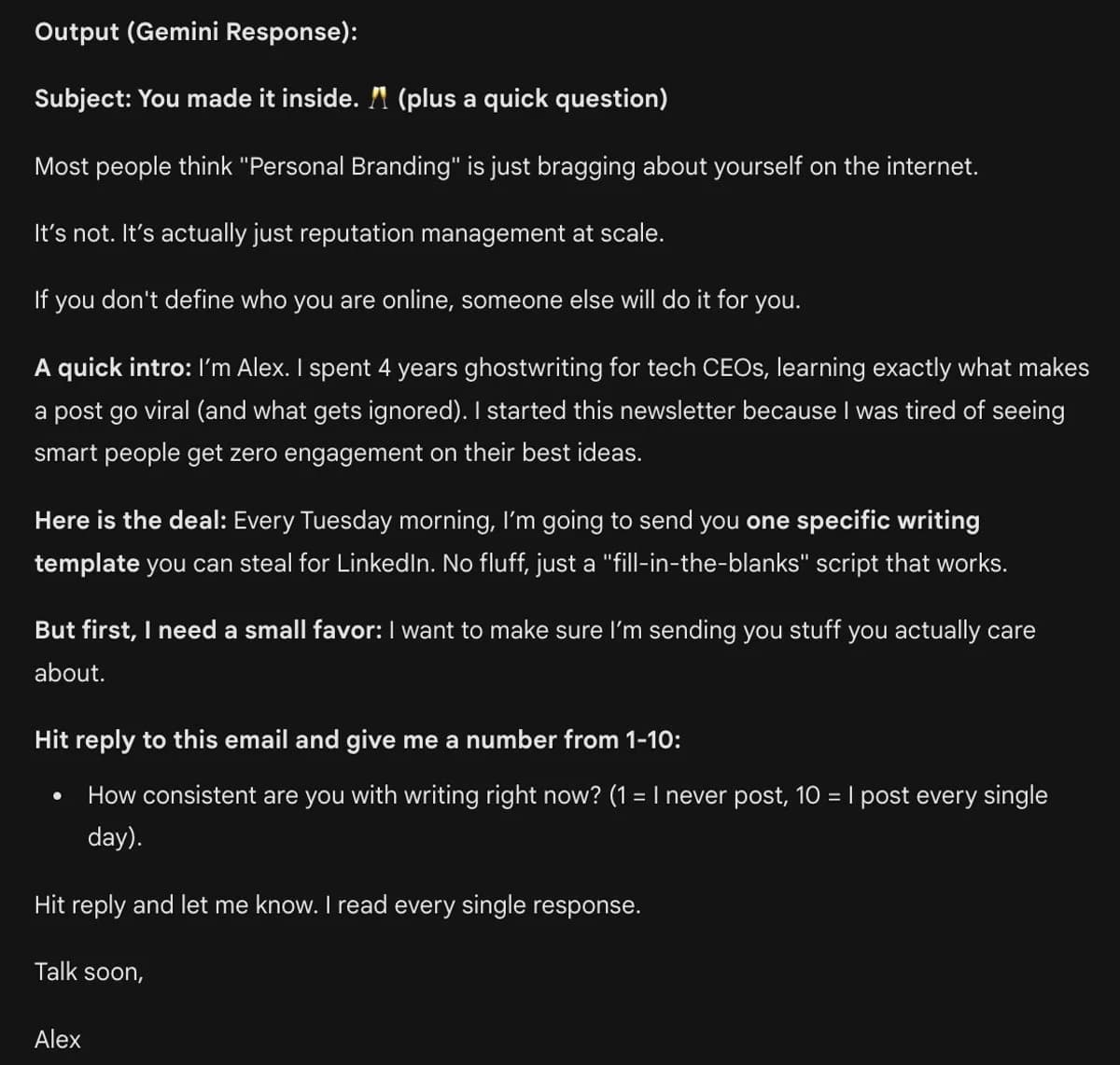
My Gemini output for a sample welcome email
17. Optimize Your Email for Clicks (The "Curiosity Gap" Method)
If your open rates are high but your click rates are low, you are likely making one fatal mistake: You are giving away too much value inside the email. The goal of an email isn't to teach…it's to sell the click. I use this prompt to rewrite my drafts so they tease the value without giving it away.
I highly recommend using the "Curiosity Gap" technique. Your email should build tension, and the link should be the only way to release that tension.
Prompt:
"Act as a Direct Response Copywriter. I have written a draft email below. Rewrite specific sections to improve the Click-Through Rate (CTR).
Optimization Rules:
The 'Tease': Identify where I give away the solution. Rewrite it to build curiosity instead (tell them what happened, but make them click to see how).
Anchor Text: Change generic links like 'Click here' to benefit-driven text (e.g., 'See the 3-step breakdown' or 'Download the template').
The P.S. Strategy: Add a 'P.S.' section at the very bottom that restates the main offer from a different angle (FOMO or Urgency).
Email Draft: [Paste text here]"
💡 My Pro Tip: The "P.S." at the bottom of an email is often the most clicked link in the entire message. Always include a direct link to your offer there for the "skimmers" who scrolled past everything else.
18. Create a 5-Day "Trust Engine" (Automated Nurture Sequence)
The biggest mistake creators make is asking for a sale too early. You need to earn the right to sell. I use this specific 5-day sequence to take a cold subscriber from "Who is this?" to "Shut up and take my money" on autopilot.
Don't just send 5 "tips." Use a narrative arc that breaks their false beliefs and positions your product as the only logical solution.
Prompt:
"Act as an Email Funnel Strategist. Outline a 5-Day Nurture Sequence for new subscribers interested in [Niche/Topic]. My ultimate goal is to sell [Product/Service].
Draft a bullet-point outline for each email using this psychological arc:
Email 1 (The Mistake): 'Most people do X, and it fails. Here is why.' (Goal: Empathy).
Email 2 (The Belief Shift): 'Here is the new way to think about X.' (Goal: Authority).
Email 3 (The Soft Pitch): A personal story of how I discovered this solution. Mention the product casually. (Goal: Social Proof).
Email 4 (The Pure Value): Give away a 'Quick Win' tool or tip they can use right now. (Goal: Reciprocity).
Email 5 (The Hard Ask): 'If you want to go faster, get the full system here.' (Goal: Conversion).
Constraint: For each email, provide a catchy subject line and the 'One Big Idea' needed for the body copy."
In my experience, this sequence is your "Silent Salesman." Once you set this up in your email tool (Kit.com, Beehiiv, etc.), it runs 24/7/365. I spend hours perfecting these 5 emails because they will be read by thousands of people for years to come.
19. Write Subject Lines That Demand to Be Opened
The "unread" pile is where emails go to die. To survive the inbox battle, you can't sound like a marketer. You need to sound like a friend…or a mystery. I use this prompt to generate subject lines that break the "marketing pattern" and trigger genuine curiosity.
My Strategy: Don't just ask for "good subject lines." Ask for Pattern Interrupts. The goal is to stand out from the sea of "Buy Now" and "Newsletter #45" emails.
Prompt:
"Act as a Copywriter. I am writing an email about [Topic]. The goal is to get the subscriber to open it immediately.
Generate 10 subject line options (all under 50 characters) using these specific styles:
The 'Lower Case' Friend: (e.g., 'quick question' or 'bad news') - Looks like a text from a friend.
The 'Open Loop': (e.g., 'I made a mistake...') - Forces them to click to close the loop.
The 'Benefit-Driven': (e.g., 'Steal my $10k template') - Pure value.
The 'Negative' Angle: (e.g., 'Don't buy X until you read this') - Protective warning.
The 'One Word': (e.g., 'System' or 'Friday') - Stands out due to brevity.
Bonus: For the top 3 options, write a matching 'Preview Text' (the snippet they see before clicking) that enhances the curiosity."
My highest open rates almost always come from the "Lower Case Friend" style. Subject lines like "quick update" or "can i ask you something" often outperform hype-filled headlines by 20% or more. Test it.
20. Write a Sales Email That Doesn't Feel "Salesy"
Let’s be real: hitting "Send" on a sales email is terrifying. You worry about being annoying or seeing a wave of unsubscribes. I used to feel the same way until I switched from "Pitching" to "Storytelling." This prompt helps me sell my products by explaining why I built them, rather than just listing features.
Use the "Scratch Your Own Itch" narrative. People don't buy "products"; they buy solutions to problems. If you show them that you had the same problem and this product fixed it for you, the sale feels like a recommendation from a friend.
Prompt:
"Act as a Ghostwriter. I need to write an email introducing my new [Product/Service] to my list.
Do NOT use hype words like 'Revolutionary,' 'Unleash,' or 'Game-changing.'
Instead, write a personal story using this 4-step 'Story-Bridge' framework:
The Struggle: Start by describing the specific frustration I faced before I had this product. (Make it relatable).
The Epiphany: The moment I realized I needed a better way.
The Solution: Introduce [Product Name] as the tool I built to solve that problem.
The Invitation: A soft call-to-action inviting them to try it if they have the same problem.
Context: [Briefly describe what your product does and who it is for]."
💡 My Pro Tip: The best sales emails focus on the Transformation, not the Features. Don't tell them it includes "4 modules and a PDF." Tell them it "saves you 5 hours a week so you can clock out early on Fridays."
21. Build a "No-Burnout" 30-Day Content Map
Waking up and thinking "What should I post today?" is the fastest way to quit. I use this prompt to map out an entire month of content in one sitting. The secret isn't just "more posts"…it's the right mix of posts.
I recommending using the "4-Bucket System." A healthy content diet needs Viral posts (for reach), Authority posts (for trust), Personal posts (for connection), and Sales posts (for money). This prompt ensures you hit all four every week.
Prompt:
"Act as a Social Media Manager. Create a 30-day content calendar for my [Platform] account. My niche is [Niche].
Format: Create a Table with columns: Day, Content Bucket, Format, and Headline Idea.
You must cycle strictly through these 4 'Content Buckets':
Growth: Broad appeal, contrarian takes, or industry trends. (Goal: Views).
Authority: 'How-to' tutorials, case studies, or technical breakdowns. (Goal: Trust).
Personal: Behind-the-scenes, mistakes I've made, or my origin story. (Goal: Connection).
Conversion: Soft or hard pitches for my [Product/Service]. (Goal: Leads).
Constraint: Mix up the formats (e.g., Carousel, Text-Only, Short Video) so the feed stays visually interesting."
Once you have this calendar, I recommend picking one bucket (e.g., "Authority") and writing all 4 of those posts at the same time. Your brain works faster when you stay in one "mode" rather than switching between storytelling and selling every day.
22. Find My Best Performing Topics (Viral DNA)
You don't need to guess what your audience wants. They are already telling you with their clicks. I use this prompt to analyze my winners, find the hidden patterns I missed, and generate a strategy to repeat that success.
My Strategy: This only works if you feed Gemini the data. I export my top 20 posts from the last 6 months (views, likes, and the text itself) and let Gemini play "Data Detective."
Prompt:
"Act as a Social Media Analyst. I am pasting the text and performance stats of my Top 10 performing posts below.
Analyze this data and identify the 'Viral DNA' shared across these posts. Look for patterns in:
The Hook Style: (e.g., Did I start with a number? A negative emotion? A question?)
The Structure: (e.g., Are they all listicles? Personal stories? Contrarian takes?)
The Topic: What specific pain points are recurring?
Based on this analysis, generate 5 NEW post ideas that follow this exact winning formula but cover slightly different angles.
Data: [Paste your top posts and their view counts here]"
NOTE: Gemini cannot log into your social accounts. You must copy-paste your post text or upload a CSV/PDF of your analytics for this to work.
I recommend looking for the "Outliers." If 9 of your top posts are "How-to" guides and 1 is a "Rant," pay attention to the Rant. It might be a signal that your audience is craving more personality and opinion from you.
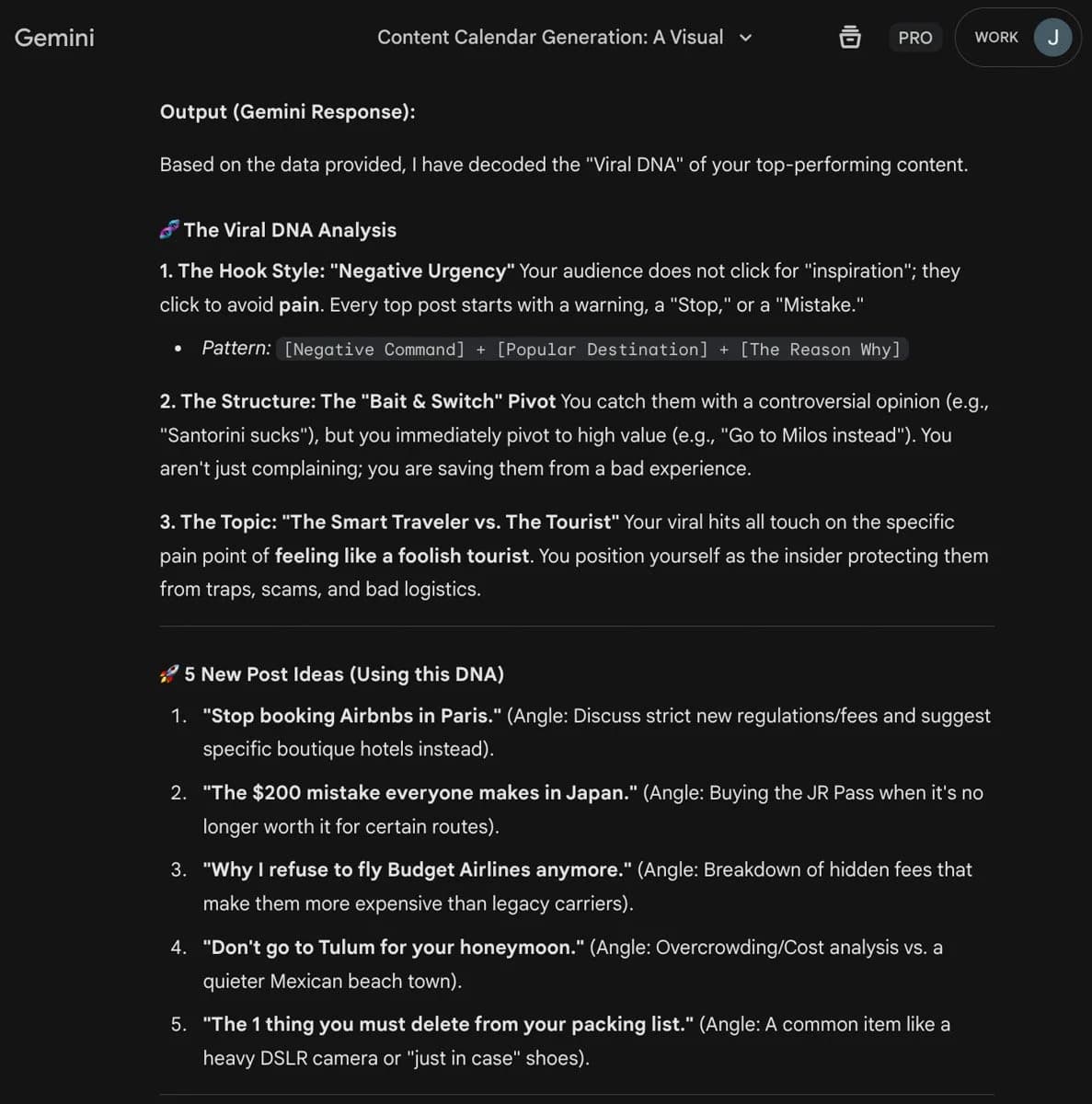
Gemini suggested new post ideas based on my social media analytics
23. Create a Lead Magnet People Actually Want to Download
Most lead magnets fail because they are "homework." Nobody wants a "10-Day Course" or a "50-Page Ebook" anymore. They want a painkiller. I use this prompt to brainstorm specific, high-utility tools that solve a problem instantly for my subscribers.
I always recommend focusing on Utility, not Information. The best lead magnets are "Cheat Sheets," "Templates," or "Calculators"…things people can use immediately to get a result.
Prompt:
"Act as a Growth Marketer. My target audience is [Target Audience] and their biggest burning pain point is [Specific Pain Point].
Generate 5 High-Utility Lead Magnet ideas that solve a specific narrow problem in under 10 minutes.
Avoid generic ideas like 'Ebooks' or 'Newsletters.' Instead, focus on these formats:
The 'Cheat Sheet': (A one-page reference guide).
The 'Template': (Copy-paste scripts or Notion pages).
The 'Audit/Checklist': (A diagnostic tool).
The 'Swipe File': (A collection of proven examples).
The 'Calculator': (A spreadsheet to solve a math problem).
For each idea, provide:
A Click-Worthy Title.
A 1-sentence description of the 'Instant Win' they get.
How this naturally leads to selling my main offer: [Your Main Product]."
Test your lead magnet title before you create it. Tweet the title or post it on LinkedIn: "I'm thinking of building a [Title]. Would you guys want a free copy?" If nobody comments "Yes," don't build it.
24. Give Me 3 Content Pillars Based on My Niche (My Unfair Advantage)
If you just post "tips and tricks," you are a commodity. To build a brand, you need Content Pillars that define not just what you know, but who you are and what you stand for. I use this prompt to move beyond generic topics and define the specific "lanes" that make my content unique.
The Strategy: A balanced Personal Brand needs three specific legs to stand on: Competence (I know my stuff), Beliefs (I have a unique worldview), and Relatability (I am a human).
Prompt:
"Act as a Personal Branding Strategist. My niche is [Niche] and my target audience is [Target Audience].
Define 3 distinct 'Content Pillars' that will differentiate me from competitors:
The 'Technical Authority' Pillar: (The hard skills and 'How-To' content I will teach to prove competence).
The 'Polarizing Belief' Pillar: (The common industry advice I disagree with, or the 'Enemy' I stand against. This builds a tribe).
The 'Backstage' Pillar: (The personal stories, failures, or 'build in public' content that creates connection).
For each pillar, list 5 specific sub-topics or headline ideas I can write about immediately."
Based on what I’ve seen, the "Polarizing Belief" pillar is usually where you go viral. If everyone in your niche says "Hustle harder," and you say "Hustle is a trap," you immediately stand out. Find your "Villain" and fight it.
25. The "Content Audit": Cut Your Work Time in Half
If you feel like a hamster on a wheel, your process is broken. Complexity kills consistency. I use this prompt once a quarter to ruthlessly audit my workflow, identifying exactly where I'm wasting time and which AI tools can replace my manual grunt work.
I recommend using the "E.A.D." Framework (Eliminate, Automate, Delegate). You need to feed Gemini your current step-by-step process so it can act as an Operations Consultant.
Prompt:
"Act as an Operations Consultant. I am pasting my current end-to-end content creation workflow below.
Analyze this process and identify 3 specific bottlenecks where I am wasting time.
For each bottleneck, provide a solution using the E.A.D. Framework:
Eliminate: What step is low-value and should be deleted entirely?
Automate: Which specific AI tool or Zapier automation could handle this step for me?
Delegate: What part should be handed off to a VA or freelancer?
My Current Process:
[Step 1: e.g., Read news for ideas]
[Step 2: e.g., Draft in Google Docs]
[Step 3: e.g., Create graphics in Canva]
[Step 4: ...]"
💡 My Pro Tip: Be honest with your "Current Process" list. Include things like "Stare at screen for 20 minutes" or "Scroll Twitter for inspiration." Gemini can often give you specific prompts to cure those procrastination triggers, too.
Video Prompts for Gemini: Copy-Paste Templates (Gemini Omni)
Video prompts for Gemini work best when you write them like a director's brief: subject, action, setting, camera, lighting, and audio, in that order. Here's what most creators miss: Gemini doesn't just script your videos anymore, it can generate them. As of September 2026, video generation in the Gemini app runs on Google's Gemini Omni model, available on the Google AI Plus ($4.99/month), Pro ($19.99/month), and Ultra (from $99.99/month) plans for users 18 and over. You choose the aspect ratio before generating, you can ask for audio with the clip, and you can edit the result with a follow-up prompt instead of starting over. (Veo 3.1, Google's earlier video model, is still available to developers through the Gemini API and in Flow.) The trick is prompting it like a director, not a search bar. The first two structures below are the exact ones I use; the three templates after them adapt the same brief to the video types creators search for most.
The "Director's Brief" (text-to-video prompt)
Gemini's video model rewards specifics. Spell out subject, action, setting, camera, and audio:
"A [subject: a golden retriever puppy] [action: chasing a red ball] across [setting: a sunlit backyard], filmed as a [camera: slow-motion tracking shot] with warm, cinematic lighting. Audio (SFX): soft grass rustling, ambient birdsong. [Aspect ratio: 16:9 for YouTube, 9:16 for Reels]."
Swap the brackets and you've got a repeatable template for product shots, B-roll, or scroll-stoppers.
The "Meta-Prompt" (let Gemini write the video prompt for you)
This is the pro move. Instead of guessing at video-prompt phrasing, have Gemini draft it:
"Act as a video prompt engineer for Gemini's video generator. I want a 3-scene video advertising [my product or idea]. For each scene, write a detailed video prompt with subject, action, camera movement, lighting, and audio (dialogue in quotes, plus SFX and ambient sound). Keep a consistent visual style across all three scenes."
Generate scene one from the first output, then use follow-up prompts for scenes two and three so the style carries over, and you get a coherent multi-shot video without touching an editor.
Product video prompt for Gemini
A product video prompt for Gemini should name the product, the surface it sits on, one camera move, and the lighting, then stop. Upload a photo of the product first so the model animates the real thing instead of inventing one.
"Animate this photo of [product] on a [surface: matte black tabletop]. Camera: slow 180-degree orbit ending on the logo. Lighting: soft studio key light from the left, subtle rim light. Audio: low ambient hum, one soft click when the logo lands. Aspect ratio 9:16."
Advertisement video prompt for Gemini
An advertisement video prompt for Gemini needs a problem, a reveal, and one spoken line. Keep the dialogue short and put it in quotes so the model knows which words are speech.
"Scene one: a cluttered desk at night, a founder rubbing their eyes, harsh laptop glow. Scene two: the same desk in morning light, [product] open on screen, the founder relaxed with coffee. Spoken line at the end: 'Ship the work, skip the grind.' Audio: quiet keyboard clicks, then birdsong. Camera: slow push-in on both shots. 16:9."
Action video prompt for Gemini
An action video prompt for Gemini is about motion and camera, so describe both explicitly and keep the scene to one subject.
"A mountain biker [subject] launching off a dirt jump [action] on a forest trail at golden hour [setting]. Camera: low-angle tracking shot that whips to follow the bike mid-air. Lighting: backlit sun flare through the trees. Audio: tire crunch on gravel, wind, one sharp exhale. Fast-paced, 16:9."
Three rules for better Gemini video prompts:
- Put spoken lines in quotes (
"We have to leave now.") so the model treats them as dialogue rather than scene description - Describe what you want in frame rather than what to exclude ("an empty desert road" beats "no cars")
- Fix one thing per follow-up prompt ("keep everything, make the lighting warmer") instead of rewriting the whole brief; Gemini Omni edits the existing clip in the same chat
Ready to Create Faster, Smarter, and Without Burnout?
These 25 prompts have saved me hundreds of hours and helped me publish content that actually performs.
But remember: A prompt is only as good as the system behind it.
If you want to stop copy-pasting and start building a real content engine, I’ve packaged my entire workflow (including my custom Notion templates, automation scripts, and advanced prompt library) into a single system.
👉 Download the full prompt pack (free). I'll send you these 25 prompts plus my Notion templates, automation scripts, and the rest of my prompt library in one place.
Frequently asked questions
Is Gemini good for content creation? Genuinely, yes. Gemini 3.1 Pro, the app's Pro model as of September 2026, has a 1M-token context window that lets you feed it an entire brand guide, your past posts, and a transcript all at once, so the output sounds like you instead of generic AI. The catch is the same as any model: what comes out depends on the prompt you put in, which is exactly what the 25 above are built for.
Gemini or ChatGPT for content: which is better? They're close, and I use both. Gemini tends to win on research-heavy and long-document tasks (huge context, tight Google integration); ChatGPT often feels a touch more natural on short social copy. The bigger lever isn't the model, it's the prompt. If you want to compare styles, see my Claude prompts for content creation, and for the head-to-head breakdown read ChatGPT vs Claude vs Gemini.
How do I write better Gemini prompts? Use the same skeleton every prompt in this post uses: Role (act as a viral ghostwriter), Context (your niche, audience, past examples), Format (thread, carousel, email), Constraints (tone, length, no hashtags), and Goal (drive newsletter clicks). Fill in those five and your results jump immediately. I go deeper in prompt engineering for Gemini.
Will Google penalize content I make with Gemini? Not for using AI. Google has said it rewards helpful content regardless of how it's produced. What gets demoted is unedited, low-value output. So treat Gemini as a first draft: add your own experience, examples, and opinions (the stuff these prompts are designed to pull out of you), then publish.
Can Gemini generate videos, not just scripts? Yes. As of September 2026 the Gemini app generates video with Google's Gemini Omni model on the paid Google AI plans (Plus, Pro, and Ultra), with audio, aspect-ratio control, and follow-up edits by prompt. The video prompts section above has my exact templates; prompts 11 to 15 handle the script-writing side.
What's the best Gemini prompt for video generation? Start with a "director's brief": name the subject, action, setting, camera movement, lighting, and audio in a single prompt (template in the video prompts section). Even better, use the meta-prompt to have Gemini write the video prompt for you; it's far more detailed than what most people type by hand.
What's the fastest way to get all of these prompts? Grab the free prompt pack. It's the full set in copy-paste format plus a few bonuses, so you're not scrolling back here every time you need one.
Keep building your content engine
- Browse the full AI Prompt Library
- Claude prompts for content creation: the same idea, tuned for Claude's voice and longer-form writing.
- Gemini prompts for landing pages and CTAs: turn that content into copy that converts.
- Prompt engineering for Gemini: the full method behind why these prompts work.
Want this done for you instead of DIY? See my AI plans and I'll build a custom GPT and prompt library around your exact workflow.

Written by Jon Miksis
Founder of AI Hustle Guy, Make the Leap, and Europe Flight Club, and the travel blogger behind Global Viewpoint (9+ years, 73 countries). He brings 9+ years of coaching and mentorship experience and has facilitated 23 transformation retreats across four continents. Every AI tool and prompt on this site gets tested on his own businesses first.
Get my free AI prompt pack
Join 300+ founders, creators, and professionals. I’ll send you my go-to AI tools and copy-paste prompts that save hours every week. No spam.