How to Start a Blog with AI in 2026 (Create a Money-Making Site in 20 Minutes)
By Jonathan Miksis · January 26, 2026 · 29 min read
Some links in this post are affiliate links. If you buy through one, I may earn a commission at no extra cost to you.

When I started blogging in 2017, it felt like I needed a computer science degree and unlimited patience. I spent hours messing with themes, plugins, settings, and random YouTube tutorials. I also wasted time writing posts nobody searched for. It took me a while to figure out what actually moves the needle.
In 2026, the whole process is different. AI removes the hard parts. You can come up with a niche, build a content plan, and draft your first posts in a single weekend. The tech setup is also simple now. You can literally get a blog online in under an hour. I’ve done this 7 times now, including making 3 new websites this past year.
And if you’ve been thinking about starting a blog but keep putting it off, I’m going to be blunt. This is the best time you will ever have to start.
More people than ever are searching for answers, itineraries, “best of” lists, and product recommendations. Brands and affiliate programs are still paying. And AI lets you create faster than the folks who are still doing everything manually.

Here’s the big difference vs just 3 years ago…
Back then, you needed months just to build momentum. Now you can set up your site today, publish your first posts this week, and start earning from affiliate links way sooner, especially if you pick the right topics.
If you want the simplest path, here’s what I recommend: Use Bluehost, install WordPress, and get your site live today. Don’t overthink it. You can tweak the design later. What matters is getting online and publishing.
👉 If you’re ready to start, use my Bluehost link to get the best deal on the internet. I’ve partnered with Bluehost for over 7 years to secure $1.99/month for my readers.
[
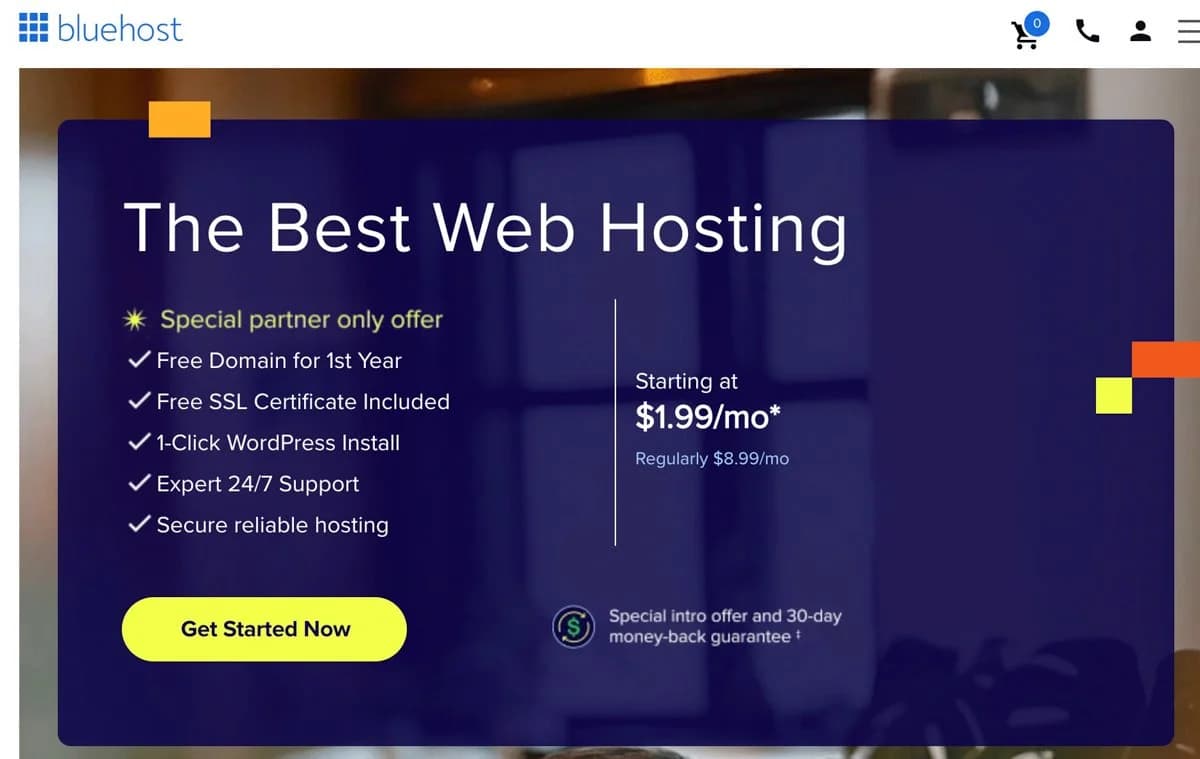
](https://bluehost.sjv.io/Jkj0PQ) My special Bluehost deal available to my readers in 2026
How to Start a Blog Fast (In 5 Easy Steps)
If you are the kind of person who just wants the shortcut, this is it.
Follow these steps and you can go from idea to real blog in a single sitting. This is just my quick-start guide, but I have many more helpful tips below.
1. Pick a money making niche with AI
Open ChatGPT, Gemini, or your favorite AI tool and paste this in:
Prompt:
You are a blogging strategist. Ask me 10 questions to find my best blog niche based on my interests, experience, and earning potential. After I answer, give me 3 niche options. For each option include: target audience, clear blog angle, 10 post ideas, and 3 monetization paths.
Answer the questions honestly. I recommend picking the niche that feels easiest to talk about for the next 90 days.
2. Grab your domain and hosting
Next, lock in your home on the internet. Use Bluehost, choose the basic plan, and search for a simple, readable domain.
No clever misspellings. No inside jokes. If someone hears it once and cannot type it, pick something else.
👉 Use my Bluehost partner link here to get my reader discount at $1.99/month and a free domain for year one.
3. Install WordPress in one click
Inside Bluehost, let the setup wizard install WordPress for you. You will not touch code. You will click a couple of buttons and be done.
Once that is finished, you officially own a live WordPress blog.
It will not be pretty yet. That is fine. We fix the looks later.
4. Create your 5 core pages with AI
Before you obsess over design, get the basics in place:
Home
About
Contact
Privacy Policy
Affiliate Disclosure
You can draft all of these in minutes with AI.
Ask your AI tool: “Write a short [About/Contact/etc.] page for my new blog about [NICHE]. Keep it simple, clear, and in first person.”
Paste it in, tweak a few lines so it sounds like you, hit save.
5. Publish your first post with AI help
Now it is time to stop planning and actually publish.
Pick one beginner friendly topic from your new content plan. Then use a writing prompt like:
“Write a casual, helpful first person blog post about [TOPIC]. Keep sentences short. No fluff. Structure it with an intro, 5 to 7 clear sections, a quick checklist, and a simple call to action at the end. Leave spots for me to add my personal stories and real examples.”
Let AI give you a draft. Add your own stories, opinions, and numbers. Then hit publish.
Next, I’m going to show you the exact 2026 blogging stack I’d use if I were starting from zero today, plus the AI prompts that make this stupidly easy. I’ve used these strategies for over 50 clients in the past 2 years (including 3 of my own new sites), so I guarantee it works.
The Simple 2026 Blogging Stack (What You Actually Need)
Let me save you a ton of time here because beginners get dragged into a million “must-have” tools.
In 2026, you only need three things to start a blog the right way: a domain, hosting, and WordPress. Everything else is optional and can come later.
1) Domain name (your site name)
This is your web address, like YourBlog.com.
Keep it simple. Easy to spell. Easy to say out loud. Don’t get cute with weird spellings.
If you’re starting a travel blog, here are formats that work:
[City] + Travel Guide (example: AustinTravelGuide)
Budget + [Region] (example: BudgetEuropeTrips)
Weekend + [Home Base] (example: WeekendTripsFromNYC)
Your name + travel (example: JonTravels)
Quick rule: if you can’t say it once without explaining it, it’s not the one.
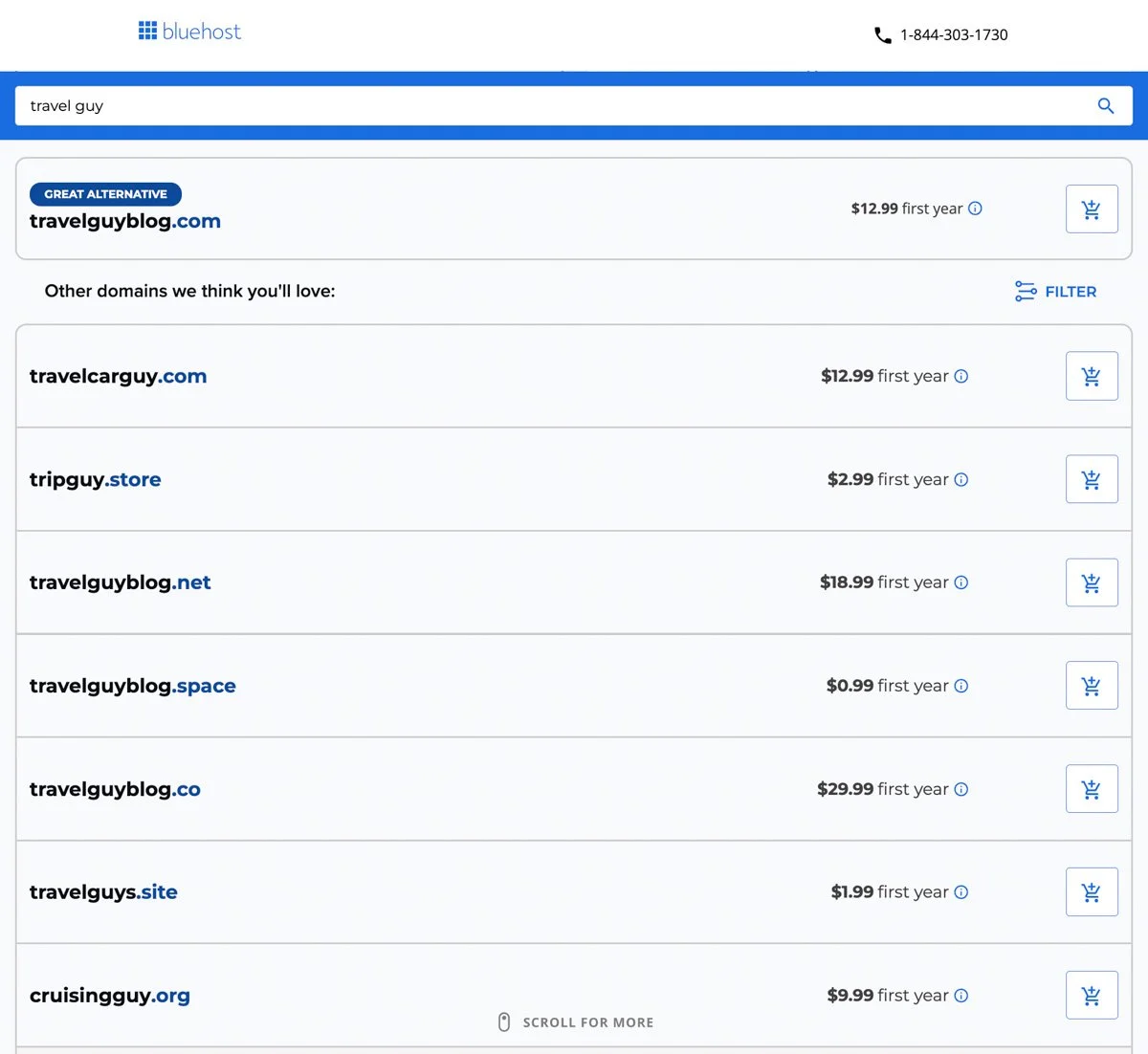
When you sign up for Bluehost, you can buy your domain during setup. I like that because your domain and hosting live under one roof. In my experience, that means fewer headaches later with connecting things, fixing DNS settings, or figuring out why your site isn’t showing up. Definitely beats GoDaddy in my experience.
2) Hosting (where your blog lives)
Hosting is what actually puts your website on the internet.
This is the part that used to be annoying in 2017. Now it’s basically plug-and-play, as long as you choose a beginner-friendly host.
That’s why I recommend Bluehost for beginners.
You can grab your domain, buy hosting, and install WordPress in one flow. No weird tech steps. No separate accounts. No bouncing between five sites.
If you’re the kind of person who wants a simple checklist and wants it done today, Bluehost is the move.
👉 If you want the easiest setup, start your blog with Bluehost here.
3) WordPress (the platform)
WordPress is what you use to create posts, pages, menus, and everything else.
It’s flexible, it’s built for blogging, and it works perfectly with SEO and affiliate marketing. That matters if you actually want to make money.
Also, AI tools work great with WordPress because you can draft fast, paste in, format, publish, and move on.
What you do NOT need right now
I’m saying this because I’ve watched people delay their blog for months over nonsense.
You do not need:
a perfect logo
an expensive theme
a fancy camera
a huge social following
a complicated email setup
a custom design
You can do all of that later. The goal is to get online and start publishing.
My “get it live today” recommendation
If you want the fastest path, do this:
Get hosting + a domain on Bluehost
Install WordPress
Pick a clean theme
Publish your first post this week (preferably today)
That’s how you build momentum. In digital marketing, momentum is everything!
Step 1: Pick a Niche That Can Actually Make Money
This is where most people mess up, so I’m going to make it simple.
A niche is just your blog’s lane. If your lane is too wide, Google doesn’t know what you’re about, readers don’t trust you yet, and you’ll struggle to monetize.
In 2026, the fastest blogs to grow are the ones that are specific from day one.
The 2-part niche test I use
Before I commit to a niche, I ask two questions:
1) Are people already searching for this?
If nobody searches it, you’ll be yelling into the void.
2) Are there things people buy in this niche?
If there’s nothing to buy, it’s hard to earn.
You want a niche where readers are already in problem-solving mode. That’s where clicks and commissions come from.
Niches that still make money in 2026
These are popular for a reason. They have buyers, affiliates, and endless content.
Travel (itineraries, where to stay, what to pack, budgeting)
Personal finance (cards, banking, side hustles, budgeting)
Fitness (home workouts, beginner plans, supplements, gear)
Food (recipes, meal prep, kitchen tools)
Tech and AI tools (tool reviews, tutorials, workflows)
Pets (training, product reviews, breed guides)
Home and lifestyle (organization, cleaning routines, decor)
If you’re reading this and thinking “yeah but my niche is random,” it can still work. You just need an angle with search demand and purchase intent.
Travel blog example: how to pick an angle that wins
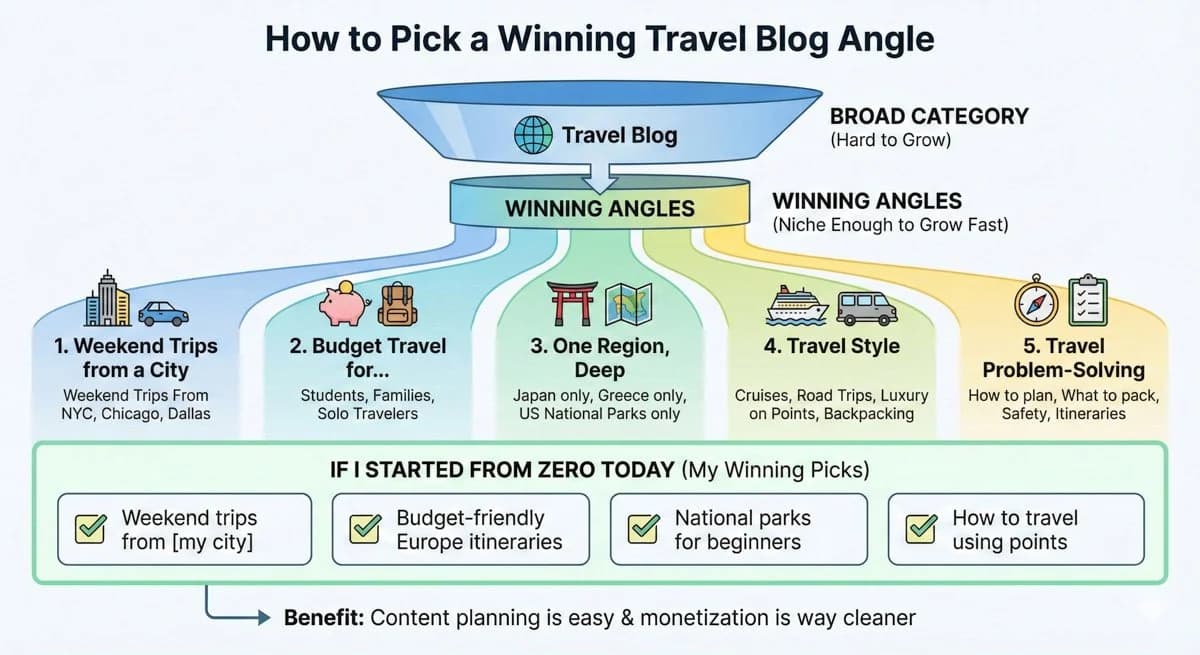
“Travel blog” is not a niche. That’s a category.
Here are angles that are actually niche enough to grow fast:
Weekend trips from a specific city (Weekend Trips From NYC, Chicago, Dallas)
Budget travel for a specific type of person (students, families, solo travelers)
One region, deep (Japan only, Greece only, US National Parks only)
Travel style (cruises, road trips, luxury on points, backpacking)
Travel problem-solving (how to plan, what to pack, safety, itineraries)
If I was starting from zero today, I’d pick something like:
“Weekend trips from [my city]”
“Budget-friendly Europe itineraries”
“National parks for beginners”
“How to travel using points”
Those niches make content planning easy and monetization way cleaner.
The “too broad vs. just right” examples
Here’s what I mean in real terms:
Too broad: Travel
Better: Solo travel
Best: Solo weekend trips from NYC under $300
Too broad: Fitness
Better: Home workouts
Best: Home workouts for busy beginners with no equipment
Too broad: Food
Better: Meal prep
Best: High-protein meal prep for people who hate cooking
Specific equals faster growth. Every time.
Use AI to choose your niche in 10 minutes
This is one of my favorite shortcuts because it forces clarity. Copy and paste this:
Prompt:
“You are a blogging strategist. Ask me 10 questions to find my best blog niche based on my interests, experience, and earning potential. After I answer, give me 3 niche options. For each option include: target audience, clear blog angle, 10 post ideas, and 3 monetization paths.”
Once you get your three niche options, pick the one that feels easiest to write about for the next 90 days. That’s the real secret.
Quick action step
Before you move on, do this. Write your niche like this:
I help [WHO] do [WHAT] so they can [RESULT].
Examples:
I help first-time travelers plan weekend trips so they stop wasting money and time.
I help busy beginners work out at home so they feel stronger without the gym.
I help new bloggers start and grow so they can earn online faster.
When you can say it in one sentence, you’re ready. Don’t skip this part…clarity is everything when starting a blog in 2026!
Step 2: Buy Hosting and Launch Your Site Today (The Fast Way)
This is the part where people overthink themselves into doing nothing.
I did that in 2017. I delayed for weeks because I wanted the perfect name, the perfect design, the perfect everything. Huge mistake.
In 2026, the goal is simple. Get your blog online today. You can improve everything later, but you can’t earn from a blog that doesn’t exist.
What you’re doing in this step
You’re doing three things, in one sitting:
securing your domain
setting up hosting
installing WordPress
That’s why I recommend Bluehost for beginners. It’s built for this exact “I want it live today” situation.
Why I Still Recommend Bluehost in 2026
There are a lot of hosting options. I stick with Bluehost for new bloggers for a few simple reasons:
Beginner friendly – Domain, hosting, and WordPress install all live in one dashboard. No duct taping tools together.
Cheap first year – With my partner link, you get hosting from $1.99 per month, which undercuts most “promo” rates you will see advertised.
Free domain included – You do not have to buy your domain somewhere else and connect it. That removes a classic tech headache.
30-day money back guarantee – If you change your mind in the first month, you are not stuck.
I have worked with Bluehost for more than 7 years across multiple sites and client projects. Are there fancier hosts out there? Sure. But if your goal is to get your first blog online today without drama, Bluehost is the simplest path.
👉 Ready to start? Use my Bluehost partner link here to lock in the $1.99/month deal and grab your domain while it is still available.
My “get it done” setup checklist
When you’re in the Bluehost signup process, here’s how I think about it.
1) Choose a domain name
Keep it simple and readable.
If your first choice isn’t available:
add a word like “get,” “go,” “guide,” “trips,” “hq”
or use a short phrase instead of one word
Examples for travel:
WeekendTripsAustin.com
GoNYCWeekends.com
BudgetJapanGuide.com
TheParkWeekend.com
My Tip: Don’t let domain perfection slow you down. In 2026, thousands of domain names are registered daily by AI site builders. Grab yours today before someone else takes your exact brand name. You can always rebrand later, but most people never start because they get stuck here.
2) Pick your hosting plan
If you’re brand new, you want the plan that’s clearly meant for beginners. Nothing fancy.
Your first blog needs:
fast enough speed
good uptime
WordPress support
simple dashboard
That’s it.
3) Install WordPress
This used to be the scary part. Now it’s basically a button.
Once WordPress is installed, you officially have a blog. Everything else from here is just details.
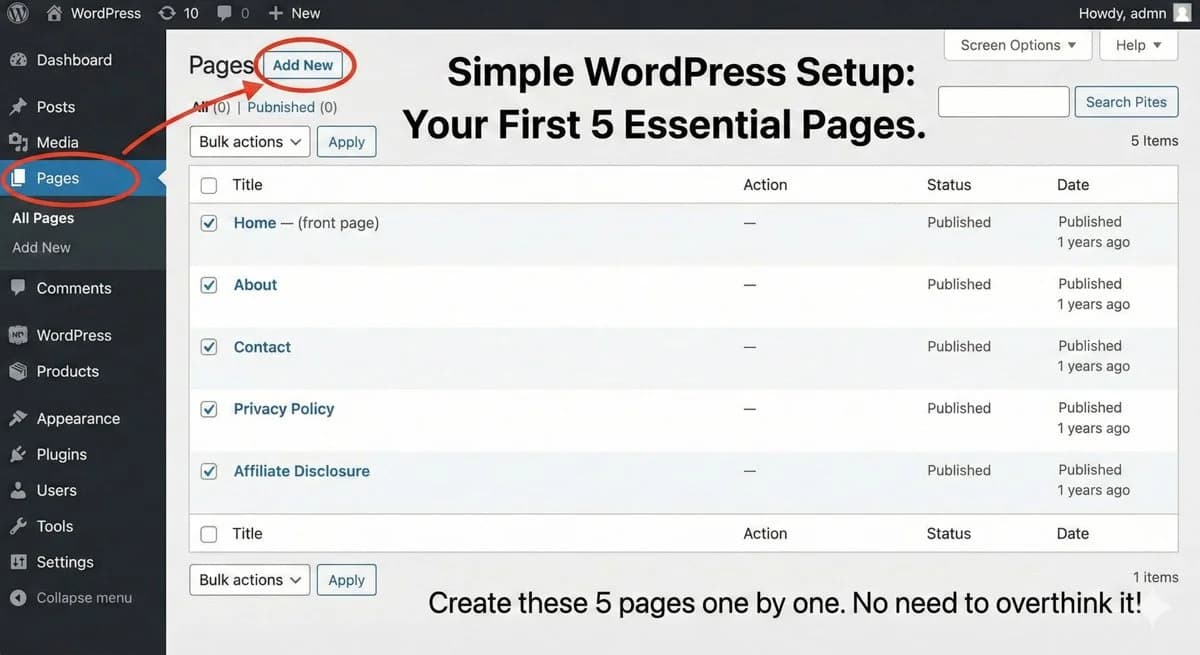
The 5 pages you should set up immediately
Do these right away so your site looks real and you’re ready for affiliate links.
Home (can be your blog feed for now)
About (who you are and who you help)
Contact (simple form is fine)
Privacy Policy (required for many programs)
Affiliate Disclosure (keeps you compliant)
You don’t need to write a novel on these pages. Simple is fine (create a knowledge base and use AI as much as you can to get the skeleton done). See step 3 for more advice on that!
Don't overpay for hosting. Over the last 7 years, I've worked closely with Bluehost to secure the lowest possible rate for my audience. By using my exclusive partner link, you're guaranteed the best deal on the internet—saving $2-$3 per month compared to standard promotions. Get your site live in 20 minutes for less than the price of a coffee.
Theme: keep it clean and boring (seriously)
Most beginners waste time chasing the “perfect” theme.
A clean theme is better than a fancy theme. Fast loading, easy to read, no clutter.
Your readers care about:
can I find what I need
is this easy to read
does this person seem legit
A simple theme wins every time.
The biggest mindset shift
I want you to treat your blog like a business, not a school project.
A business ships. A school project gets endlessly edited.
Get it online. Publish your first post. Then improve.
Quick action step (do this today)
If you only do one thing after reading this post, do this:
Set up Bluehost + WordPress
Create those 5 pages
Publish one post this week, even if it’s not perfect
That’s how you start building momentum.
👉 If you want your blog live today, start with Bluehost here.
Step 3: Let AI Build Your Blog Plan (So You Don’t Stall Out)
Most people don’t quit because blogging is “hard.” They quit because they sit down to write and think, “What the heck do I post?” Then they lose momentum. Then the blog dies.
AI fixes that problem fast. Instead of guessing, you can build a real content plan in one sitting and know exactly what to publish next.
My rule for new blogs: plan first, then write
When I started in 2017, I wrote whatever felt fun. Bad strategy.
In 2026, I do it the opposite way:
I pick a niche angle
I plan content clusters
I publish posts that match what people are already searching for
That’s how you get traffic quicker. It’s also how you earn quicker.
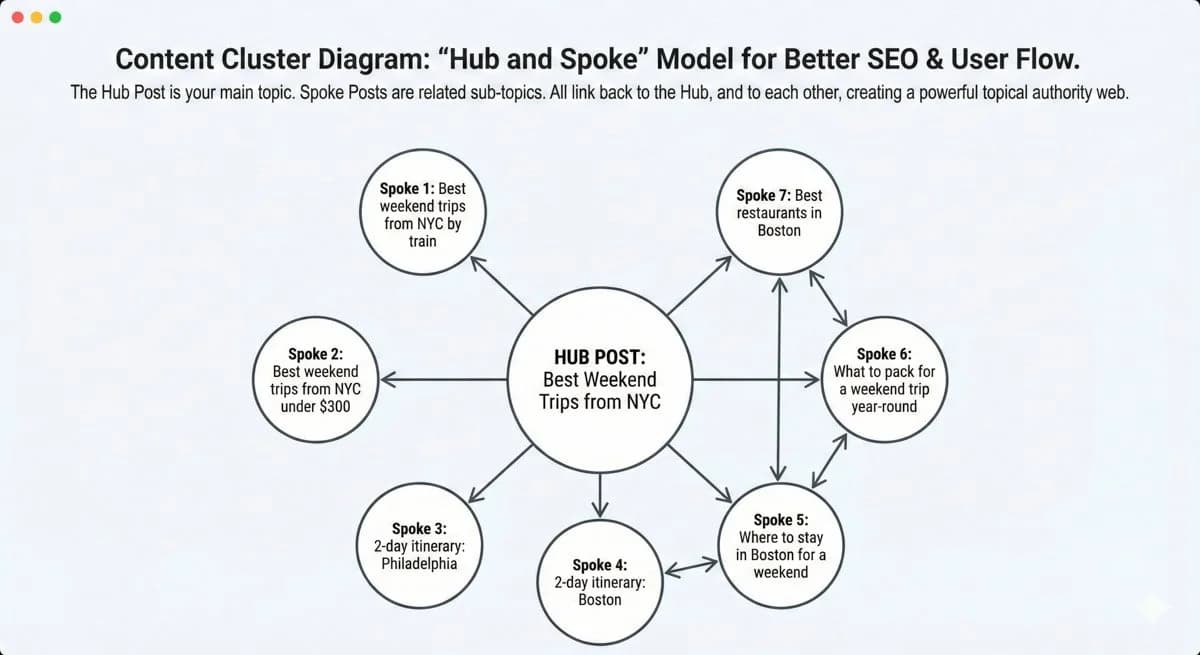
What a “content cluster” actually is
A cluster is just a group of posts that all connect.
Example for a travel blog angle like “Weekend trips from NYC”:
Best weekend trips from NYC
Best weekend trips from NYC by train
Best weekend trips from NYC under $300
2-day itinerary: Philadelphia
2-day itinerary: Boston
Where to stay in Boston for a weekend
What to pack for a weekend trip year-round
Google loves this because it’s clear what your site is about. Readers love it because they can keep clicking.
Build a 30-post plan in 10 minutes with this prompt
Copy and paste this prompt into your AI tool (Gemini or ChatGPT):
Prompt:
“You are an SEO blogging strategist. My blog niche is: [YOUR NICHE ANGLE]. Create a 30-post content plan for the next 60 days. Requirements:
Group posts into 5 content clusters
For each post give: keyword, search intent, suggested title, and an H2 outline
Include 10 posts designed to monetize through affiliate links
Include internal linking suggestions between posts”
That prompt alone can save you weeks of confusion.
My favorite “money post” types (because they convert)
If you want to earn faster, these post types matter more early on.
Here are the ones I always include in a new plan:
Best of lists (best hotels, best tours, best travel backpacks)
Where to stay guides (super buyer intent)
Itinerary posts (people planning trips are ready to spend)
Cost breakdowns (high search demand, strong trust builder)
Packing lists (easy affiliate links)
Comparisons (X vs Y, best option for beginners)
If you’re in a different niche, the same idea works.
“Best X for beginners” and “X vs Y” are almost always monetizable.
Travel blog example: a quick 10-post starter plan
If you’re doing travel, here’s a simple set that works well:
Best weekend trips from [your city]
Weekend trips from [your city] without a car
3-day itinerary: [popular destination]
Where to stay in [destination] (by neighborhood)
How much it costs to visit [destination]
Best time to visit [destination]
What to pack for [destination]
Best restaurants in [destination] (optional but great for SEO)
[Destination] day trips you can do in one day
Mistakes to avoid in [destination]
That’s enough to start building traction and internal links right away.
One important warning about AI content plans
AI will sometimes suggest topics that sound good but have low value.
So I do a quick gut-check:
Would someone actually Google this?
Does this solve a real problem?
Can this post naturally include an affiliate link or email signup?
If it passes those three, it goes on the list.
Quick action step
Before you write anything, do this today:
generate your 30-post plan with the prompt above
pick your first 5 posts
publish the first one within 48 hours
Momentum beats perfection every single time. The sooner you publish, the sooner they start ranking on search engines!
Step 4: Write Your First Posts the 2026 Way (Fast, But Still Human)
Here’s the truth nobody tells beginners. AI can help you write faster, but it can also make your blog sound like every other bland website on the internet.
So the goal isn’t “let AI write everything.” The goal is “use AI to remove the friction, then add your real voice.” That’s exactly how I do it now.
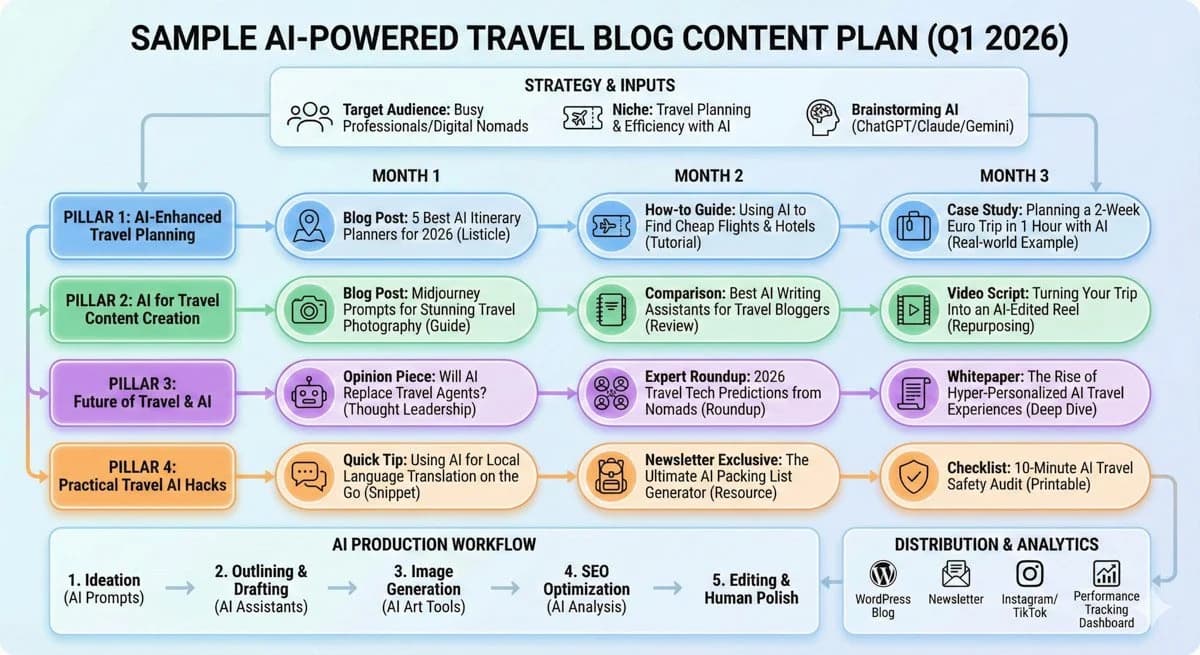
My 5-step AI writing workflow
This is the workflow I wish I had in 2017.
1) I use AI for the outline
Outlines are the hardest part when you’re new. AI makes it instant.
2) I tell AI what to include and what to avoid
I’m specific so I don’t get fluffy junk.
3) I add real details only I can add
Personal stories. Prices I paid. Mistakes I made. What I would do differently.
4) I use AI to tighten the writing
Shorter sentences, clearer structure, better flow.
5) I fact-check anything important
Especially prices, rules, and anything safety-related.
That’s the whole system.
The “make it sound like me” prompt I use
This is how you keep AI from sounding generic. Copy and paste this:
Prompt:
“Write in a casual, helpful first-person tone. Keep sentences short. No fluff.
Topic: [POST TOPIC]
Target keyword: [KEYWORD]
Audience: beginners.
Include: step-by-step actions, examples, and quick tips I learned from experience.
Structure: intro, 6 to 8 sections with H2s, quick checklist, FAQ, conclusion with CTA.
Also include 3 natural spots where I can add affiliate links.”
This gives you a solid draft that’s easy to edit.
How I “humanize” an AI draft in 10 minutes
This is the difference between a blog that feels real and one that feels like a content farm.
I scan the draft and add:
a quick personal moment (“When I went to X, I messed this up…”)
a specific recommendation (“I always do Y because…”)
a real example (“Here’s a sample 3-day plan…”)
a simple opinion (“Skip this, it’s not worth it…”)
Even 5 to 10 personal inserts makes the post feel legit.
Travel blog example: what to add that AI cannot fake
If you’re writing something like “3 days in Lisbon,” don’t just list attractions.
Add details like:
what neighborhood you stayed in and why
how much you paid for transit or a meal
the one tourist trap you would skip
the one thing you’d book ahead next time
how you handled timing and logistics
That’s the stuff readers trust. That’s also the stuff that makes people click your links.
Creating blog images
In 2026, the absolute best strategy for blog images is taking your own. Whether your niche is travel like mine, interior decor, or cooking, readers value real images that show your real-life experiences.
Why? Because it builds instant trust and signals to search engines like Google that you have EEAT (Experience, Expertise, Authoritativeness, and Trustworthiness). A blurry photo you took on your phone of a hostel in Boston is infinitely more valuable to Google than a perfect stock photo.
However, you can’t be everywhere at once. If you need to scale faster, or you're writing a post about a location you haven't visited in a few years, you’ll definitely want to create custom, copyright-free blog images using AI tools like Midjourney or ChatGPT.
Gone are the days of scrolling through stock photo sites for hours.
The 2026 AI Image Prompt: Copy and paste this exact prompt into ChatGPT or Midjourney to get the perfect header image in seconds:
Prompt: "Create a hyper-realistic, high-quality blog header image for a post about [Topic, e.g., Blogging tips]. The style should be modern, well-lit, and photorealistic. Aspect ratio 16:9."
The Golden Rule for 2026: Use your real photos as much as humanly possible to prove you're legit. Use AI-generated images to fill in the gaps and make your site look professional instantly.
The “first 3 posts” strategy I recommend
If you want faster momentum, don’t start with random inspirational content.
Start with posts that match search intent and can monetize.
Here’s a simple trio that works in most niches:
A beginner guide
“How to do X for the first time”
A best-of list
“Best X for Y” (great for affiliate links)
A problem solver
“Mistakes to avoid” or “What to do if…”
For travel, that could be:
“3-day itinerary for [city]”
“Where to stay in [city] (best neighborhoods)”
“Mistakes to avoid in [city]”
Quick SEO formatting that matters (and is easy)
You don’t need to be an SEO genius, but do these basics every time:
one clear keyword per post
keyword in the title
keyword in the first paragraph (naturally)
short paragraphs
lots of H2 headings
internal links to your other posts
That alone puts you ahead of most beginners.
👇 The Click-Magnet Headline Prompt: "I am writing a blog post about [Topic]. Give me 10 SEO-friendly headline options that use curiosity, power words, and numbers. They should be under 60 characters and make people want to click immediately."
Quick action step
Pick one post from your plan and do this right now:
generate the outline with AI
generate the draft with the “sound like me” prompt
add 5 personal details
publish it this week
That’s how you stop being “someone who wants to blog” and become a blogger.
👇 The 5-Minute "Get Found" Step: > Once your first post is live, Google won't know it's there unless you tell them. Sign up for Google Search Console (it's free) and submit your sitemap. It takes 5 minutes and cuts your waiting time for traffic from months down to weeks.
Next up is where the money comes in. I’ll show you how to set up monetization from day one, even with tiny traffic, and exactly what posts convert best.
Step 5: Set Up Monetization From Day One (So You Can Earn Faster)
Here’s the mistake I made early on. I waited to monetize until I felt “big enough.”
That is backwards. In 2026, I set monetization up immediately so every post can become an asset.
The mindset shift that makes money
Traffic without a plan is just vibes. You want posts that solve a problem and naturally lead to a recommendation. That’s how you earn even with small traffic.
The easiest way to monetize fast: affiliate links
Affiliate marketing is simple. You recommend something you already use or would confidently recommend. If someone buys through your link, you earn a commission.
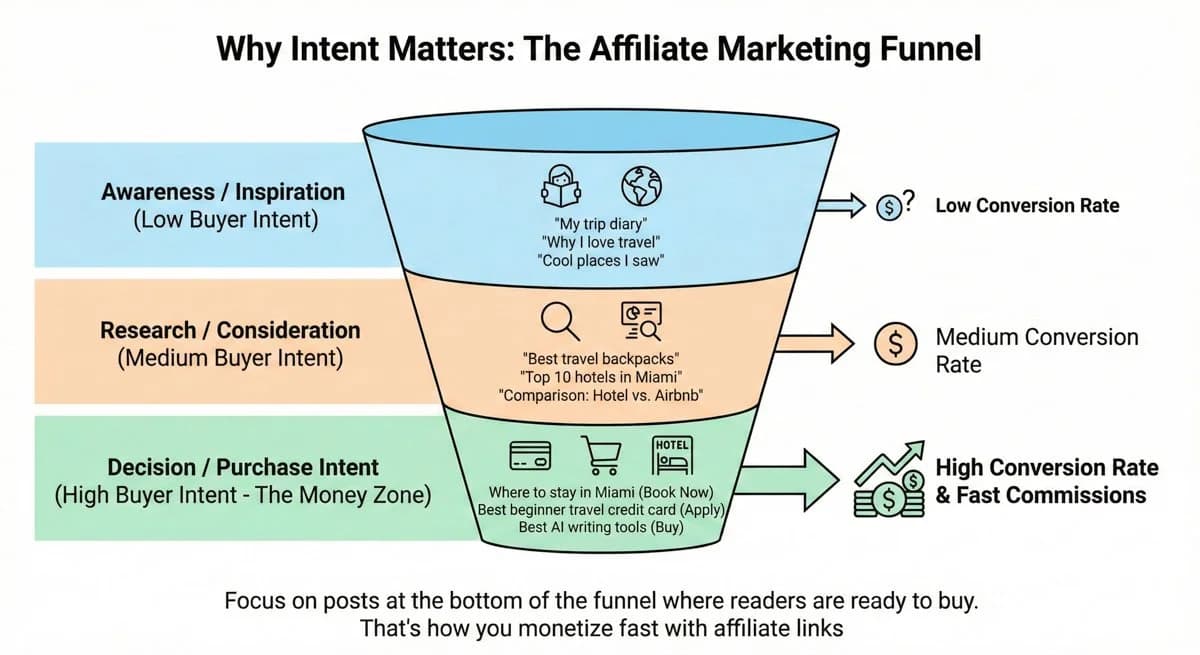
This works best when your reader is already in decision mode.
Examples:
“Where to stay in Miami” (hotel intent)
“Best travel backpack for Europe” (gear intent)
“Best beginner credit card for travel” (high buyer intent)
“Best AI writing tools for bloggers” (tool intent)
My “Day 1” monetization checklist
Do these right after your blog is live:
Add an Affiliate Disclosure page
Put a link to it in your footer.
Add a quick disclosure line near your first affiliate link
Keep it simple, like: “Some links may be affiliate links.”
Join 2 to 4 affiliate programs that match your niche
Don’t join 20. You’ll overwhelm yourself.
Create a Resources page
This becomes your “tools I use” money page over time.
Publish 2 money posts in your first week
Not later. Week one.
Travel blog monetization (specific and proven)
If you’re building a travel blog, these are the easiest categories to earn from early:
Hotels and stays (people book fast when planning)
Tours and activities (great for city guides and itineraries)
Travel insurance (fits naturally in planning posts)
Gear and packing lists (easy links, easy wins)
Credit cards and points (strong commissions but needs trust)
That’s why I love itinerary posts. You can naturally include all of the above without being pushy.
Where Bluehost fits in (and how I’d sell it naturally)
If you’re writing a post like this one, your reader has one main goal.
They want to start today without confusion.
That’s the perfect moment to recommend Bluehost because it removes the setup friction. Domain, hosting, WordPress install, all in one flow.
I’d place Bluehost links in three spots:
near the top (for impulse buyers)
after the setup checklist (when they feel ready)
at the end (final nudge)
👉 If you want the fastest beginner setup, start your blog with Bluehost ASAP to lock in the cheapest rates I’ve seen in 4+ years ($1.99 per month).
The 5 post types that make money the fastest
If you want to earn sooner, focus on these first:
Best X for Y
“Best carry-on backpacks for budget travelers”
Where to stay in X
“Where to stay in Barcelona (best neighborhoods)”
X itinerary
“3 days in Nashville: exact plan, costs, and tips”
What to pack for X
“What to pack for Iceland in winter”
X vs Y comparisons
“Hostel vs hotel in Tokyo: what I’d choose and why”
These posts attract readers who are already ready to act.
Quick action step
Pick one post from your plan and monetize it the right way:
add 3 to 5 affiliate links that genuinely help
add internal links to 2 other posts
add one clear call to action
Then publish it. Improve it later. You can absolutely earn quickly, but it comes from intent-based posts, not random journaling.
The “First 5 Posts” Blueprint (What I’d Publish First If I Started From Zero Today)
If you want to earn faster, you need to publish with intention.
When I started in 2017, I wrote whatever I felt like. It was fun, but it slowed down growth. Now I treat the first posts like laying down train tracks. Each one connects and pushes the reader toward a next step.
Here’s the exact five-post setup I’d publish first in 2026.
Post 1: The “start here” beginner guide
This is the post that builds trust and introduces your angle.
Travel examples:
“How to Plan a Weekend Trip From NYC (My Exact System)”
“How to Travel Japan for the First Time (Beginner Plan + Mistakes to Avoid)”
Why it works: People want a simple plan. You become the guide.
Monetization ideas: travel insurance, itinerary tools, luggage, travel cards (lightly), booking links.
Post 2: The itinerary post (high intent, high trust)
This is one of the best formats in travel because it’s practical and bingeable.
Travel examples:
“3 Days in Lisbon: The Exact Itinerary I’d Follow Again”
“2 Days in Boston: Walkable Plan + Food + Where to Stay”
Why it works: People reading itineraries are planning a real trip. Planners spend money.
Monetization ideas: hotels, tours, transit passes, booking links, packing gear.
Post 3: The “where to stay” guide (this is a money post)
If you only publish one monetizable post early, make it this.
Travel examples:
“Where to Stay in Barcelona: Best Neighborhoods for First-Timers”
“Where to Stay in Miami: Best Areas for Beaches, Nightlife, and Budget”
Why it works: This is decision content. The reader is choosing right now.
Monetization ideas: hotel affiliate links, travel credit cards (optional), booking tools.
Post 4: The cost breakdown post (people love these)
Cost posts rank well and build a ton of trust.
Travel examples:
“What a Weekend in Chicago Costs (Real Numbers + Budget Options)”
“How Much Does a Trip to Paris Cost in 2026?”
Why it works: People are trying to figure out if they can afford the trip. You help them decide.
Monetization ideas: booking links, insurance, budget-friendly gear, tours.
Post 5: The packing list post (easy and consistent affiliate clicks)
Packing lists are simple, useful, and great for affiliate links.
Travel examples:
“What to Pack for Iceland in Winter (My Actual List)”
“Carry-On Only Packing List for a 3-Day Weekend Trip”
Why it works: Readers want a checklist they can trust. They also buy gear.
Monetization ideas: backpacks, jackets, packing cubes, shoes, chargers, toiletry kits.
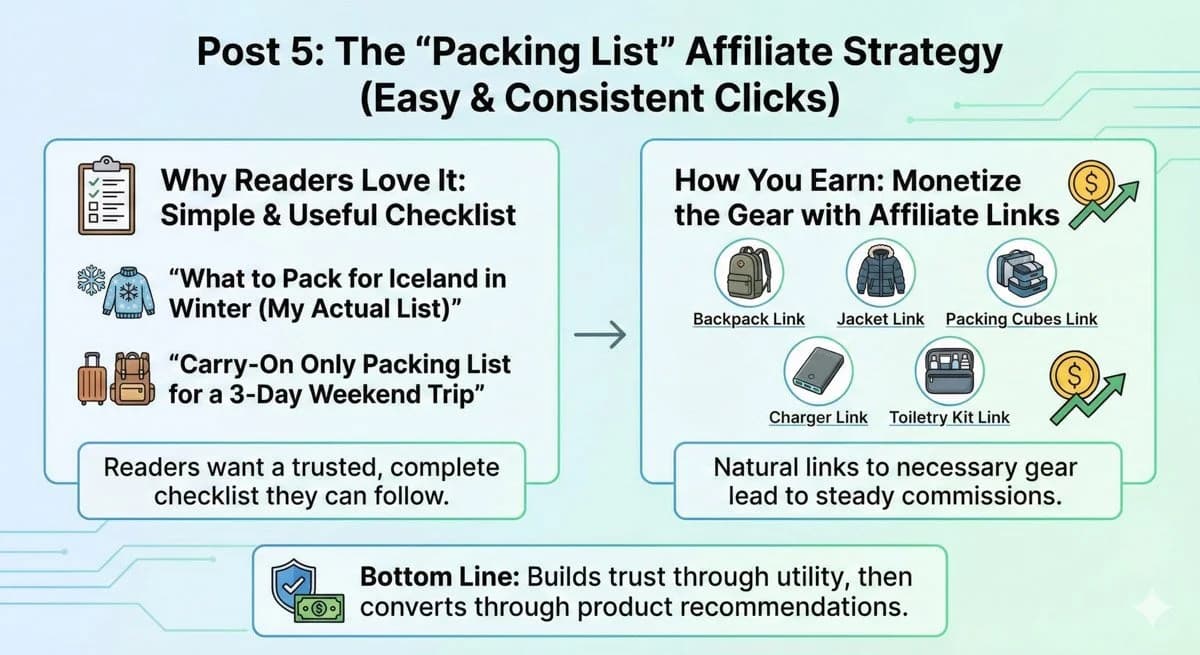
I love creating packing lists because they are helpful for readers and provide monetary value in return
How these 5 posts connect (and why that matters)
This is the part most people skip.
Each post should link to the others like a loop.
Example internal linking flow:
The beginner guide links to the itinerary
The itinerary links to where to stay and packing list
The where to stay post links back to the itinerary
The cost breakdown links to where to stay and beginner guide
The packing list links to the itinerary and cost breakdown
This keeps readers on your site longer. It also helps Google understand your site faster.
Quick action step (do this this week)
If you want a simple plan you can actually follow, do this:
Publish Post 1 and Post 2 this week
Publish Post 3 next week
Publish Post 4 and Post 5 the week after
That’s five strong posts in two to three weeks. That’s enough to start building traffic, trust, and clicks. My quick tip: do NOT over-publish quickly, as it may send a negative signal to search engines that your content is spam. Start slow and ramp up once you start seeing some traction.
Ready to launch your AI-powered blog? > As a partner with Bluehost for over 7 years, I’ve negotiated the absolute best deal on the internet exclusively for AI Hustle Guy readers.
👉 Click here to start your blog for just $1.99/mo—saving you at least $2 to $3 per month compared to any other promotion online. Lock in your discount and let AI start building your business today.
2026 Blogging FAQ
Is it too late to start a blog in 2026?
No. Search is crowded, but most content is shallow or generic. If you use AI to move faster and still add real experience, you can compete much earlier than people think.
Will AI kill blogging?
AI will kill lazy blogging. It will not kill helpful, search-driven blogs that show real experience, clear frameworks, and smart recommendations. Tools change. People still need trustworthy answers.
Can I really make money from a new blog now?
Yes, but not by writing random diary posts. You make money by publishing intent based posts and adding affiliate links, simple offers, or service packages that actually help. That is why this guide leans so hard on “where to stay,” “best X for Y,” and itineraries.
How long until I see results?
If you follow the steps here, plan smart topics, and publish consistently, you can see your first clicks and commissions in a few months. A blog is an asset, not a scratch ticket. You are building something that compounds.
Should I focus on a blog or social media first?
Use your blog as your home base, then use short form content to send people there. Platforms come and go. Your site is yours.
Related reading
Get my free AI prompt pack
Join 300+ founders, creators, and professionals. I’ll send you my go-to AI tools and copy-paste prompts that save hours every week. No spam.