Claude Cowork: The AI Assistant for People Who Don't Code
By Jonathan Miksis · Updated September 3, 2026 · 6 min read
Most of the buzz about AI "agents" has been aimed at developers. Claude Code, Codex, terminals, repositories, none of it means much if you don't write software.
Claude Cowork is the exception, and it's the one non-technical founders should actually care about. It's Anthropic's agent built for everyone who isn't a coder, and this week it expanded from a desktop app to web and mobile. That matters more than it sounds, and I'll explain why.
I've spent two years trying to offload the "work around the work" (the reports, the reconciling, the admin that isn't my actual job but somehow fills my week). Cowork is the closest thing I've used to actually delegating it. Here's the founder's guide.
What Claude Cowork actually is
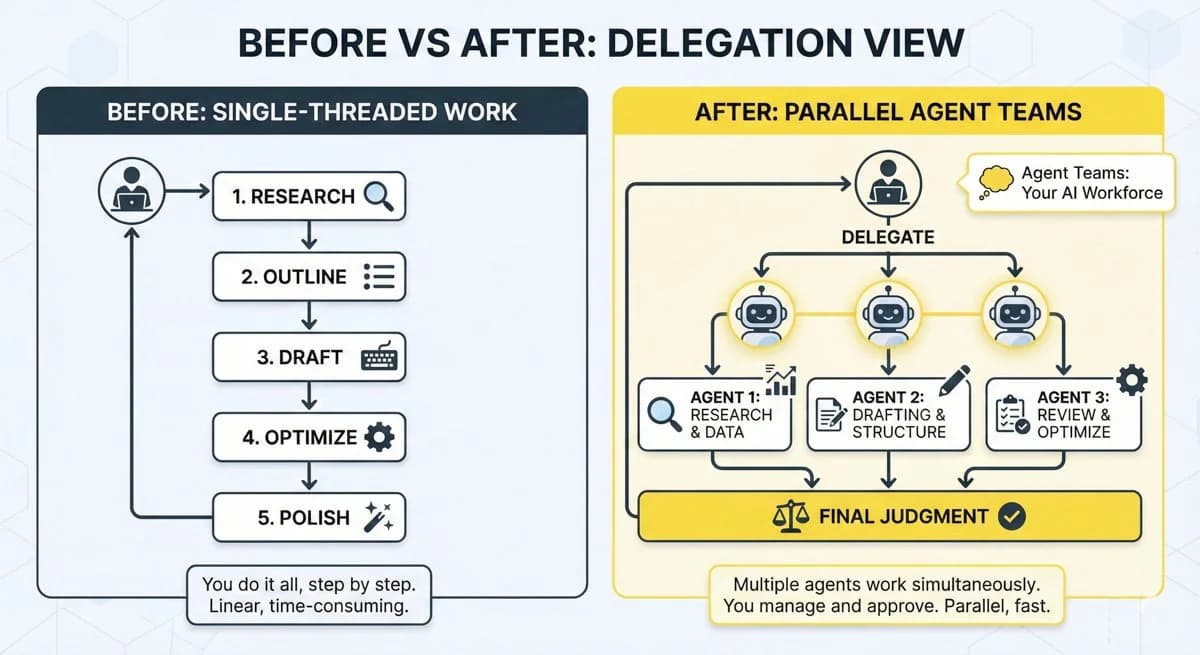
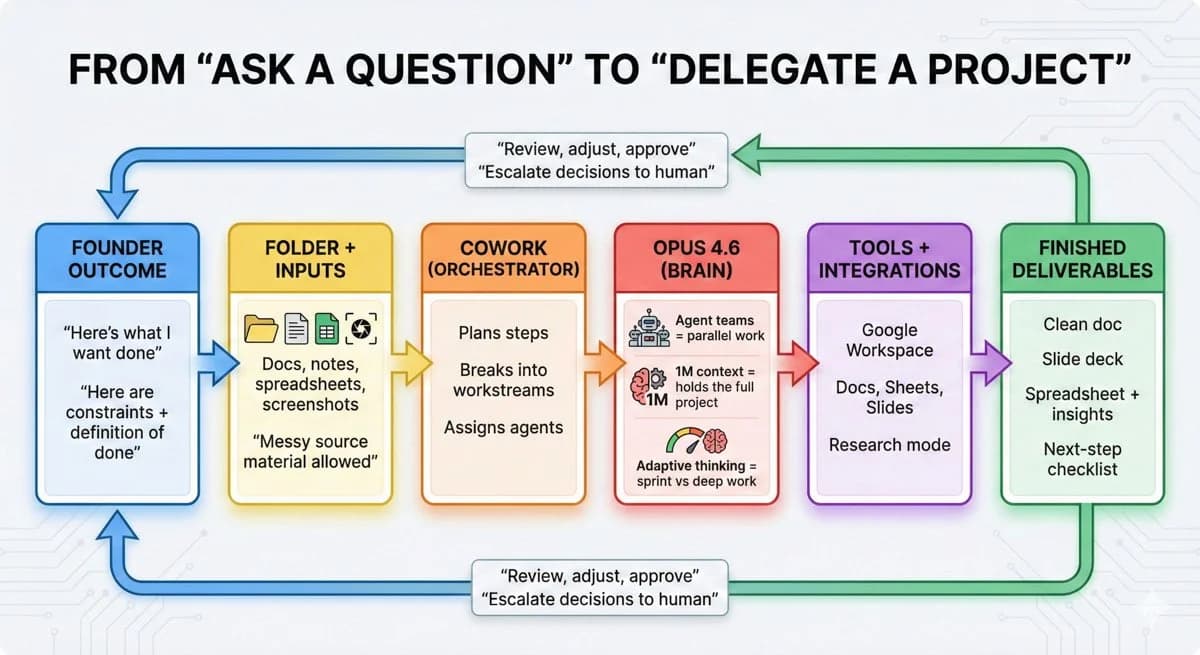
Think of Cowork less like a chatbot and more like a capable assistant you hand a project to. You describe an outcome, point it at your files, and walk away. It plans the steps, does the work, and delivers the finished result, without you supervising every move.
The key difference from a normal chat: it keeps working even when you close the app. As of this week's update, Cowork sessions run in the cloud by default. So you can kick off a task at your desk, get status updates on your phone, and pick up the finished output later, even if your laptop is shut. Start on web, check on mobile, delegate from anywhere.
It's built on the same underlying technology as Claude Code (Anthropic's developer tool), but the interface and the jobs are aimed at business work, not software.
The proof it's built for non-coders: the usage data
Here's the stat that made me pay attention. When Anthropic looked at what people actually do with Cowork, more than 90% of usage had nothing to do with software development.
The two biggest categories are exactly the stuff that drains a founder's week:
- Business process work (about a third of all usage): pulling scattered updates into one report, building onboarding checklists, reconciling spreadsheets, turning messy inputs into something usable.
- Content and copywriting (the next biggest): drafts, slide decks, social posts, proposals, and the endless communication work.
Anthropic calls this "the work around the work", the tasks that span every role but never appear in anyone's job description. If you've ever spent a Sunday cleaning up a spreadsheet or turning ten Slack threads into one status update, that's the work Cowork is built to take off your plate.
What founders and creators can actually delegate to it
Here's where I'd start if you run a business or create content:
- Turn scattered inputs into a clean deliverable. "Here are my notes, three call transcripts, and last month's numbers, build me a one-page investor update." That's a Cowork job.
- Reconcile and organize. Point it at a messy folder of files and have it sort, rename, summarize, and produce an index. The stuff you keep meaning to do and never do.
- Draft the first version of everything. Decks, proposals, onboarding docs, content calendars. It won't be final, but a strong first draft you edit beats a blank page every time.
- Repurpose content at scale. Hand it a blog post and a brand-voice note, get back the social posts, the newsletter, and the outline for a video.
- Run a recurring report. The weekly summary you dread pulling together, described once, run every week.
The mental shift is the same one I keep coming back to with AI: you stop asking questions and start delegating outcomes. That's a different relationship with the tool, and it's where the real time savings live.
Cowork vs Claude Code: which is which?
People mix these up, so to be clear:
| Claude Cowork | Claude Code | |
|---|---|---|
| Built for | Non-developers, business & creative work | Developers |
| Where it runs | Web, mobile, desktop app | Your terminal / IDE |
| Typical jobs | Reports, drafts, reconciling, decks | Writing and shipping software |
| You need to know | How to describe an outcome | How to review and run code |
If you're not a developer, Cowork is your lane. If a tool assumes you can read a codebase and debug it, that's Claude Code, and not where you should start.
How to get started
Cowork's web and mobile access is currently rolling out to Max subscribers ($100 and $200/mo Claude plans), with the desktop app also available. If you're on Max, open Cowork, point it at a real project, something you actually need done this week, and give it a clear outcome plus the files it needs.
My advice: don't test it on a toy task. Give it something genuinely tedious that you've been avoiding, the messy folder, the report you dread, the pile of notes that needs to become a document. That first time you walk away and come back to finished work is when it clicks.
Cowork runs on Anthropic's latest models, so it pairs naturally with everything I covered in what Claude Opus means for founders. And if you're weighing Claude against ChatGPT and Gemini for your business overall, that's my full model comparison.
Frequently asked questions
What is Claude Cowork? It's Anthropic's AI agent built for non-developers. You describe an outcome and point it at your files, and it plans and completes the work, reports, drafts, reconciling, and more, without step-by-step supervision. It now runs on web, mobile, and desktop.
Is Claude Cowork the same as Claude Code? No. They share underlying technology, but Claude Code is for developers working in a terminal, while Cowork is for business and creative work and assumes no coding. Non-technical users should use Cowork.
Do I need to know how to code to use Cowork? No, that's the entire point. Over 90% of Cowork usage is non-coding work like reports, content, and process tasks. If you can describe what you want done, you can use it.
How much does Claude Cowork cost? Web and mobile access is rolling out to Claude Max subscribers ($100 and $200 per month), alongside the desktop app. It's included in those plans rather than priced separately.
What should I use Claude Cowork for first? Pick one genuinely tedious task you've been putting off, cleaning up a folder, building a recurring report, turning scattered notes into a document, and delegate it end to end. That's where the time savings show up fastest.
Related reading

Written by Jon Miksis
Founder of AI Hustle Guy, Make the Leap, and Europe Flight Club, and the travel blogger behind Global Viewpoint (9+ years, 73 countries). He brings 9+ years of coaching and mentorship experience and has facilitated 23 transformation retreats across four continents. Every AI tool and prompt on this site gets tested on his own businesses first.
Get my free AI prompt pack
Join 300+ founders, creators, and professionals. I’ll send you my go-to AI tools and copy-paste prompts that save hours every week. No spam.