Descript vs Opus Clip: Editor or Repurposer? (2026)
By Jonathan Miksis · Updated September 3, 2026 · 4 min read
Some links in this post are affiliate links. If you buy through one, I may earn a commission at no extra cost to you.
Descript vs Opus Clip is the comparison creators ask about most after they start producing long-form, and it's a bit of a trick question. Descript is a full editor: you create and polish the long video (or podcast) in it. Opus Clip is a repurposer: it takes a finished long video and mines it for short clips.
I put both through the same 12-minute footage in my three-way AI video editor test. Here's the direct comparison, and why the real answer for many creators is a workflow, not a winner.
Quick verdict
- Choose Descript if you need to make the content: record, edit by editing text, clean the audio, and ship a polished long-form video or podcast.
- Choose Opus Clip if the long-form already exists and your bottleneck is turning it into shorts at volume.
- Publishing weekly long-form plus daily shorts? You'll likely want both, Descript to create, Opus to multiply.
One line: Descript makes the asset. Opus Clip multiplies it.
Descript vs Opus Clip at a glance
| Descript | Opus Clip | |
|---|---|---|
| What it is | All-in-one video/podcast editor | AI clip-discovery machine |
| Best for | Creating + editing long-form | Auto-clipping finished videos |
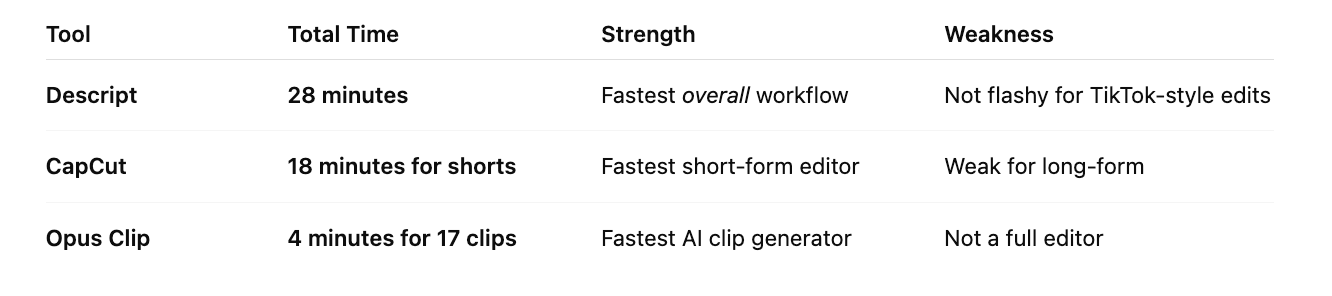
| My test result | Full edit (long-form + 5 shorts) in 28 min | 17 clips auto-generated in ~4 min |
| Signature feature | Edit video by editing the transcript | Viral score + auto punch-ins |
| Audio cleanup | Excellent (Studio Sound) | None to speak of |
| Free plan | ~60 media min/mo | 60 processing min/mo (watermarked) |
| Paid from (annual) | Hobbyist ~$16/mo | Starter ~$9/mo |
Where Descript wins
Descript is the fastest way I've found to go from raw recording to finished long-form. You edit the video by editing the transcript (delete a sentence, the clip disappears), filler words vanish in one click, and Studio Sound rescues mediocre audio. In my timed test, the entire workflow (one long-form edit plus five shorts, captioned and exported) took 28 minutes.
Where it falls short: pulling shorts out of a long video is a manual job in Descript. You choose the moments. That's fine for two or three clips, and slow for fifteen.
Where Opus Clip wins
Opus Clip automates exactly the part Descript leaves manual. Upload a finished video and it finds the hook-worthy moments, cuts them vertical, adds captions and punch-ins, and scores each clip's potential. Seventeen clips in four minutes in my test, six or seven of them postable as-is. For podcasters and YouTubers sitting on backlogs, that's a month of shorts from an afternoon of uploads.
Where it falls short: it can't create or meaningfully edit. No recording, no audio repair, no timeline control. Garbage in, watermarked garbage out, it needs a well-made source video, which is exactly what Descript produces.
Pricing: Descript vs Opus Clip
| Plan | Descript | Opus Clip |
|---|---|---|
| Free | ~60 media min/mo | 60 processing min/mo, watermark |
| Entry paid (annual) | Hobbyist ~$16/mo | Starter ~$9/mo (150 min) |
| Serious tier | Creator ~$24/mo (30 hrs, 4K) | Pro ~$19/mo (300 min, auto-post) |
Prices checked July 2026. Running both on entry annual plans is roughly $25/month, less than an hour of a video editor's time.
The verdict: which should you choose?
It comes down to your bottleneck:
- "I can't produce long-form fast enough" → Descript. It collapses the create-edit-caption-export pipeline into one tool.
- "I have long-form, but no time to make shorts" → Opus Clip. It's the highest-leverage $9 in the repurposing game.
- "Both" → that's the stack. It's literally the workflow I run: Descript to create, Opus to mine, and CapCut to polish the winners.
Frequently asked questions
Is Descript or Opus Clip better? They're not substitutes. Descript is the better editor (creating and polishing long-form); Opus Clip is the better repurposer (auto-cutting shorts from finished videos). Pick by your bottleneck, or pair them.
Can Opus Clip edit videos like Descript? No. Opus Clip finds and cuts moments with basic captioning and reframing, but it has no real editing, recording, or audio tools. It expects a finished video as input.
Can Descript make short clips automatically? It can help you cut shorts from your timeline quickly, but selecting the moments is manual. If you want AI to find the best moments across a long video automatically, that's Opus Clip's entire job.
Which is cheaper? Opus Clip starts lower (~$9/mo annual vs ~$16/mo for Descript), but they're priced for different jobs. If you only need one, choose by workflow, not by the $7 difference.
Keep comparing

Written by Jon Miksis
Founder of AI Hustle Guy, Make the Leap, and Europe Flight Club, and the travel blogger behind Global Viewpoint (9+ years, 73 countries). He brings 9+ years of coaching and mentorship experience and has facilitated 23 transformation retreats across four continents. Every AI tool and prompt on this site gets tested on his own businesses first.
Get my free AI prompt pack
Join 300+ founders, creators, and professionals. I’ll send you my go-to AI tools and copy-paste prompts that save hours every week. No spam.