Opus Clip vs CapCut: Which Short-Form Video Tool Wins? (2026)
By Jonathan Miksis · Updated September 3, 2026 · 4 min read
Some links in this post are affiliate links. If you buy through one, I may earn a commission at no extra cost to you.

Opus Clip vs CapCut looks like a close call until you realize they answer different questions. CapCut asks "how do I edit this short?" Opus Clip asks "where are the shorts hiding in this long video?"
I ran both through the same footage for my full three-way AI video editor test. Here's the direct head-to-head.
Quick verdict
- Choose CapCut if you create native short-form: you plan the clip, film it, and want fast, trendy, polished edits. Best pure editor for TikTok/Reels/Shorts.
- Choose Opus Clip if you sit on long-form (podcasts, YouTube videos, webinars) and want AI to find and cut the best moments for you, automatically.
One line: CapCut edits the shorts you plan. Opus Clip discovers the shorts you already recorded.
Opus Clip vs CapCut at a glance
| Opus Clip | CapCut | |
|---|---|---|
| What it is | AI repurposing machine | Short-form video editor |
| Best for | Auto-clipping long videos | Editing native shorts |
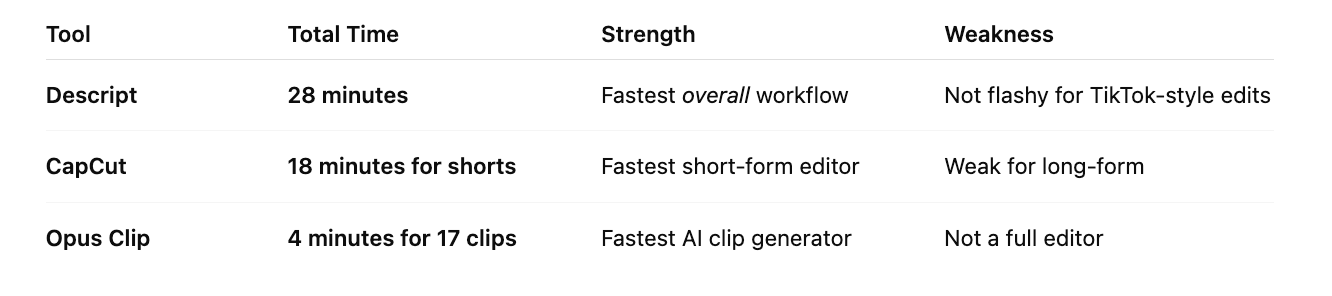
| My test result | 17 clips from a 12-min video in ~4 min | 5 polished shorts in 18 min |
| Editing control | Limited styling | Full editor, templates, effects |
| AI standout | Viral scores + auto clip detection | Auto-captions + AI effects |
| Free plan | 60 processing min/mo (watermarked) | Generous: 1080p, no watermark |
| Paid from (annual) | ~$9/mo | Standard $9.99/mo, Pro $19.99/mo |
Where Opus Clip wins
Opus Clip does one thing better than anything I've tested: it scans long footage, finds the moments with hook potential, and cuts them into ready-to-post vertical clips, with captions, punch-ins, and a "viral score" to help you prioritize. In my test it produced 17 usable clips from a 12-minute video in about 4 minutes. If you record podcasts, webinars, or YouTube videos, it turns your backlog into a month of shorts.
Where it falls short: it's not an editor. Styling is limited, captions sometimes need cleanup, and story-driven edits aren't its thing. Most creators polish the best Opus clips elsewhere.
Where CapCut wins
CapCut is the fastest way to make a short look native: trending templates, motion text, transitions, and shockingly accurate auto-captions. In my timed test I produced 5 polished shorts in 18 minutes, and the learning curve is nearly zero. If your content is planned short-form (talking to camera, tutorials, trends), CapCut is the tool.
Where it falls short: it can't find moments for you. Point a 40-minute podcast at CapCut and you're the one scrubbing the timeline. And its free tier, while genuinely generous, gates the fanciest AI tools behind Pro.
Pricing: Opus Clip vs CapCut
| Plan | Opus Clip | CapCut |
|---|---|---|
| Free | 60 min/mo processing, watermark, short storage | Full editor, 1080p, no watermark on standard edits |
| Entry paid (annual) | Starter ~$9/mo (150 min, no watermark) | Standard $9.99/mo |
| Power tier | Pro ~$19/mo (300 min, 1080p, auto-post) | Pro $19.99/mo (4K, full AI toolkit) |
Prices checked July 2026. CapCut's free tier is the best starting point in the category; Opus Clip's free tier is a demo, its value shows up on paid plans processing real volume.
The verdict: which should you choose?
Ask one question: does your content start long or start short?
- Starts long (podcast, YouTube, webinar)? Opus Clip. The discovery-and-clipping automation pays for itself in the first week.
- Starts short (native TikTok/Reels)? CapCut. Nothing edits vertical video faster.
- Honestly, high-volume creators use both: Opus finds the moments, CapCut polishes the winners. That's the exact workflow from my full comparison test.
Frequently asked questions
Is Opus Clip or CapCut better? For editing planned short-form content, CapCut. For automatically turning long videos into clips, Opus Clip. They're different tools that happen to output the same format, so match the tool to where your content starts.
Can Opus Clip replace an editor like CapCut? No, and it doesn't try to. Opus Clip finds and cuts moments, with basic captioning and reframing. For styling, effects, and manual control, you still want a real editor like CapCut (or Descript for long-form).
Is CapCut really free? The free tier is genuinely usable: full editor, templates, auto-captions, and 1080p export without a watermark on standard edits. Standard ($9.99/mo) and Pro ($19.99/mo) add premium templates, the full AI toolkit, and 4K.
Does Opus Clip have a watermark? On the free plan, yes, plus limited storage. Paid plans from about $9/month (annual) remove the watermark and raise your processing minutes.
Keep comparing

Written by Jon Miksis
Founder of AI Hustle Guy, Make the Leap, and Europe Flight Club, and the travel blogger behind Global Viewpoint (9+ years, 73 countries). He brings 9+ years of coaching and mentorship experience and has facilitated 23 transformation retreats across four continents. Every AI tool and prompt on this site gets tested on his own businesses first.
Get my free AI prompt pack
Join 300+ founders, creators, and professionals. I’ll send you my go-to AI tools and copy-paste prompts that save hours every week. No spam.