Airbnb Cover Photo: How to Pick One That Wins the Click (See the Real Crops)
By Jonathan Miksis · October 23, 2026 · 18 min read
Your Airbnb cover photo (some hosts call it the main or hero photo) has one job: win the tap. Guests meet it in a grid of similar homes, often on a phone, and never in the shape you uploaded it.
So we measured where Airbnb actually crops covers (on airbnb.com, October 2026), turned that into a 10-minute test, and checked every Airbnb step against its Help Center. I run AI Hustle Guy, I've worked with Airbnb and Vrbo hosts, and this guide is part of my AI for Airbnb hosts hub.
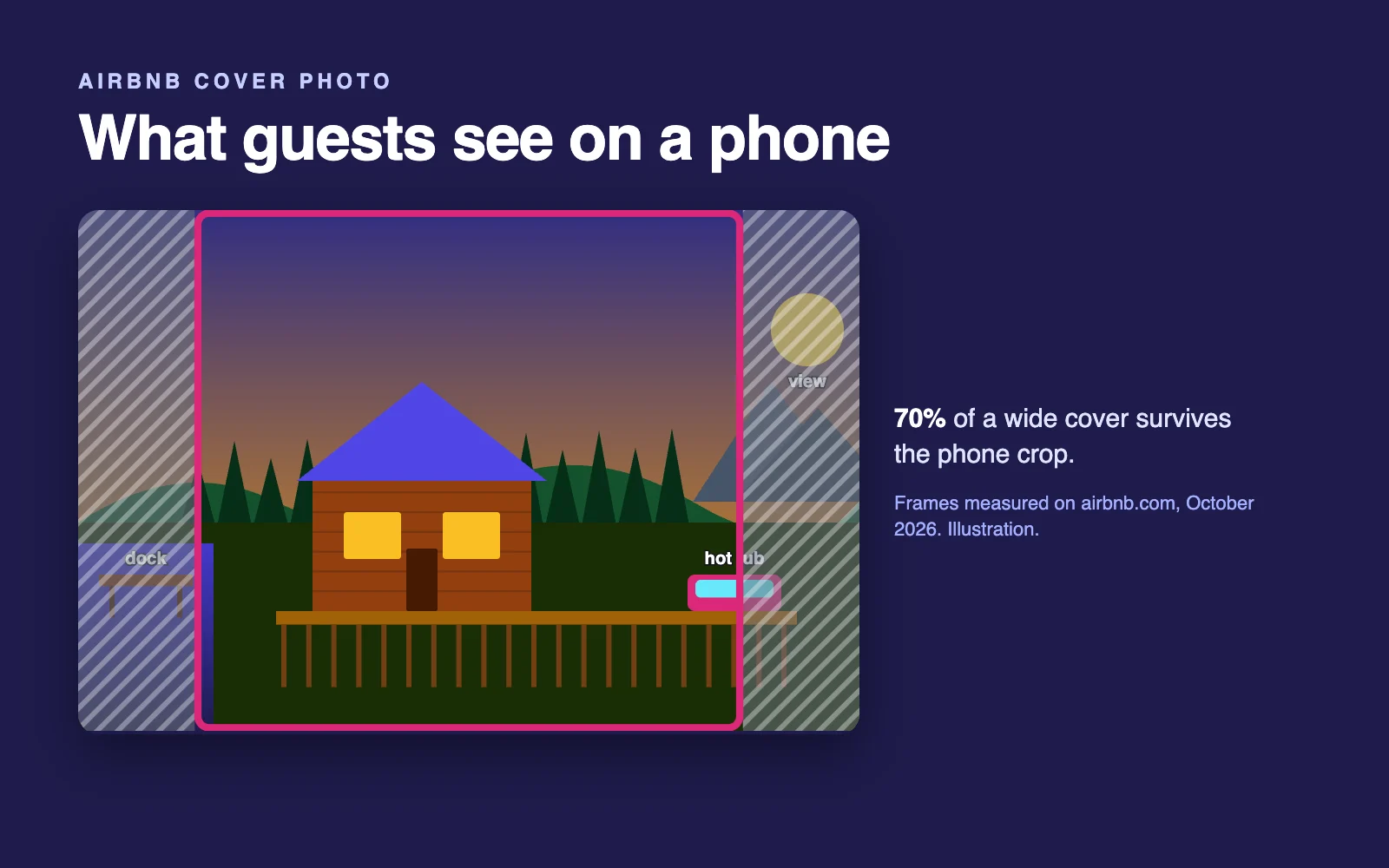
The short answer (verified October 2026): Pick the photo that shows why guests book your place (the view, the hot tub, a bright living room), shot horizontally with that feature centered. Airbnb crops covers to about 4:3 in desktop search and nearly square on phones, where a 3:2 photo loses about 30% of its width. Then compare it with the homes around yours.
Five facts to know (October 2026):
- Airbnb shows your cover in four frames: about 4:3 in desktop search, nearly square on phones.
- On a phone, a standard 3:2 cover loses about 15% of its width on each side.
- A vertical 2:3 cover loses half its height in a desktop search card.
- Airbnb's app accounted for 63% of nights booked in Q1 2026 (Airbnb Q1 2026 shareholder letter), so judge your cover at phone size.
- A new cover can take up to 30 minutes to appear (Airbnb Help).
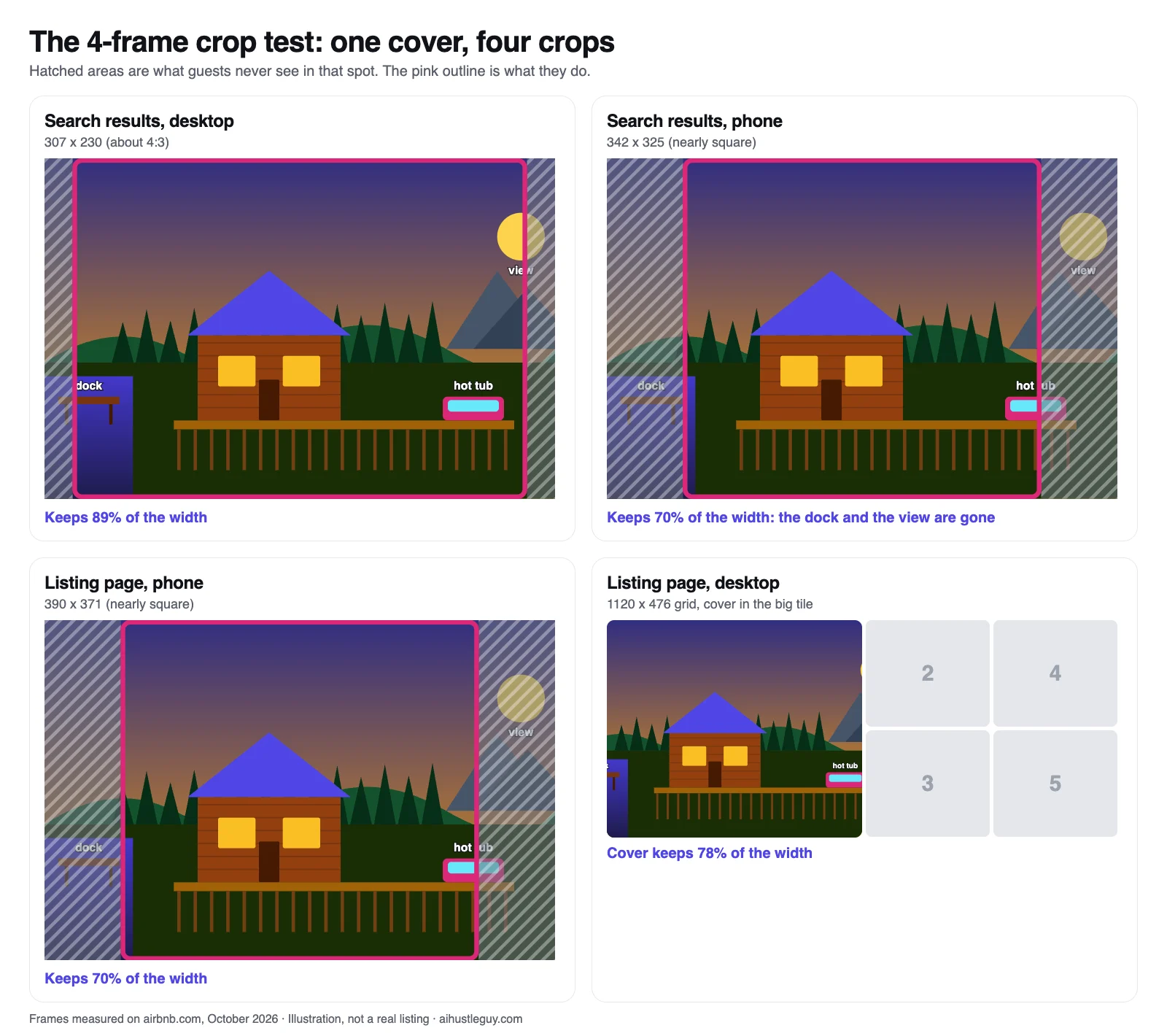
The same 3:2 photo in each frame. Illustration, not a real listing. Frames measured on airbnb.com, October 2026.
What an Airbnb cover photo has to do
Airbnb's Help Center calls your first five photos the most important and says the first is the large one that shows up in search (Airbnb Help). That's your cover. It leads your search card, fills the left half of the desktop photo grid and opens your listing on a phone.
It has two jobs:
- Win the tap. In search it's a few inches wide among similar homes, so it has to say at a glance what your place is and why it beats the next card.
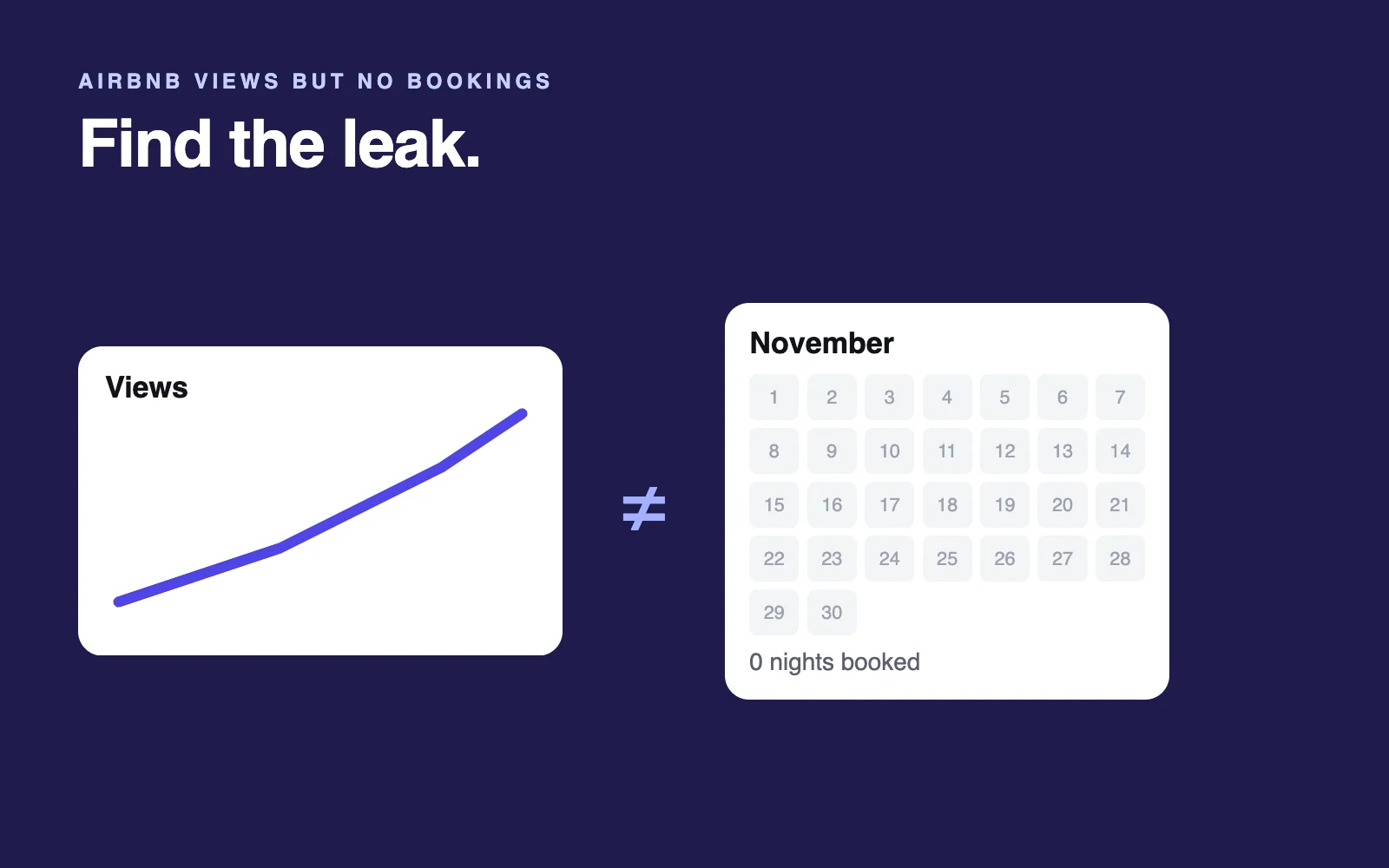
- Make a promise the listing keeps. A cover that oversells wins the tap and loses the booking. If you get views but no bookings, look there first.
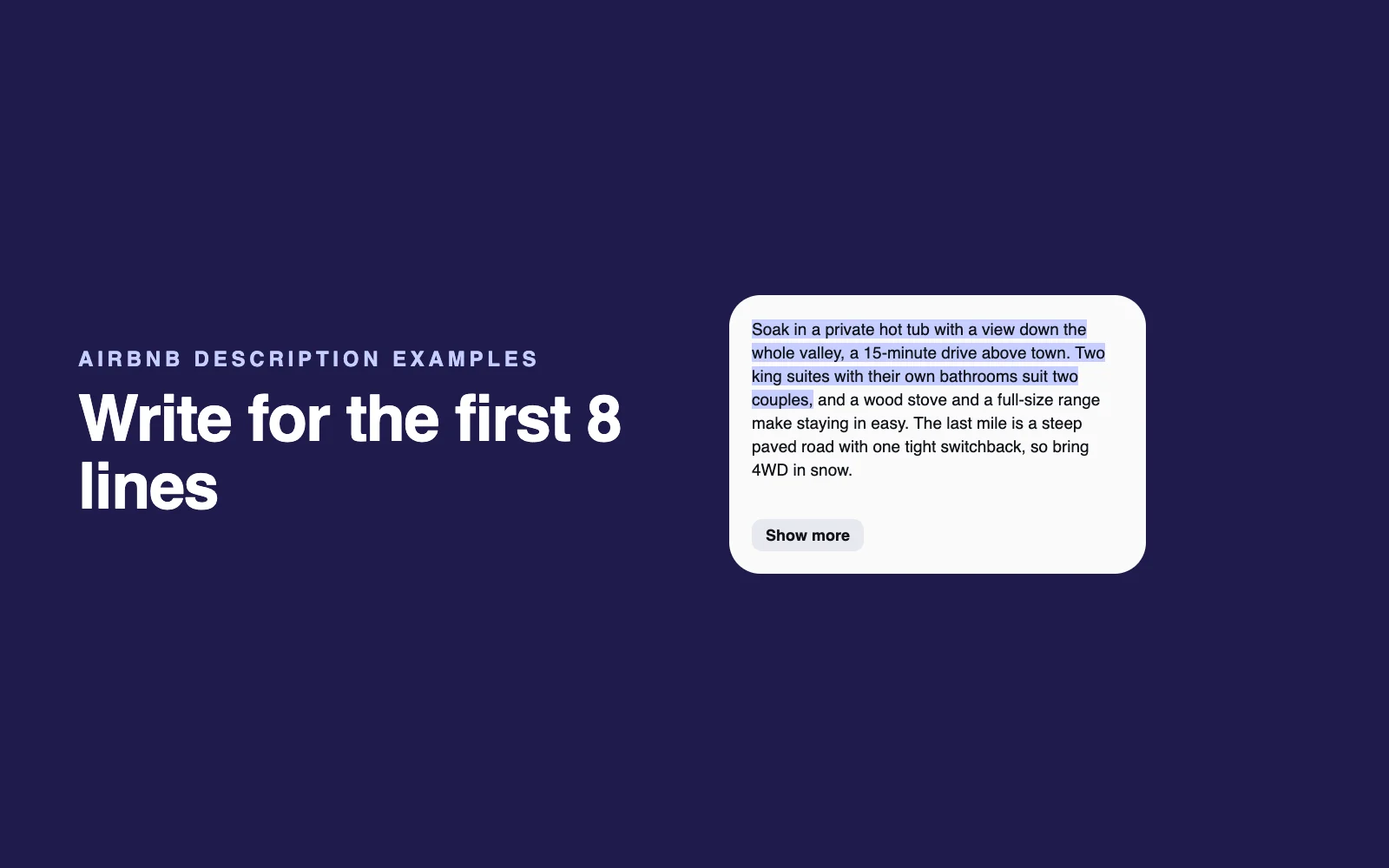
The card around it changed this fall. Airbnb's Fall 2026 update (September 30, 2026) added AI-powered descriptions to search results (Airbnb Newsroom). As of October 2026, in the US, search cards show the home type and place (such as Cabin in Gatlinburg) and a one-line summary Airbnb writes from details hosts provide, not your title.
In our logged-out desktop capture of a US search on October 22, 2026, none of the 18 cards in the results list showed the host's title; it heads the listing page instead (what to write there, and what Airbnb's 2026 AI changes mean for hosts). The apps and other countries may differ, but on those cards the cover and the price were what a host picks outright.
The cover also feeds ranking. Airbnb counts photos and videos toward listing quality and says high-quality photos help attract attention and improve engagement, which can improve ranking (Airbnb Help).
Not getting booked at all? Start with the full diagnosis.
How Airbnb crops your cover photo (measured October 2026)
Airbnb doesn't shrink your whole photo to fit each spot. It scales the photo to fill a fixed frame and trims the overflow equally from both sides (in web terms, object-fit cover, centered). Its help pages describe no way to move that crop.
| Where guests see your cover | Frame (pixels) | Shape | A 3:2 photo keeps | A 4:3 photo keeps |
|---|---|---|---|---|
| Search results, desktop | 307 x 230 | About 4:3 | 89% of its width | All of it |
| Search results, phone | 342 x 325 | Nearly square | 70% of its width | 79% of its width |
| Listing page, phone (first screen) | 390 x 371 | Nearly square | 70% of its width | 79% of its width |
| Listing page, desktop (left tile of the 1120 x 476 grid) | 560 x 476 | About 7:6 | 78% of its width | 88% of its width |
What that means in practice:
- Your safe zone is the middle 70% of the width. That's the part of a 3:2 photo (the usual DSLR shape) that survives all four frames. For a 4:3 photo, the default on most phone cameras, it's the middle 79%.
- Wide and tall photos suffer most. A 16:9 photo keeps 59% of its width on phones. A vertical 2:3 photo keeps half its height in desktop search, one reason Airbnb asks for landscape photos (Airbnb Help).
- A square isn't safe either. It keeps only 75% of its height in desktop search.
Watch the corners, too. On the desktop search cards we captured, the Guest favorite label sat top left, the wishlist heart top right and the photo dots along the bottom. On the phone listing page, back, share and save buttons ran across the top, with a photo counter bottom right.
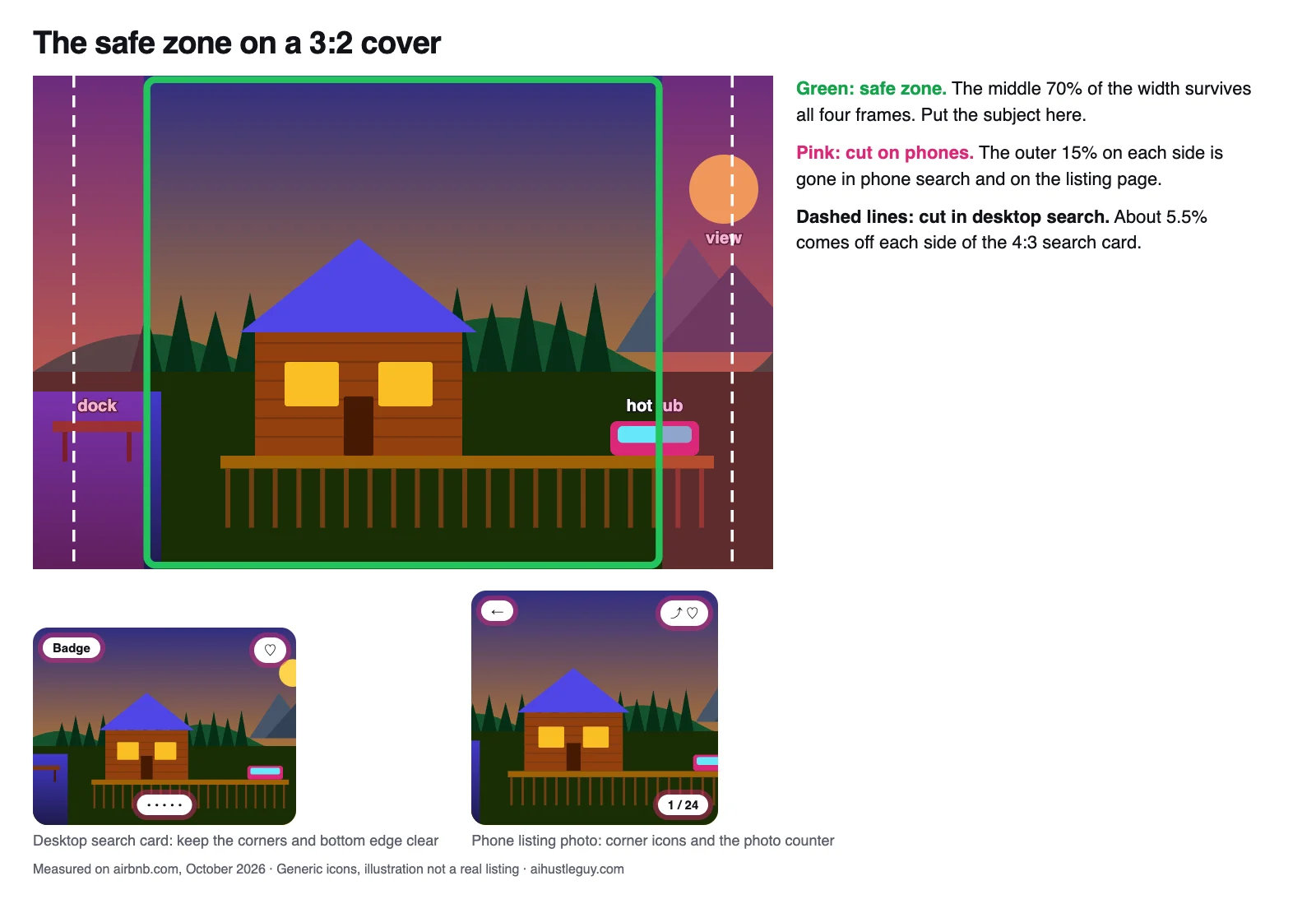
Keep your main feature inside the middle band and away from the corners. Illustration, not a real listing.
How we measured: on October 22, 2026, we loaded Airbnb search results and a listing page in headless Chrome, logged out, in a 1440 x 900 desktop window and as a 390 x 844 iPhone-sized screen. We recorded each photo's on-screen size and fit, then calculated how much of each photo shape survives.
Frame sizes scale with screen width, Airbnb tests layouts, and we didn't measure the iOS or Android apps, so treat this as a dated snapshot. The same frames power our free listing audit, which renders your own cover in each one.
What AI assistants get wrong about Airbnb cover photos (checked October 22, 2026)
- The crop shape. Airbnb's Resource Center says it crops photos into squares (Airbnb Resource Center); its Help Center says search photos display in landscape (Airbnb Help). ChatGPT repeated the squares line and Gemini said Airbnb crops thumbnails horizontally. We measured one 4:3 frame, two nearly square phone frames and a 7:6 tile.
- A statistic with no source. Gemini told us the cover drives more than 80% of a listing's click-through rate. It cited nothing.
- The wrong spec. The 800 x 1200 size that turns up in photo searches is Airbnb's spec for Experiences, not homes (Airbnb Resource Center).
AI is handy for drafting listing copy (here are my AI prompts for hosts). But no chatbot can see your cover in Airbnb's crops or next to your actual neighbors.
The 4-frame crop test
Here's the check I'd run before changing anything. It takes about 10 minutes with any photo editor, including the one on your phone.
- Gather candidates: your current cover plus two or three alternatives, as original files, not screenshots.
- Crop each one three ways, centered: 4:3 for desktop search, square for both phone frames (slightly tighter than Airbnb's, so a safe worst case) and 7:6 for the desktop grid if your editor allows it. Don't nudge the crop sideways. Airbnb won't.
- View them at real size: the square crop on your phone at arm's length, the 4:3 crop about 300 pixels wide on your laptop.
- Ask of every frame: Can I name the main feature at a glance? Did the crop cut it, or the thing that explains it (the edge of the hot tub, the horizon of the view)? Is it still bright and clear when small? Are the corners and bottom edge free of anything important? Do photos 2 to 5 deliver what it promises?
- Decide. Passes every frame: keep it. Fails only on phones: recenter it. Fails everywhere, or your main draw isn't in any photo: swap or reshoot.
Fix a near-miss: crop before you upload
You can't move Airbnb's crop, but you control the file. If the hot tub sits near the right edge, trim part of the left side so the tub moves toward the middle. Keep the photo landscape and above Airbnb's 1024 x 683 minimum (Airbnb Help); Airbnb's own photo guide tells hosts to crop and straighten as needed (Airbnb Resource Center).
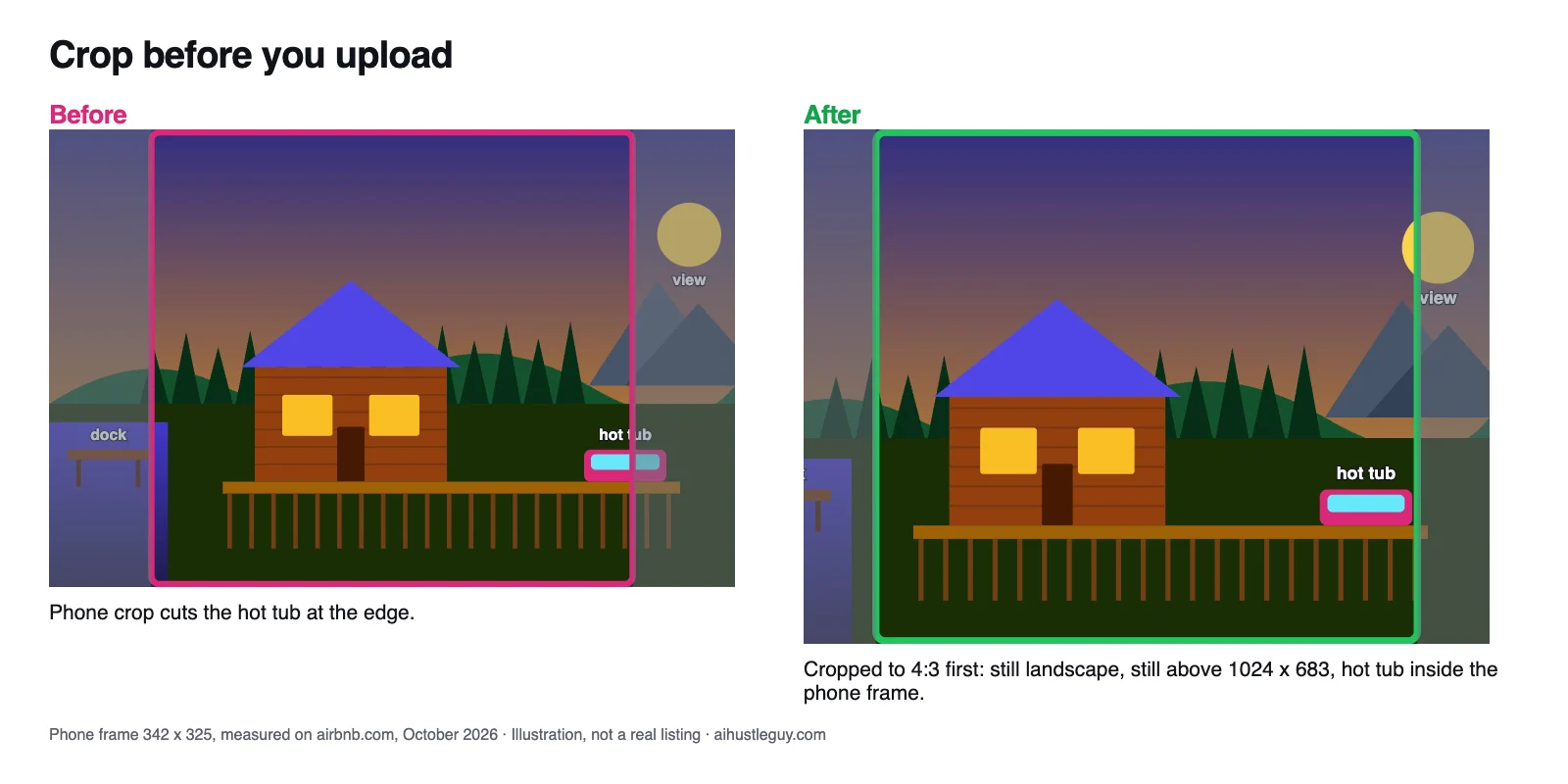
Cropping before you upload moves the subject into the part Airbnb keeps. Illustration, not a real listing.
5 rules for an Airbnb cover photo that works on a phone
- Lead with the reason to book. The one feature that makes a guest choose you over the next card: the view, the hot tub, the pool, the design, room for twelve. If it needs a caption to make sense, it's the wrong cover.
- Shoot horizontal and keep the subject in the middle 70%. Airbnb asks for landscape photos of at least 1024 x 683 pixels (Airbnb Help), and its photo guide says horizontals work better because search crops photos (Airbnb Resource Center). The middle band also keeps your subject clear of the label, heart and dots.
- Make it bright and simple. One clear subject, natural light, no clutter. Airbnb's guide suggests shooting rooms when they get the most daylight and exteriors in the hour after sunrise or before sunset. Close-ups, collages and dark rooms turn to noise at thumbnail size.
- Keep it honest. Brightness and contrast tweaks are fine. Airbnb will ask you to remove photos where AI or other tools were used to hide flaws or damage, or to add amenities (Airbnb Help). Don't lead with a shared pool or lobby in a way that implies it's private; an oversold cover comes back in your accuracy rating.
- Make your amenity photos cover-worthy too. Hosts report that amenity filters, such as hot tub, can put that amenity's photo on your card instead of your cover (more below). Shoot those to the same standard.
Airbnb cover photo ideas by property type
There's no single best Airbnb cover photo, only the best one for your listing: your main draw, shot so it survives the crop.
| Property type | Strong first choice | Common miss |
|---|---|---|
| Cabin (mountain or lake) | The cabin in its setting, or the hot tub or deck with the view, at golden hour or dusk with the lights on | A dark wood interior; the hot tub pushed to the edge of a wide shot |
| Beach condo | The view from your balcony, with a slice of the balcony in frame to show it's yours | A beach photo not taken from the unit; a shared pool shown as if private |
| City apartment or loft | The brightest living space, with the window or skyline | The bed; the building's exterior |
| Family or group home | The space that proves capacity: the big living and dining area, or the pool and yard with the house | One bedroom; a close-up of the game room |
| Pool home | Pool and house together, shot from the far end so both sit in the middle | A pool shot so wide the house is cut on phones |
| Unique stay (A-frame, treehouse, dome) | The structure itself, whole and centered, with space around it | An interior that could be any cabin |
| Private room | The room itself: bright, bed made, window light | A shared living room the guest won't have to themselves |
Check your cover against your neighbors
Guests see your cover in a grid of nearby homes, and the one that reads first gets the tap. So the second test, which I call the Neighbor Contrast check, puts your cover next to the cards around it.
Aim for different, not strange. A study in the December 2025 Journal of Consumer Research scored nearly 482,000 New York City Airbnb photos for visual uniqueness: listings with less distinctive photos tended to have lower occupancy, but photos that were too unusual put people off as well (Harvard Business School Working Knowledge, February 2026).
- Open airbnb.com in a private window, logged out, so your own browsing doesn't shape the results.
- Search your town for a typical stay: a weekend a few weeks out, with your usual guest count.
- Move the map until your listing shows, then screenshot the 12 or so cards around yours. Repeat on your phone.
- Look at the screenshot small, at arm's length. Which three covers does your eye land on first? Is yours one of them?
- Note what the eye-catchers share (light, color, one clear feature) and the shot almost everyone uses. That common shot is the one not to copy. If every cabin leads with a dusk exterior, a bright daytime shot of your hot tub and view may read first.
- Turn on the filters guests use in your area, such as Hot tub, Pool or Allows pets, and see whether your card's photo changes.
Our free listing audit automates this. It runs a live map search around your listing, places your cover among up to 11 nearby homes in a desktop search layout with yours outlined, and gives you a stand-out score. The full audit adds which cards pull the eye first and what they do differently.
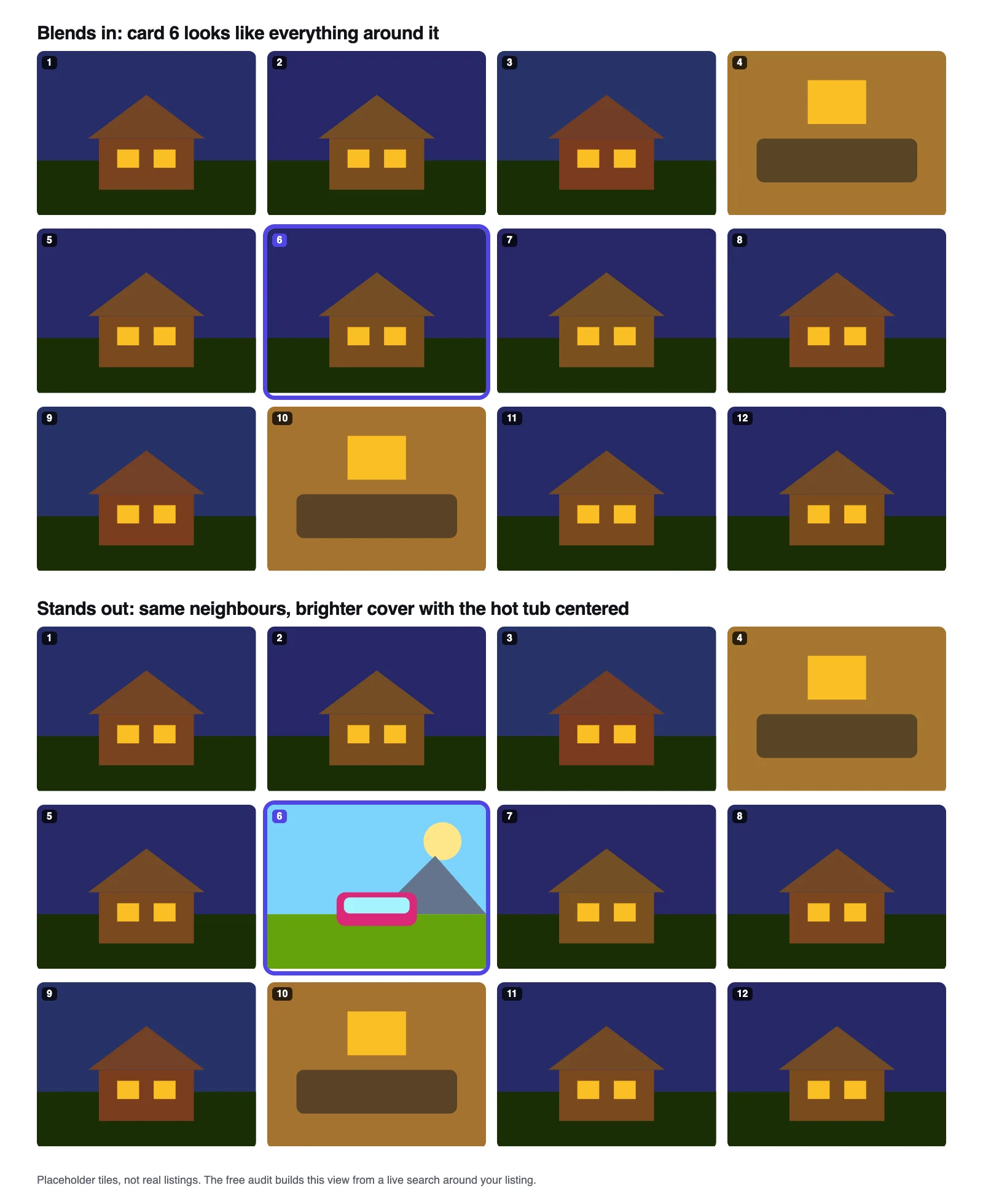
Same grid, two covers. Placeholder tiles, not real listings.
Keep, swap or reshoot: Airbnb cover photo examples
Every cover lands on one of three verdicts, the same three our audit gives:
- Keep if it shows your main draw, passes the crop test and reads first, or close to first, among your neighbors. Don't change a cover that works.
- Swap if a better cover is already in your gallery. Check every photo before you book a photographer; the strongest candidate can be buried deep.
- Reshoot if nothing passes, or your main draw only appears at the edge of a wide shot. Plan the shoot around one horizontal frame, the feature centered, in the best light of the day.
These examples are made up to show the reasoning. They are not real listings.
| Listing | Current cover | What the tests show | Verdict |
|---|---|---|---|
| Lakeside cabin | A wide 3:2 shot with the dock and lake in the right third | Fine in desktop search; on phones the dock is cut and the frame is mostly trees | Crop before upload so the dock sits nearer the middle, or swap to the deck shot with the lake centered |
| City one-bedroom | A close-up of the bed | Clear at every size, but it looks like every bedroom cover nearby; the skyline living room is photo 9 | Swap to photo 9 and move the bedroom to photo 2 |
| Beach condo | The ocean from the balcony, filling the middle of the frame | Survives every frame; most neighbors lead with the shared pool | Keep |
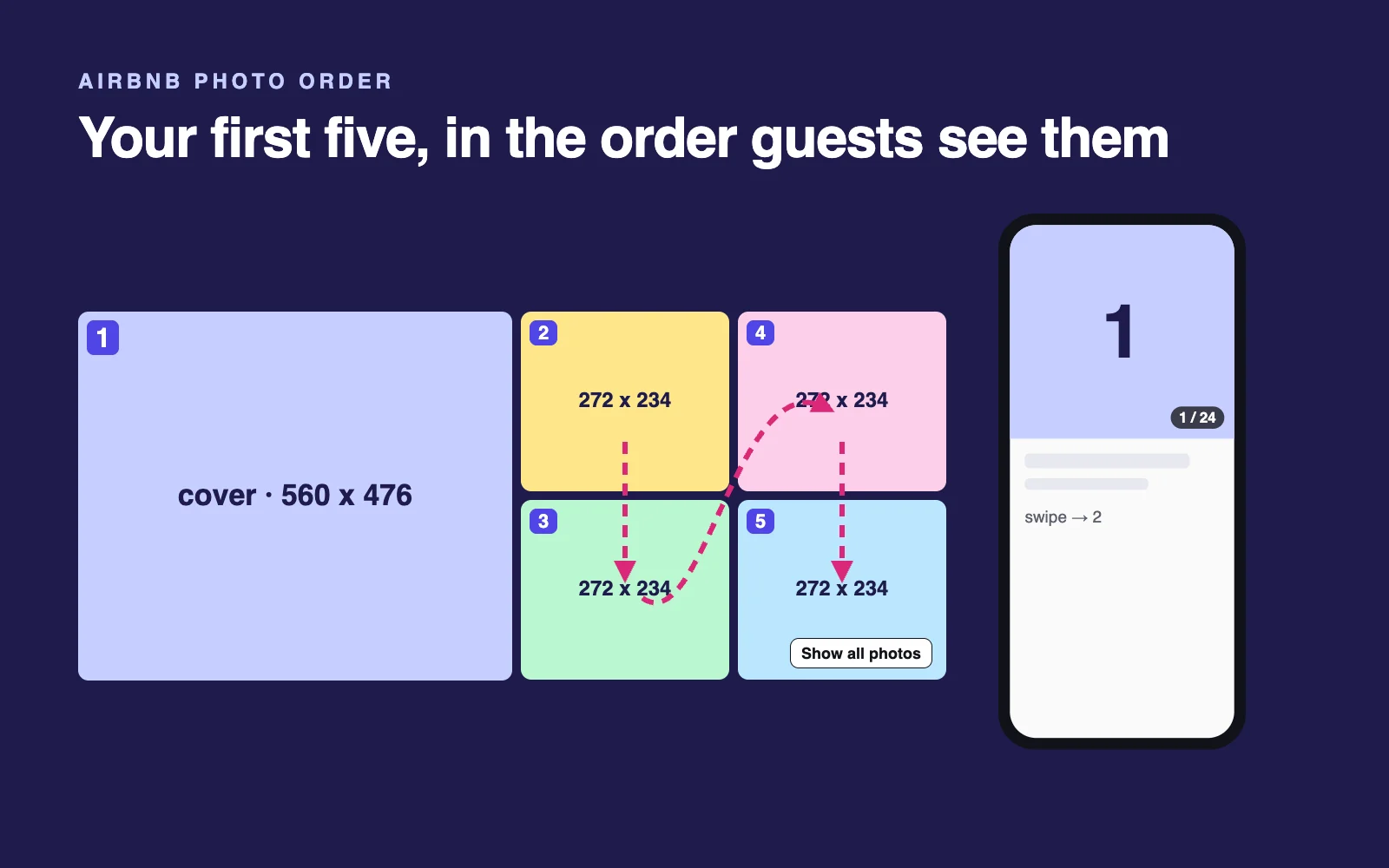
Once the cover is settled, the other four photos in your first five matter next. Here's how to order them.
How to change your cover photo on Airbnb
These are Airbnb's steps, checked in its Help Center in October 2026 (Airbnb Help). On desktop:
- Click Listings and select the listing.
- Under Listing editor, click Photo tour.
- Click All photos.
- Select the photo and click Make cover photo.
- Optional: click Add a description for this room or space to add a caption.
- Click Save.
The iOS and Android apps and mobile browsers use the same path; you tap instead of click. To reorder the rest of your first five, open All photos and drag them into place. Airbnb saves the order automatically.
Then measure. Give a new cover a few weeks and compare your search-to-listing conversion in Insights, under Performance, then Conversion, changing one thing at a time so you know what moved the number.
No Performance tab? Airbnb says to opt in to its professional hosting tools (Airbnb Help).
Why your Airbnb cover photo won't change (or keeps changing)
Work through these in order:
- Give it 30 minutes. Airbnb says changes may take up to 30 minutes to appear.
- Check that you clicked Save after Make cover photo.
- Look from a clean view: a logged-out private window or another device. Your usual browser or app may show a copy it loaded earlier.
- Clear the filters before you judge search. On March 6, 2026, a reply in Airbnb's Community Center said a listing's cover photo "may change depending on the category where it's being featured, as well as what a user is searching for" (Airbnb Community Center). It isn't in the Help Center, so treat it as reported, not documented. In the same thread, a host reported filters switching the first photo to a selected amenity, and others report search showing a cover they never chose.
- Check your software. If a property management system or channel manager (the tools I recommend) handles your photos, make the change there too and check the live listing after the next sync. One operator reports a photo order set in their PMS showing up in a different sequence on Airbnb (Short Term Rental Riches).
- Still wrong on the listing page itself? If the listing page, not just search, shows the old cover after 30 minutes and a clean view, contact Airbnb support.
Airbnb doesn't document any setting that locks your cover in every search. Your defense is to make each of your first five photos, and every photo of an amenity guests filter for, good enough to be the cover.
FAQ
How do I choose a cover photo for my Airbnb listing?
Choose the one photo that shows the main reason to book, such as the view, the hot tub or a bright living room, and check it at phone size. Airbnb crops the cover to roughly 4:3 in desktop search and close to square on phones, so keep the key feature centered and skip bathrooms, close-ups and dark shots.
How do I change my cover photo on Airbnb?
Go to Listings and select your listing. Under Listing editor, open Photo tour, then All photos. Select the photo you want, choose Make cover photo and save. The steps are the same on desktop, in the iOS and Android apps and in a mobile browser. Airbnb says changes can take up to 30 minutes to appear.
Why is Airbnb showing a different cover photo than the one I chose?
First wait 30 minutes, confirm you saved, and check in a logged-out private window. If search still shows another photo, a March 2026 reply in Airbnb's Community Center said the cover can change with the category a listing appears in and what a guest searches for. Hosts also report amenity filters, such as hot tub, pulling in a matching photo.
What size should an Airbnb cover photo be?
Airbnb asks for landscape photos of at least 1024 x 683 pixels and says bigger is better; its photo guide suggests at least 1200 x 800, with files up to about 10 MB. Shape matters as much as size: desktop search shows covers at about 4:3 and phones show them nearly square, so keep the subject centered.
Should my Airbnb cover photo show the outside or the inside?
Show whichever space is the main reason guests book. For cabins, A-frames, treehouses and pool homes that is often the exterior or the outdoor amenity. For a city apartment it is usually the brightest living space or the view, and for a private room it is the room itself. Then compare your pick with nearby listings at phone size.
Can I use AI to edit my Airbnb cover photo?
Light edits are fine. Airbnb's own photo guide suggests adjusting brightness, contrast and highlights, and cropping or straightening as needed. What Airbnb prohibits is using AI or other digital tools to hide flaws or damage, add amenities or otherwise misrepresent the listing, and it will ask hosts to remove that content. Oversold photos can also hurt your accuracy rating.
How often should I change my Airbnb cover photo?
Only when you have a reason: a better photo, a new feature, a season that changes your main draw, or a cover that fails the crop or neighbor checks. Edit frequency isn't among the ranking factors Airbnb lists. After a switch, give it a few weeks, then compare your search-to-listing conversion in Insights, under Performance, then Conversion.

Written by Jon Miksis
Founder of AI Hustle Guy, Make the Leap, and Europe Flight Club, and the travel blogger behind Global Viewpoint (9+ years, 73 countries). He brings 9+ years of coaching and mentorship experience and has facilitated 23 transformation retreats across four continents. Every AI tool and prompt on this site gets tested on his own businesses first.
Get my free AI prompt pack
Join 300+ founders, creators, and professionals. I’ll send you my go-to AI tools and copy-paste prompts that save hours every week. No spam.