Why Is My Airbnb Not Getting Booked? A 15-Minute Diagnosis (2026)
By Jonathan Miksis · October 23, 2026 · 19 min read
Some links in this post are affiliate links. If you buy through one, I may earn a commission at no extra cost to you.
You've probably tried the usual fixes already: a lower price, new photos, a tweaked description, maybe a promotion. And the calendar still looks dead.
You're in good company. In one April 2026 r/airbnb_hosts thread, "No freaking bookings? Please help!", a Superhost with more than a hundred five-star reviews said their mountain cabin, usually booked months out, had gone quiet despite new photos, lower prices and promotions. Replies blamed everything from the economy to the algorithm.
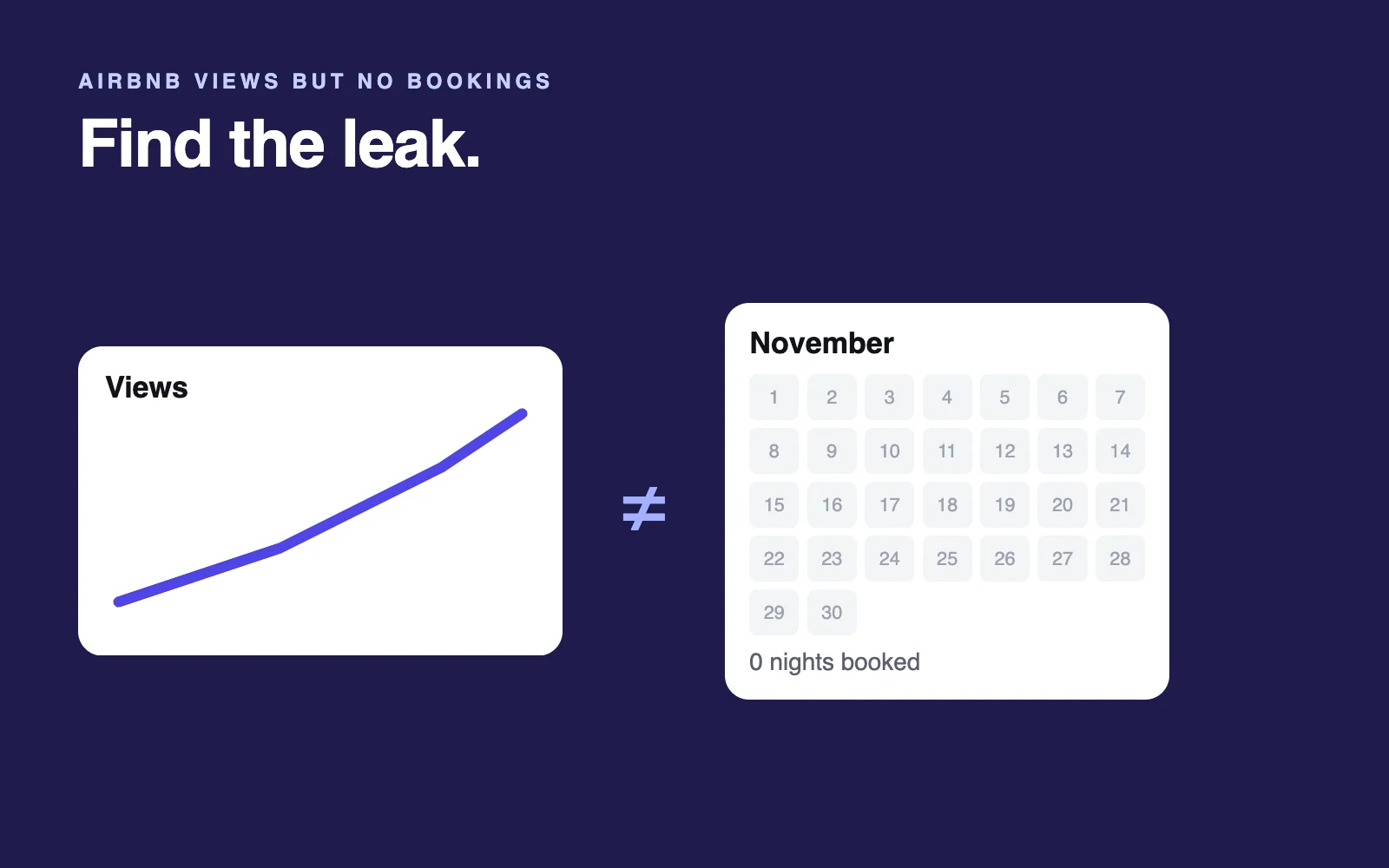
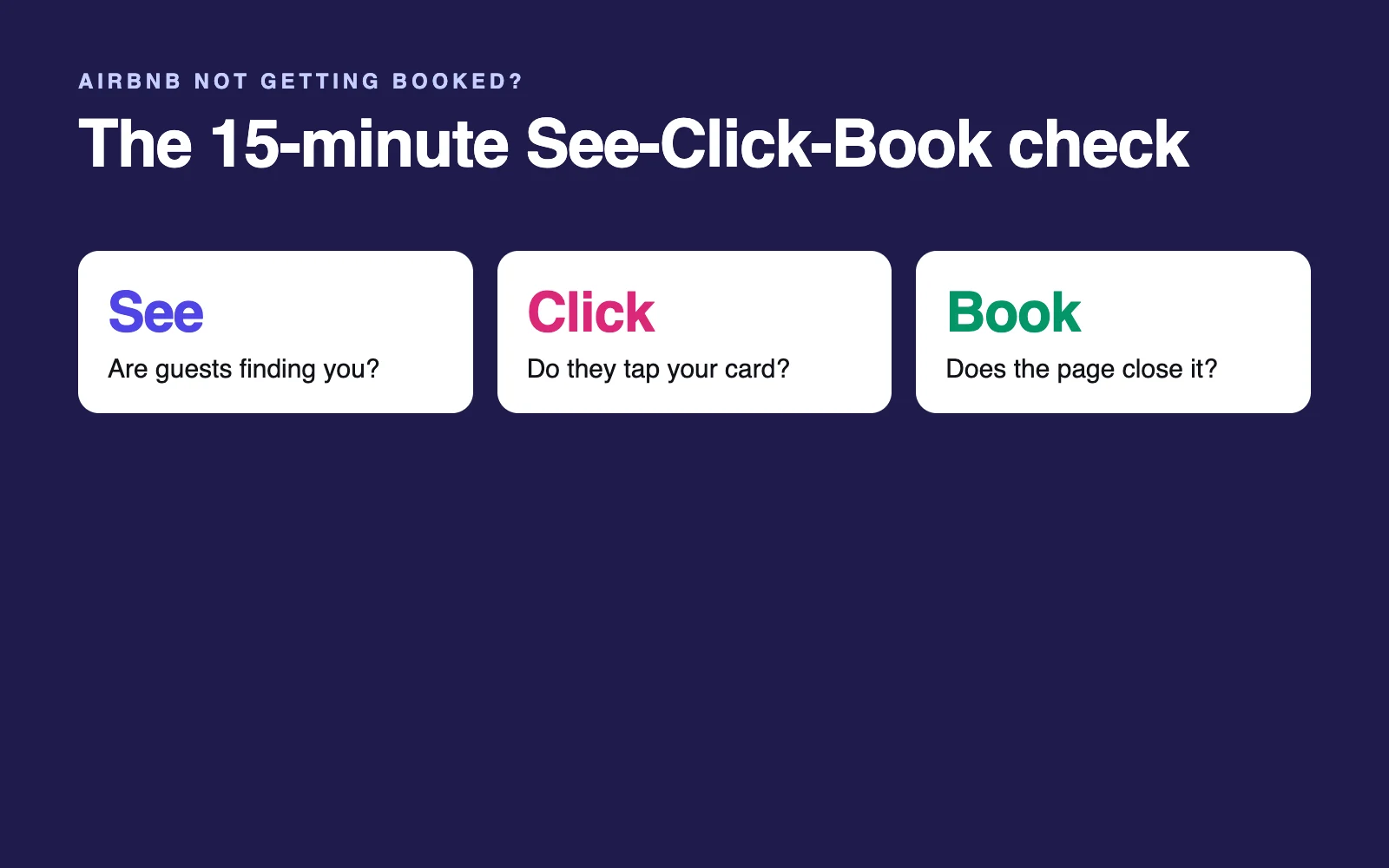
Everyone was guessing, because nobody could see the host's numbers. You can see yours: Airbnb tracks each guest's path to your listing in three stages, and the right fix depends on which stage is leaking.
Checked against Airbnb's Help Center, Resource Center and live airbnb.com searches, October 2026.
The short answer: Most listings that aren't getting booked have one of three problems: guests don't see it (calendar, minimum stay, guest limit or price filters it out), they see it but don't click (cover photo, total price, rating, card text), or they click but don't book (photos, description, reviews, fees, rules). Find the leaking stage in Insights and fix it first.
Three facts to know first (October 2026):
- In Q1 2026, 63% of nights booked on Airbnb came through its app (Airbnb Q1 2026 results).
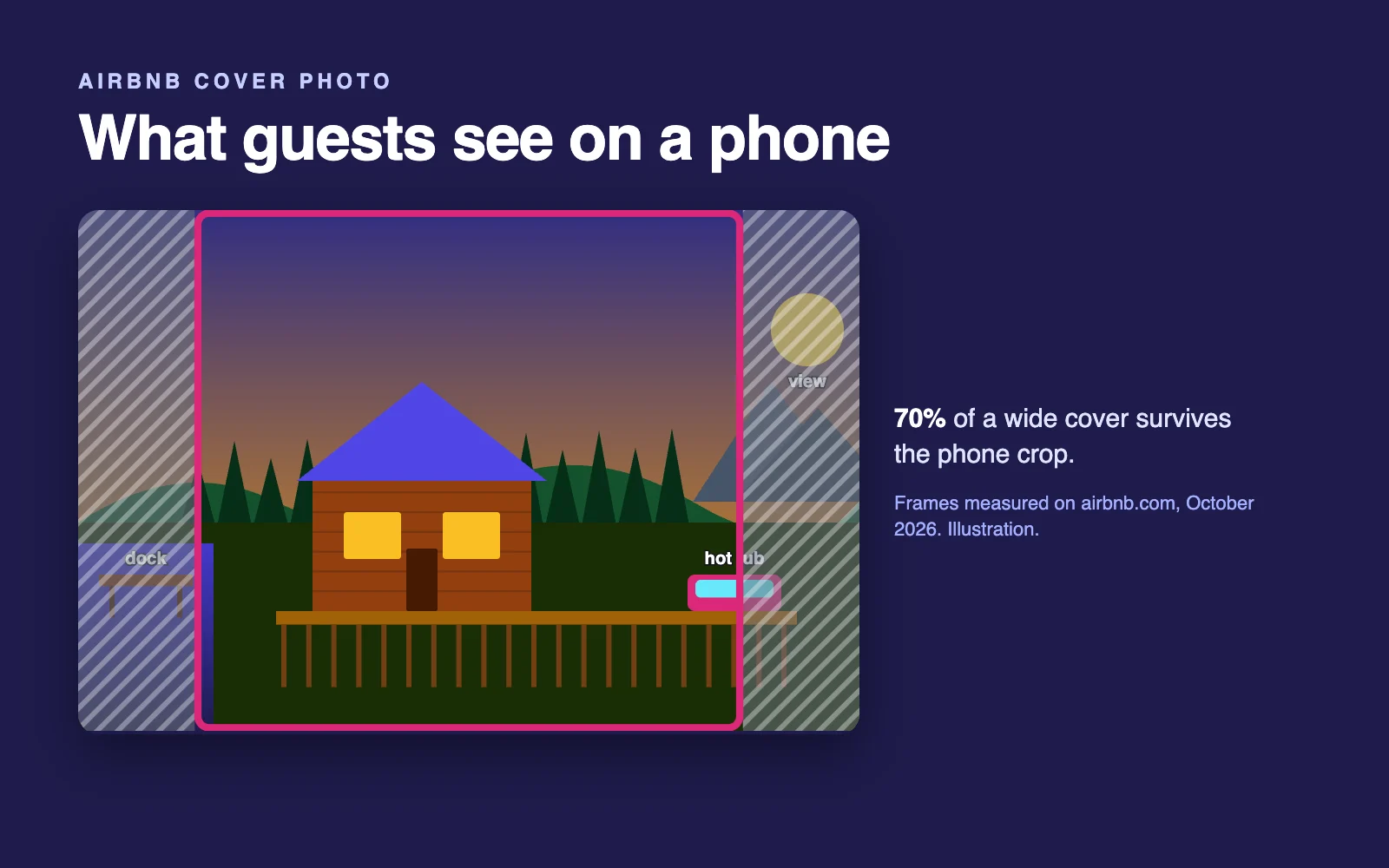
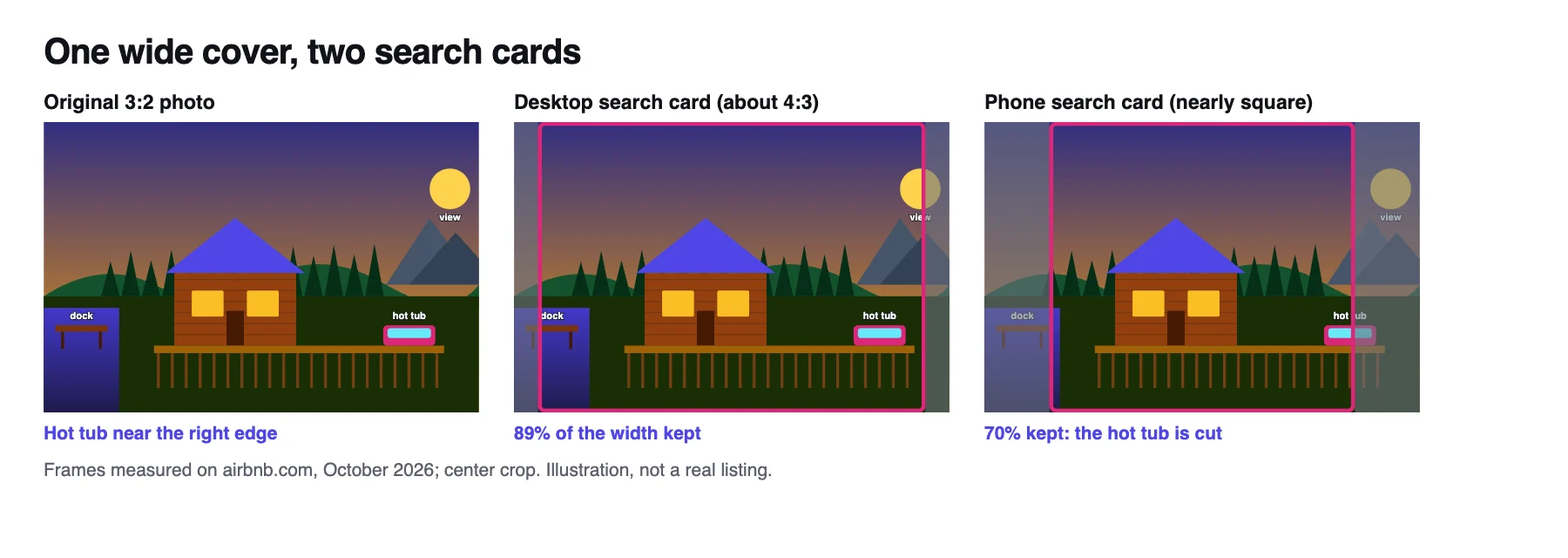
- On a phone search card, a standard 3:2 cover photo keeps only about 70% of its width (measured on airbnb.com, October 2026).
- US search cards now show an AI-written line about your home (Airbnb 2026 Fall Update) and, in our October 2026 checks, not your title.
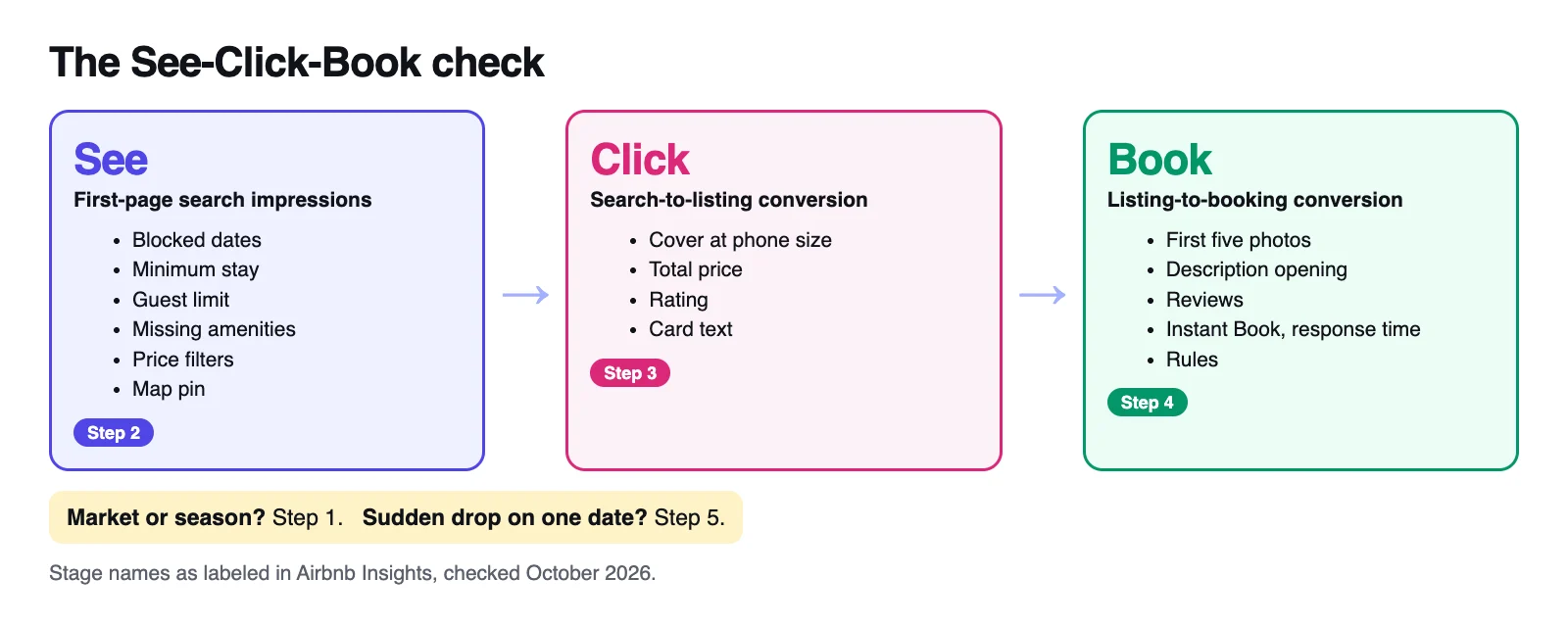
The See-Click-Book check: find the leak first
Airbnb shows all three stages under Insights, then Performance, then Conversion (Airbnb Help). No Performance tab? Turn on professional hosting tools in your Account settings (Airbnb Help).
- First-page search impressions: guests seeing your listing in search. This is See.
- Search-to-listing conversion: the share who click through to your page. This is Click.
- Listing-to-booking conversion: the share who then book. This is Book.
Insights compares each number with similar listings in your area and with earlier periods. Data only starts after your first booking (Airbnb Help), so if you've never been booked, start with Step 2's test search.
| What your numbers show | Where it's leaking | Start with |
|---|---|---|
| Impressions low next to similar listings or earlier periods | See: you're filtered out of searches | Step 2 |
| Normal impressions, few clicks | Click: your card loses to the cards around it | Step 3 |
| Plenty of views, almost no bookings | Book: your listing page talks guests out of it | Step 4 |
| All three normal for your area, bookings still down | The market or the season | Step 1 |
| Everything fell off a cliff on one date | Something changed | Step 5 |
Is there a "good" conversion rate? Airbnb doesn't publish one. An IntelliHost and Uplisting analysis of 24,000+ active US listings (May 2026) estimated a median of one booking per 47 first-page impressions, with about 53% of page-one viewers never clicking and about 96% of clickers never booking. These are unaudited estimates from public calendar data on established listings (10+ reviews, $10,000+ a year), so use them as a sanity check, not a target.
Run the steps in order. Together they take about 15 minutes.
Step 1: Slow season or your listing? Rule out the market (3 minutes)
Demand didn't vanish in 2026: Airbnb's nights and seats booked rose 10% year over year in Q2 (Airbnb Q2 2026 results). Your town can still move on its own, so check locally:
- Run the same-dates test. In a private window, search your neighborhood with your usual guest count and no dates, and note how many homes show. Then add a weekend three to six weeks out: if the count barely drops, the market is soft; if it drops a lot and you're still open, guests are passing you over.
- See what similar listings booked at. In your calendar, select the nights, click the nightly price, then View similar listings (Airbnb Help). If the average booked price sits well below your rate, guests are choosing cheaper homes. It compares nightly prices, not totals, and it's hidden while Smart Pricing is on.
- Check your booking lead time. If Insights shows guests now book closer to arrival, an empty calendar six weeks out may fill later. If bookings come in bursts (feast or famine, as that Superhost put it), compare whole months.
Airbnb's pricing and availability insights (in your calendar since May 2026) use the past month of local searches and bookings to suggest changes (Airbnb Resource Center). For occupancy and booking pace across comparable listings, PriceLabs Market Dashboards chart both; as of October 2026, PriceLabs offers a free dashboard credit that expires after 30 days, and standalone plans start at $9.99 a month.
Verdict: If homes like yours are empty too, it's the market: adjust price and minimum stays for the season (see when cutting your price helps) and leave a working listing alone. If they're booking and you're not, keep going.
Step 2: Make sure you're not filtered out (4 minutes)
When your settings don't fit a guest's dates, group or filters, you're usually left out of the search, not ranked lower. Airbnb says a blocked calendar or unmet requirements (advance notice, preparation time, a good guest track record) can keep you out of results (Airbnb Help).
Search as a guest (Airbnb Help) in a private window with real dates and a typical group, then check:
- Open nights and availability window. A synced calendar can block nights you think are free. Your window can run 3, 6, 9, 12 or 24 months ahead, and Airbnb says extending it helps you appear in more searches (Airbnb Resource Center).
- Advance notice and preparation time. Airbnb blocks those days automatically, so nobody can book them.
- Minimum nights. A 3-night minimum hides you from every 2-night weekend search. Change it under Calendar, then Availability, then Trip length, including by check-in day (Airbnb Help).
- Guests and pets. A four-guest limit usually hides you from a family of five, and a no-pets rule from a guest with a dog.
- Amenities. Many guests filter by amenities, so Airbnb says to list everything you offer (Airbnb Help). US guests can now also type keywords into filters.
- Price range. Guests can filter by price (Airbnb Help), so pricing well above your neighbors can drop you out early.
- Listing status. It should be Listed, not Unlisted, including unlisted for a set of dates (Airbnb Help). A new listing usually appears within 24 hours, sometimes up to 72 (Airbnb Help).
- The map pin. Airbnb's ground rules require accurate location details, including the pin (Airbnb Help).
Results are personalized, so one search proves little: that April Superhost couldn't find their cabin in their own town while support said it was showing. Rule of thumb: showing with dates cleared but never for real dates means settings; showing far down means ranking, where quality, popularity, price and location weigh most (Airbnb Help).
Step 3: Are guests clicking? (4 minutes)
If guests see you but don't click, your card is losing to the ones around it. As of October 2026, in the US, that card doesn't show your title: it shows your property type and town plus a one-line summary Airbnb's AI writes from details hosts provide, per a note above the results. On Airbnb's UK and Canadian websites, every card we checked on October 22, 2026 still showed the host's own title.
What guests see before they click (measured October 2026)
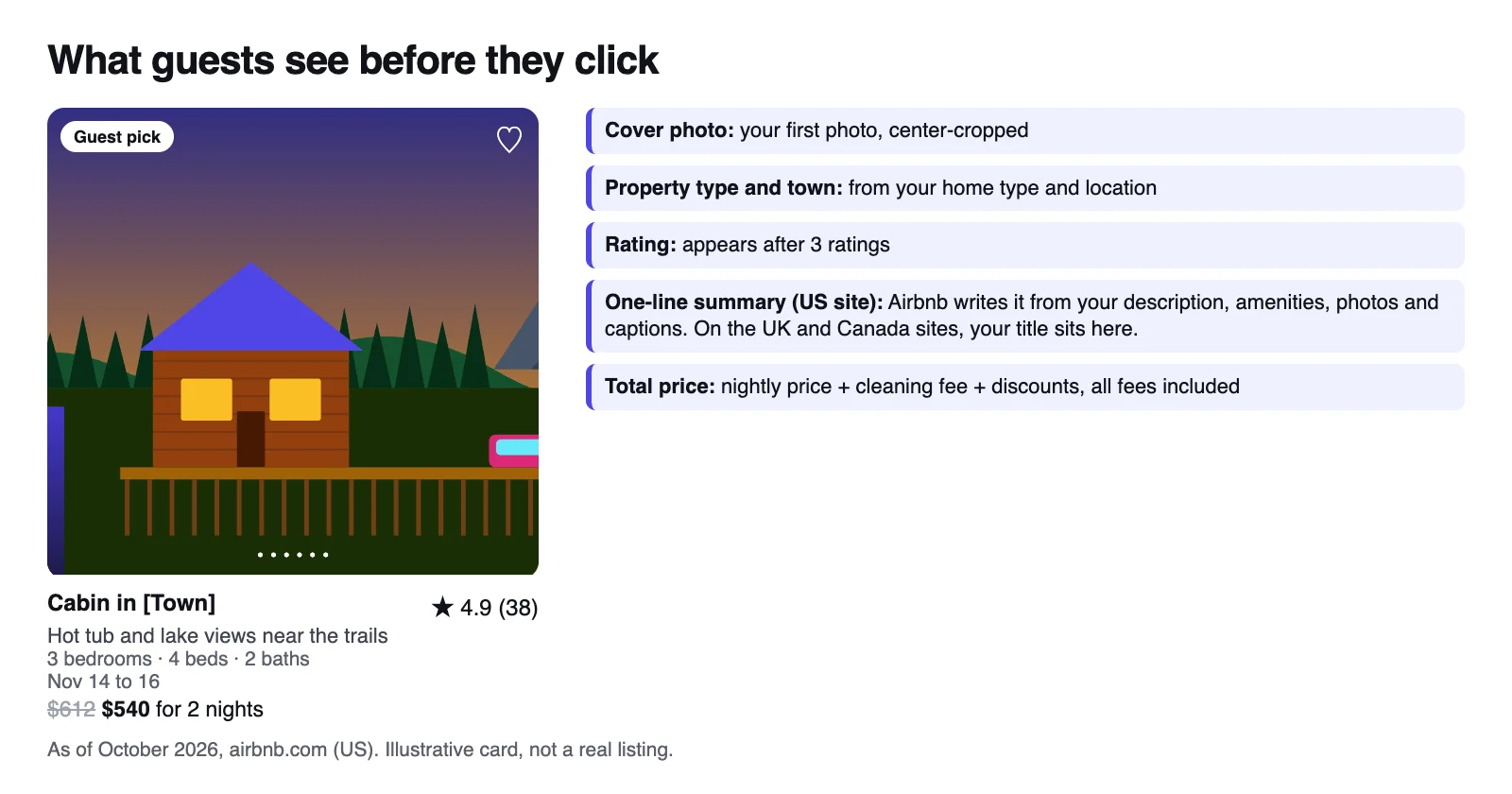
| On the card | Where it comes from | What you control |
|---|---|---|
| Cover photo, about 4:3 on desktop, near square on phones | Your first photo (in some searches, another) | Which photo leads, and what's in its center |
| Property type and town, for example Cabin in Gatlinburg | Home type and location | The right home type |
| Star rating and review count | Guest ratings, shown once 3 guests rate you | The guest experience |
| One-line AI summary (US site) | Details hosts provide (Airbnb doesn't say which) | Description, amenities, photos, captions |
| Bedrooms, beds and baths | Listing details | An accurate room and bed setup |
| Dates and one total with all fees, crossed out when discounted | Nightly price, cleaning fee, discounts | Every part of that total |
How we measured: on October 22, 2026, we searched homes in Gatlinburg, Tennessee, on airbnb.com, logged out and without filters, in desktop (1,440 pixels wide) and iPhone-sized browsers; covers are center-cropped to 307 x 230 pixels on the desktop card and 342 x 325 on the phone card. None of the 18 cards showed its host's title, while on airbnb.co.uk (Lake District) and airbnb.ca (Muskoka) all 18 cards of each did. An October 23 repeat matched; we checked the websites only, not the apps.
Now check your own card, logged out, with and without filters:
- Does your cover work at phone size? Most nights are booked in Airbnb's app, and on a phone-sized screen the card trims about 15% off each side of a 3:2 photo, so a hot tub at the edge can vanish. Use landscape photos of at least 1024 x 683 pixels (Airbnb Help) and run the 4-frame crop test in my cover photo guide.
- Do you stand out? Compare the ten or so cards around yours on the map. If every cabin leads with the same deck at dusk, guests can only choose on price.
- Is your total competitive? Since April 2025, cards show one total with all fees, before taxes in most places (Airbnb Newsroom). A high cleaning fee can make yours the priciest card for two nights even when your nightly rate matches Step 1's comparison.
- What does your AI line say? If it's vague, give Airbnb better material: name the view, list every amenity and open your description with specifics (description examples). Your title still heads your listing page (and the card outside the US), so keep it under 50 characters, in sentence case, without emojis (Airbnb Resource Center, title ideas).
- Do you have stars yet? Your rating shows once 3 guests have rated you (Airbnb Help). Until then you win on cover and total, and the optional new listing promotion takes 20% off your first 3 bookings (Airbnb Help).
One more 2026 wrinkle: according to a March 2026 reply in Airbnb's Community Center, the cover a guest sees can vary with the category a listing is featured in and what the guest searches for. That's reported, not official (it isn't in the Help Center), and hosts report it with amenity filters such as hot tub, so make all of your first five photos cover-worthy.
You can't see your own card the way a stranger does. Not sure it's the problem? Run the free check below.
Step 4: Are clickers booking? (3 minutes)
If views are healthy but listing-to-booking conversion is low, your page is talking guests out of it. Check it in the order guests read it:
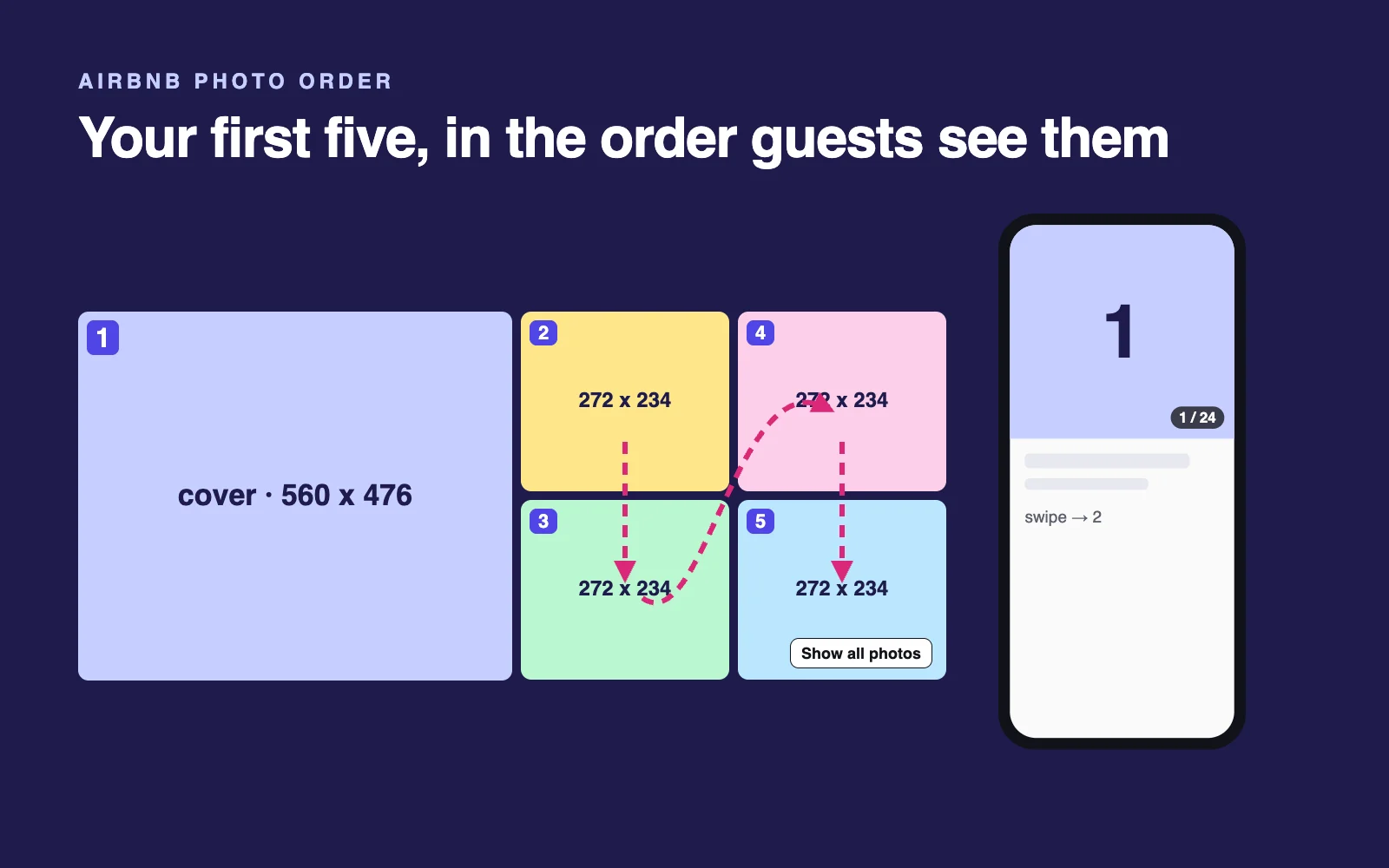
- Your first five photos. Airbnb calls them the most important photos on your listing (Airbnb Help). On desktop, photo 1 fills the left half and photos 2 to 5 fill a 2x2 block column by column: 2 top left, 3 below it, then 4 and 5 on the right (measured October 2026). Do they deliver what the cover promised? See how to order your first five photos.
- The opening of your description. Guests see only the first lines before Show more, so lead with who the place suits and what makes it different.
- Reviews. Check the count, recency and category scores, especially accuracy: did the place match its photos and information (Airbnb Help)? If reviews keep naming one problem, fix it and say so (accuracy rating guide).
- Booking friction. Airbnb says Instant Book can improve your placement in search (Airbnb Help) and asks hosts to answer requests within 24 hours (Airbnb Help). If you can't always reply fast, automate your Airbnb messages.
- Rules and policies. A strict cancellation policy, a long rule list or checkout chores give guests reasons to keep looking. For reservations booked from November 20, 2026, Airbnb's house rules policy generally doesn't allow fines or chores a cleaner would do, such as stripping beds or washing and putting away dishes; persistent violations can bring a notice on your listing and less search visibility (Airbnb Help).
If this is your stage, I go deeper in Airbnb views but no bookings.
Step 5: Did something change on a specific date? (1 minute)
If your numbers fell off a cliff on one date, find what changed that day before you touch the listing.
Changes on your side
- Your settings: price, minimum stay, calendar sync, a new pricing tool, a stricter cancellation policy.
- Your listing isn't new anymore. Airbnb's algorithm is designed to help new listings show up well in search (Airbnb Help). Once that fades, you compete on your own, which is why some hosts describe busy first weeks, then a drop.
- The 2026 fee switch. Airbnb moved hosts to one host-paid service fee, 15.5% for most and 16% in Brazil and Mexico (Airbnb Help), and asked them to raise prices by September 15, 2026 (October 13 in the European Economic Area and Switzerland) to keep payouts level (Airbnb Resource Center). Done right, guests pay what they did before: Airbnb's example raises $100 to $115, the same $115 guests saw under the old split fee.
Two things can still make you look pricier: raising prices twice (by hand and in a pricing tool), or neighbors who didn't raise theirs and now cost guests less. Airbnb's one-time adjustment tool is for hosts without property management software (Airbnb Help), so if software sets your prices, check the increase landed once, then recompare totals.
Changes on Airbnb's side in 2026
- AI search (September 30, starting in the US): guests search in their own words, and cards carry the AI line from Step 3 (Airbnb Newsroom). More in what Airbnb's 2026 AI means for hosts.
- Airbnb's dynamic pricing (rolling out from October): Airbnb says using it doesn't directly affect ranking and leaving it off isn't penalized, but competitively priced listings tend to rank higher (Airbnb Resource Center).
If nothing changed and impressions dropped to almost zero
Contact Airbnb support with the date your numbers fell and ask them to check your search visibility. It does happen: in October 2026 a Kauai host posted that support found a sync error, triggered when new pricing was saved, that hid the listing from general search.
The fix order: how to get more bookings, fastest first
Fix the leaking stage first, starting with what costs least and shows up fastest.
| Order | Fix | Stage | Effort | Judge it after |
|---|---|---|---|---|
| 1 | Open what hides you: nights, availability window, advance notice, minimum nights, guest limit, amenities | See | 10 minutes | 2 weeks |
| 2 | Bring 2- and 3-night totals in line with similar listings: base price, cleaning fee, weekly discount | See, Click | 15 minutes | 2 weeks |
| 3 | Make your cover work at phone size: swap in a better photo, or reshoot if none works | Click | 10 minutes to a day | Live in 30 minutes; judge at 2 weeks |
| 4 | Feed Airbnb's AI line: complete amenities, a specific description opening | Click, Book | 30 minutes | 2 weeks |
| 5 | Reorder your first five photos to deliver the cover's promise | Book | 15 minutes | 2 weeks |
| 6 | Turn on Instant Book; answer requests within 24 hours | See, Book | 5 minutes | 2 to 4 weeks |
| 7 | Rewrite your title: under 50 characters, sentence case | Book (Click outside the US) | 10 minutes | Live in an hour; judge at 2 weeks |
| 8 | Bring house rules in line with the November 20, 2026 policy | Book; protects visibility | 20 minutes | Before November 20 |
| 9 | Fix what reviews keep mentioning | Book | Varies | Your next stays |
Effort and timing are my estimates. Airbnb says how fast changes appear (photos within 30 minutes, titles within an hour, per Help 477 and Help 3021), not how fast they work, so change one thing at a time and compare two weeks before and after.
Rather not work through every row? The full Airbnb listing audit turns this table into a plan for your listing, with each fix rated by effort and impact.
When cutting your price helps, and when it doesn't
Cut, or discount, when:
- Your total is above similar homes for the same dates. Airbnb weighs your total price against comparable listings for those dates, and those priced below tend to rank higher (Airbnb Help).
- Step 1 showed a soft market for your dates.
- You have short-notice gaps. Airbnb's last-minute discounts can step up for bookings 8 to 14, 2 to 7 and 0 to 1 days out (Airbnb Resource Center).
Don't cut when:
- You're filtered out. A cheaper listing that guests can't see is still unseen.
- Your card loses the click at a fair price. You'd pay a discount on every booking to make up for a cover you could swap in ten minutes.
- You already cut and nothing moved. Another April 2026 post came from a Superhost with a top 5% Guest Favorite apartment: no bookings in four months, even at 25 euros a night. If a deep cut doesn't move impressions or views within a couple of weeks, price wasn't the leak.
If you do cut, cut smart:
- Discount before you cut your base rate. Weekly discounts of 10% or more show your original price crossed out, and Airbnb says discounts on stays of 7 nights or longer can help your search ranking (Airbnb Resource Center).
- Let a tool track demand if you reprice by hand every week. I compare the main options in PriceLabs vs Wheelhouse vs Beyond.
What AI answers and host forums get wrong about this
No AI answer can see your listing, and when we asked Google's AI Mode this question on October 22, 2026, it cited no sources at all. Four claims to ignore:
- Keep your title to 32 characters. AI Mode told hosts this in our October 2026 checks; Airbnb's current guide (February 2, 2026) says fewer than 50 (Airbnb Resource Center).
- Edit your listing or shuffle photos so the algorithm sees fresh content. Freshness isn't among the ranking factors Airbnb lists (Airbnb Help).
- A Superhost or Guest Favorite badge keeps you on top. Airbnb does weigh the Superhost criteria, but both hosts in the threads above were Superhosts.
- Have a friend book to restart your ranking. Airbnb's Terms of Service ban practices intended to manipulate its search algorithm (Airbnb Help), and its review policy bars coordinating with anyone to influence a review (Airbnb Help).
Once you know what to fix, my AI prompts for Airbnb hosts help you draft a title or description. For the bigger picture, start with AI for Airbnb hosts.
FAQ
Why did my Airbnb bookings suddenly stop?
Look for a change on the date your numbers dropped: a synced calendar blocking nights, a new minimum stay, a price change (including the 2026 switch to Airbnb's single host-paid fee) or the end of your season. If search impressions fell to almost zero and nothing changed, ask Airbnb support to check your listing's search visibility.
How do I get more bookings on Airbnb?
Find where guests drop off first. Open more dates and loosen minimum stays so you show up in more searches, keep your total price in line with similar listings, make your cover photo work at phone size, and lead with five photos and a description opening that deliver what the cover promised.
Should I lower my price if my Airbnb isn't getting booked?
Only if your total for the same dates is above similar listings or the whole market is slow. Airbnb ranks price against similar homes, so overpricing costs you visibility, but a price cut won't fix blocked dates, strict settings or a weak cover photo. Try targeted discounts before cutting your base rate.
Why is my new Airbnb listing not getting bookings?
New listings usually appear in search within 24 hours, and Airbnb's algorithm helps them show up well at first; some hosts report a quiet spell once that fades. Until three guests rate you, your card shows no stars. Open your calendar wide, consider the optional 20% new listing promotion, and check your cover on a phone.
Does Instant Book help you get more bookings on Airbnb?
Airbnb says listings that can be booked instantly may rank higher, and guests can filter for them. It also removes the wait that sends some guests to the next listing. You can still set guest requirements, such as a good track record, but guests who don't meet them may not see your listing.
Did Airbnb's 2026 fee change hurt bookings?
It shouldn't if prices were adjusted correctly. Airbnb switched hosts to a single host-paid fee (15.5% for most) and asked them to raise prices to keep their payouts, which leaves guest prices about the same. Trouble comes from raising prices twice or from neighbors who didn't raise theirs and now look cheaper, so compare your total with similar listings.

Written by Jon Miksis
Founder of AI Hustle Guy, Make the Leap, and Europe Flight Club, and the travel blogger behind Global Viewpoint (9+ years, 73 countries). He brings 9+ years of coaching and mentorship experience and has facilitated 23 transformation retreats across four continents. Every AI tool and prompt on this site gets tested on his own businesses first.
Get my free AI prompt pack
Join 300+ founders, creators, and professionals. I’ll send you my go-to AI tools and copy-paste prompts that save hours every week. No spam.