Airbnb AI Search and 2026 AI Features: What Changed for Hosts and What to Fix
By Jonathan Miksis · October 23, 2026 · 20 min read
Airbnb spent 2026 putting AI between your listing and your guests. This guide dates each change to the Airbnb page that announced it, keeps it apart from what hosts report, and shows what Airbnb's AI wrote on 54 live search cards.
I run AI Hustle Guy and have worked with Airbnb and Vrbo hosts, and this guide is part of my AI for Airbnb hosts hub.
The short answer (verified October 2026): Since September 30, 2026, cards on Airbnb's US site show a line Airbnb's AI writes from "details hosts provide," and none of the 54 cards we checked showed the host's title. As auto-replies roll out, AI also answers guest questions from your amenities, description and house manual, so make those specific and accurate.
Five facts to know (October 2026):
- Airbnb added AI-written descriptions to search results on September 30, 2026, starting in the US (Airbnb Newsroom).
- On October 22, 2026, none of the 54 cards in our logged-out searches on airbnb.com showed the host's title.
- Airbnb's own label on those results says the descriptions are "generated with AI and can include mistakes."
- Auto-replies, announced May 20, 2026 and rolling out over the following months, answer common guest questions from your amenities, description and house manual (Airbnb Resource Center).
- AI filters, added September 30, 2026, turn a typed word like "baby" into filters such as cribs.
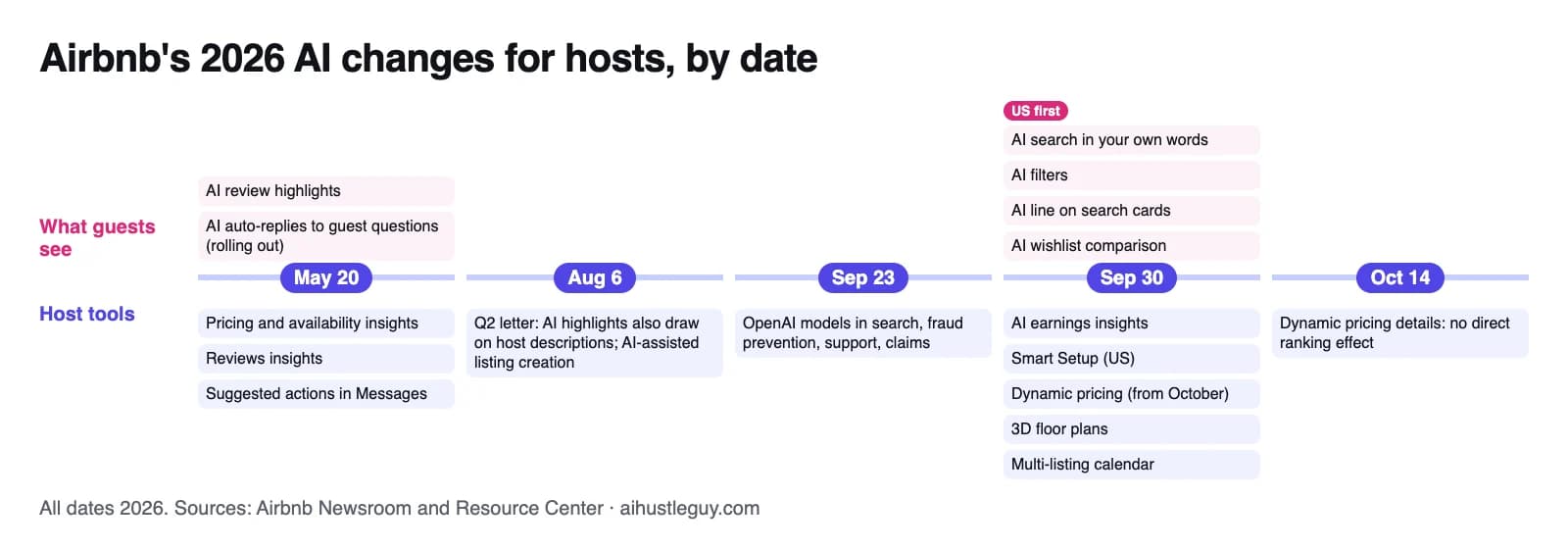
Airbnb's 2026 AI announcements by date, from Airbnb's Newsroom and Resource Center.
What Airbnb announced in 2026, with dates
Airbnb announced these in its Summer Release (May 20, 2026), its fall update (September 30, 2026) and Resource Center articles for hosts. An announcement date isn't an availability date: several features roll out over months, and the September guest features start in the US.
What guests now see, and what it reads
| Date | What Airbnb announced | What it draws on, per Airbnb |
|---|---|---|
| May 20, 2026 | AI review highlights: each listing's reviews summed up, with topics like location, amenities, noise and family-friendliness (Resource Center) | Guest reviews and, per Airbnb's August 6 results post, host listing descriptions (Q2 2026 results) |
| May 20, 2026 | Auto-replies: AI answers to common guest questions, with Airbnb shown as the sender, rolling out over the following months (Resource Center) | Your amenities, listing description and house manual |
| September 30, 2026 | AI search: guests describe the trip in their own words or by voice (Newsroom) | Not specified |
| September 30, 2026 | AI filters: typing "baby" brings up filters such as cribs, playgrounds or children's books and toys | Search filters, which include amenities (Airbnb Help) |
| September 30, 2026 | AI listing descriptions: an AI-written line on search results that highlights key features of each home | "Details hosts provide," per the note above search results |
| September 30, 2026 | AI comparison: wishlist homes side by side, with AI summaries of key features | Not specified; the May preview mentioned location and best amenities |
New tools for hosts
Airbnb's fall update calls its September host tools "new AI-powered tools." It doesn't say whether Smart Setup, listed only in the Resource Center, or the May insights use AI.
| Date | Tool | What Airbnb says it does | Availability, as announced |
|---|---|---|---|
| May 20, 2026 | Pricing and availability insights; reviews insights (Resource Center) | Calendar tips such as adding discounts or lowering minimum nights; review-based tips such as updating photos a guest said didn't match | Available from May 20; the September 30 update says the pricing tips weigh the amenities guests search for nearby, with new tips from October |
| May 20, 2026 | Suggested actions and priority messages | AI suggests actions from guest messages, such as changing dates; time-sensitive messages go to the top | Rolling out over the following months |
| September 30, 2026 | AI earnings insights (Resource Center) | AI summarizes your performance, for example against similar listings nearby, and suggests actions such as turning on Instant Book or adding missing amenities | Rolling out to hosts with 5 or fewer listings |
| September 30, 2026 | Smart Setup | Builds a new listing from your address, with the option to use property details about the home; editable before you publish | Eligible US homes now; other countries early in 2027 |
| September 30, 2026 | Dynamic pricing (details, October 14) | Recommends a price range and adjusts nightly prices daily | Rolling out from October 2026 |
| September 30, 2026 | 3D floor plans | Scan rooms with a compatible iPhone Pro or iPad; basic amenities are detected automatically | All hosts in the coming weeks |
| September 30, 2026 | Multi-listing calendar | Update prices and availability across several listings at once | Default desktop calendar for hosts with 6 or more listings, in the coming months |
Announced vs reported: what Airbnb hasn't said
Much of what hosts read about Airbnb's AI comes from forums and vendor blogs. Here's where each popular claim stands as of October 2026.
| Claim | Status | Source |
|---|---|---|
| Airbnb's AI line replaced the host's title on US search cards | Partly announced: Airbnb announced AI descriptions in search results, not the loss of titles. We saw no host titles on 54 airbnb.com cards | Fall update; our check below |
| The cover photo guests see can change with what they search for | Said in a reply in Airbnb's Community Center (March 6, 2026); not in the Help Center | Community Center |
| An amenity filter, such as hot tub, puts that amenity's photo on the card | Reported by hosts in January and August 2026 | Reddit and BiggerPockets threads |
| Airbnb rewrote titles in search before the fall update | Reported by hosts in August 2026 | |
| "Ask About This Home," an AI that answers guests from your listing | On no Airbnb page we checked; a vendor blog (Chekin, June 2026) passed it on from industry coverage as unconfirmed. Airbnb announced auto-replies instead | Industry coverage of the Summer Release |
| AI search ranks listings differently | Not announced; Airbnb says the AI it uses in search considers quality, popularity, price and location | Airbnb Help |
| Airbnb penalizes AI-written listing copy | No Airbnb statement found; what Airbnb bans is content, AI-edited or not, that misrepresents the listing | Airbnb Help |
| There's an official Airbnb app in ChatGPT | Not announced by Airbnb as of October 23, 2026 | Airbnb Newsroom |
What AI assistants get wrong about Airbnb's AI (checked October 2026)
- Old title advice. In our October 22 check, Google's AI Mode said to "use your 32 characters" for the title. Airbnb's guidance is fewer than 50 (Airbnb Resource Center, February 2, 2026), and its US search cards no longer show titles.
- The privacy switch. Turning off Help improve AI-powered features (Account settings, then Privacy) stops Airbnb using your data to develop its AI models (Airbnb Help). Airbnb presents it as control over your data, not over the features, and a host in its Community Center reported in July 2026 that it didn't stop cover changes.
- Where AI search works. The fall update promises search in your own words or by voice, but Airbnb's Help Center says AI Search mode works only in English, in a desktop web browser (Airbnb Help). In our logged-out desktop check, its toggle sat at the top of the page, switched off.
What Airbnb's AI wrote on 54 search cards (our October 2026 check)
On October 22, 2026, we ran three logged-out searches on airbnb.com for homes in Gatlinburg, Tennessee; Destin, Florida; and Bath, England, with no dates or filters. For the 18 cards in each results list, we compared Airbnb's line with the host's own title in the page data.
| What we counted (54 cards) | Result |
|---|---|
| Cards that showed the host's title | 0 of 54 |
| Length of Airbnb's line | 29 to 48 characters (median 38) |
| Lines naming something the title didn't mention: an amenity, a view or landmark, the building's type or era, or a number | 39 of 54 |
| Lines with a number, such as a floor, a count, minutes to a landmark or a year | 11 of 54 |
| Host titles with words like luxury, epic, amazing or premium | 17 of 54 |
| Airbnb lines with any of those words | 0 of 54 |
| Host titles with pipes, bullets, asterisks, tildes or exclamation marks | 20 of 54 |
| Airbnb lines with those symbols | 0 of 54 |
Each card held up to six swipeable photos, the home type and town (such as Cabin in Gatlinburg), the rating, Airbnb's line, bedrooms, beds and baths, dates and a total price. A note above the results read "Descriptions are based on details hosts provide," and its info button added that they are "generated with AI and can include mistakes."
It depends on the guest's site, not your home's location. Airbnb.com showed AI lines for homes in Bath, England, while the same Destin search on Airbnb's UK, Canadian, Australian and Irish sites showed each host's own title, with no AI note.
How we measured: website only, logged out, on October 22, 2026. We read three first-page searches on airbnb.com from the page data, where each card's line and the host's title are separate fields, and took a desktop screenshot of the Gatlinburg page; the four non-US pages were fetched the same evening from a US connection. We counted "something the title didn't mention" by hand, using the rule in the table, and we didn't check the apps or see which part of a listing each line came from.
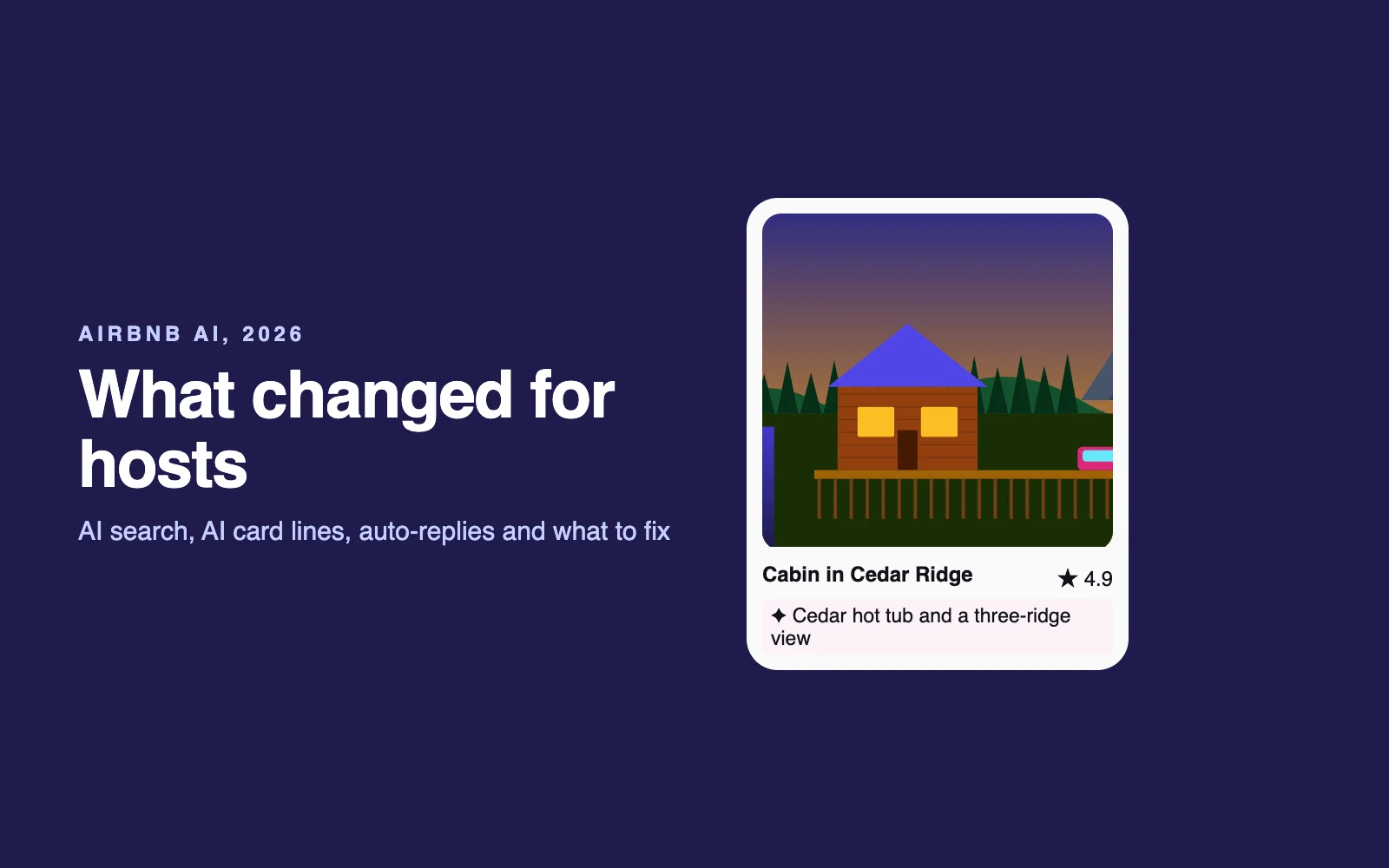
What that means for you: you can't edit Airbnb's line directly, but you control the details it's built from. "Luxury cabin with epic views" gives an AI nothing to repeat, while "Cedar hot tub on the back deck, a view across three ridges, 12 minutes to downtown" gives it nouns and numbers (a made-up example, not a real listing).
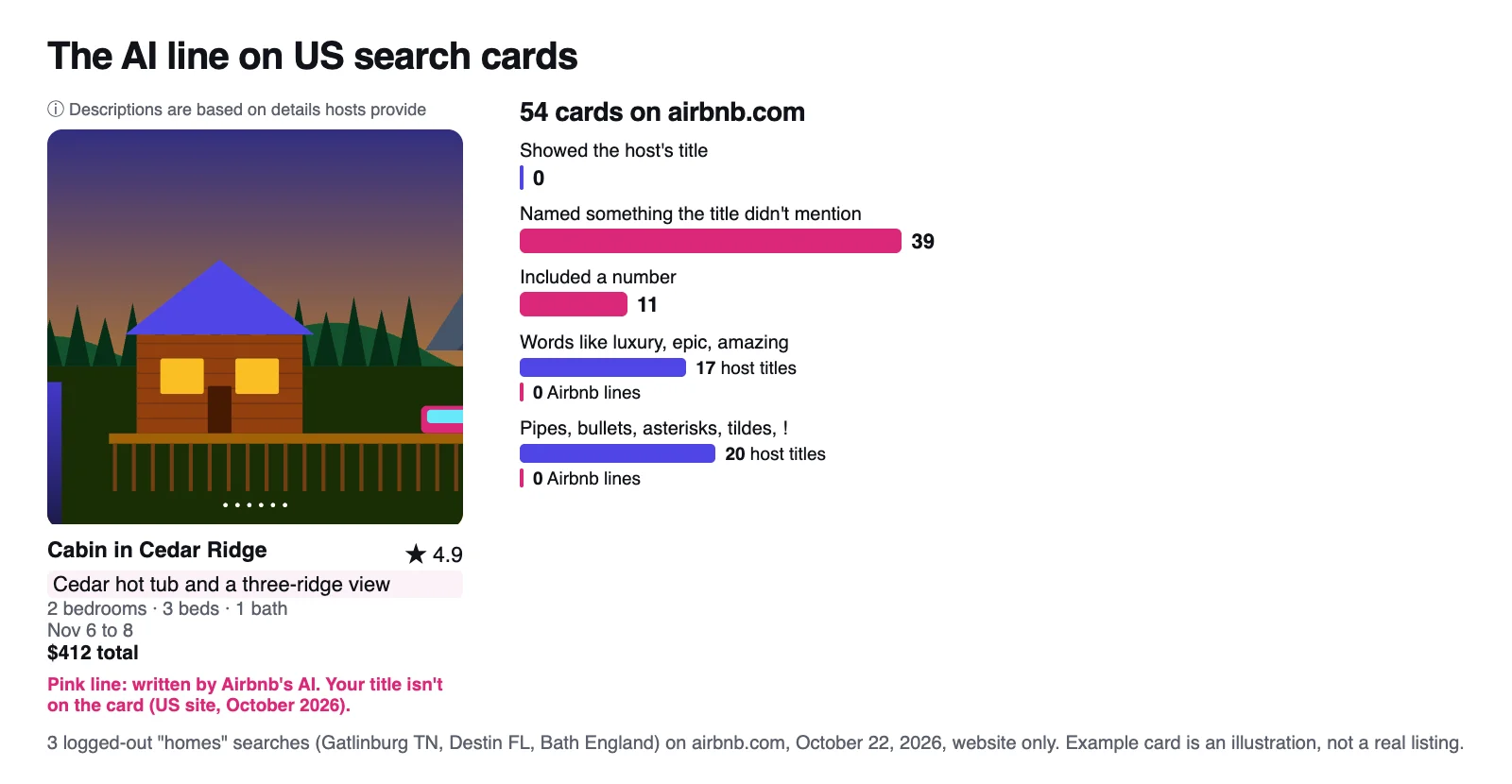
54 cards on airbnb.com, October 22, 2026. The example card is an illustration, not a real listing.
What each change means for your photos, title, description and amenities
| Part of your listing | Airbnb AI that now uses it | This week |
|---|---|---|
| Amenities | AI filters, auto-replies, the amenities shown first on your listing, earnings-insight tips | Tick everything you have, remove anything you don't, disclose limits |
| Description | Auto-replies, AI highlights, and likely the search-card line (Airbnb says only "details hosts provide") | Name your two or three best features in plain nouns and numbers |
| Photos and captions | Photo tour room sorting, reviews insights about photos that don't match, covers that may change with the search | Photograph every headline amenity and caption the facts |
| House manual | Auto-replies | Fill in parking, Wi-Fi, check-in and appliance basics |
| Title | Your listing page headline; not on US search cards | Keep it under 50 characters and specific |
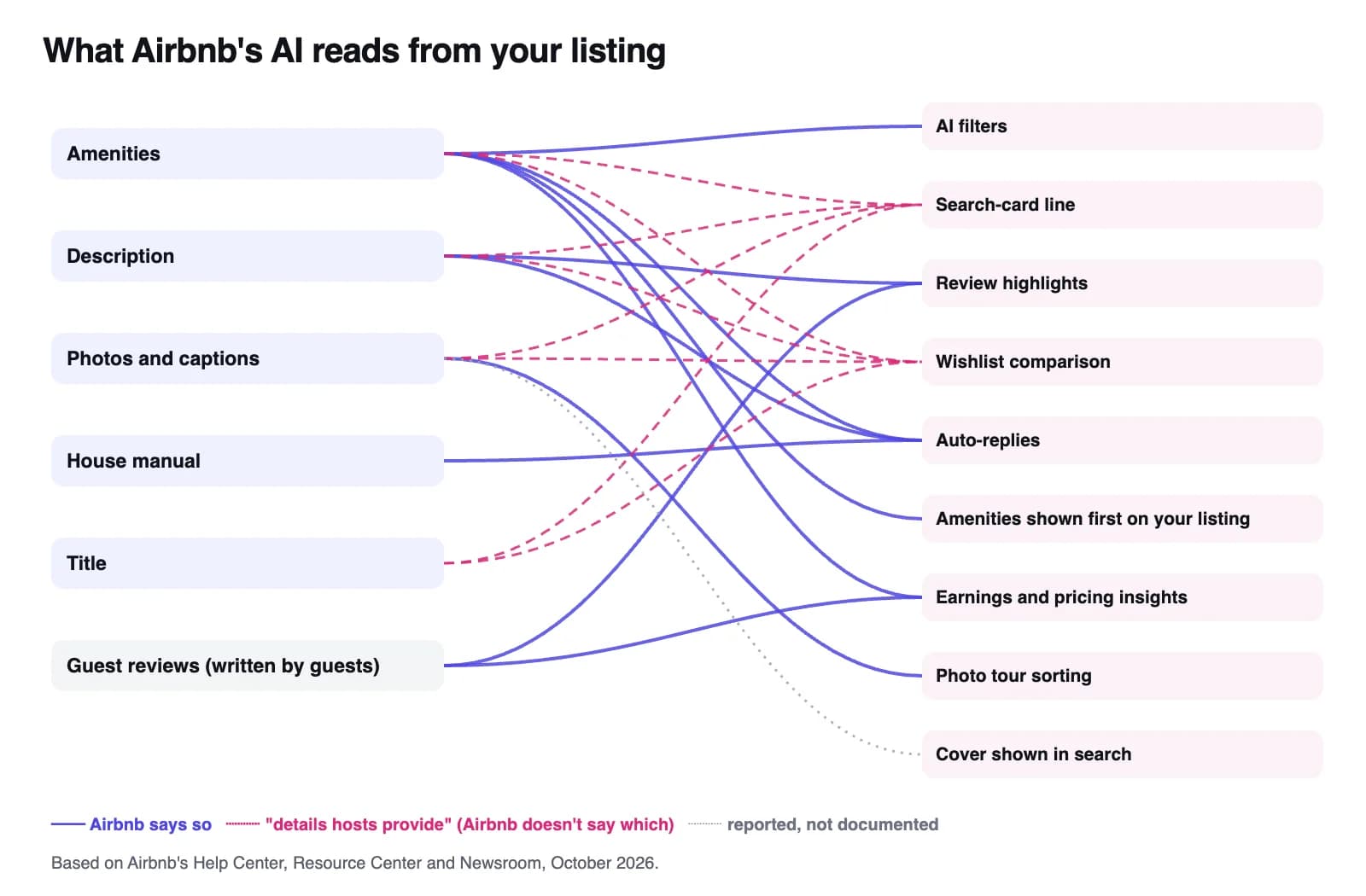
Solid lines: Airbnb says so. Dashed: Airbnb hasn't said which fields. Dotted: reported, not documented.
Amenities: the field Airbnb's AI leans on most
Count the features above and your amenities list feeds more of them than any other field. Airbnb says many guests filter by amenities and that adding everything you offer may help you increase bookings (Airbnb Help), and that sought-after amenities can improve visibility in searches for them (Airbnb Help).
Since September 30, US guests can type a need into the filters, and a crib you never ticked can't match a crib filter. Airbnb's auto-reply example answers a parking question from the amenities, and its AI picks which amenities to show first on your listing for each guest (Airbnb Help).
The catch is accuracy: Airbnb requires amenities to be accurate and restrictions disclosed, such as a pool open only certain hours or months (Airbnb Help). An amenity you can't deliver becomes a promise Airbnb's AI repeats, and it comes back in your accuracy rating. To edit on desktop: Listings, your listing, Listing editor, Your space, Amenities.
Description: write the specifics you want repeated
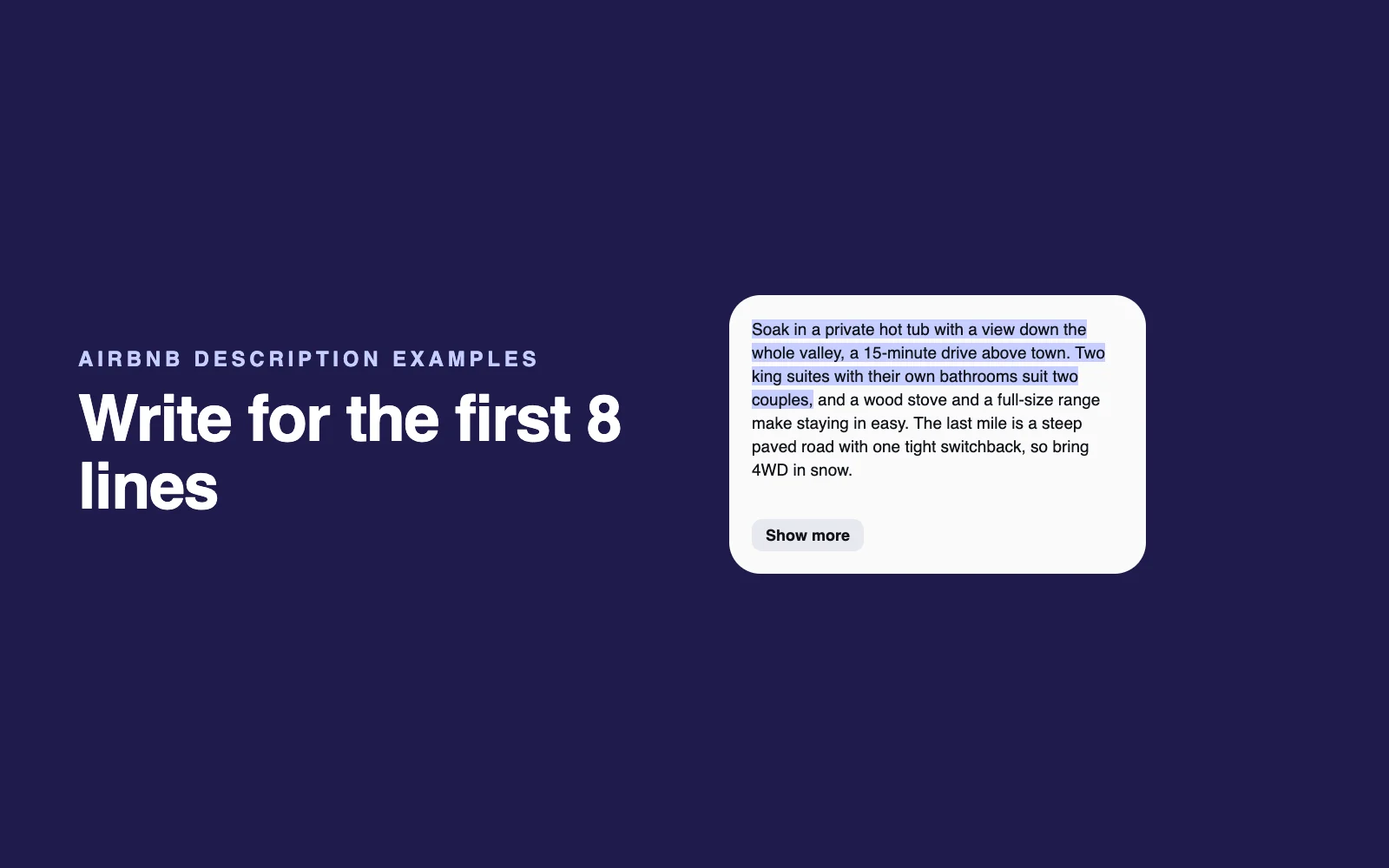
Auto-replies use your description, Airbnb's AI highlights draw on it, and it's likely among the "details hosts provide" behind your search-card line. Write the opening so any honest summary of it is specific:
- Lead with your two or three strongest features, in plain nouns: what the view looks at, which amenity (a private heated pool, a cedar hot tub, an EV charger) and the minutes to whatever guests come for.
- Prefer facts to adjectives. Airbnb's lines in our check never used words like "luxury" or "epic."
- Keep honest warnings in: steep driveway, stairs, road noise. Airbnb requires listings to disclose surroundings that affect noise (Airbnb Help).
- Move house rules out. Airbnb's rules put them in their own section (Airbnb Help), and a new house rules policy takes effect November 20, 2026 (Airbnb Resource Center).
For openings that work, see these Airbnb description examples. Drafting with ChatGPT or Claude? My AI prompts for Airbnb hosts include a two-sentence hook; give the model your real amenities list and tell it not to add anything.
Photos and captions: one story, every amenity shown
Airbnb's AI sorts your photos into rooms in the photo tour, where you can add details such as sleeping arrangements, amenities and accessibility features (Airbnb Help). Reviews insights can flag when guests say a room didn't look like your photos, and per the Community Center reply above, the cover a guest sees may change with the search.
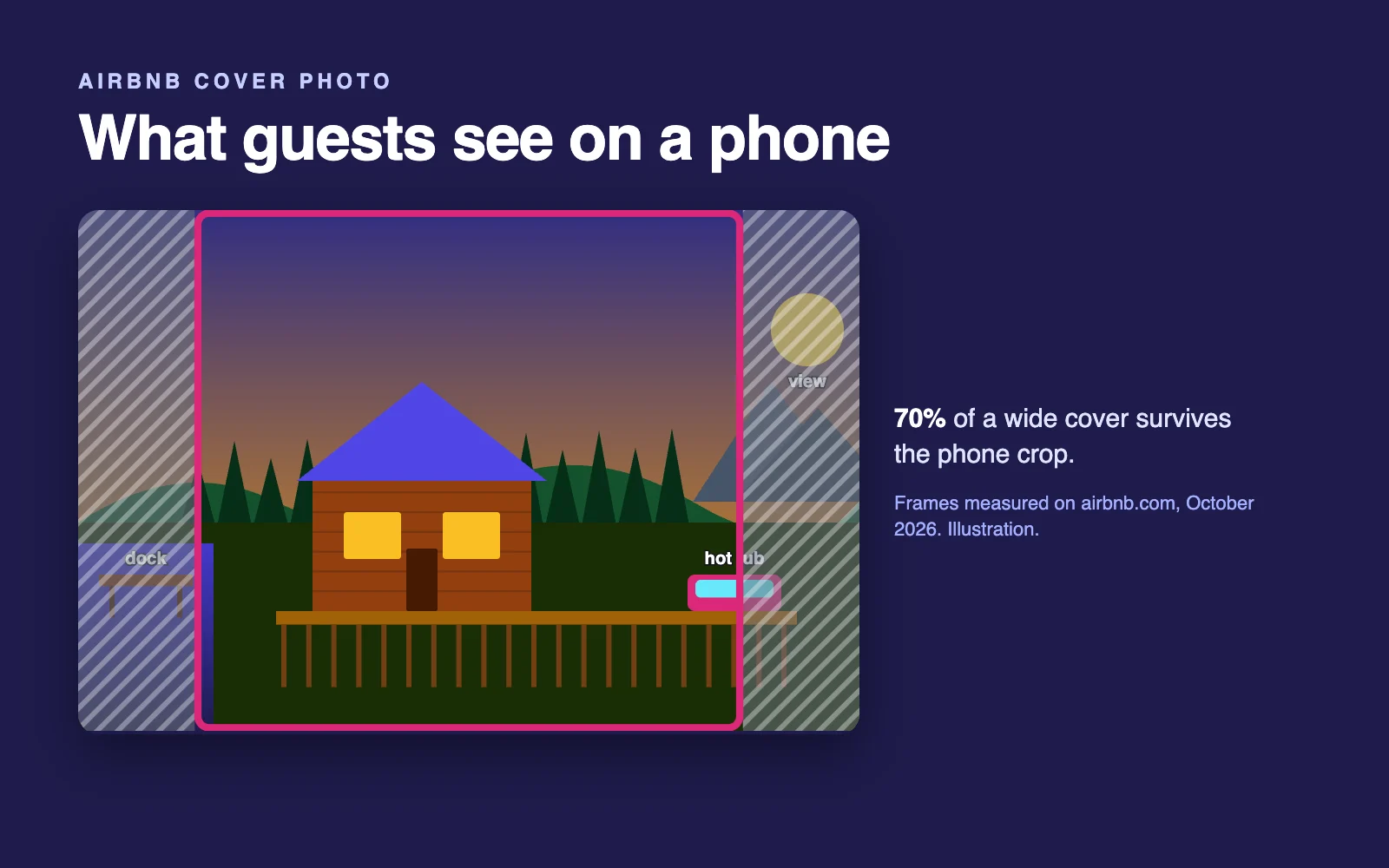
- Give every headline amenity a clear, horizontal photo that could be a cover, since it may become one. Covers are cropped to 307 x 230 on desktop search cards and 342 x 325 on phones (measured on airbnb.com, October 2026); here's how to choose and check a cover.
- Keep your first five photos telling the main story. More on photo order.
- Caption the facts: what it is, where it is, how many it seats. A little mood is fine in a caption, but Airbnb asks for visual descriptions (alt text) that are objective and under 250 characters (Airbnb Help).
- Never use AI to add or hide anything. Airbnb asks hosts to remove content where AI or other digital technology was used to edit flaws, hide damage, add amenities or otherwise misrepresent the listing (Airbnb Help).
Title: five minutes, not five hours (in the US)
As of October 2026, your title no longer appears on Airbnb's US search cards. It still heads your listing page, and in our checks it still showed on cards on Airbnb's UK, Canadian, Australian and Irish sites.
Follow Airbnb's guidelines: fewer than 50 characters, the most important information first, capitals only for the first word and proper names, no emojis or repeated symbols, and no city, bed count or "new" (Airbnb Resource Center). Then spend the saved time on amenities and the description; more in my Airbnb title ideas.
House manual and messages: the script for auto-replies
Auto-replies answer from your amenities, description and house manual. Each one shows Airbnb as the sender, both you and the guest see it, and you can delete it and reply yourself.
Fill in what guests ask most: parking, Wi-Fi, check-in, heating and cooling, appliances, trash, then check your threads weekly for anything Airbnb sent. Here's how auto-replies fit with your own automated Airbnb messages, plus message templates to start from.
The hard part is seeing your listing the way Airbnb's AI and a guest do, next to the listings around yours.
What to do this week: the AI read-back test, then the fix list
The AI read-back test (about 10 minutes)
- Find your card line. In a private window, logged out, search your town on airbnb.com for a typical stay and check whether the line under the home type and town names your main draw and gets nothing wrong. Hosts outside the US should check airbnb.com too.
- Read your listing page as a guest. Note what shows near the top and what review highlights say; other guests may see different amenities first.
- Ask five guest questions. List the five things guests ask you most, such as parking, Wi-Fi, check-in, a crib or hot tub hours, and find each answer in your amenities, description or house manual. If it isn't there, an auto-reply can't use it.
- Read your insights. Note any tips in your calendar and earnings dashboard, especially review-based ones.
The fix list, in order
- Amenities. Tick every amenity you truly have, remove any you don't, and add restrictions such as pool hours or a seasonal hot tub.
- Description opening. Put your two or three best features in the first two sentences, as nouns and numbers.
- Photos and captions. One clear photo per headline amenity, factual captions, room details in the photo tour.
- House manual. Answer the five questions from your read-back test.
- House rules. Before November 20, 2026, move rules out of your description into House rules and drop chores a cleaner would do.
- Title. Under 50 characters, specific, no emojis or repeated symbols.
- Check again in a week or two. Re-read your card line, look at your card with the Hot tub or Pool filter on, and compare search-to-listing and listing-to-booking conversion under Insights, Performance, Conversion, which needs professional hosting tools turned on (Airbnb Help). If guests open your listing but don't book, here's how to find the leak.
If you'd rather not cross-check every photo, caption and amenity by hand, that's what our listing audit does. The free mini-audit shows your cover in Airbnb's real crops next to the listings around yours. The full audit ($39, one time) adds mismatches between photos, captions and amenities, three new titles and a rewritten description opening.
Airbnb's AI tools for hosts: how to use them
Smart Setup builds a new listing from your address (Airbnb Resource Center). Treat its output as a first draft: check beds, baths and amenities against the real home, then add what only you know, such as the view or the quirks guests should hear about.
AI earnings insights suggest actions such as turning on Instant Book or adding missing amenities. Read each as a lead to check, and add an amenity only if you really have it; Airbnb does say instantly bookable listings may rank higher (Airbnb Help).
Dynamic pricing recommends a price range, adjusts nightly prices daily, previews the next 52 weeks and takes optional minimum and maximum prices, but can't run alongside Smart Pricing. Airbnb says it doesn't directly affect ranking, though competitively priced listings tend to rank higher (Airbnb Resource Center, October 14, 2026). I compare it with paid tools in PriceLabs vs Wheelhouse vs Beyond, and my wider picks are in the tools I recommend.
3D floor plans detect basic amenities from your scan (Airbnb lists the iPhone 12 Pro or later and iPads with a LiDAR camera), so check what they found against your amenities list.
Does AI search change how Airbnb ranks listings?
Airbnb hasn't announced a new ranking system for AI search. It says the AI it uses in search weighs quality, popularity, price and location (Airbnb Help), the same four factors as its ranking explainer (Airbnb Help). Its Q2 2026 results post described "smarter search rankings" that favor higher-quality homes that better fit each trip.
Personalization is the part to plan for. Airbnb may rank listings higher for a guest whose past bookings share their characteristics (Airbnb Help), and in Airbnb's own example of its AI inferring interests, a guest who booked homes with pools gets pool-related filters first (Airbnb Help).
So the most useful "AI search optimization" is the boring kind: complete amenities, specific facts, accurate photos and a competitive total price. Title keywords aren't among the factors Airbnb lists. For the rest, use my Airbnb listing optimization checklist, and if bookings have stalled, start with the full diagnosis.
FAQ
Does Airbnb use AI to show my listing to guests?
Yes. Since its May 20 and September 30, 2026 updates, Airbnb uses AI to write a one-line description on US search cards, sum up reviews and compare saved homes, and it is rolling out auto-replies that answer common guest questions from your amenities, description and house manual. All of it draws on what you've written and ticked.
Can you use AI to search for Airbnb?
Yes. Airbnb's AI search, announced September 30, 2026 and starting in the US, lets guests describe what they want in their own words, such as a beachfront home with a pool, instead of filling in fields. As of October 2026, its Help Center says AI Search mode works only in English, in a desktop web browser.
Where does the AI-written line on Airbnb search cards come from?
Airbnb says the lines are based on details hosts provide, and its own label warns they are generated with AI and can include mistakes. It doesn't say which fields it reads. Of 54 logged-out airbnb.com cards we checked in October 2026, 39 named something the host's title didn't mention, such as an amenity, a view or a landmark.
Can I edit or turn off Airbnb's AI description of my listing?
Not directly, as of October 2026: no Airbnb page we checked describes a way to edit or switch off the AI line on search cards. You can delete an AI auto-reply in a guest thread and answer yourself. The privacy setting Help improve AI-powered features covers whether Airbnb uses your data to develop its AI models, not the features themselves.
What is Airbnb Smart Setup?
Smart Setup is Airbnb's new listing setup tool, announced September 30, 2026: you enter your home's address, can choose to use property details about the home, and can make changes before you publish. Airbnb began rolling it out for eligible US homes that day, with other countries early in 2027. Check every detail it fills in.
What is "Ask About This Home" on Airbnb?
It's a name some industry coverage of Airbnb's 2026 Summer Release used for an AI that answers guest questions. As of October 2026, no Airbnb page we checked uses that name. What Airbnb did announce, on May 20, 2026, is auto-replies: AI answers to common guest questions built from your amenities, listing description and house manual.
Is there an official Airbnb app in ChatGPT?
Not as of October 2026: Airbnb's newsroom hasn't announced an Airbnb app inside ChatGPT or Claude. On September 23, 2026, Airbnb said it uses OpenAI models inside its own search, fraud prevention, guest and host support, and insurance claims. For hosts, the AI that matters is the one built into Airbnb's own site and app.

Written by Jon Miksis
Founder of AI Hustle Guy, Make the Leap, and Europe Flight Club, and the travel blogger behind Global Viewpoint (9+ years, 73 countries). He brings 9+ years of coaching and mentorship experience and has facilitated 23 transformation retreats across four continents. Every AI tool and prompt on this site gets tested on his own businesses first.
Get my free AI prompt pack
Join 300+ founders, creators, and professionals. I’ll send you my go-to AI tools and copy-paste prompts that save hours every week. No spam.