Airbnb Photo Order: How to Arrange Your First 5 Photos
By Jonathan Miksis · October 23, 2026 · 18 min read
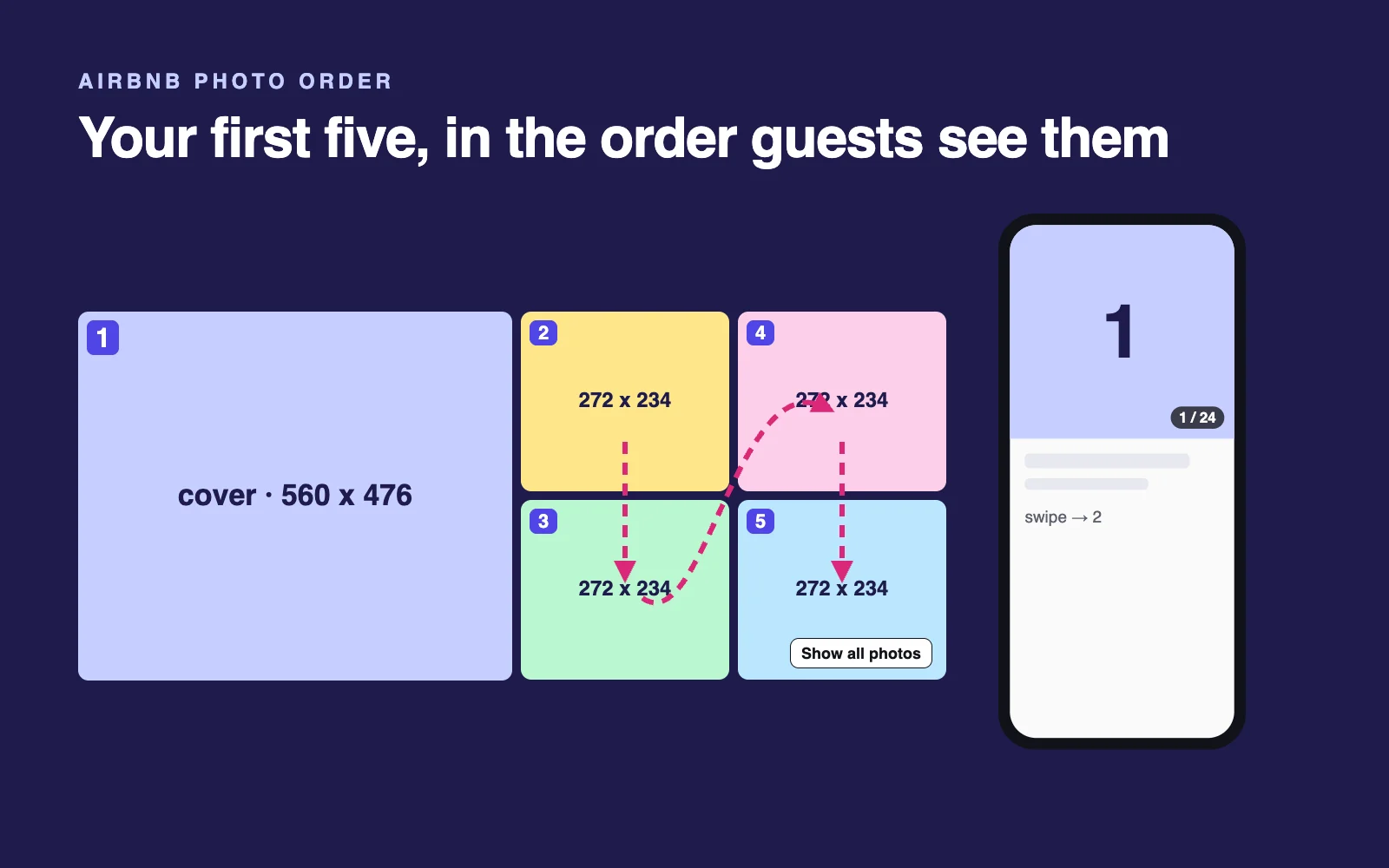
When it comes to Airbnb photo order, five photos matter most. Inside the photo tour, they're the five Airbnb lets you put in order, and they're what guests see first. There's also a layout detail none of the guides we reviewed mention: on desktop, photos 2 to 5 fill their block column by column, not row by row.
I run AI Hustle Guy, I've worked with Airbnb and Vrbo hosts, and this guide is part of my AI for Airbnb hosts hub. Every Airbnb step below is checked against Airbnb's Help Center. Updated October 23, 2026.
The short answer
Put the photo that sells the stay first. Use photos 2 to 5 for the setting or hero feature, a bedroom, the evening space and one extra, each room once. On desktop, Airbnb fills that 2x2 block column by column (2 top left, 3 below it, 4 top right, 5 below it, measured October 2026), and phones show photo 1 alone.
Key facts (measured on airbnb.com, October 2026):
- In a 1440-pixel-wide desktop window, the listing photo grid measures 1120 x 476 pixels: photo 1 fills the left half (560 x 476), and photos 2 to 5 fill 272 x 234 tiles, column-first.
- On a 390-pixel-wide phone screen, a listing opens on photo 1 alone, at 390 x 371 pixels.
- Search cards in our capture let guests swipe through six photos.
- Inside the photo tour, Airbnb's Help Center says you can reorder the first five photos (Airbnb Help).
How Airbnb shows your first five photos
On desktop: a large photo, then a 2x2 block filled column by column
On a laptop, photo 1 takes the left half of the grid. Photos 2 to 5 share the right half as four small tiles: 2 top left, 3 under it, 4 top right, 5 under that.
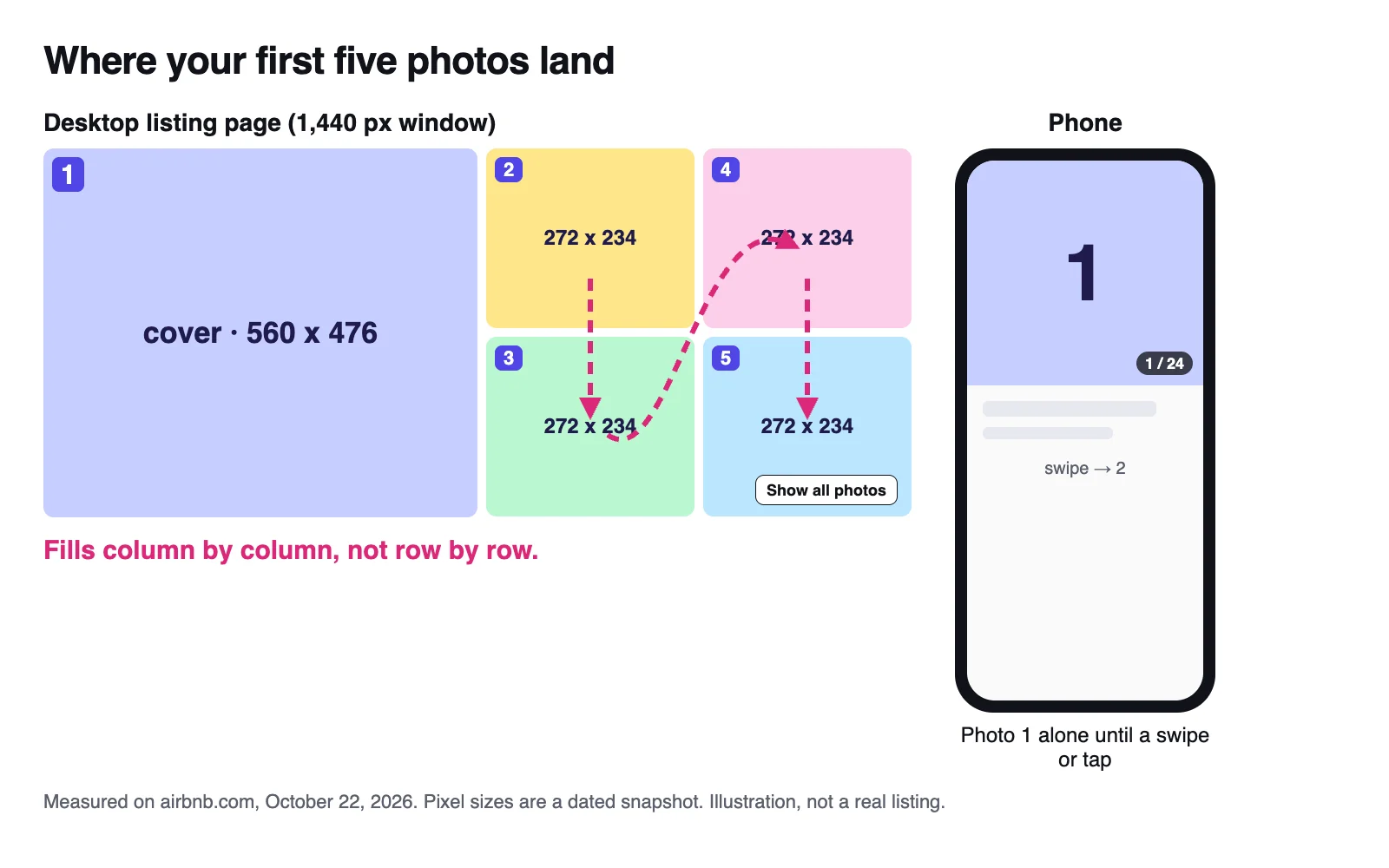
Slot positions measured on airbnb.com, October 22, 2026. Placeholder tiles, not a real listing.
Plan your five like a page of text, left to right, and photos 3 and 4 trade places on screen. Three more details:
- The small tiles are small. At 272 x 234 pixels, a wide shot of a room reads; a close-up of a coffee station doesn't.
- The tiles are almost square. Airbnb center-crops each photo to fill its tile, so a 3:2 photo loses about 22% of its width and a vertical photo more than a third of its height.
- Photo 5 shares its corner with a button. In our capture, Show all photos sat over its lower right corner.
On a phone: photo 1, alone
A phone opens your listing on one full-width photo with a photo counter. Everything else is a swipe or a tap away, and most nights are booked in Airbnb's app: 63% in the first quarter of 2026, per Airbnb's Q1 2026 shareholder letter.
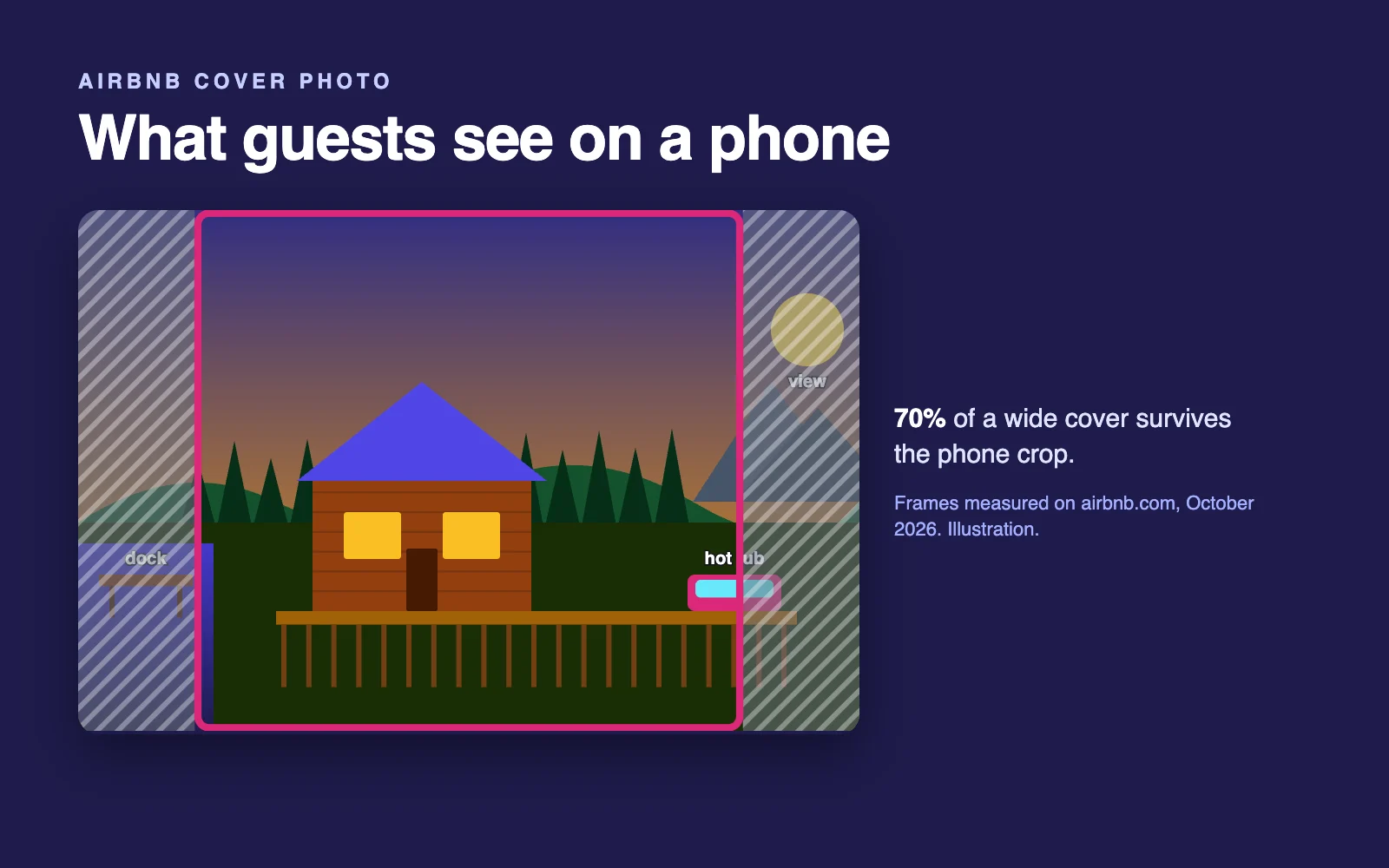
So photo 1 has to work alone, and photo 2, the first swipe, is your most valuable slot after the cover. The phone frame is nearly square too, trimming about 30% of a 3:2 photo's width; my guide to choosing your Airbnb cover photo covers that crop.
In search: your cover, plus a short carousel
Your search card leads with photo 1, and guests can swipe through more without opening the listing. In the logged-out search we captured on October 22, 2026, each of the 18 cards in the results list carried six photos; for the listing we traced, they were its photos 1 to 6 in order.
As of October 2026, in the US, the words on the card are Airbnb's: the home type, the place and a one-line summary Airbnb writes from details hosts provide (more on Airbnb's 2026 AI changes). Your title heads the listing page instead (what to write there), so on the card your photos and your price are what you choose directly.
| Where guests see it | What shows | Frame we measured (October 2026) | What it means for your order |
|---|---|---|---|
| Search card, desktop | Photo 1, then more on request | 307 x 230 (about 4:3) | Photo 1 wins or loses the click |
| Search card, phone | Photo 1, swipe for more | 342 x 325 (nearly square) | Same job, tighter crop |
| Listing page, phone | Photo 1 alone, with a counter | 390 x 371 (nearly square) | Photo 2 is the first swipe |
| Listing page, desktop | Photos 1 to 5 at once | 1120 x 476 grid: one 560 x 476 tile, four 272 x 234 tiles | The five must work as a set |
The column check: before you save a new order, read the block the way Airbnb builds it, 2 over 3, then 4 over 5. Then open the listing on a laptop in a private window and confirm it.
How we measured: on October 22, 2026, we loaded an Airbnb listing page and a search page, logged out, in headless Chrome, in a 1440 x 900 desktop window and as a 390 x 844 iPhone-sized screen. We recorded the frame each photo filled and matched the photos to the listing's own order. That's Airbnb's website, not its apps, and Airbnb tests layouts, so treat the pixel sizes as a dated snapshot.
Want to see your own five laid out like this? The free listing audit renders your current desktop grid and scores it as a set.
How to choose your five: the Stay Set
Your first five are one set, not five separate best shots. I call it the Stay Set: five photos, each answering a different guest question.
- Setting: where is it? The cabin in the trees, the view from the balcony, the beach across the road.
- Hero feature: why this one? The hot tub, pool, view or room that makes guests pick you over the place next door.
- Sleep: where will I sleep? Your best bedroom, bed made, lights on.
- Evening space: where do we hang out? The living room, deck, fire pit or game room where the group ends up.
- One more: what removes the last doubt? Pick it for your usual guest: the kitchen for families, a desk for remote workers, the bunk room for groups.
Photo 1 takes whichever of setting or hero feature is the stronger reason to book. If one shot does both, like a deck with the lake behind it, give the spare slot to a second bedroom or the kitchen.
| Slot | Desktop position | Job |
|---|---|---|
| 1 | Left half | Reason to book: hero feature or setting |
| 2 | Top left of the block | The other of the two, or your best living space |
| 3 | Bottom left | Sleep |
| 4 | Top right | Evening space |
| 5 | Bottom right, under Show all photos | One more |
Photo 2 is the first swipe on a phone, the second photo on your search card and the top left tile on desktop, so it gets your second-strongest shot. Five rules keep the set honest:
- One room, one slot. A room shown twice means a question goes unanswered.
- Spaces, not details. Close-ups shrink to a quarter tile. Save them for the photo tour.
- No bathroom unless it's a reason to book, like a soaking tub with a view.
- Landscape only. Airbnb asks for landscape photos (Airbnb Help).
- A trailer, not a floor plan. The tour already walks guests room by room, so don't spend the five on entry, hallway and kitchen in walking order.
Make every one of the five cover-worthy
Airbnb's Help Center says you choose your cover. But a March 6, 2026 reply in Airbnb's Community Center said a listing's cover can change with the category it's featured in and what a guest searches for (Airbnb Community Center), and hosts report it most with amenity filters such as hot tub.
It isn't in the Help Center, so treat it as reported; in our unfiltered capture, the listing we traced led with its own photo 1.
Either way, each of your five should hold up as a cover: horizontal, bright, its subject centered. So should your best photo of any amenity guests filter for.
Same room four times vs a set that tells the stay
The common trap is one great feature, then four more angles of it in photos 2 to 5. The guest knows the hot tub well and still doesn't know where they'd sleep.
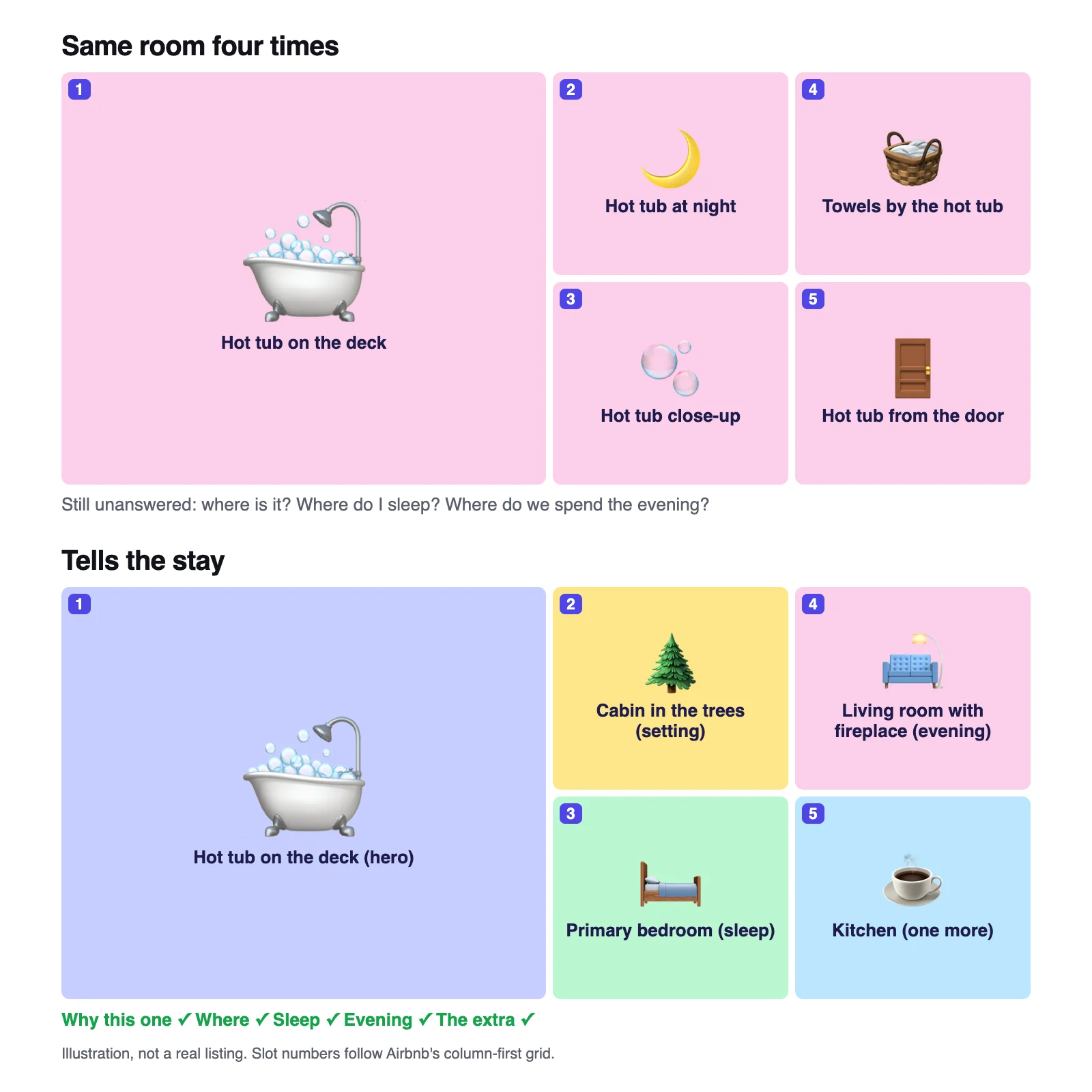
Illustration with placeholder tiles, not real listings.
The fix is free. Keep the strongest shot of the feature, move the other angles into its room in the photo tour, and use the freed slots for sleep, the evening space and the extra.
Starting sets by property type
These are starting points, not tested formulas. Adjust them to what guests actually book you for.
| Property | 1 (left half) | 2 (top left) | 3 (bottom left) | 4 (top right) | 5 (bottom right) |
|---|---|---|---|---|---|
| Cabin with a hot tub | Hot tub or deck with the view | Cabin in its setting | Primary bedroom | Living room with the fireplace | Kitchen or game room |
| Beach condo | Water view from the balcony | Living room facing the water | Primary bedroom | Pool or beach access (caption it if shared) | Kitchen and dining |
| City apartment | Living room in its best light | The block or a nearby landmark | Bedroom | Workspace or balcony | Kitchen |
| Family home with a pool | Pool and backyard | Front of the house | Primary bedroom | Living room | Kids' room or bunk room |
| Unique stay (A-frame, dome, treehouse) | The structure in its setting | The signature feature inside | Sleeping area | Fire pit or deck at dusk | Bathroom or kitchen setup |
| Private room in a home | The bedroom | The bathroom (say if it's shared) | Shared living space | Kitchen | The building or street |
The Airbnb photo tour: what the AI sorts and what you control
The photo tour is Airbnb's room-by-room view of your photos. Airbnb's AI assigns each photo to a room and sorts new uploads automatically, and you can add, move or remove photos and rooms (Airbnb Help). Airbnb has said the AI sorts photos into 19 types of rooms and spaces, with anything it doesn't recognize under Additional photos (Airbnb Resource Center).
Inside the tour, photos are grouped by room, which can bury your best feature. In one cabin listing we inspected on October 22, 2026, the tour had 13 rooms and spaces; its hot tub photos, which the first five were built around, were split across four of them, and the Hot tub stop came 11th, after the laundry area.
Your first five are the one place where you decide what guests see first.
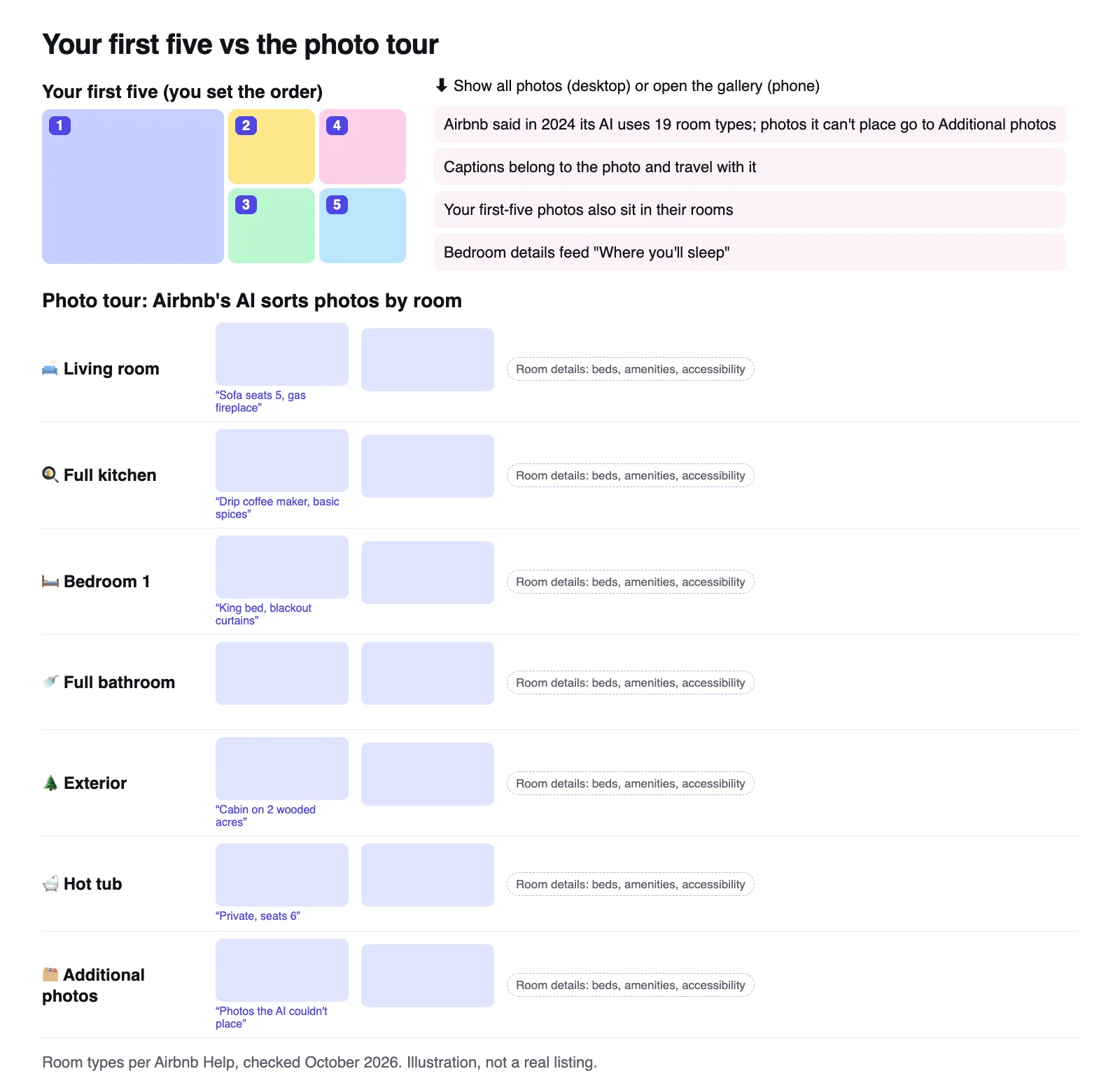
Illustration with placeholder tiles, not a real listing.
In the tour, you control:
- Which room each photo sits in. If the AI files your view under Additional photos, move it.
- Which rooms exist. You can add or delete rooms (Airbnb Help).
- Room details: sleeping arrangements, amenities and accessibility features. Bedroom details also feed the Where you'll sleep section of your listing page.
- Captions and visual descriptions for every photo.
Give every room at least one photo, since Airbnb says a room needs one to appear in the tour, and fill in the details.
Can you turn off or remove the photo tour?
Airbnb's Help Center doesn't describe an off switch, but it lets you delete rooms and temporarily remove a room with no photos. Some hosts use that as a workaround: leave one room empty and the listing falls back to a plain photo grid (Short Term Rental Riches, September 2026), keeping bedroom and bathroom photos in their rooms so Where you'll sleep still displays.
The trade-offs: guests lose the room-by-room amenity tags, Airbnb may prompt you to create the tour again, and you redo it whenever you add photos. My take: keep the tour and put the effort into the first five and the captions.
Airbnb photo captions: what to write, with examples
The room decides where a photo sits in the tour and carries details like beds and amenities. The caption belongs to one photo and travels with it. Airbnb suggests using captions for details a photo doesn't show, for example: "The dining table expands to seat 10 people." (Airbnb Resource Center)
So skip the room name (the tour already says Bedroom) and write what a guest would otherwise have to ask. A simple formula: what it is, the detail that matters, any limit.
| Photo | Weak caption | Specific caption |
|---|---|---|
| Hero: hot tub | Relax! | Private hot tub on the back deck, seats 6, open all year |
| Setting: exterior | Our cabin | Cabin on 2 wooded acres, a 10-minute drive to the park entrance |
| Sleep: bedroom | Bedroom | Primary bedroom: king bed, blackout curtains, ceiling fan |
| Evening: living room | Cozy living room | Sofa seats 5 around a gas fireplace, 65-inch TV with streaming apps |
| One more: kitchen | Kitchen | Full kitchen with a drip coffee maker, a pod machine and basic spices |
| Shared amenity: pool | Pool | Community pool shared with other units, open Memorial Day to Labor Day |
These are illustrations: write only what's true for your place. Airbnb's ground rules say amenity restrictions, like a pool open only part of the year, should be disclosed on the listing page (Airbnb Help), and a caption is a natural place to do it. Your captions, amenities and description should tell the same story; overselling leads to the complaints my guide to the Airbnb accuracy rating covers.
Visual descriptions (alt text) are a separate field. Screen readers read them aloud, they must be under 250 characters, and they should describe only what's in the frame; mood and selling points belong in the caption (Airbnb Help). Add both, at least for your first five.
AI can draft captions quickly if you give it the facts. My AI prompts for Airbnb hosts include a caption prompt you can adapt; check every line against your listing before you paste it.
How many photos an Airbnb listing needs, and what to cut
Airbnb needs at least five photos to get a listing started (Airbnb Resource Center), wants a photo of every room or space, and asks for at least 1024 x 683 pixels (Airbnb Help). There's no official ideal total; Hospitable's photo guide suggests 20 to 30. That fits most homes: every space once, a second angle where guests decide, nothing repeated.
Cut, or at least keep out of the first five:
- Near-duplicates (keep the brighter one)
- Dark or blurry shots
- Vertical photos
- Anything under 1024 x 683 pixels
- Photos of furniture or decor you've since replaced
- Edits that hide flaws or add features, which Airbnb asks hosts to remove (Airbnb Help)
Rather not sort 40 photos by hand? The full audit looks through your gallery, recommends the five that should lead with a reason for each slot, lists what to cut and renders your grid before and after.
How to change the photo order on Airbnb
These steps follow Airbnb's Help Center as of October 2026 (Airbnb Help). On desktop:
- Click Listings and select the listing.
- Under Listing editor, click Photo tour. (No tour yet? Click Photos, then Create your photo tour.)
- Click All photos.
- Drag photos into order. You can reorder the first five, and changes save automatically.
- To change the cover, select a photo, click Make cover photo, add an optional caption and click Save.
In the iOS and Android apps the path is the same: tap Listings, the listing, Listing editor, Photo tour and All photos, then drag.
A new cover can take up to 30 minutes to appear. Then check like a guest:
- Laptop, private window: is it 2 top left, 3 bottom left, 4 top right, 5 bottom right?
- Phone: does photo 1 work alone, and is photo 2 the swipe you want?
- Search, logged out: look with and without an amenity filter such as hot tub, since hosts report filters changing the cover.
If a property management system or channel manager pushes your photos, check the live listing after each sync: one operator reports an order set in their PMS showing up in a different sequence on Airbnb with the photo tour on (Short Term Rental Riches). I compare those tools in my roundup of the best Airbnb tools for hosts.
Your first-five checklist
- Photo 1 is your reason to book and reads at phone size.
- Photo 2 is your second-strongest shot.
- No room appears twice, and sleep and the evening space are both in.
- Each of the five could stand in as the cover.
- Nothing vertical, dark or under 1024 x 683 pixels.
- Each of the five has a specific caption.
- You've checked it logged out: 2 over 3, then 4 over 5.
Views but few bookings? These five are among the first things to check, and my guide to Airbnb views but no bookings covers the rest of the page.
Not getting booked at all? Start with the full diagnosis.
Photo order myths and half-truths, corrected (checked October 2026)
- Myth: your first six photos matter most. Some vendor guides say six. Airbnb's Help Center and the desktop grid say five. Search cards in our capture did carry six photos, so a guest swiping a card can reach photo 6, but five is what Airbnb tells you to arrange.
- Myth: Airbnb recommends at least 20 photos. It's in vendor guides, but not on any current Airbnb page we could find. Airbnb's stated minimum is five, plus a photo for each room in your tour.
- Half-true: Airbnb crops photos into squares. Airbnb's Resource Center says so, and ChatGPT repeated it when we asked in October 2026. Phone frames are nearly square, but we measured 4:3 in desktop search and slightly wide tiles in the desktop grid. The cover photo guide has the full crop table.
FAQ
How do I change the order of photos on Airbnb?
Go to Listings, select the listing, then Listing editor, Photo tour and All photos, and drag photos into place. Inside the photo tour you can reorder the first five, which lead your listing, and changes save automatically. To change the cover, select a photo and choose Make cover photo; it can take up to 30 minutes to show.
Which photos do guests see first on Airbnb?
Your cover, photo 1. It leads your card in search, and on a phone your listing opens on it alone until the guest swipes or taps. On a desktop listing page, photos 1 to 5 appear together: photo 1 fills the left half, then 2 to 5 fill a 2x2 block column by column (measured October 2026).
What is the Airbnb photo tour?
The photo tour is Airbnb's room-by-room view of your listing photos. Airbnb's AI sorts each photo into a room or space, and photos it can't place go under Additional photos. You can move, add or delete photos and rooms, add room details and captions, and reorder the first five photos that lead your listing.
Can I turn off the Airbnb photo tour?
Airbnb's Help Center doesn't describe an off switch. It lets you delete rooms and temporarily remove a room with no photos. Some hosts report that leaving a room empty makes the listing fall back to a plain photo grid, but guests then lose the room labels and details. For most listings, keep the tour and control the first five.
Why did my Airbnb photo order or cover photo change?
A new cover can take up to 30 minutes to show. An order set in a PMS may not match what Airbnb shows. And a March 2026 reply in Airbnb's Community Center said a cover can change with the category a listing is featured in and what a guest searches for. Check logged out, with and without filters.
How many photos should an Airbnb listing have?
Airbnb needs at least five photos to get a listing started and wants at least one photo of every room or space so each appears in your photo tour. There's no official ideal total; Hospitable's photo guide suggests 20 to 30. Cover every space once, add second angles where guests decide, and cut anything that repeats.
Do captions matter on Airbnb photos?
Yes. Captions add what a photo can't show, such as bed sizes, what's included, or that a pool is shared or seasonal, and they stay attached to the photo as guests browse. Write one specific sentence per photo, match it to your amenities list, and add separate visual descriptions (alt text) for guests who use screen readers.

Written by Jon Miksis
Founder of AI Hustle Guy, Make the Leap, and Europe Flight Club, and the travel blogger behind Global Viewpoint (9+ years, 73 countries). He brings 9+ years of coaching and mentorship experience and has facilitated 23 transformation retreats across four continents. Every AI tool and prompt on this site gets tested on his own businesses first.
Get my free AI prompt pack
Join 300+ founders, creators, and professionals. I’ll send you my go-to AI tools and copy-paste prompts that save hours every week. No spam.