Airbnb Views but No Bookings? How to Find and Fix the Leak (2026)
By Jonathan Miksis · October 23, 2026 · 19 min read
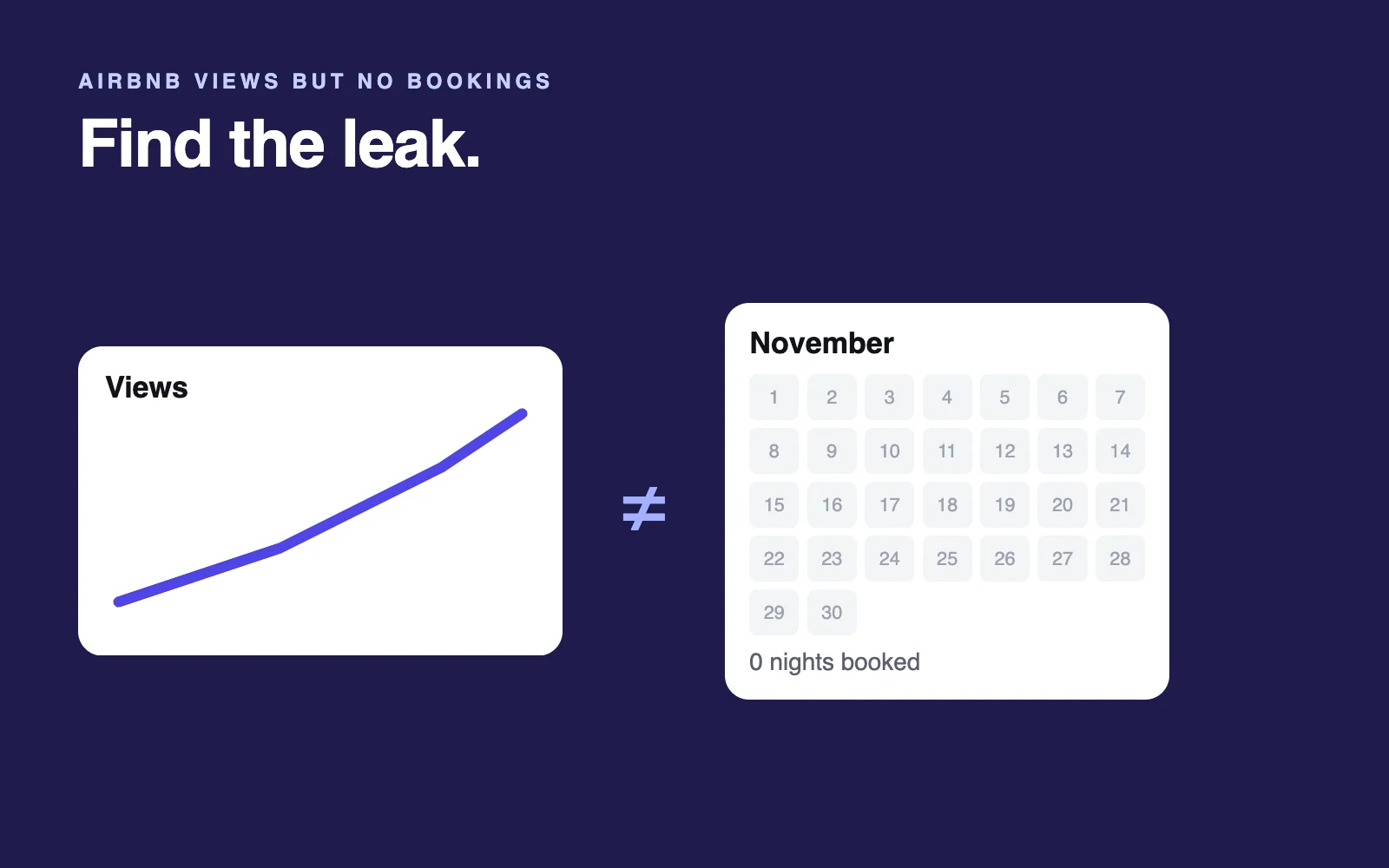
Your Insights page says guests are finding your listing and opening it. Your calendar says they aren't booking. That narrows the problem: Airbnb views but no bookings means guests reach your listing page, and something on that page, in the total for their trip or in your terms sends them to another home.
Here's how to find which one, and a 14-day plan to test one fix at a time.
Last checked October 23, 2026, against Airbnb's Help Center, Resource Center and newsroom, plus a logged-out airbnb.com search we captured on October 22.
Short answer (October 2026): Getting views but no bookings means guests click your card, then something on the listing page stops them. Since April 2025 the card already shows your total with fees, so check the page first: first photos that don't back up the cover, buried deal-breakers, thin or old reviews, and strict minimum stays, rules or cancellation terms.
Facts worth knowing (checked October 2026):
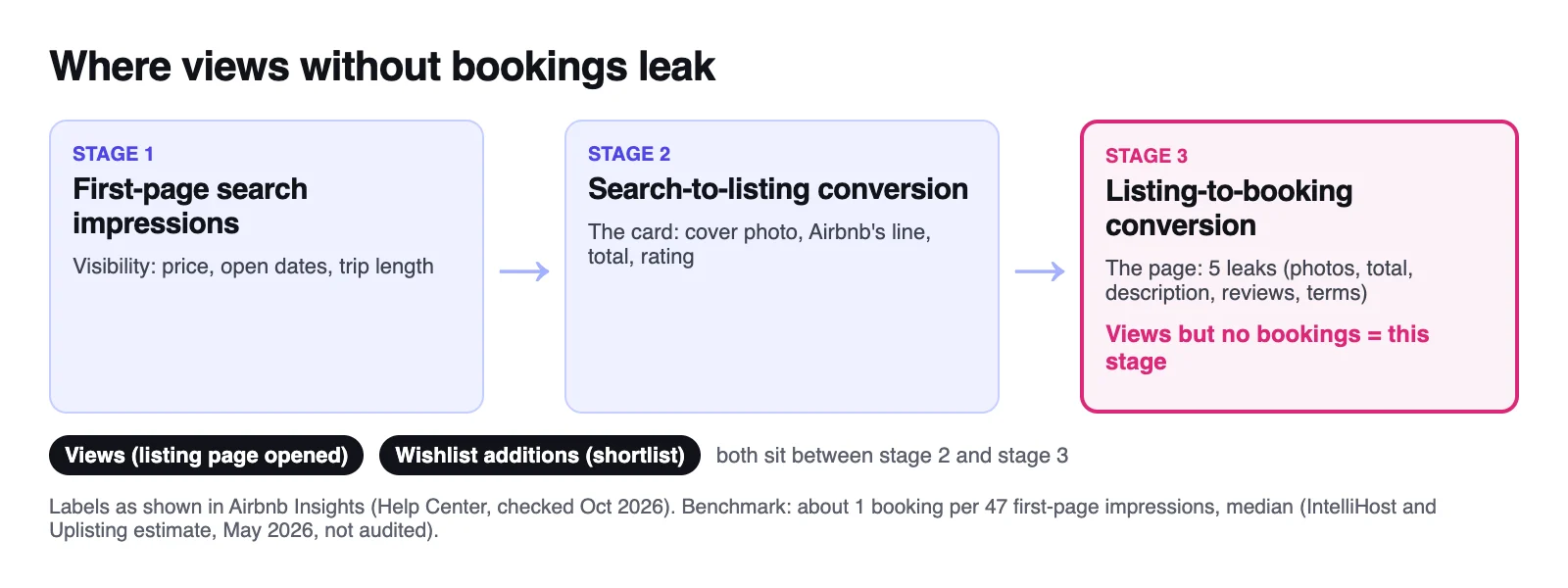
- Airbnb's Insights splits booking conversion into three stages: first-page search impressions, search-to-listing conversion and listing-to-booking conversion.
- Airbnb counts views as times your listing was viewed, but builds its overall conversion rate on unique visitors.
- Since April 21, 2025, Airbnb search results show every guest the total price with all fees included.
- A home's star rating appears only after at least three guests have rated it.
What views without bookings actually tells you
Airbnb tracks the path to a booking in three stages: your listing appears in search, the guest clicks through to your listing page, and the guest books. Views count how often your listing was viewed; Airbnb pitches its conversion data as a way to turn page views into bookings, so views sit after the click.
Healthy views with few bookings mean guests can find you and your card earns the click. The leak is in the last stage.
Fix it soon. Airbnb says listings that guests save, book and message more often tend to rank higher, so a conversion problem left alone can become a visibility problem.
Low views too? Start with why your Airbnb isn't getting booked.
Where the numbers live in Airbnb Insights
Go to Insights > Performance > Conversion (on desktop, Today, then Menu, then Insights; in the app, Menu, then Insights). Data starts after your first booking and updates within 24 hours (Airbnb Help).
No Performance tab? Switch on Use professional tools in your Account settings (Airbnb Help).
Airbnb's labels as of October 2026, from its conversion help page:
| Insights label | What Airbnb says it measures |
|---|---|
| First-page search impressions | Guests seeing your listing in search, sometimes on the first page |
| Search-to-listing conversion | Guests clicking through to your full listing page |
| Listing-to-booking conversion | Guests booking your stay |
| Overall conversion rate | The average daily number of unique visitors who saw your listing in search and then booked |
| Views | How many times your listings were viewed over a set period, which you can compare with similar listings |
| Wishlist additions | How often guests add your listing to a wishlist |
What "good" looks like
Airbnb publishes no target conversion rate (what many hosts call their booking rate). Its built-in benchmark is your similar listings, chosen by location, size, features, amenities, ratings, reviews and the other homes guests browse while considering yours (Airbnb Help).
For an outside reference, an IntelliHost and Uplisting analysis of 24,000+ active US listings (May 14, 2026) put the median at one booking per 47 first-page search impressions and estimated that about 96% of guests who click into a listing don't book. Those are estimates from public calendar data, not audited.
So most views never become bookings, even on good listings. What matters is whether you trail similar homes over the same dates.
The shortlist split: find where guests drop
Compare each number with your similar listings and find the first stage where you fall behind:
| Against similar listings | Where guests drop | Check first |
|---|---|---|
| Few first-page search impressions | They never see you | Price, open dates, trip length (full diagnosis) |
| Low search-to-listing conversion | They see your card and keep scrolling | Your cover photo, total and rating |
| Views fine, few wishlist additions | They open your listing and leave | Leak 1 (photos) and Leak 3 (description) |
| Views and wishlist additions fine, low listing-to-booking conversion | They shortlist you, then book another home | Leak 2 (total), Leak 4 (reviews) and Leak 5 (terms) |
This split is my reading, not an Airbnb rule, and wishlists also hold someday trips, so treat it as a pointer. The last row matters more since Airbnb's Fall Update (September 30, 2026): starting in the US, guests can compare wishlist homes side by side, with AI summaries of each (Airbnb Newsroom; more in Airbnb's 2026 AI changes for hosts).
What the guest knew before they clicked
On October 22, 2026, we captured a logged-out Airbnb search and read all 18 cards in the results list; our audit engine measured Airbnb's photo frames the same month.
| Search card (before the click) | Listing page (after the click) | |
|---|---|---|
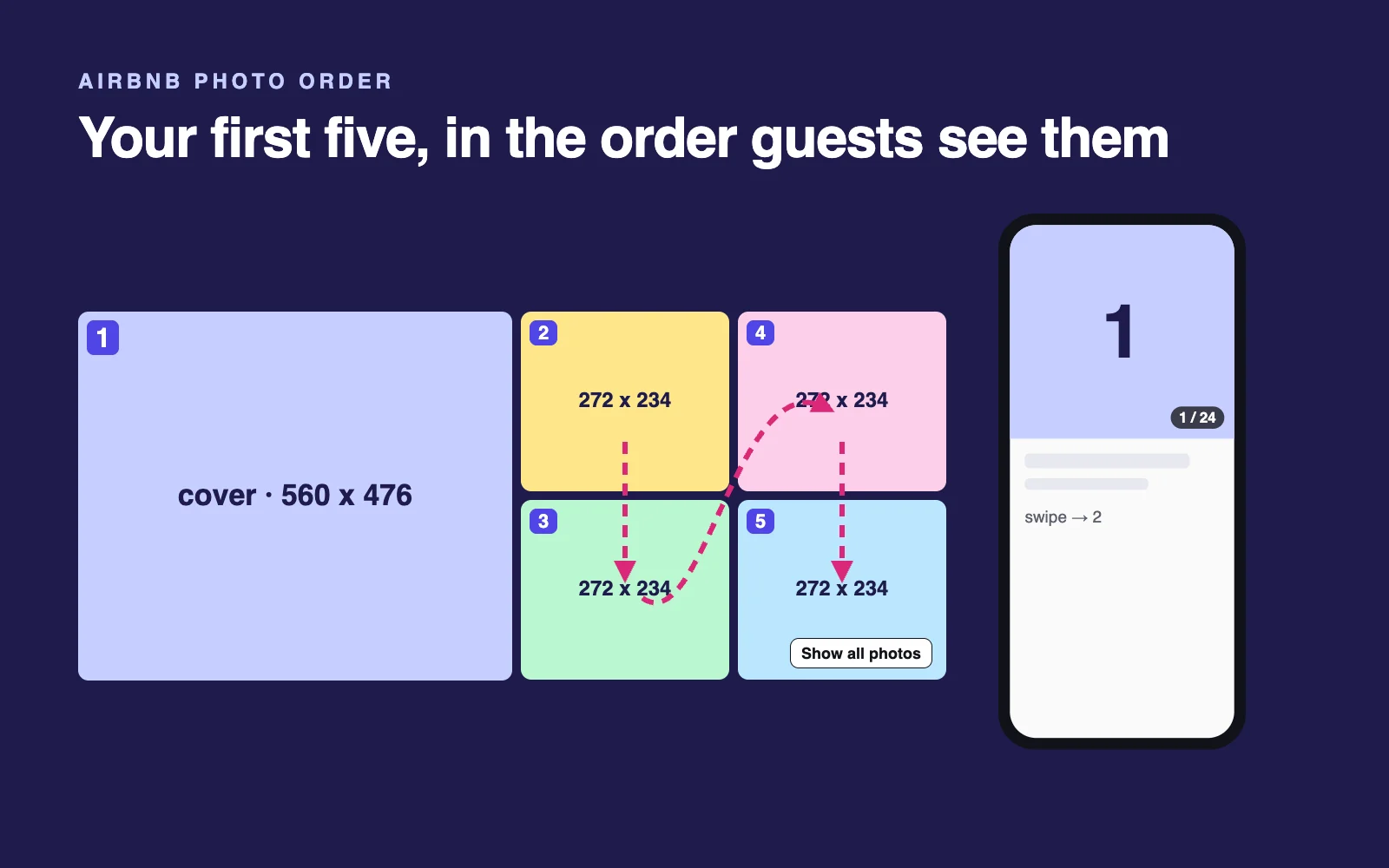
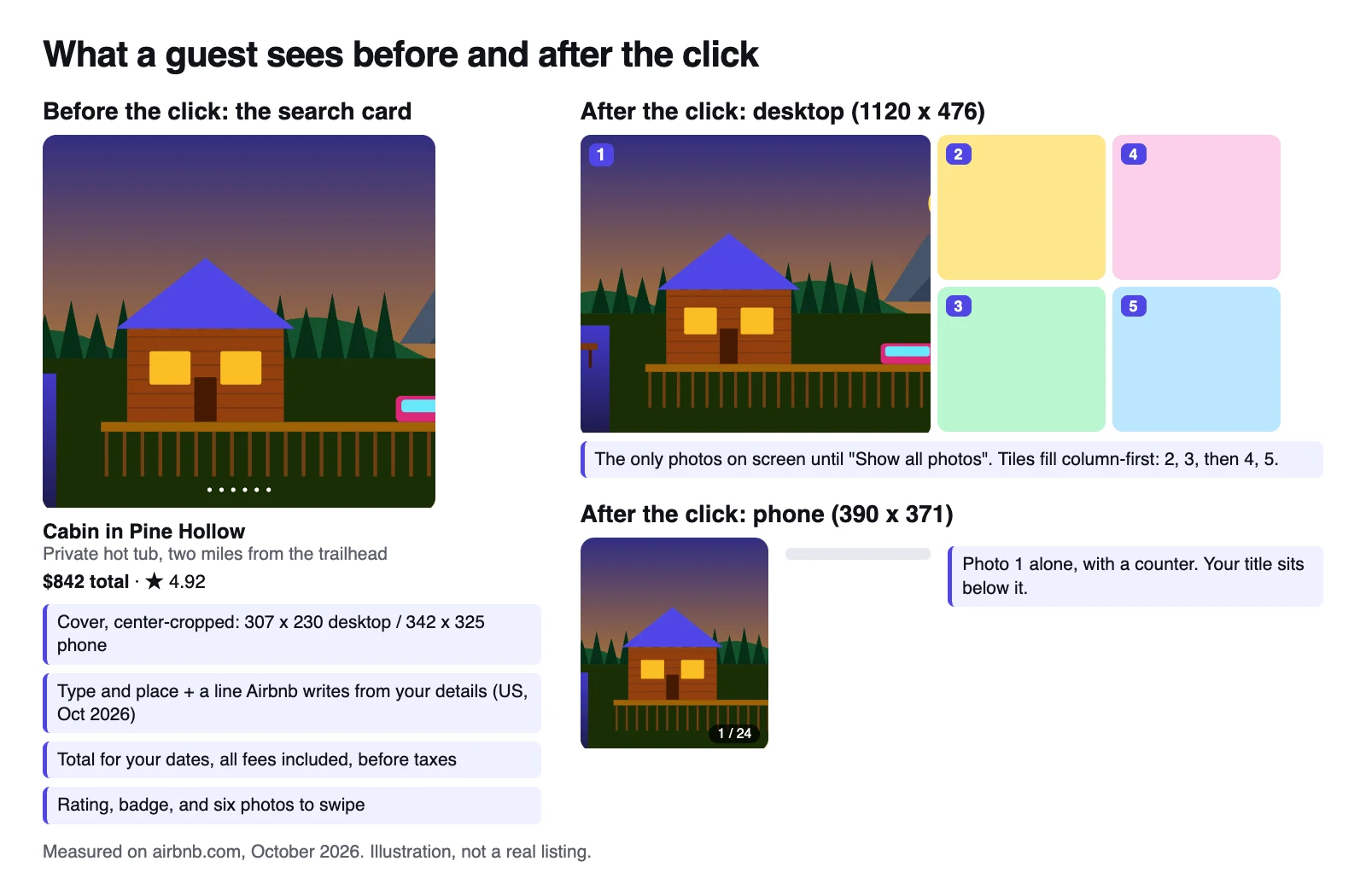
| Photos | Your cover, center-cropped to 307 x 230 on desktop or 342 x 325 on a phone; each card held six swipeable photos | Desktop: a 1120 x 476 grid, photo 1 on the left, photos 2 to 5 in a 2x2 block filled column by column. Phone: the cover again at 390 x 371 |
| Words | Property type and place, plus a line Airbnb writes from details hosts provide; no card showed the host's own title | Your title, description, amenities, room details and house rules |
| Price | A total for specific dates, all fees included, before taxes | The total for the guest's own dates and party, with taxes before checkout |
| Trust | Your rating and any Guest favorite badge | Reviews, category ratings and, on some listings, AI review highlights |
| Terms | The page data for 13 of the 18 cards included a Free cancellation label | Your cancellation policy, minimum stay and house rules |
How we checked: a logged-out desktop search for homes in Gatlinburg, Tennessee (US English, no dates or filters), read from the page data and a screenshot. It's one US market on one day; the app, other countries and filtered searches can differ. And a March 2026 reply in Airbnb's Community Center said the cover a guest sees can change with the category and what they search for (Airbnb Community Center), which is reported, not in the Help Center.
So your price wasn't a surprise (Leak 2), and your card made a promise that your first five photos must keep (Leak 1). Your words do their work after the click: as of October 2026, in the US, even your title heads the listing page rather than the search card (Leaks 3 and 5).
Leak 1: the first five photos don't deliver what the cover promised
The cover wins the click; the first five photos prove it was honest. Airbnb calls the first five the most important photos on a listing, and on desktop they're the only photos on screen until the guest clicks Show all photos.
Common ways the five break the promise:
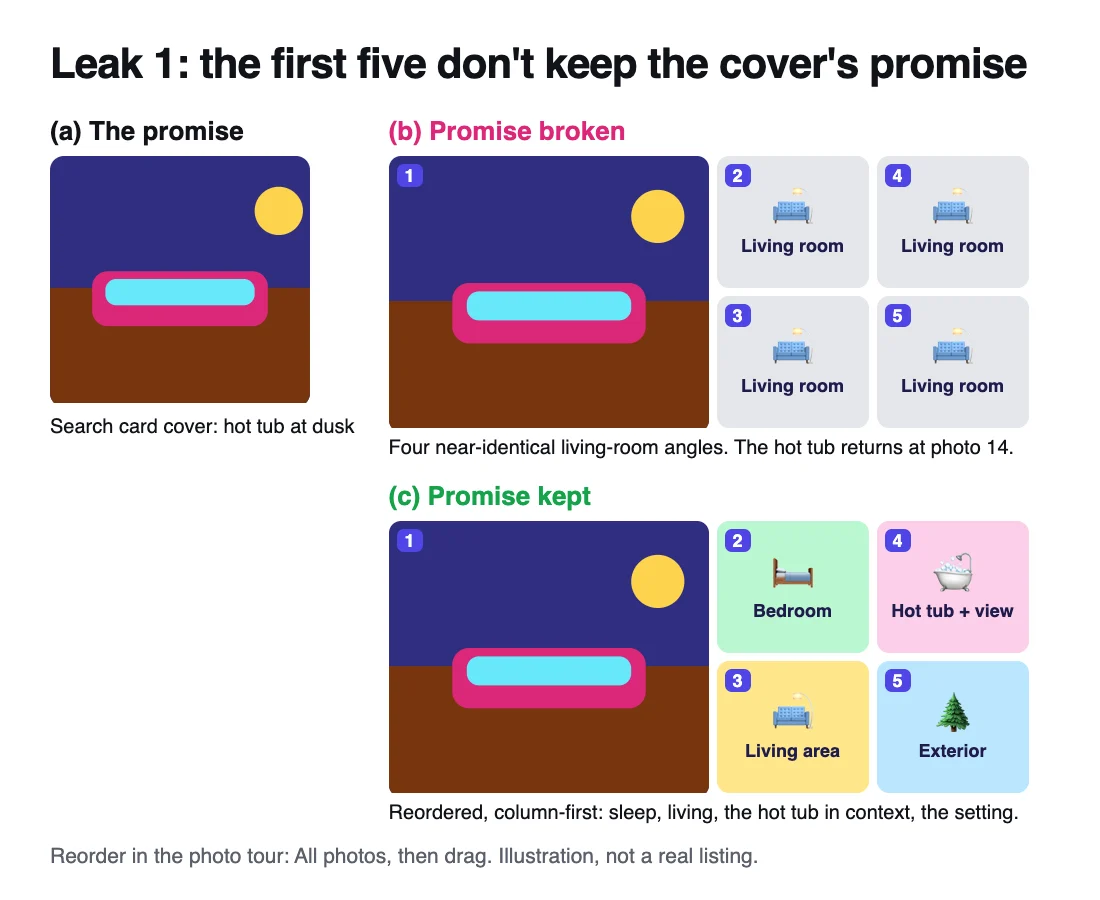
- The hero feature disappears. The cover shows the hot tub at dusk; photos 2 to 5 show the living room from four angles.
- The cover oversells the space. A wide-angle shot makes a studio look like a loft, and guests who book anyway mark you down for accuracy (Leak 4).
- The cover isn't the stay. A resort pool or skyline can be the honest draw, but photos 2 to 5 must show the unit, the bed and the view from inside.
- Airbnb showed a different cover. Hosts report amenity filters, such as hot tub, putting those photos on the card. A guest who clicked a hot tub photo and can't find it in your first five has a reason to leave.
Check it in five minutes. Open your listing logged out on a phone and a laptop, and write down the one thing your cover and card line promise. On desktop, does it show up in photos 1 to 5 (2 top left, 3 below it, 4 top right, 5 bottom right), along with where guests sleep and spend the evening? Then match captions and amenities to the photos: guests filter search by the amenities you list (Airbnb Help).
The fix is usually free: reorder. In your photo tour, click All photos and drag to set the first five: the hero feature, where guests sleep, where they spend time, the hero in context, the setting. My photo order guide walks through the sequence.
Not sure your first five back up your cover? My free audit (listing link and email, no Airbnb login) shows your cover in Airbnb's real crops, scores your current first-five grid and compares your cover with the listings around yours. The full audit ($39) also picks the best five from your gallery, renders the new grid and flags mismatches between your photos, captions, amenities and description.
Leak 2: the total changes for their trip, or loses the comparison
Since April 21, 2025, Airbnb has shown every guest the total with all fees in search results; in the US search we checked, cards showed totals before taxes. So the old shock of hidden cleaning fees is mostly gone. The total still costs bookings in three ways:
- Their trip costs more than the card. With no dates entered, every card in our capture priced dates Airbnb picked. The guest's own dates, party size, pets and weekend rates can push the total up, and taxes arrive before checkout.
- Your nightly rate looks fine, but your total doesn't. The similar-listings tool in your calendar compares nightly prices only, without cleaning fees and discounts (Airbnb Help). Guests compare totals, so a large cleaning fee can make a competitive rate the highest total on a short stay.
- The new fee moved your price. Airbnb has been moving hosts to a single 15.5% service fee paid by hosts, so guests see the price you set, and asked hosts to raise prices by September 15 (October 13 for hosts living in the EEA or Switzerland) to keep their payouts (Airbnb Resource Center). If you adjusted, recheck your total against similar homes.
Check it. Search your most common trip logged out (say 2 adults, 3 nights, a weekend next month) and compare your total with three to five homes beside yours. If yours is the highest without an obvious reason, you've found the leak.
Fix it in this order:
- Rebalance fees: a lower cleaning fee helps short stays most.
- Add a weekly discount. At 10% or more, Airbnb shows a callout in search and on your listing, with the original price crossed out (Airbnb Resource Center).
- Price weekends and weekdays separately.
- Only then test a lower nightly rate, on its own. My PriceLabs vs Wheelhouse vs Beyond comparison covers the pricing tools.
Leak 3: the description buries the deal-breakers
Some facts end a booking on their own: stairs, where the car goes, which beds are real beds, the bar downstairs. A guest who can't find the answer books the next listing. Airbnb's ground rules already require listings to describe the setup (bedrooms, bed sizes), privacy, limits on amenities and anything nearby that affects noise (Airbnb Help); the question is whether guests can find it fast.
| Deal-breaker | Where to put it |
|---|---|
| Sleeping setup (sofa beds, bunks, a loft up a ladder) | Photo tour room details and captions, plus one line in the description opening |
| Parking | The amenities list, plus a short line in the description |
| Stairs and step-free access | Accessibility features, an entrance photo, and the number of flights in the description |
| Noise (street, bars, trains) | Plainly in the description; Airbnb's rules ask for it |
| Shared spaces, Wi-Fi, a crib | Clear captions and a complete amenities list, so filters can find them |
Airbnb's AI reads the same details: US search-card summaries are based on details hosts provide, and guests can now type what they need into AI filters (Airbnb Newsroom). A vague listing gives the AI less to say.
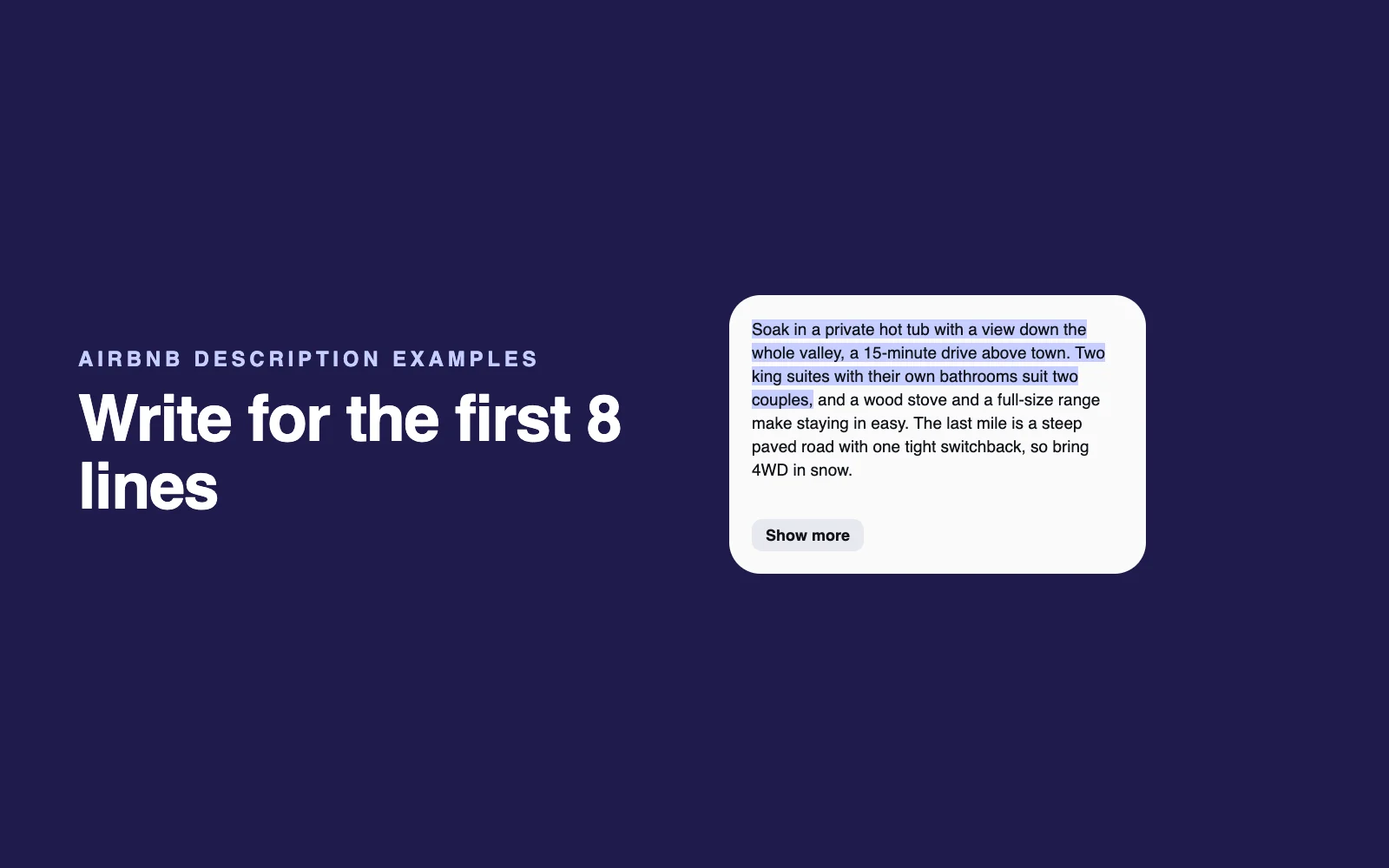
Fix it in this order. Rewrite the first two or three sentences of your description (who it's for, the standout feature, the one thing a guest must know), because that's what guests see before they open the full text. Fill in the room details in your photo tour (sleeping arrangements, amenities, accessibility features), then complete your amenities list so everything agrees. My Airbnb description examples and AI prompts for Airbnb hosts help, and the full audit rewrites your opening and flags the mismatches it finds.
Leak 4: reviews (count, recency and the accuracy score)
On desktop, your rating sits right under the photo grid. Guests check four things:
- Count. Your star rating appears only once at least three guests have rated your home (Airbnb Help). The Guest favorite badge needs at least five reviews (Airbnb Help).
- Recency. Guests can sort reviews by most recent and search them by keyword, such as noise or parking (Airbnb Help).
- Accuracy. Category averages sit beside your reviews, and Airbnb's accuracy rating asks guests: "Was it accurately represented with up-to-date photos and info?" A weak score tells future guests your photos oversell, which leads back to Leak 1.
- The summary. Airbnb's Summer Release (May 20, 2026) introduced AI review highlights that pull together what reviews say about location, amenities, family-friendliness and more (Airbnb Newsroom). A repeated complaint is hard to bury.
What to do. In Insights, open Reviews (or Performance, then Quality) and compare your category ratings with similar listings; your weakest category is your to-do list. Fix the cause, then reply publicly and briefly with what you changed (Airbnb lets hosts respond publicly to published reviews). More in why guests say "not as described".
No reviews yet? Airbnb's new listing promotion can take 20% off your first three bookings (Airbnb Help). Don't ask friends to book and review: Airbnb's review policy bars coordinating with anyone to influence a review, and violations can cost you the listing (Airbnb Help).
Leak 5: minimum stays, cancellation terms and house rules
Sometimes a guest likes everything and still can't, or won't, book.
Open dates and minimum stay. The guest arrives with their own dates. If those nights are blocked, or your minimum is three nights and they want two, the view ends there.
You can set minimums by check-in day (Calendar, then Availability, then Trip length), and Airbnb's slow-season advice is to allow shorter midweek stays while keeping weekend minimums (Airbnb Resource Center). Advance notice and preparation time block days automatically, so check those too.
Cancellation policy. Airbnb's standard policies for stays of 27 nights or fewer run from Flexible (full refund until 24 hours before check-in) to Moderate (5 days), Limited (14 days, for bookings made on or after October 1, 2025) and Firm (30 days); Strict and Super strict are by invitation only. In our capture, the page data for 13 of the 18 cards included a Free cancellation label. If most homes near you offer it and yours doesn't, test a softer policy, or add Airbnb's discounted non-refundable option alongside it.
House rules. Under Airbnb's new policy for reservations booked on or after November 20, 2026, rules must sit in the House rules and requests section and be reasonable: no chores a cleaner would do (stripping beds, washing dishes, taking trash off-site), no fines and no limits on features you advertise. If a violation persists, Airbnb may flag it to guests on your listing page or reduce your visibility in search. Checkout instructions now live in the same section (Airbnb Resource Center); Airbnb says more guests book listings that have them, so keep them short.
Instant Book. Airbnb says instantly bookable listings may rank higher, and you can still require a good track record or a pre-reservation message (Airbnb Help). If you keep request to book, reply fast: for those listings, ranking weighs how quickly you respond and how often you decline. My guide to automating Airbnb messages covers fast first replies.
What AI answers and forum threads get wrong
Checked October 22, 2026:
- Dividing bookings by views. A ChatGPT answer we checked worked out conversion as bookings divided by views. Airbnb counts views as times viewed and builds its overall conversion rate on unique visitors, so that math won't match Insights. Use the rates Insights calculates.
- Fearing every view that doesn't book, or editing daily to bump your rank. Airbnb names neither as a factor. Its search help lists quality, popularity (saves, bookings, messages), price and location.
A 14-day test plan: one change at a time
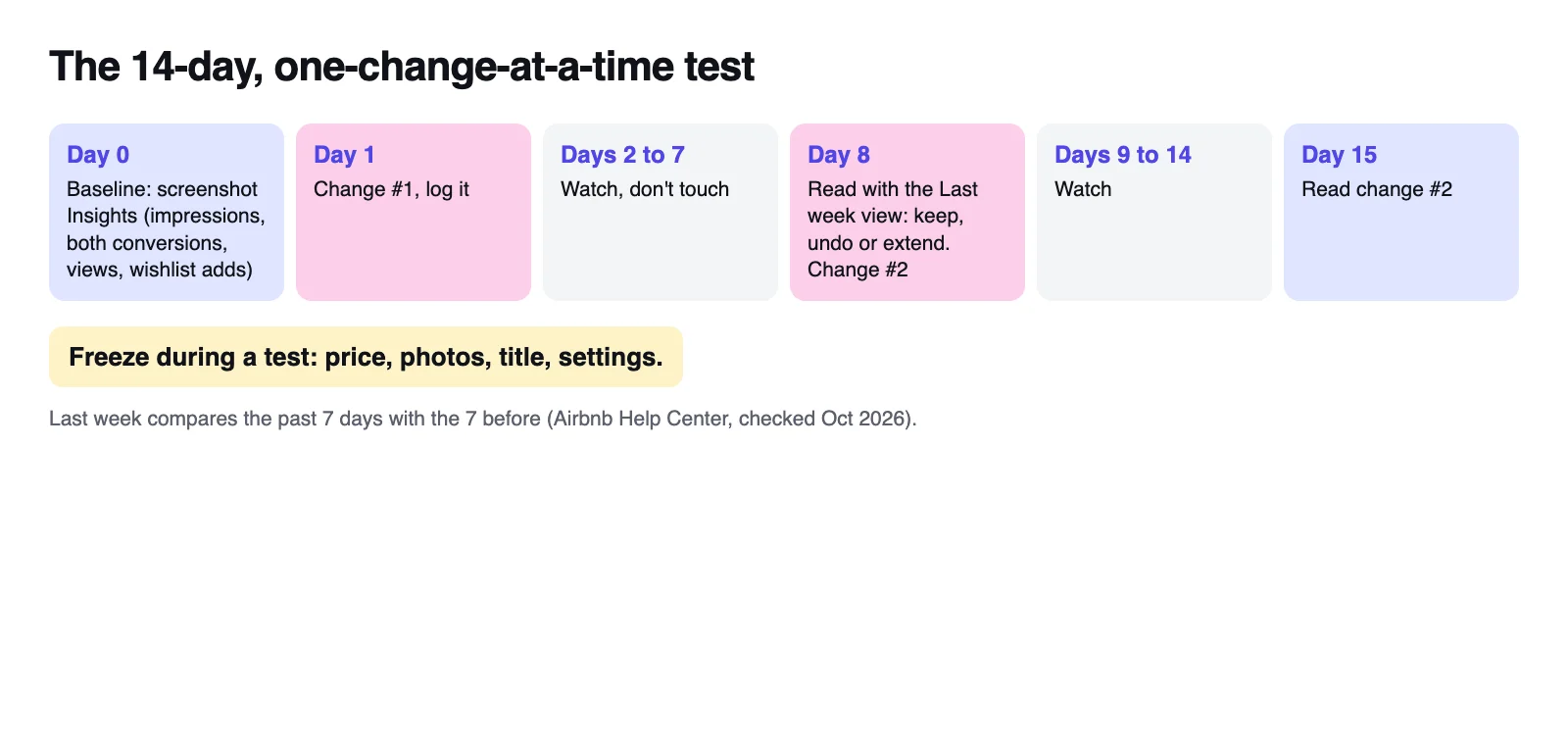
Change five things at once and you can't tell which one moved bookings. So change one, and let Insights' own Last week view do the reading.
| Day | What to do |
|---|---|
| 0 | Baseline: screenshot first-page search impressions, both conversion rates, views and wishlist additions for the last month, with similar listings on. Note recent price changes, reviews, blocked dates and local events. |
| 1 | Make one change, the leak with the strongest evidence, and log the date. Freeze everything else: no price, photo, title or settings edits. |
| 2 to 7 | Watch, don't touch. New data arrives within 24 hours. |
| 8 | Read change one in the Last week view (the past 7 days against the 7 before). Keep, undo or extend it; if you keep it, make change two. |
| 9 to 15 | Watch again; on day 15, read change two the same way and pick the next leak. |
Reading the result:
- Keep a change if listing-to-booking conversion or wishlist additions improved while views held steady.
- If views swung sharply, something upstream changed (season, price, search), so check the similar-listings line before crediting your edit.
- For cover changes, watch search-to-listing conversion too.
- With only a few bookings a month, give one change the full 14 days.
Good first changes, one per window: reorder photos 1 to 5, rewrite your description's opening, add sleeping and parking details, move from Firm to Moderate cancellation, allow two-night midweek stays, or turn on Instant Book. Leave price for last, and test it alone.
A new cover can take up to 30 minutes to appear and a new title up to an hour (Airbnb Help). If Smart Pricing, Airbnb's newer dynamic pricing or a tool from my host tools roundup sets your rates, leave its settings alone during a test. The full audit includes one re-audit if you want a second read afterward.
The short version
Views without bookings is the better problem to have: guests already want to look. Find the stage where you trail similar listings, check the five leaks in order, and change one thing at a time. For more ways to run your listing with AI, see my AI for Airbnb hosts hub.
FAQ
Why does my Airbnb get views but no bookings?
Getting views but no bookings means guests open your listing, then something on the page stops them. Common causes are first photos that do not back up the cover, a description that buries deal-breakers, a total above similar homes for the same trip, few or old reviews, and strict minimum stays, cancellation terms or house rules.
Are Airbnb view counts accurate?
Treat them as a trend, not a headcount. Airbnb describes views as the number of times your listing was viewed in a period, while its overall conversion rate counts unique visitors, and it does not say whether your own visits are excluded. Compare your views with the similar-listings average and with your own earlier periods.
What is a good conversion rate on Airbnb?
Airbnb publishes no target, so compare yourself with the similar listings in Insights for the same period. As an outside reference, an IntelliHost and Uplisting estimate across 24,000+ active US listings (May 2026) put the median at one booking per 47 first-page search impressions, with about 96% of guests who open a listing not booking.
What are first-page search impressions on Airbnb?
First-page search impressions are the first stage of booking conversion in Airbnb's Insights: guests seeing your listing in search, sometimes on the first page. The next stages are search-to-listing conversion, when guests click through to your listing, and listing-to-booking conversion, when they book. All three sit under Insights, Performance, Conversion.
How do I increase views on my Airbnb listing?
Views come from showing up in more searches and winning more clicks. Open more dates, loosen minimum stays where you can, keep your total in line with similar homes, consider Instant Book, and make your cover photo work at phone size. Then track first-page search impressions and search-to-listing conversion in Insights.
Why are my Airbnb views down?
Check the season and your similar listings first: if their views fell too, it is demand. If only yours fell, look at what changed on your side, such as price, blocked dates, minimum stay, advance notice or a new low review. Airbnb ranks on quality, popularity, price and location, so any of them can move views.
Should I lower my price if I get views but no bookings?
Not first. Guests see your total with fees on the search card before they click, so a guest who opened your listing has already seen your price. Compare your total with similar homes for a typical trip, rebalance cleaning fees or add a weekly discount, and test a lower rate last, on its own.

Written by Jon Miksis
Founder of AI Hustle Guy, Make the Leap, and Europe Flight Club, and the travel blogger behind Global Viewpoint (9+ years, 73 countries). He brings 9+ years of coaching and mentorship experience and has facilitated 23 transformation retreats across four continents. Every AI tool and prompt on this site gets tested on his own businesses first.
Get my free AI prompt pack
Join 300+ founders, creators, and professionals. I’ll send you my go-to AI tools and copy-paste prompts that save hours every week. No spam.